
AI在线开发
实验01-接入火山引擎豆包 AI
实验准备:
2. 获取模型接入点ID: https://console.volcengine.com/ark/region:ark+cn-beijing/endpoint
实验步骤:
cd AI\_online#进入功能包nano config.py#替换个人API Key和模型接入点,模型接入点以ep-开头
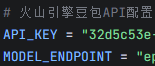
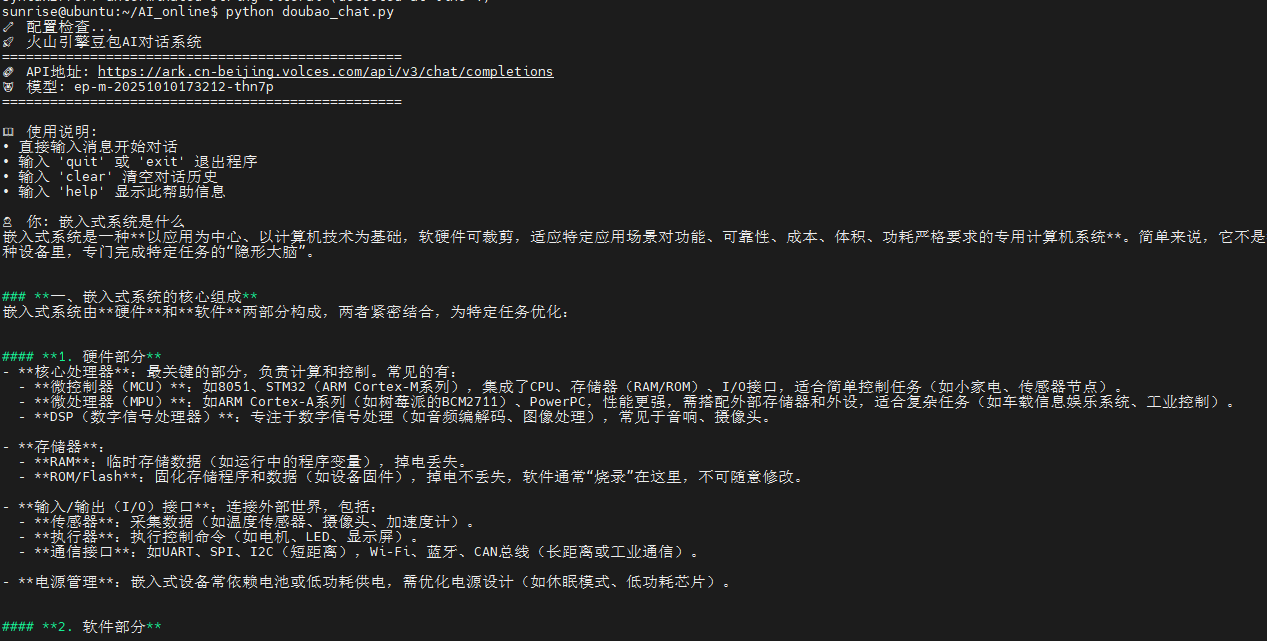
3.python doubao\_chat.py #运行接入豆包ai脚本
实验效果如下:
#!/usr/bin/env python3
# -*- coding: utf-8 -*-
"""
火山引擎豆包AI对话脚本
精简版本,直接使用API接口
"""

import requests
import json
import os
import sys

# 导入配置
try:
    from config import API_KEY, MODEL_ENDPOINT, API_BASE_URL, SYSTEM_PROMPT, REQUEST_TIMEOUT
except ImportError:
    print("❌ 配置文件 config.py 不存在或配置错误")
    print("📝 请确保 config.py 文件存在并正确配置")
    sys.exit(1)

class DoubaoChat:
    def __init__(self):
        # 火山引擎豆包API配置
        self.api_url = API_BASE_URL
        self.api_key = API_KEY
        self.model = MODEL_ENDPOINT
        self.timeout = REQUEST_TIMEOUT

        # 对话历史
        self.messages = [
            {"role": "system", "content": SYSTEM_PROMPT}
        ]

        # 检查配置
        self.check_config()

    def check_config(self):
        """检查API配置"""
        if not self.api_key or self.api_key == "你的API_KEY":
            print("❌ 请先配置API Key")
            print("📝 请在 config.py 文件中设置 API_KEY = '你的API_KEY'")
            print("🔗 获取方式:https://console.volcengine.com/ark/region:ark+cn-beijing/apiKey")
            sys.exit(1)

        if not self.model or self.model == "你的接入点ID":
            print("❌ 请先配置模型接入点ID")
            print("📝 请在 config.py 文件中设置 MODEL_ENDPOINT = '你的接入点ID'")
            print("🔗 获取方式:https://console.volcengine.com/ark/region:ark+cn-beijing/endpoint")
            sys.exit(1)

    def send_message(self, user_input):
        """发送消息到豆包API"""
        # 添加用户消息
        self.messages.append({"role": "user", "content": user_input})

        # 准备请求数据 - 根据火山引擎API文档格式
        data = {
            "model": self.model,
            "messages": self.messages,
            "stream": False,
            "temperature": 0.7,
            "max_tokens": 2000
        }

        # 设置请求头 - 使用Bearer认证
        headers = {
            "Content-Type": "application/json",
            "Authorization": f"Bearer {self.api_key}",
            "Accept": "application/json"
        }

        try:
            print("🔄 正在请求豆包API...", end="", flush=True)

            # 发送请求
            response = requests.post(self.api_url, json=data, headers=headers, timeout=self.timeout)

            print("\r" + " " * 30 + "\r", end="", flush=True)  # 清除加载提示

            if response.status_code == 200:
                result = response.json()
                if 'choices' in result and len(result['choices']) > 0:
                    assistant_message = result['choices'][0]['message']['content']
                    # 添加助手回复到历史
                    self.messages.append({"role": "assistant", "content": assistant_message})
                    return assistant_message
                else:
                    return "❌ API返回格式错误,请检查模型接入点ID是否正确"
            elif response.status_code == 401:
                return "❌ 认证失败 (401),请检查API Key是否正确"
            elif response.status_code == 404:
                return "❌ 接入点不存在 (404),请检查模型接入点ID是否正确"
            elif response.status_code == 429:
                return "❌ 请求过于频繁 (429),请稍后再试"
            else:
                error_info = f"❌ API请求失败,状态码: {response.status_code}"
                try:
                    error_data = response.json()
                    if 'error' in error_data:
                        if isinstance(error_data['error'], dict):
                            error_msg = error_data['error'].get('message', '未知错误')
                            error_info += f"\n错误信息: {error_msg}"
                        else:
                            error_info += f"\n错误信息: {error_data['error']}"
                except:
                    error_info += f"\n响应内容: {response.text[:200]}"
                return error_info

        except requests.exceptions.Timeout:
            return "❌ 请求超时,请检查网络连接或稍后重试"
        except requests.exceptions.ConnectionError:
            return "❌ 连接失败,请检查网络连接"
        except requests.exceptions.RequestException as e:
            return f"❌ 网络请求异常: {str(e)}"
        except Exception as e:
            return f"❌ 未知异常: {str(e)}"

    def clear_history(self):
        """清空对话历史"""
        self.messages = [
            {"role": "system", "content": SYSTEM_PROMPT}
        ]
        print("✅ 对话历史已清空")

    def show_help(self):
        """显示帮助信息"""
        print("\n📖 使用说明:")
        print("• 直接输入消息开始对话")
        print("• 输入 'quit' 或 'exit' 退出程序")
        print("• 输入 'clear' 清空对话历史")
        print("• 输入 'help' 显示此帮助信息")

    def run(self):
        """运行对话程序"""
        print("🚀 火山引擎豆包AI对话系统")
        print("=" * 50)
        print(f"🔗 API地址: {self.api_url}")
        print(f"🤖 模型: {self.model}")
        print("=" * 50)

        self.show_help()

        while True:
            try:
                user_input = input("\n👤 你: ").strip()

                if not user_input:
                    continue

                if user_input.lower() in ['quit', 'exit', '退出']:
                    print("👋 再见!")
                    break
                elif user_input.lower() in ['clear', '清空']:
                    self.clear_history()
                    continue
                elif user_input.lower() in ['help', '帮助']:
                    self.show_help()
                    continue

                print("🤖 豆包: ", end="", flush=True)
                response = self.send_message(user_input)
                print(response)

            except KeyboardInterrupt:
                print("\n👋 程序已退出")
                break
            except Exception as e:
                print(f"\n❌ 程序异常: {e}")

def main():
    """主函数"""
    print("🔧 配置检查...")

    # 创建对话实例
    chat = DoubaoChat()

    # 运行对话
    chat.run()

if __name__ == "__main__":
    main()
## 实验02-图片分析
实验准备:
- 确保已接入火山引擎豆包ai
- 寻找一张格式为jpg图片,作为实验素材
实验步骤:
cd AI\_online#进入主目录python examples/01\_image\_analysis.py#运行示例程序
终端打印如下:
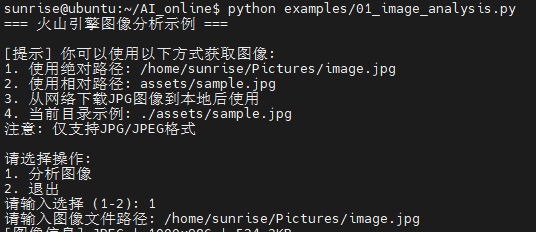
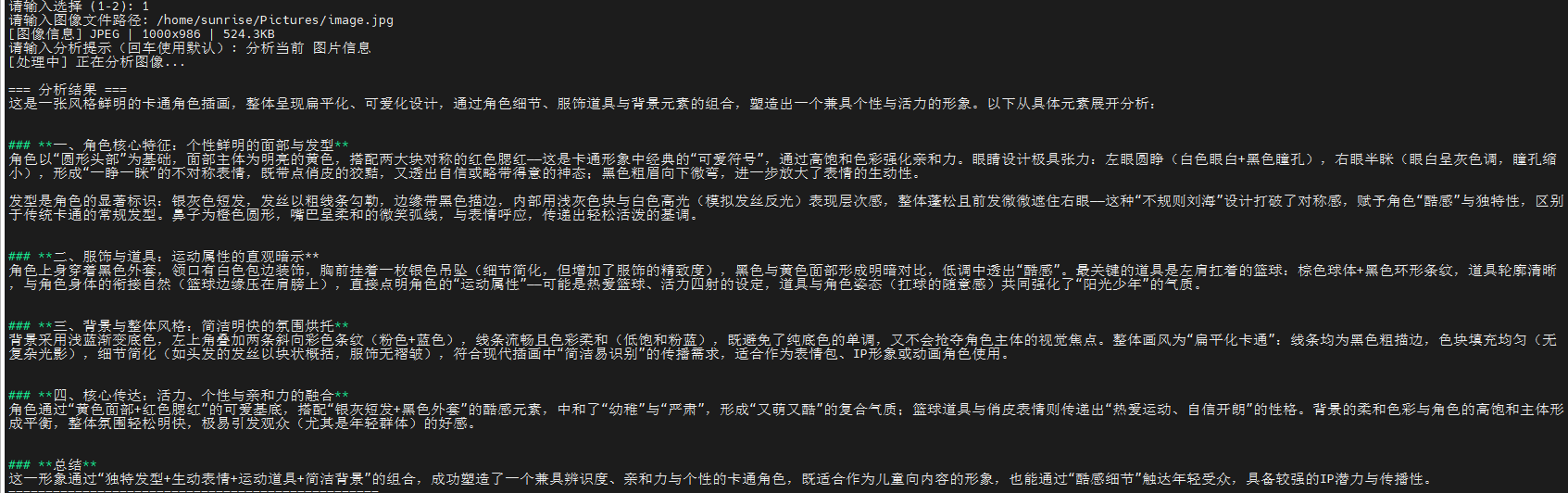
可使用功能包内置的相对路径图像,如若要使用绝对路径,需在用户主目录下新建文件夹名为Pictures,在其子目录下导入命名为image.jpg图像
实验结果:
# -*- coding: utf-8 -*-
"""
基础图像分析示例
演示如何使用火山引擎豆包API进行图像分析

使用方法:
1. 确保config.py中配置了正确的API_KEY和MODEL_ENDPOINT
2. 运行: python examples/01_image_analysis.py
3. 输入图像路径进行分析

支持的图像格式: JPG, PNG, GIF, BMP, WEBP
"""

import os
import sys
import requests
import base64
from typing import Optional
from PIL import Image
import io

# 添加父目录到路径,以便导入配置
sys.path.append(os.path.dirname(os.path.dirname(os.path.abspath(__file__))))

try:
    from config import API_KEY, MODEL_ENDPOINT, API_BASE_URL, REQUEST_TIMEOUT
except ImportError:
    print("错误: 无法导入config.py,请确保config.py文件存在且配置正确")
    sys.exit(1)

class ImageProcessor:
    """图像处理器 - 简化版本,仅支持JPG格式"""

    @staticmethod
    def encode_image_to_base64(image_path: str) -> str:
        """将图像编码为base64格式"""
        try:
            # 检查文件扩展名
            file_ext = os.path.splitext(image_path)[1].lower()
            if file_ext not in ['.jpg', '.jpeg']:
                raise ValueError(f"不支持的文件格式: {file_ext},仅支持JPG/JPEG格式")

            # 直接读取JPG文件并编码
            with open(image_path, 'rb') as f:
                img_data = f.read()

            return base64.b64encode(img_data).decode('utf-8')
        except Exception as e:
            raise ValueError(f"图像处理失败: {e}")

    @staticmethod
    def get_image_info(image_path: str) -> dict:
        """获取图像信息"""
        try:
            file_ext = os.path.splitext(image_path)[1].lower()
            if file_ext not in ['.jpg', '.jpeg']:
                return {'error': f'不支持的文件格式: {file_ext},仅支持JPG/JPEG格式'}

            # 使用PIL获取JPG信息
            with Image.open(image_path) as img:
                return {
                    'format': 'JPEG',
                    'mode': img.mode,
                    'size': img.size,
                    'file_size': os.path.getsize(image_path)
                }
        except Exception as e:
            return {'error': str(e)}

class ImageAnalyzer:
    """图像分析器"""

    def __init__(self):
        self.api_key = API_KEY
        self.model_endpoint = MODEL_ENDPOINT
        self.base_url = API_BASE_URL
        self.timeout = REQUEST_TIMEOUT
        self.processor = ImageProcessor()

        # 检查配置
        self._check_config()

    def _check_config(self):
        """检查API配置"""
        if not self.api_key or self.api_key == "你的API_KEY":
            raise ValueError("请在config.py中配置正确的API_KEY")

        if not self.model_endpoint or self.model_endpoint == "你的接入点ID":
            raise ValueError("请在config.py中配置正确的MODEL_ENDPOINT")

    def analyze_image(self, image_path: str, prompt: str = "请详细描述这张图片的内容") -> Optional[str]:
        """
        分析图像内容

        Args:
            image_path: 图像文件路径
            prompt: 分析提示词

        Returns:
            str: 分析结果,失败返回None
        """
        try:
            # 编码图像
            base64_image = self.processor.encode_image_to_base64(image_path)

            # 构建请求
            headers = {
                'Authorization': f'Bearer {self.api_key}',
                'Content-Type': 'application/json'
            }

            data = {
                "model": self.model_endpoint,
                "messages": [
                    {
                        "role": "user",
                        "content": [
                            {
                                "type": "text",
                                "text": prompt
                            },
                            {
                                "type": "image_url",
                                "image_url": {
                                    "url": f"data:image/jpeg;base64,{base64_image}"
                                }
                            }
                        ]
                    }
                ]
            }

            # 发送请求
            response = requests.post(
                self.base_url,
                headers=headers,
                json=data,
                timeout=self.timeout
            )

            if response.status_code == 200:
                result = response.json()
                if 'choices' in result and len(result['choices']) > 0:
                    return result['choices'][0]['message']['content']
                else:
                    print(f"API返回格式异常: {result}")
                    return None
            else:
                print(f"API请求失败: {response.status_code}")
                print(f"错误信息: {response.text}")
                return None

        except requests.exceptions.Timeout:
            print("请求超时,请检查网络连接")
            return None
        except requests.exceptions.RequestException as e:
            print(f"网络请求错误: {e}")
            return None
        except Exception as e:
            print(f"分析过程中发生错误: {e}")
            return None

def main():
    """主函数"""
    print("=== 火山引擎图像分析示例 ===")

    # 创建分析器
    try:
        analyzer = ImageAnalyzer()
    except ValueError as e:
        print(f"配置错误: {e}")
        print("\n请检查config.py文件中的API_KEY和MODEL_ENDPOINT配置")
        return

    # 提供示例图像路径提示
    print("\n[提示] 你可以使用以下方式获取图像:")
    print("1. 使用绝对路径: /home/sunrise/Pictures/image.jpg")
    print("2. 使用相对路径: assets/sample.jpg")
    print("3. 从网络下载JPG图像到本地后使用")
    print("4. 当前目录示例: ./assets/sample.jpg")
    print("注意: 仅支持JPG/JPEG格式")

    # 交互式图像分析
    while True:
        print("\n请选择操作:")
        print("1. 分析图像")
        print("2. 退出")

        choice = input("请输入选择 (1-2): ").strip()

        if choice == "1":
            # 输入图像路径
            image_path = input("请输入图像文件路径: ").strip()

            # 去除可能的引号
            image_path = image_path.strip('"').strip("'")

            # 处理相对路径
            if not os.path.isabs(image_path):
                # 如果是相对路径,尝试从项目根目录查找
                project_root = os.path.dirname(os.path.dirname(os.path.abspath(__file__)))
                full_path = os.path.join(project_root, image_path)
                if os.path.exists(full_path):
                    image_path = full_path
                elif os.path.exists(image_path):
                    # 使用当前工作目录的相对路径
                    pass
                else:
                    print(f"[错误] 文件不存在: {image_path}")
                    print("请检查路径是否正确。")
                    print("提示:")
                    print("  - 绝对路径示例: /home/sunrise/Pictures/image.jpg")
                    print("  - 相对路径示例: assets/sample.jpg")
                    print("  - 当前目录示例: ./assets/sample.jpg")
                    print("支持的格式: JPG/JPEG")
                    continue
            elif not os.path.exists(image_path):
                print(f"[错误] 文件不存在: {image_path}")
                print("请检查绝对路径是否正确,支持的格式: JPG/JPEG")
                continue

            # 显示图像信息
            processor = ImageProcessor()
            img_info = processor.get_image_info(image_path)
            if 'error' not in img_info:
                print(f"[图像信息] {img_info['format']} | {img_info['size'][0]}x{img_info['size'][1]} | {img_info['file_size']/1024:.1f}KB")
            else:
                print(f"[错误] {img_info['error']}")
                continue

            # 输入分析提示(可选)
            custom_prompt = input("请输入分析提示(回车使用默认): ").strip()
            prompt = custom_prompt if custom_prompt else "请详细描述这张图片的内容"

            print("[处理中] 正在分析图像...")

            # 执行分析
            result = analyzer.analyze_image(image_path, prompt)

            if result:
                print("\n=== 分析结果 ===")
                print(result)
                print("=" * 50)
            else:
                print("[错误] 分析失败,请检查:")
                print("- 图像文件是否完整")
                print("- 网络连接是否正常")
                print("- API配置是否正确")

        elif choice == "2":
            print("感谢使用!")
            break

        else:
            print("无效选择,请重新输入")

if __name__ == "__main__":
    main()
## 实验03-多模态视觉分析定位
实验准备:
- 确保已接入火山引擎豆包ai
- 寻找图片,作为实验素材
实验步骤:
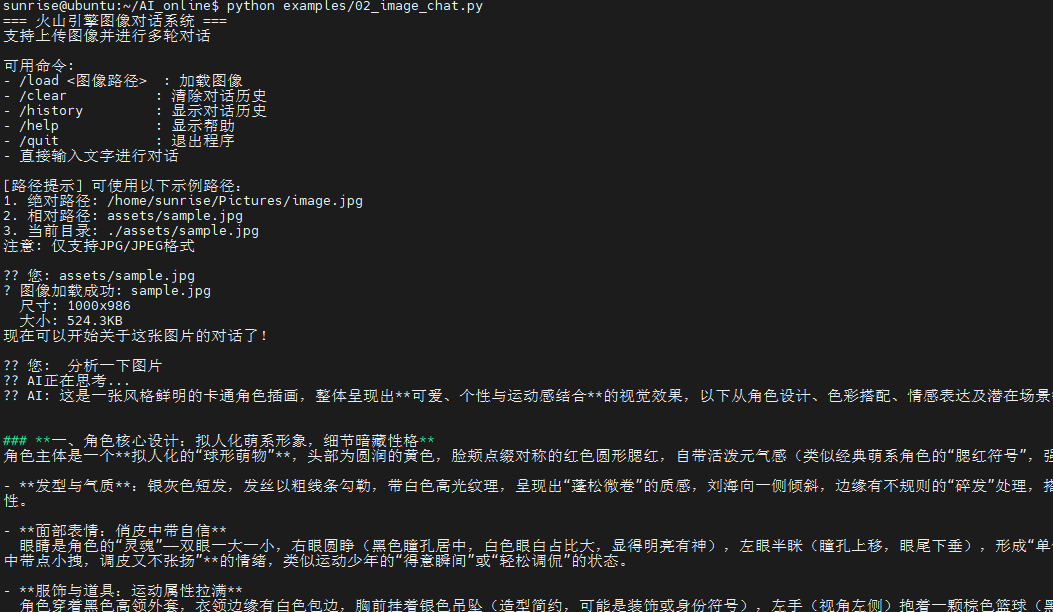
cd AI\_online#进入主目录python examples/02\_image\_chat.py#运行示例程序
(如若出现报错信息: (unicode error) 'utf-8' codec can't decode byte 0xcf in position 3: invalid continuation byte 。请运行命令,把源文件转为UTF-8编码:iconv -f GBK -t UTF-8 examples/02_image_chat.py -o /tmp/02_image_chat.py && mv /tmp/02_image_chat.py examples/02_image_chat.py )
终端打印如下:
# -*- coding: utf-8 -*-
"""
多模态对话示例
集成文本和图像的完整对话系统
"""
import os
import sys
from typing import List, Dict, Optional
# 添加父目录到路径
sys.path.append(os.path.dirname(os.path.dirname(os.path.abspath(__file__))))
from utils.api_client import DoubaoAPIClient
from utils.image_processor import ImageProcessor
class MultimodalChatSystem:
"""多模态对话系统"""
def __init__(self):
"""初始化系统"""
try:
self.client = DoubaoAPIClient()
self.processor = ImageProcessor()
self.chat_history: List[Dict] = []
self.system_prompt = "你是一个智能的AI助手,能够理解和分析图像内容,并与用户进行自然对话。"
print("多模态对话系统初始化成功")
except Exception as e:
print(f"系统初始化失败: {e}")
raise
def add_system_message(self, prompt: str):
"""设置系统提示词"""
self.system_prompt = prompt
print(f"系统提示词已更新")
def send_text_message(self, message: str) -> Optional[str]:
"""
发送纯文本消息
Args:
message: 用户消息
Returns:
str: AI回复
"""
try:
# 复刻实验01的调用方式:仅包含系统提示词与当前用户消息
response = self.client.chat_text(message, system_prompt=self.system_prompt)
if response:
# 更新历史
self.chat_history.append({"role": "user", "content": message})
self.chat_history.append({"role": "assistant", "content": response})
return response
return None
except Exception as e:
print(f"发送文本消息失败: {e}")
return None
def send_image_message(self, text: str, image_path: str) -> Optional[str]:
"""
发送图文消息
Args:
text: 文本内容
image_path: 图像路径
Returns:
str: AI回复
"""
try:
# 放宽校验,支持 JPG/JPEG/PNG
if not os.path.exists(image_path):
print(f"图像文件不存在: {image_path}")
return None
if not image_path.lower().endswith((".jpg", ".jpeg", ".png")):
print("仅支持JPG/JPEG/PNG格式,请使用 .jpg/.jpeg/.png 文件")
return None
# 获取图像信息
image_info = self.processor.get_image_info(image_path)
print(f"处理图像: {os.path.basename(image_path)} ({image_info.get('width')}x{image_info.get('height')})")
# 复刻实验02的调用方式:直接通过客户端封装发送图像文件
response = self.client.chat_with_image_file(text, image_path, system_prompt=self.system_prompt)
if response:
# 更新历史(简化存储,只保存文本部分)
self.chat_history.append({
"role": "user",
"content": f"{text} [图像: {os.path.basename(image_path)}]"
})
self.chat_history.append({"role": "assistant", "content": response})
return response
return None
except Exception as e:
print(f"发送图文消息失败: {e}")
return None
def analyze_image_detailed(self, image_path: str, analysis_focus: str = None) -> Optional[str]:
"""
详细分析图像
Args:
image_path: 图像路径
analysis_focus: 分析重点
Returns:
str: 分析结果
"""
if analysis_focus:
prompt = f"请重点分析这张图片的{analysis_focus},并提供详细描述。"
else:
prompt = "请详细分析这张图片,包括内容、构图、色彩、情感等各个方面。"
return self.send_image_message(prompt, image_path)
def compare_images(self, image1_path: str, image2_path: str, comparison_aspect: str = None) -> Optional[str]:
"""
比较两张图像(需要分别分析后总结)
Args:
image1_path: 第一张图像路径
image2_path: 第二张图像路径
comparison_aspect: 比较方面
Returns:
str: 比较结果
"""
try:
# 分析第一张图像
print("分析第一张图像...")
result1 = self.analyze_image_detailed(image1_path, "整体内容和特征")
if not result1:
return None
# 分析第二张图像
print("分析第二张图像...")
result2 = self.analyze_image_detailed(image2_path, "整体内容和特征")
if not result2:
return None
# 生成比较总结(将两次分析内容纳入同一次请求上下文)
if comparison_aspect:
compare_task = f"请重点比较它们在{comparison_aspect}方面的异同。"
else:
compare_task = "请总结比较这两张图片的异同点。"
comparison_prompt = (
"以下是两张图片的分析,请基于这些分析进行比较:\n"
"【图片1分析】\n"
f"{result1}\n\n"
"【图片2分析】\n"
f"{result2}\n\n"
f"{compare_task}"
)
comparison_result = self.send_text_message(comparison_prompt)
return comparison_result
except Exception as e:
print(f"图像比较失败: {e}")
return None
def clear_history(self):
"""清除对话历史"""
self.chat_history = []
print("对话历史已清除")
def show_history(self):
"""显示对话历史"""
if not self.chat_history:
print("暂无对话历史")
return
print("\n=== 对话历史 ===")
for i, msg in enumerate(self.chat_history, 1):
role = "用户" if msg["role"] == "user" else "AI"
content = msg["content"]
print(f"{i}. {role}: {content}")
print("=" * 50)
def get_stats(self) -> Dict:
"""获取统计信息"""
return {
"total_messages": len(self.chat_history),
"user_messages": len([m for m in self.chat_history if m["role"] == "user"]),
"ai_messages": len([m for m in self.chat_history if m["role"] == "assistant"]),
"system_prompt": self.system_prompt[:50] + "..." if len(self.system_prompt) > 50 else self.system_prompt
}
def main():
"""主函数"""
print("=== 多模态AI对话系统 ===")
print("支持文本对话、图像分析、图文结合等功能")
try:
# 初始化系统
chat_system = MultimodalChatSystem()
print("\n可用功能:")
print("1. 文本对话 - 直接输入文字")
print("2. 图像分析 - /analyze <图像路径> [分析重点]")
print("3. 图文对话 - /image <图像路径> <问题>")
print("4. 图像比较 - /compare <图像1> <图像2> [比较方面]")
print("5. 系统设置 - /system <提示词>")
print("6. 查看历史 - /history")
print("7. 清除历史 - /clear")
print("8. 统计信息 - /stats")
print("9. 帮助信息 - /help")
print("10. 退出程序 - /quit")
# 路径规范化与解析(项目根优先,其次当前目录;支持 ~ 展开;在非 Windows 自动将反斜杠转为斜杠)
def normalize_and_resolve(p: str) -> str:
p = p.strip().strip('"').strip("'")
p = os.path.expanduser(p)
if os.name != 'nt':
p = p.replace('\\', '/')
project_root = os.path.dirname(os.path.dirname(os.path.abspath(__file__)))
candidate = os.path.join(project_root, p) if not os.path.isabs(p) else p
if not os.path.isabs(p):
if os.path.exists(candidate):
return candidate
elif os.path.exists(p):
return p
else:
return p
else:
return p
while True:
try:
user_input = input("\n您: ").strip()
if not user_input:
continue
# 处理命令
first_token = user_input.split(" ", 1)[0].lower()
recognized_commands = {"/analyze", "/image", "/compare", "/system", "/history", "/clear", "/stats", "/help", "/quit"}
if user_input.startswith("/") and first_token in recognized_commands:
parts = user_input.split(" ", 2)
command = parts[0].lower()
if command == "/quit":
print("感谢使用多模态AI对话系统!")
break
elif command == "/help":
print("\n可用功能:")
print("1. 文本对话 - 直接输入文字")
print("2. 图像分析 - /analyze <图像路径> [分析重点]")
print("3. 图文对话 - /image <图像路径> <问题>")
print("4. 图像比较 - /compare <图像1> <图像2> [比较方面]")
print("5. 系统设置 - /system <提示词>")
print("6. 查看历史 - /history")
print("7. 清除历史 - /clear")
print("8. 统计信息 - /stats")
print("9. 退出程序 - /quit")
if os.name == 'nt':
print("\n[路径提示] 示例:")
print("- 绝对路径: C:\\Users\\Administrator\\Pictures\\a.jpg")
print("- 相对路径: assets\\sample.jpg")
print("- 当前目录: .\\assets\\sample.jpg")
else:
print("\n[路径提示] 示例:")
print("- 绝对路径: /home/user/Pictures/a.jpg")
print("- 相对路径: assets/sample.jpg")
print("- 当前目录: ./assets/sample.jpg")
print("注意: 支持 JPG/JPEG/PNG 格式")
elif command == "/clear":
chat_system.clear_history()
elif command == "/history":
chat_system.show_history()
elif command == "/stats":
stats = chat_system.get_stats()
print(f"\n统计信息:")
print(f"总消息数: {stats['total_messages']}")
print(f"用户消息: {stats['user_messages']}")
print(f"AI回复: {stats['ai_messages']}")
print(f"系统提示: {stats['system_prompt']}")
elif command == "/system":
if len(parts) < 2:
print("请提供系统提示词: /system <提示词>")
continue
new_prompt = " ".join(parts[1:])
chat_system.add_system_message(new_prompt)
elif command == "/analyze":
if len(parts) < 2:
print("请提供图像路径: /analyze <图像路径> [分析重点]")
continue
image_path = parts[1]
analysis_focus = parts[2] if len(parts) > 2 else None
resolved = normalize_and_resolve(image_path)
if not os.path.exists(resolved):
print(f"图像文件不存在: {resolved}")
continue
if not resolved.lower().endswith((".jpg", ".jpeg", ".png")):
print("仅支持JPG/JPEG/PNG格式,请使用 .jpg/.jpeg/.png 文件")
continue
print("正在分析图像...")
result = chat_system.analyze_image_detailed(resolved, analysis_focus)
if result:
print(f"分析结果: {result}")
else:
print("图像分析失败")
elif command == "/image":
if len(parts) < 3:
print("请提供图像路径和问题: /image <图像路径> <问题>")
continue
image_path = parts[1]
question = parts[2]
resolved = normalize_and_resolve(image_path)
if not os.path.exists(resolved):
print(f"图像文件不存在: {resolved}")
continue
if not resolved.lower().endswith((".jpg", ".jpeg", ".png")):
print("仅支持JPG/JPEG/PNG格式,请使用 .jpg/.jpeg/.png 文件")
continue
print("正在处理图文对话...")
result = chat_system.send_image_message(question, resolved)
if result:
print(f"AI: {result}")
else:
print("图文对话失败")
elif command == "/compare":
if len(parts) < 3:
print("请提供两个图像路径: /compare <图像1> <图像2> [比较方面]")
continue
image1 = parts[1]
image2_and_aspect = parts[2].split(" ", 1)
image2 = image2_and_aspect[0]
aspect = image2_and_aspect[1] if len(image2_and_aspect) > 1 else None
image1 = normalize_and_resolve(image1)
image2 = normalize_and_resolve(image2)
if not os.path.exists(image1):
print(f"第一张图像不存在: {image1}")
continue
if not os.path.exists(image2):
print(f"第二张图像不存在: {image2}")
continue
if (not image1.lower().endswith((".jpg", ".jpeg", ".png"))) or (not image2.lower().endswith((".jpg", ".jpeg", ".png"))):
print("仅支持JPG/JPEG/PNG格式,请使用 .jpg/.jpeg/.png 文件")
continue
print("正在比较图像...")
result = chat_system.compare_images(image1, image2, aspect)
if result:
print(f"比较结果: {result}")
else:
print("图像比较失败")
elif user_input.startswith("/"):
print("未知命令,输入 /help 查看帮助")
else:
# 普通文本对话或直接路径输入(支持 ~、非 Windows 下反斜杠自动转换)
use_path = normalize_and_resolve(user_input)
if os.path.exists(use_path) and use_path.lower().endswith((".jpg", ".jpeg", ".png")):
print("检测到路径输入,执行图像详细分析...")
result = chat_system.analyze_image_detailed(use_path)
if result:
print(f"分析结果: {result}")
else:
print("图像分析失败")
continue
print("正在思考...")
response = chat_system.send_text_message(user_input)
if response:
print(f"AI: {response}")
else:
print("获取回复失败,请重试")
except KeyboardInterrupt:
print("\n\n程序被用户中断")
break
except Exception as e:
print(f"发生错误: {e}")
except Exception as e:
print(f"系统启动失败: {e}")
print("请检查config.py中的API配置")
if __name__ == "__main__":
main()## 实验04-多模态图文比较分析
实验准备:
- 确保已接入火山引擎豆包ai
- 寻找一张格式为jpg图片,作为实验素材
实验步骤:
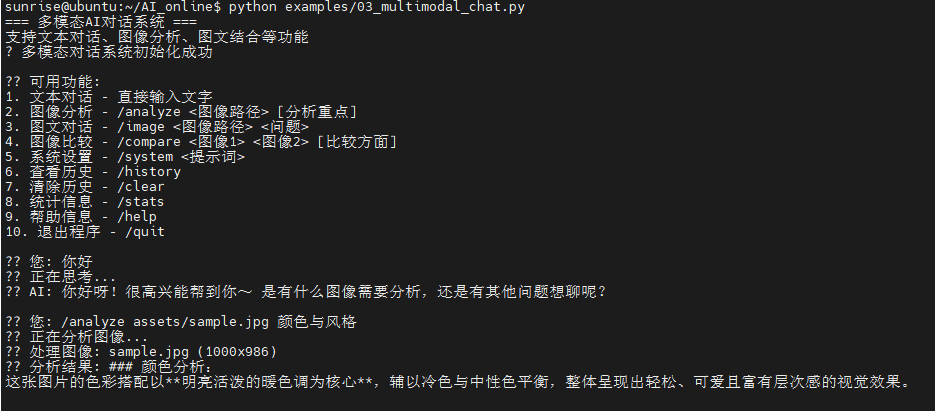
cd AI\_online#进入主目录python examples/03\_multimodal\_chat.py#运行示例程序
参考运行指令:
- 你好(直接输入文字对话即可)
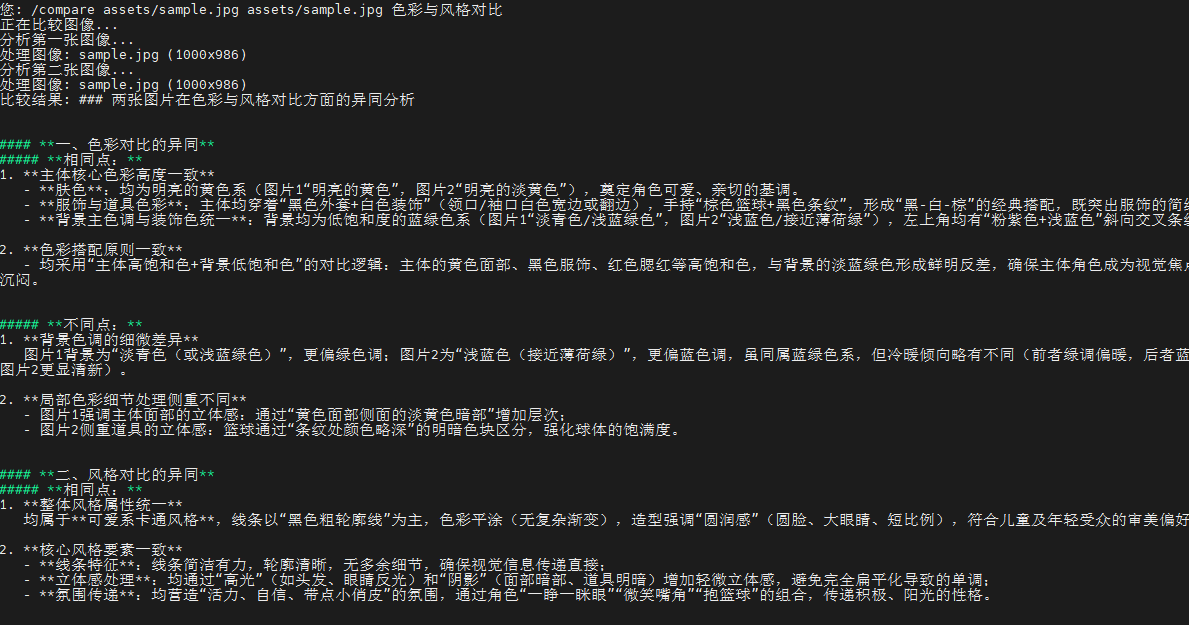
/analyze assets/sample.jpg颜色与风格 (分析图片)/image assets/sample.jpg这张图片里描述的场景是什么?(图文对话)/compare assets/sample.jpg assets/sample.jpg色彩与风格对比 (两图比较,可自行额外添加图片)
终端打印如下:
# -*- coding: utf-8 -*-
"""
图像对话功能示例
支持上传图像并进行多轮对话
"""

import os
import sys
import requests
import base64
from typing import List, Dict, Optional

# 添加父目录到路径
sys.path.append(os.path.dirname(os.path.dirname(os.path.abspath(__file__))))

from config import API_KEY, MODEL_ENDPOINT, API_BASE_URL, REQUEST_TIMEOUT
from utils.image_processor import ImageProcessor

class ImageChatBot:
    """图像对话机器人"""

    def __init__(self):
        self.api_key = API_KEY
        self.model_endpoint = MODEL_ENDPOINT
        self.base_url = API_BASE_URL
        self.timeout = REQUEST_TIMEOUT
        self.processor = ImageProcessor()

        # 对话历史
        self.chat_history: List[Dict] = []
        self.current_image_base64: Optional[str] = None
        self.current_image_path: Optional[str] = None

        # 检查配置
        self._check_config()

    def _check_config(self):
        """检查API配置"""
        if not self.api_key or self.api_key == "你的API_KEY":
            raise ValueError("请在config.py中配置正确的API_KEY")

        if not self.model_endpoint or self.model_endpoint == "你的接入点ID":
            raise ValueError("请在config.py中配置正确的MODEL_ENDPOINT")

    def load_image(self, image_path: str) -> bool:
        """
        加载图像

        Args:
            image_path: 图像文件路径

        Returns:
            bool: 是否成功加载
        """
        try:
            # 对齐 01 的行为:仅按扩展名检查 JPG/JPEG
            ext = os.path.splitext(image_path)[1].lower()
            if ext not in [".jpg", ".jpeg"]:
                print("仅支持JPG/JPEG格式,请选择 .jpg 或 .jpeg 文件")
                return False

            if not os.path.exists(image_path):
                print(f"图像文件不存在: {image_path}")
                return False

            # 转换为base64(与 01 一致,直接读取文件字节)
            base64_data = self.processor.image_to_base64(image_path)
            if not base64_data:
                print("图像编码失败")
                return False

            self.current_image_base64 = base64_data
            self.current_image_path = image_path

            # 获取图像信息(用于提示显示,不作为严格格式校验)
            image_info = self.processor.get_image_info(image_path)
            width = image_info.get('width', 0)
            height = image_info.get('height', 0)
            file_size = image_info.get('file_size', 0)
            print(f"? 图像加载成功: {os.path.basename(image_path)}")
            print(f"  尺寸: {width}x{height}")
            print(f"  大小: {file_size / 1024:.1f}KB")

            return True

        except Exception as e:
            print(f"图像加载失败: {e}")
            return False

    def send_message(self, message: str, include_image: bool = True) -> Optional[str]:
        """
        发送消息并获取回复

        Args:
            message: 用户消息
            include_image: 是否包含当前图像

        Returns:
            str: AI回复,失败返回None
        """
        try:
            # 构建消息内容
            content = [{"type": "text", "text": message}]

            # 如果需要包含图像且有当前图像
            if include_image and self.current_image_base64:
                content.append({
                    "type": "image_url",
                    "image_url": {
                        "url": f"data:image/jpeg;base64,{self.current_image_base64}"
                    }
                })

            # 添加到对话历史
            user_message = {"role": "user", "content": content}

            # 构建完整的消息列表(包含历史)
            messages = self.chat_history + [user_message]

            # 构建API请求
            # 1) API_BASE_URL 已配置为完整端点(.../chat/completions),直接使用
            # 2) API_BASE_URL 为基础路径(.../api/v3),则补齐 /chat/completions
            base = self.base_url.rstrip('/')
            url = base if base.endswith('chat/completions') else f"{base}/chat/completions"
            headers = {
                "Authorization": f"Bearer {self.api_key}",
                "Content-Type": "application/json"
            }
            data = {
                "model": self.model_endpoint,
                "messages": messages,
                "temperature": 0.7,
                "max_tokens": 1000
            }

            print("?? AI正在思考...")
            response = requests.post(url, json=data, headers=headers, timeout=self.timeout)

            if response.status_code == 200:
                result = response.json()
                if 'choices' in result and len(result['choices']) > 0:
                    ai_reply = result['choices'][0]['message']['content']

                    # 更新对话历史
                    self.chat_history.append(user_message)
                    self.chat_history.append({
                        "role": "assistant",
                        "content": ai_reply
                    })

                    return ai_reply
                else:
                    print("API响应格式异常")
                    return None
            else:
                print(f"API请求失败: {response.status_code}")
                if response.status_code == 401:
                    print("认证失败,请检查API_KEY")
                elif response.status_code == 404:
                    print("模型端点不存在,请检查MODEL_ENDPOINT")
                else:
                    print(f"错误详情: {response.text}")
                return None

        except requests.exceptions.Timeout:
            print("请求超时,请检查网络连接")
            return None
        except requests.exceptions.RequestException as e:
            print(f"网络请求错误: {e}")
            return None
        except Exception as e:
            print(f"发送消息失败: {e}")
            return None

    def clear_history(self):
        """清除对话历史"""
        self.chat_history = []
        print("? 对话历史已清除")

    def show_history(self):
        """显示对话历史"""
        if not self.chat_history:
            print("暂无对话历史")
            return

        print("\n=== 对话历史 ===")
        for i, msg in enumerate(self.chat_history, 1):
            role = "用户" if msg["role"] == "user" else "AI"
            content = msg["content"]

            if isinstance(content, list):
                # 提取文本内容
                text_content = ""
                has_image = False
                for item in content:
                    if item["type"] == "text":
                        text_content = item["text"]
                    elif item["type"] == "image_url":
                        has_image = True

                print(f"{i}. {role}: {text_content}")
                if has_image:
                    print("   [包含图像]")
            else:
                print(f"{i}. {role}: {content}")
        print("=" * 30)

def main():
    """主函数"""
    print("=== 火山引擎图像对话系统 ===")
    print("支持上传图像并进行多轮对话")

    # 创建对话机器人
    try:
        chatbot = ImageChatBot()
    except ValueError as e:
        print(f"配置错误: {e}")
        return

    print("\n可用命令:")
    print("- /load <图像路径>  : 加载图像")
    print("- /clear           : 清除对话历史")
    print("- /history         : 显示对话历史")
    print("- /help            : 显示帮助")
    print("- /quit            : 退出程序")
    print("- 直接输入文字进行对话")
    print("\n[路径提示] 可使用以下示例路径:")
    if os.name == 'nt':
        print("1. 绝对路径: C:\\Users\\Administrator\\Pictures\\image.jpg")
        print("2. 相对路径: assets\\sample.jpg")
        print("3. 当前目录: .\\assets\\sample.jpg")
    else:
        print("1. 绝对路径: /home/sunrise/Pictures/image.jpg")
        print("2. 相对路径: assets/sample.jpg")
        print("3. 当前目录: ./assets/sample.jpg")
    print("注意: 仅支持JPG/JPEG格式")

    while True:
        try:
            user_input = input("\n?? 您: ").strip()

            if not user_input:
                continue

            # 处理命令(仅识别已知命令,避免把 Linux 绝对路径当作命令)
            recognized_commands = {"/load", "/clear", "/history", "/help", "/quit"}
            if user_input.startswith("/") and user_input.split(" ", 1)[0].lower() in recognized_commands:
                command_parts = user_input.split(" ", 1)
                command = command_parts[0].lower()

                if command == "/quit":
                    print("感谢使用图像对话系统!")
                    break

                elif command == "/load":
                    if len(command_parts) < 2:
                        print("请提供图像路径: /load <图像路径>")
                        continue

                    image_path = command_parts[1].strip().strip('\"').strip("'")
                    # 非 Windows 平台将反斜杠转换为正斜杠,并展开 ~
                    if os.name != 'nt':
                        image_path = image_path.replace('\\', '/')
                    image_path = os.path.expanduser(image_path)
                    # 与 01 保持一致:支持项目根相对路径与当前工作目录相对路径
                    project_root = os.path.dirname(os.path.dirname(os.path.abspath(__file__)))
                    full_path = os.path.join(project_root, image_path)
                    if os.path.exists(full_path):
                        image_path = full_path
                    elif os.path.exists(image_path):
                        pass
                    else:
                        print(f"图像文件不存在: {image_path}")
                        print("路径示例:")
                        if os.name == 'nt':
                            print("  - 绝对路径: C:\\Users\\Administrator\\Pictures\\image.jpg")
                            print("  - 相对路径: assets\\sample.jpg")
                            print("  - 当前目录: .\\assets\\sample.jpg")
                        else:
                            print("  - 绝对路径: /home/sunrise/Pictures/image.jpg")
                            print("  - 相对路径: assets/sample.jpg")
                            print("  - 当前目录: ./assets/sample.jpg")
                        print("  - 仅支持JPG/JPEG格式 (.jpg/.jpeg)")
                        continue

                    ext = os.path.splitext(image_path)[1].lower()
                    if ext not in [".jpg", ".jpeg"]:
                        print("仅支持JPG/JPEG格式,请选择 .jpg 或 .jpeg 文件")
                        continue
                    if chatbot.load_image(image_path):
                        print("现在可以开始关于这张图片的对话了!")
                    else:
                        print("图像加载失败")

                elif command == "/clear":
                    chatbot.clear_history()

                elif command == "/history":
                    chatbot.show_history()

                elif command == "/help":
                    print("\n可用命令:")
                    print("- /load <图像路径>  : 加载图像")
                    print("- /clear           : 清除对话历史")
                    print("- /history         : 显示对话历史")
                    print("- /help            : 显示帮助")
                    print("- /quit            : 退出程序")
                    print("- 直接输入文字进行对话")
                    print("\n[路径提示] 可使用以下示例路径:")
                    if os.name == 'nt':
                        print("1. 绝对路径: C:\\Users\\Administrator\\Pictures\\image.jpg")
                        print("2. 相对路径: assets\\sample.jpg")
                        print("3. 当前目录: .\\assets\\sample.jpg")
                    else:
                        print("1. 绝对路径: /home/sunrise/Pictures/image.jpg")
                        print("2. 相对路径: assets/sample.jpg")
                        print("3. 当前目录: ./assets/sample.jpg")
                    print("注意: 仅支持JPG/JPEG格式")

                else:
                    print("未知命令,输入 /help 查看帮助")

            else:
                # 支持直接输入路径进行加载(参考 01 的交互方式)
                possible_path = user_input.strip().strip('\"').strip("'")
                looks_like_path = any(sep in possible_path for sep in ['\\', '/']) or possible_path.lower().endswith(('.jpg', '.jpeg'))
                # 非 Windows 平台将反斜杠转换为正斜杠,并展开 ~
                if os.name != 'nt':
                    possible_path = possible_path.replace('\\', '/')
                possible_path = os.path.expanduser(possible_path)
                if looks_like_path:
                    project_root = os.path.dirname(os.path.dirname(os.path.abspath(__file__)))
                    full_path = os.path.join(project_root, possible_path)
                    target_path = full_path if os.path.exists(full_path) else possible_path
                    if not os.path.exists(target_path):
                        print(f"图像文件不存在: {possible_path}")
                        print("路径示例:")
                        if os.name == 'nt':
                            print("  - 绝对路径: C:\\Users\\Administrator\\Pictures\\image.jpg")
                            print("  - 相对路径: assets\\sample.jpg")
                            print("  - 当前目录: .\\assets\\sample.jpg")
                        else:
                            print("  - 绝对路径: /home/sunrise/Pictures/image.jpg")
                            print("  - 相对路径: assets/sample.jpg")
                            print("  - 当前目录: ./assets/sample.jpg")
                        print("  - 仅支持JPG/JPEG格式 (.jpg/.jpeg)")
                    else:
                        ext = os.path.splitext(target_path)[1].lower()
                        if ext not in [".jpg", ".jpeg"]:
                            print("仅支持JPG/JPEG格式,请选择 .jpg 或 .jpeg 文件")
                        elif chatbot.load_image(target_path):
                            print("现在可以开始关于这张图片的对话了!")
                        else:
                            print("图像加载失败")
                    continue

                # 普通对话
                if not chatbot.current_image_base64:
                    print("提示: 还未加载图像,使用 /load <图像路径> 加载图像后可进行图像相关对话")

                reply = chatbot.send_message(user_input)
                if reply:
                    print(f"?? AI: {reply}")
                else:
                    print("? 获取回复失败,请重试")

        except KeyboardInterrupt:
            print("\n\n程序被用户中断")
            break
        except Exception as e:
            print(f"发生错误: {e}")

if __name__ == "__main__":
    main()
## 实验05-多模态文档表格分析
实验准备:
- 确保已接入火山引擎豆包ai
- 寻找一张格式为jpg图片,作为实验素材
- 下载python-docx,命令:
pip install python-docx(本文档以分析word文档为例,如需分析Excel等其他文件,请根据终端提示操作)
实验步骤:
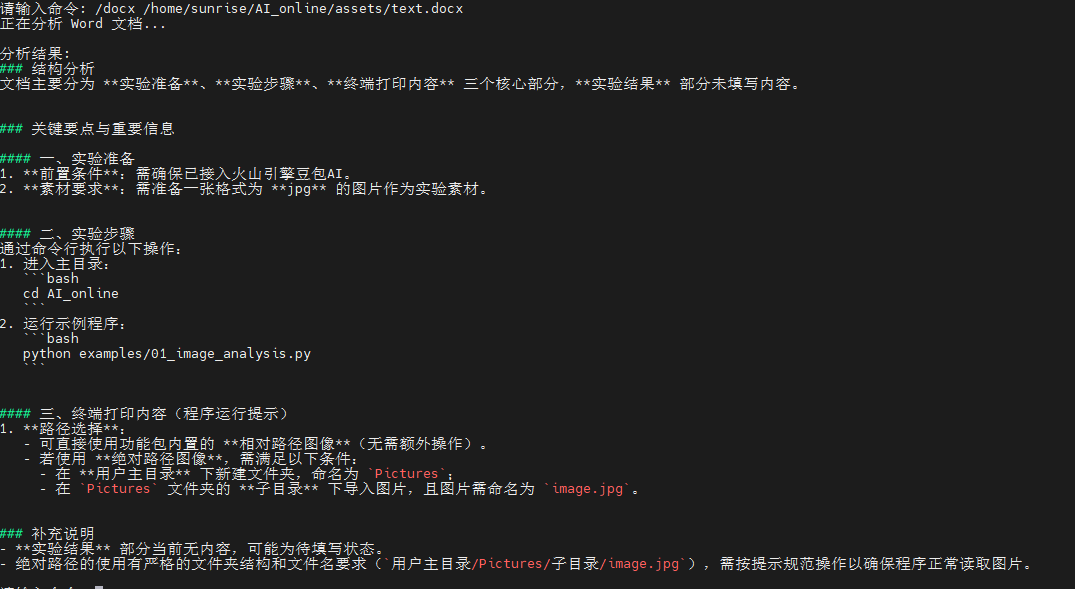
cd AI\_online#进入主目录python examples/04\_document\_analyzer.py#运行示例程序
参考命令:/docx /home/sunrise/AI\_online/assets/text.docx
终端运行结果如下:
"""
文档分析器示例
专门用于分析文档、表格、图表等结构化内容
"""
import os
import sys
from typing import Dict, List, Optional
try:
import docx
except ImportError:
docx = None
try:
import openpyxl
except ImportError:
openpyxl = None
# 添加父目录到路径
sys.path.append(os.path.dirname(os.path.dirname(os.path.abspath(__file__))))
from utils.api_client import DoubaoAPIClient
from utils.image_processor import ImageProcessor
class DocumentAnalyzer:
"""文档分析器"""
def __init__(self):
"""初始化分析器"""
try:
self.client = DoubaoAPIClient()
self.processor = ImageProcessor()
# 预定义的分析模板
self.analysis_templates = {
"ocr": "请识别并提取这个文档中的所有文字内容,保持原有的格式和结构。",
"table": "请分析这个表格的结构和内容,并以结构化的方式描述表格数据。",
"chart": "请分析这个图表,包括图表类型、数据趋势、关键信息等。",
"form": "请识别这个表单的字段和内容,并整理成结构化格式。",
"invoice": "请分析这张发票,提取关键信息如金额、日期、商品等。",
"contract": "请分析这份合同文档,提取关键条款和重要信息。",
"report": "请分析这份报告,总结主要内容和关键数据。",
"presentation": "请分析这个演示文稿页面,提取主要观点和信息。"
}
print("文档分析器初始化成功")
except Exception as e:
print(f"初始化失败: {e}")
raise
def analyze_document(self, image_path: str, doc_type: str = "auto",
custom_prompt: str = None) -> Optional[Dict]:
"""
分析文档
Args:
image_path: 文档图像路径
doc_type: 文档类型 (auto, ocr, table, chart, form, invoice, contract, report, presentation)
custom_prompt: 自定义分析提示词
Returns:
Dict: 分析结果
"""
try:
# 验证图像
if not self.processor.validate_image(image_path):
return None
# 获取图像信息
image_info = self.processor.get_image_info(image_path)
print(f"分析文档: {os.path.basename(image_path)}")
print(f" 尺寸: {image_info.get('width')}x{image_info.get('height')}")
# 确定分析提示词
if custom_prompt:
prompt = custom_prompt
elif doc_type == "auto":
prompt = self._auto_detect_prompt(image_path)
else:
prompt = self.analysis_templates.get(doc_type, self.analysis_templates["ocr"])
print(f"分析类型: {doc_type}")
print(f"分析提示: {prompt[:50]}...")
# 执行分析
result = self.client.chat_with_image_file(prompt, image_path)
if result:
return {
"file_path": image_path,
"file_name": os.path.basename(image_path),
"doc_type": doc_type,
"image_info": image_info,
"analysis_prompt": prompt,
"result": result,
"success": True
}
else:
return {
"file_path": image_path,
"success": False,
"error": "分析失败"
}
except Exception as e:
print(f"文档分析失败: {e}")
return {
"file_path": image_path,
"success": False,
"error": str(e)
}
def _auto_detect_prompt(self, image_path: str) -> str:
"""
自动检测文档类型并生成提示词
Args:
image_path: 图像路径
Returns:
str: 分析提示词
"""
# 基于文件名推测文档类型
filename = os.path.basename(image_path).lower()
if any(word in filename for word in ["table", "表格", "excel", "sheet"]):
return self.analysis_templates["table"]
elif any(word in filename for word in ["chart", "graph", "图表", "统计"]):
return self.analysis_templates["chart"]
elif any(word in filename for word in ["form", "表单", "申请"]):
return self.analysis_templates["form"]
elif any(word in filename for word in ["invoice", "发票", "账单"]):
return self.analysis_templates["invoice"]
elif any(word in filename for word in ["contract", "合同", "协议"]):
return self.analysis_templates["contract"]
elif any(word in filename for word in ["report", "报告", "总结"]):
return self.analysis_templates["report"]
elif any(word in filename for word in ["ppt", "slide", "演示", "幻灯片"]):
return self.analysis_templates["presentation"]
else:
# 默认使用OCR
return self.analysis_templates["ocr"]
def extract_text(self, image_path: str) -> Optional[str]:
"""
提取文档中的文字(OCR功能)
Args:
image_path: 文档图像路径
Returns:
str: 提取的文字内容
"""
result = self.analyze_document(image_path, "ocr")
return result["result"] if result and result["success"] else None
def analyze_table(self, image_path: str) -> Optional[str]:
"""
分析表格结构和内容
Args:
image_path: 表格图像路径
Returns:
str: 表格分析结果
"""
result = self.analyze_document(image_path, "table")
return result["result"] if result and result["success"] else None
def analyze_chart(self, image_path: str) -> Optional[str]:
"""
分析图表内容
Args:
image_path: 图表图像路径
Returns:
str: 图表分析结果
"""
result = self.analyze_document(image_path, "chart")
return result["result"] if result and result["success"] else None
def analyze_word(self, file_path: str) -> Optional[str]:
"""
分析 Word 文档内容(.docx)
"""
try:
if not os.path.exists(file_path):
print(f"文件不存在: {file_path}")
return None
if not file_path.lower().endswith(".docx"):
print("仅支持 .docx 格式的 Word 文档")
return None
if docx is None:
print("未安装 python-docx,请先安装:pip install python-docx")
return None
document = docx.Document(file_path)
paragraphs = [p.text.strip() for p in document.paragraphs if p.text.strip()]
table_texts = []
for table in document.tables:
for row in table.rows:
cells = [cell.text.strip() for cell in row.cells]
if any(cells):
table_texts.append(" | ".join(cells))
content = "\n".join(paragraphs)
if table_texts:
content += "\n\n表格内容:\n" + "\n".join(table_texts)
if len(content) > 8000:
content = content[:8000] + "\n...(内容已截断)"
prompt = f"请分析以下 Word 文档内容,提取关键要点、结构和重要信息:\n\n{content}"
result = self.client.chat_text(prompt)
return result if result else None
except Exception as e:
print(f"Word 文档分析失败: {e}")
return None
def analyze_excel(self, file_path: str) -> Optional[str]:
"""
分析 Excel 表格内容(.xlsx)
"""
try:
if not os.path.exists(file_path):
print(f"文件不存在: {file_path}")
return None
if not file_path.lower().endswith(".xlsx"):
print("仅支持 .xlsx 格式的 Excel 表格")
return None
if openpyxl is None:
print("未安装 openpyxl,请先安装:pip install openpyxl")
return None
wb = openpyxl.load_workbook(file_path, data_only=True)
ws = wb.active
rows_data = []
max_rows = 50
max_cols = 20
for r_idx, row in enumerate(ws.iter_rows(values_only=True), start=1):
if r_idx > max_rows:
break
cells = []
for c_idx, cell in enumerate(row, start=1):
if c_idx > max_cols:
break
cells.append("" if cell is None else str(cell))
rows_data.append(", ".join(cells))
content = "\n".join(rows_data)
prompt = f"请分析以下 Excel 表格的结构与数据,提取关键指标、趋势与异常,并给出简要总结:\n\n{content}"
result = self.client.chat_text(prompt)
return result if result else None
except Exception as e:
print(f"Excel 表格分析失败: {e}")
return None
def batch_analyze(self, folder_path: str, doc_type: str = "auto") -> List[Dict]:
"""
批量分析文档
Args:
folder_path: 文档文件夹路径
doc_type: 文档类型
Returns:
List[Dict]: 批量分析结果
"""
results = []
if not os.path.exists(folder_path):
print(f"文件夹不存在: {folder_path}")
return results
# 支持的图像格式
supported_formats = ['.jpg', '.jpeg']
# 遍历文件夹
files = [f for f in os.listdir(folder_path)
if os.path.splitext(f.lower())[1] in supported_formats]
if not files:
print("文件夹中没有找到支持的图像文件(仅支持JPG/JPEG)")
return results
print(f"开始批量分析,共 {len(files)} 个文件")
for i, filename in enumerate(files, 1):
file_path = os.path.join(folder_path, filename)
print(f"\n[{i}/{len(files)}] 分析文件: {filename}")
result = self.analyze_document(file_path, doc_type)
if result:
results.append(result)
if result["success"]:
print("分析成功")
else:
print(f"分析失败: {result.get('error', '未知错误')}")
else:
print("分析失败")
print(f"\n批量分析完成,成功: {sum(1 for r in results if r['success'])}/{len(results)}")
return results
def save_results(self, results: List[Dict], output_file: str = "analysis_results.txt"):
"""
保存分析结果到文件
Args:
results: 分析结果列表
output_file: 输出文件路径
"""
try:
with open(output_file, 'w', encoding='utf-8') as f:
f.write("=== 文档分析结果 ===\n\n")
for i, result in enumerate(results, 1):
f.write(f"[{i}] 文件: {result['file_name']}\n")
f.write(f"路径: {result['file_path']}\n")
f.write(f"类型: {result.get('doc_type', 'unknown')}\n")
f.write(f"状态: {'成功' if result['success'] else '失败'}\n")
if result['success']:
f.write(f"分析结果:\n{result['result']}\n")
else:
f.write(f"错误信息: {result.get('error', '未知错误')}\n")
f.write("-" * 50 + "\n\n")
print(f"结果已保存到: {output_file}")
except Exception as e:
print(f"保存结果失败: {e}")
def main():
"""主函数"""
print("=== 火山引擎文档分析器 ===")
try:
analyzer = DocumentAnalyzer()
print("\n可用功能:")
print("1. 单文档分析 - /analyze <文件路径> [类型]")
print("2. 批量分析 - /batch <文件夹路径> [类型]")
print("3. OCR提取 - /ocr <文件路径>")
print("4. 表格分析 - /table <文件路径>")
print("5. 图表分析 - /chart <文件路径>")
print("6. 查看类型 - /types")
print("7. 帮助信息 - /help")
print("8. 退出程序 - /quit")
print("9. Word 文档分析 - /docx <文件路径>")
print("10. Excel 表格分析 - /xlsx <文件路径>")
print("\n[路径提示] 可使用以下示例路径:")
print("1. 绝对路径: C:\\Users\\Administrator\\Pictures\\image.jpg")
print("2. 相对路径: assets\\sample.jpg")
print("3. 当前目录: .\\assets\\sample.jpg")
print("支持 JPG/JPEG(.jpg/.jpeg)、Word(.docx)、Excel(.xlsx) 文件")
while True:
try:
user_input = input("\n请输入命令: ").strip()
if not user_input:
continue
parts = user_input.split(" ", 2)
command = parts[0].lower()
if command == "/quit":
print("感谢使用文档分析器!")
break
elif command == "/help":
print("\n可用功能:")
print("1. 单文档分析 - /analyze <文件路径> [类型]")
print("2. 批量分析 - /batch <文件夹路径> [类型]")
print("3. OCR提取 - /ocr <文件路径>")
print("4. 表格分析 - /table <文件路径>")
print("5. 图表分析 - /chart <文件路径>")
print("6. 查看类型 - /types")
print("7. 帮助信息 - /help")
print("8. 退出程序 - /quit")
print("9. Word 文档分析 - /docx <文件路径>")
print("10. Excel 表格分析 - /xlsx <文件路径>")
print("\n[路径提示] 可使用以下示例路径:")
print("1. 绝对路径: C:\\Users\\Administrator\\Pictures\\image.jpg")
print("2. 相对路径: assets\\sample.jpg")
print("3. 当前目录: .\\assets\\sample.jpg")
print("支持 JPG/JPEG(.jpg/.jpeg)、Word(.docx)、Excel(.xlsx) 文件")
print("注意: 路径含空格请使用引号: /analyze \"C:\\My Pics\\a.jpg\"")
print("Word: /docx \"C:\\Docs\\test.docx\" Excel: /xlsx \"C:\\Docs\\table.xlsx\"")
elif command == "/analyze":
if len(parts) < 2:
print("用法:/analyze <文件路径> [类型]")
print("示例:/analyze assets\\sample.jpg auto")
continue
file_path = parts[1]
doc_type = parts[2] if len(parts) > 2 else "auto"
# 统一路径解析(项目根优先 + 当前目录)
project_root = os.path.dirname(os.path.dirname(os.path.abspath(__file__)))
candidate = os.path.join(project_root, file_path) if not os.path.isabs(file_path) else file_path
if not os.path.isabs(file_path):
if os.path.exists(candidate):
file_path = candidate
elif os.path.exists(file_path):
pass
else:
print(f"文件不存在: {file_path}")
print("路径示例:\n - 绝对路径: C:\\Users\\Administrator\\Pictures\\a.jpg\n - 相对路径: assets\\sample.jpg\n - 当前目录: .\\assets\\sample.jpg\n - 支持: JPG/JPEG(.jpg/.jpeg)、Word(.docx)、Excel(.xlsx)")
continue
elif not os.path.exists(file_path):
print(f"文件不存在: {file_path}")
continue
lower = file_path.lower()
if lower.endswith((".jpg", ".jpeg")):
print("正在分析图像...")
result = analyzer.analyze_document(file_path, doc_type)
if result and result["success"]:
print(f"\n分析结果:")
print(result["result"])
else:
print("分析失败")
elif lower.endswith(".docx"):
print("正在分析 Word 文档...")
result = analyzer.analyze_word(file_path)
if result:
print("\n分析结果:")
print(result)
else:
print("分析失败")
elif lower.endswith(".xlsx"):
print("正在分析 Excel 表格...")
result = analyzer.analyze_excel(file_path)
if result:
print("\n分析结果:")
print(result)
else:
print("分析失败")
else:
print("仅支持 JPG/JPEG(.jpg/.jpeg)、Word(.docx)、Excel(.xlsx) 文件")
continue
elif command == "/batch":
if len(parts) < 2:
print("请提供文件夹路径: /batch <文件夹路径> [类型]")
continue
folder_path = parts[1].strip().strip('"').strip("'")
doc_type = parts[2] if len(parts) > 2 else "auto"
project_root = os.path.dirname(os.path.dirname(os.path.abspath(__file__)))
candidate = os.path.join(project_root, folder_path) if not os.path.isabs(folder_path) else folder_path
if not os.path.isabs(folder_path):
if os.path.isdir(candidate):
folder_path = candidate
elif os.path.isdir(folder_path):
pass
else:
print(f"文件夹不存在: {folder_path}")
print("路径示例:\n - 绝对路径: C:\\Users\\Administrator\\Desktop\\AI\\assets\n - 相对路径: assets\n - 当前目录: .\\assets")
continue
elif not os.path.isdir(folder_path):
print(f"文件夹不存在: {folder_path}")
continue
# 批量分析支持的格式: 图片(JPG/JPEG)、Word(docx)、Excel(xlsx)
results = []
files = [f for f in os.listdir(folder_path)
if os.path.splitext(f.lower())[1] in [
'.jpg', '.jpeg', '.docx', '.xlsx']]
if not files:
print("文件夹中没有找到支持的文件(支持 JPG/JPEG、DOCX、XLSX)")
continue
print(f"开始批量分析,共 {len(files)} 个文件")
for i, filename in enumerate(files, 1):
file_path_i = os.path.join(folder_path, filename)
print(f"\n[{i}/{len(files)}] 分析文件: {filename}")
lower_i = filename.lower()
result = None
if lower_i.endswith((".jpg", ".jpeg")):
result = analyzer.analyze_document(file_path_i, doc_type)
if result:
results.append(result)
elif lower_i.endswith(".docx"):
text = analyzer.analyze_word(file_path_i)
if text:
results.append({
"file_name": filename,
"file_path": file_path_i,
"doc_type": "docx",
"result": text,
"success": True
})
result = True
elif lower_i.endswith(".xlsx"):
text = analyzer.analyze_excel(file_path_i)
if text:
results.append({
"file_name": filename,
"file_path": file_path_i,
"doc_type": "xlsx",
"result": text,
"success": True
})
result = True
if result:
if isinstance(result, dict):
if result.get("success"):
print("分析成功")
else:
print(f"分析失败: {result.get('error', '未知错误')}")
else:
print("分析成功")
else:
print("分析失败")
if results:
# 询问是否保存结果
save_choice = input("是否保存结果到文件?(y/n): ").strip().lower()
if save_choice == 'y':
output_file = input("输出文件名 (默认: analysis_results.txt): ").strip()
if not output_file:
output_file = "analysis_results.txt"
analyzer.save_results(results, output_file)
elif command == "/ocr":
if len(parts) < 2:
print("请提供文件路径: /ocr <文件路径>")
continue
image_path = parts[1]
# 统一路径解析
project_root = os.path.dirname(os.path.dirname(os.path.abspath(__file__)))
candidate = os.path.join(project_root, image_path) if not os.path.isabs(image_path) else image_path
if not os.path.isabs(image_path):
if os.path.exists(candidate):
image_path = candidate
elif os.path.exists(image_path):
pass
else:
print(f"图像文件不存在: {image_path}")
continue
elif not os.path.exists(image_path):
print(f"图像文件不存在: {image_path}")
continue
if not image_path.lower().endswith((".jpg", ".jpeg")):
print("仅支持JPG/JPEG格式,请使用 .jpg 或 .jpeg 文件")
continue
print("正在执行OCR...")
result = analyzer.extract_text(image_path)
if result:
print(f"\n提取的文字:")
print(result)
else:
print("文字提取失败")
elif command == "/table":
if len(parts) < 2:
print("请提供文件路径: /table <文件路径>")
continue
image_path = parts[1]
# 统一路径解析
project_root = os.path.dirname(os.path.dirname(os.path.abspath(__file__)))
candidate = os.path.join(project_root, image_path) if not os.path.isabs(image_path) else image_path
if not os.path.isabs(image_path):
if os.path.exists(candidate):
image_path = candidate
elif os.path.exists(image_path):
pass
else:
print(f"图像文件不存在: {image_path}")
continue
elif not os.path.exists(image_path):
print(f"图像文件不存在: {image_path}")
continue
if not image_path.lower().endswith((".jpg", ".jpeg")):
print("仅支持JPG/JPEG格式,请使用 .jpg 或 .jpeg 文件")
continue
print("正在识别表格...")
result = analyzer.analyze_table(image_path)
if result:
print(f"\n表格分析:")
print(result)
else:
print("表格分析失败")
elif command == "/chart":
if len(parts) < 2:
print("请提供文件路径: /chart <文件路径>")
continue
image_path = parts[1]
# 统一路径解析
project_root = os.path.dirname(os.path.dirname(os.path.abspath(__file__)))
candidate = os.path.join(project_root, image_path) if not os.path.isabs(image_path) else image_path
if not os.path.isabs(image_path):
if os.path.exists(candidate):
image_path = candidate
elif os.path.exists(image_path):
pass
else:
print(f"图像文件不存在: {image_path}")
continue
elif not os.path.exists(image_path):
print(f"图像文件不存在: {image_path}")
continue
if not image_path.lower().endswith((".jpg", ".jpeg")):
print("仅支持JPG/JPEG格式,请使用 .jpg 或 .jpeg 文件")
continue
print("正在解析图表...")
result = analyzer.analyze_chart(image_path)
if result:
print(f"\n图表分析:")
print(result)
else:
print("图表分析失败")
elif command == "/docx":
if len(parts) < 2:
print("请提供文件路径: /docx <文件路径>")
continue
file_path = parts[1].strip().strip('"').strip("'")
project_root = os.path.dirname(os.path.dirname(os.path.abspath(__file__)))
candidate = os.path.join(project_root, file_path) if not os.path.isabs(file_path) else file_path
if not os.path.isabs(file_path):
if os.path.exists(candidate):
file_path = candidate
elif os.path.exists(file_path):
pass
else:
print(f"文件不存在: {file_path}")
continue
elif not os.path.exists(file_path):
print(f"文件不存在: {file_path}")
continue
if not file_path.lower().endswith(".docx"):
print("仅支持 .docx 格式的 Word 文档")
continue
print("正在分析 Word 文档...")
result = analyzer.analyze_word(file_path)
if result:
print("\n分析结果:")
print(result)
else:
print("分析失败")
elif command == "/xlsx":
if len(parts) < 2:
print("请提供文件路径: /xlsx <文件路径>")
continue
file_path = parts[1].strip().strip('"').strip("'")
project_root = os.path.dirname(os.path.dirname(os.path.abspath(__file__)))
candidate = os.path.join(project_root, file_path) if not os.path.isabs(file_path) else file_path
if not os.path.isabs(file_path):
if os.path.exists(candidate):
file_path = candidate
elif os.path.exists(file_path):
pass
else:
print(f"文件不存在: {file_path}")
continue
elif not os.path.exists(file_path):
print(f"文件不存在: {file_path}")
continue
if not file_path.lower().endswith(".xlsx"):
print("仅支持 .xlsx 格式的 Excel 表格")
continue
print("正在分析 Excel 表格...")
result = analyzer.analyze_excel(file_path)
if result:
print("\n分析结果:")
print(result)
else:
print("分析失败")
else:
# 普通文本输入或直接路径输入(自动分析)
possible_path = user_input.strip().strip('"').strip("'")
project_root = os.path.dirname(os.path.dirname(os.path.abspath(__file__)))
candidate = os.path.join(project_root, possible_path) if not os.path.isabs(possible_path) else possible_path
use_path = None
if not os.path.isabs(possible_path):
if os.path.exists(candidate):
use_path = candidate
elif os.path.exists(possible_path):
use_path = possible_path
elif os.path.exists(possible_path):
use_path = possible_path
if use_path:
lower = use_path.lower()
if lower.endswith((".jpg", ".jpeg")):
print("检测到图像路径,自动执行文档分析...")
result = analyzer.analyze_document(use_path, "auto")
if result and result["success"]:
print("\n分析结果:")
print(result["result"])
else:
print("分析失败")
continue
elif lower.endswith(".docx"):
print("检测到 Word 文档路径,自动执行分析...")
text = analyzer.analyze_word(use_path)
if text:
print("\n分析结果:")
print(text)
else:
print("分析失败")
continue
elif lower.endswith(".xlsx"):
print("检测到 Excel 文件路径,自动执行分析...")
text = analyzer.analyze_excel(use_path)
if text:
print("\n分析结果:")
print(text)
else:
print("分析失败")
continue
print("未知命令,输入 /help 查看帮助")
except KeyboardInterrupt:
print("\n\n程序被用户中断")
break
except Exception as e:
print(f"发生错误: {e}")
except Exception as e:
print(f"程序启动失败: {e}")
if __name__ == "__main__":
main()## 实验06-摄像头运用-AI视觉分析
实验准备:
- 确保系统已安装python3以及opencv数据库
- 准备一个usb摄像头
实验步骤:
- 将摄像头接入主板,运行
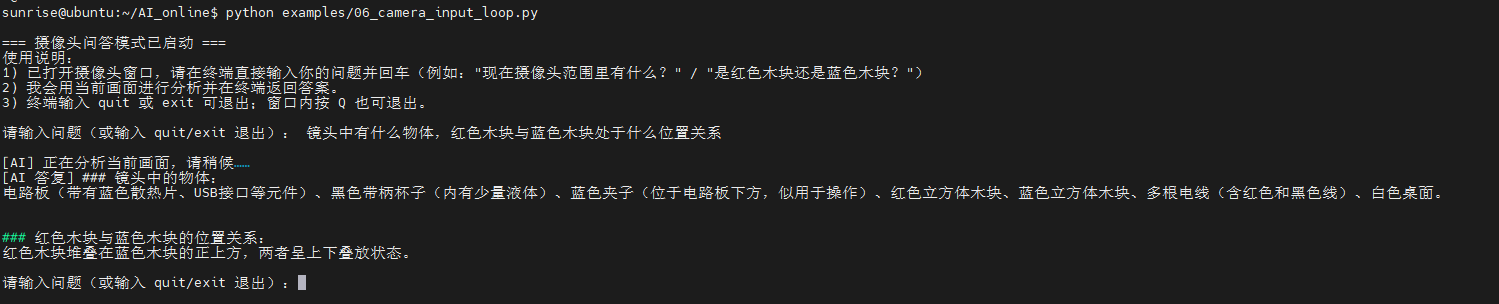
ls /dev/video\*,检查摄像头是否接入,程序中使用默认摄像头接口video0,如接口不符可自行更改。 cd AI\_online#进入功能包python examples/06\_camera\_input\_loop.py#运行示例程序
运行终端如下:
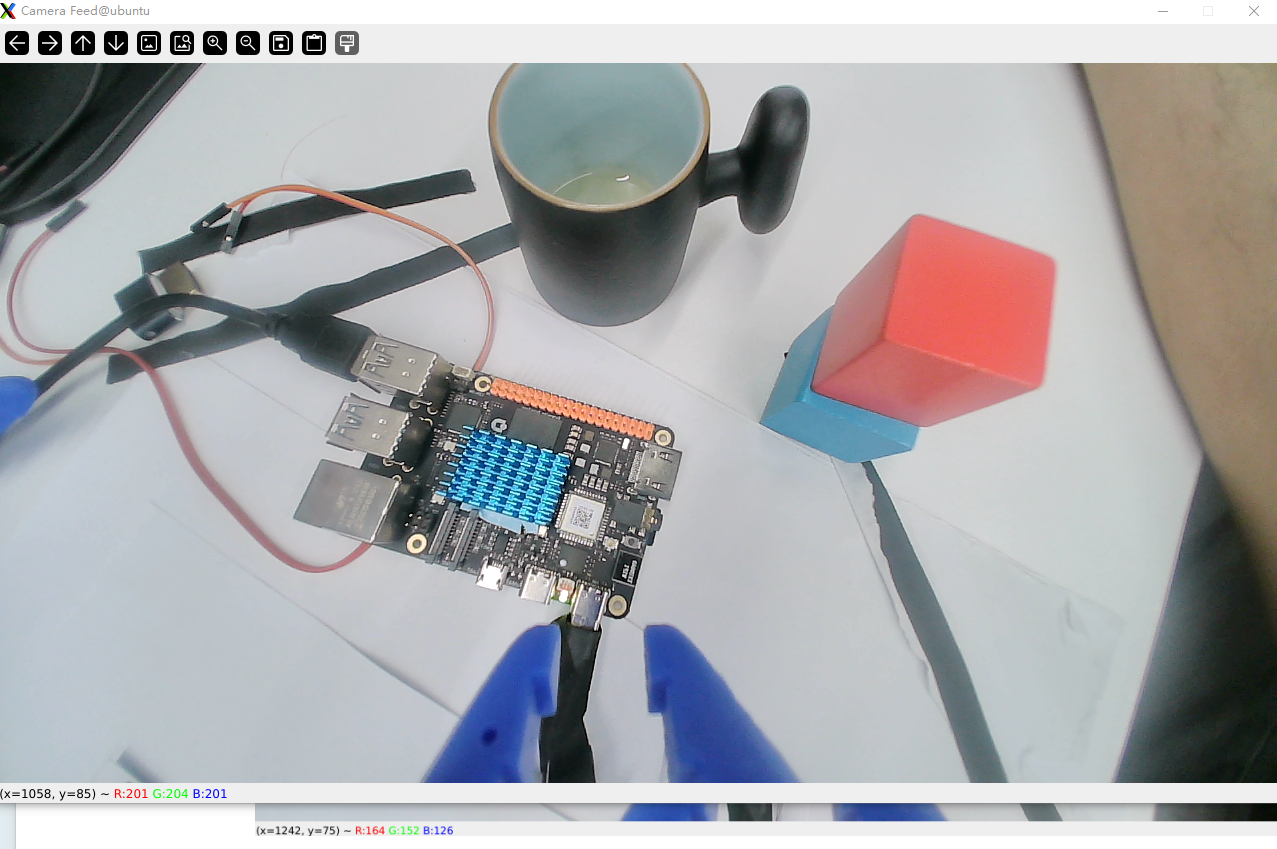
摄像头画面示例:
"""
06_camera_input_loop.py

功能:
- 打开摄像头窗口实时显示画面
- 在终端输入问题后,将“当前帧”发送到 AI 做图文分析并返回回答
- 适用于识别当前画面中有什么、颜色判断(如红色或蓝色木块)等

依赖:
- OpenCV: pip install opencv-python
- 已配置好的 DoubaoAPIClient:请在 utils/config.py 中填写 API_KEY / MODEL_ENDPOINT / API_BASE_URL
"""
import sys
import os
import threading
import time
from typing import Optional

# 尝试导入 OpenCV
try:
    import cv2
except ImportError:
    print("未安装 OpenCV,请先执行: pip install opencv-python")
    sys.exit(1)

# 加入父目录,便于示例脚本直接运行
sys.path.append(os.path.dirname(os.path.dirname(os.path.abspath(__file__))))
from utils.api_client import DoubaoAPIClient


def encode_frame_to_jpeg_bytes(frame) -> Optional[bytes]:
    """将当前帧编码为 JPEG 字节,失败返回 None"""
    try:
        # 轻度缩放,降低带宽与延迟(保持 16:9/4:3 等比例)
        max_w = 960
        h, w = frame.shape[:2]
        if w > max_w:
            scale = max_w / float(w)
            new_size = (int(w * scale), int(h * scale))
            frame = cv2.resize(frame, new_size, interpolation=cv2.INTER_AREA)
        ok, buf = cv2.imencode('.jpg', frame, [int(cv2.IMWRITE_JPEG_QUALITY), 85])
        if not ok:
            return None
        return buf.tobytes()
    except Exception as e:
        print(f"帧编码失败: {e}")
        return None


class CameraQALoop:
    """摄像头输入循环 + 终端问答,将当前画面发送到 AI 进行分析"""
    def __init__(self, camera_index: int = 0, window_name: str = "Camera Feed"):
        self.camera_index = camera_index
        self.window_name = window_name
        self.cap: Optional[cv2.VideoCapture] = None
        self.running = False
        self.latest_frame = None
        self.lock = threading.Lock()
        self.client: Optional[DoubaoAPIClient] = None
        self.input_thread: Optional[threading.Thread] = None

    def _init_camera(self) -> bool:
        self.cap = cv2.VideoCapture(self.camera_index)
        if not self.cap.isOpened():
            print(f"无法打开摄像头(index={self.camera_index}),请检查设备或更换索引")
            return False
        # 可选:设置分辨率,视设备而定
        self.cap.set(cv2.CAP_PROP_FRAME_WIDTH, 1280)
        self.cap.set(cv2.CAP_PROP_FRAME_HEIGHT, 720)
        return True

    def _init_client(self) -> bool:
        try:
            self.client = DoubaoAPIClient()
            return True
        except Exception as e:
            print(f"API 客户端初始化失败:{e}\n请检查 utils/config.py 中的 API_KEY / MODEL_ENDPOINT / API_BASE_URL 配置是否正确")
            return False

    def _print_intro(self):
        print("\n=== 摄像头问答模式已启动 ===")
        print("使用说明:")
        print("1) 已打开摄像头窗口,请在终端直接输入你的问题并回车(例如:\"现在摄像头范围里有什么?\" / \"是红色木块还是蓝色木块?\")")
        print("2) 我会用当前画面进行分析并在终端返回答案。")
        print("3) 终端输入 quit 或 exit 可退出;窗口内按 Q 也可退出。\n")

    def _answer_with_current_frame(self, question: str):
        # 读取最新帧
        with self.lock:
            frame = None if self.latest_frame is None else self.latest_frame.copy()
        if frame is None:
            print("暂时没有可用画面,请稍后再试……")
            return

        image_bytes = encode_frame_to_jpeg_bytes(frame)
        if image_bytes is None:
            print("当前帧编码失败,未能发送给 AI")
            return

        # 系统提示词:引导模型专注当前图像进行客观识别与颜色判断
        system_prompt = (
            "你是一位视觉助手。请始终基于用户提供的当前图像来回答问题,"
            "需要进行:物体识别、颜色判断、场景/位置描述、简单关系判断。"
            "当图像中信息不足或不确定时,请明确说明不确定并简要给出可能性。"
        )

        try:
            print("\n[AI] 正在分析当前画面,请稍候……")
            answer = self.client.chat_with_image(
                text=question,
                image_data=image_bytes,
                image_format="bytes",  # 直接发送内存字节
                system_prompt=system_prompt,
                max_tokens=800,
                temperature=0.3
            )
            if answer:
                print(f"[AI 答复] {answer}\n")
            else:
                print("[AI] 未返回有效答案,请重试或检查网络/API 配置\n")
        except Exception as e:
            print(f"[AI] 分析失败:{e}\n")

    def _input_loop(self):
        """终端输入线程:阻塞读取用户问题,触发当前帧分析"""
        while self.running:
            try:
                question = input("请输入问题(或输入 quit/exit 退出):").strip()
            except EOFError:
                # 终端被关闭或无输入源
                question = "quit"
            if question.lower() in ("quit", "exit"):
                self.running = False
                break
            if not question:
                continue
            self._answer_with_current_frame(question)

    def start(self):
        if not self._init_camera():
            return
        if not self._init_client():
            # 即使 AI 客户端失败,也允许预览摄像头;但无法问答
            print("提示:你仍可查看摄像头窗口,但无法进行 AI 问答。")
        self.running = True
        self._print_intro()

        # 启动输入线程
        self.input_thread = threading.Thread(target=self._input_loop, daemon=True)
        self.input_thread.start()

        # 摄像头显示主循环
        try:
            while self.running:
                ret, frame = self.cap.read()
                if not ret:
                    print("读取摄像头帧失败,尝试继续……")
                    time.sleep(0.05)
                    continue
                # 更新当前帧
                with self.lock:
                    self.latest_frame = frame
                # 在窗口显示
                cv2.imshow(self.window_name, frame)
                key = cv2.waitKey(1) & 0xFF
                if key in (ord('q'), ord('Q')):
                    self.running = False
                    break
            print("正在退出……")
        finally:
            self.stop()

    def stop(self):
        try:
            if self.cap:
                self.cap.release()
            cv2.destroyAllWindows()
        except Exception:
            pass
        self.running = False
        # 等待输入线程结束
        if self.input_thread and self.input_thread.is_alive():
            try:
                self.input_thread.join(timeout=1.0)
            except Exception:
                pass
        print("已关闭摄像头与窗口。")


def main():
    import argparse
    parser = argparse.ArgumentParser(description="摄像头输入循环 + AI 图文问答")
    parser.add_argument("--index", type=int, default=0, help="摄像头索引(默认0)")
    args = parser.parse_args()

    loop = CameraQALoop(camera_index=args.index)
    loop.start()


if __name__ == "__main__":
    main()