
语音LLM应用
实验01-语音识别
实验准备:
1.安装 ALSA 工具(用于录音和播放)
sudo apt-get install alsa-utils
2.安装所需的依赖
1.pip install -r requirements.txt
2.python -m pip install websocket-client
3.sudo apt-get update && sudo apt-get install -y ffmpeg
3.注册讯飞账号
- 登录讯飞开放平台 https://www.xfyun.com.cn
- 点击进入控制台
- 注册登录账号
- 创建应用
- 开通语音识别-语音听写服务
- 获取APIID、APISecret、APIKey、语音听写接口地址四项信息
- 将四项信息保存(后续代码填入config.py中)
实验步骤:
- 检查使用语音模块 (确保语音模块与RDK主板以及喇叭已正确连接)
终端运行: arecord -l #识别麦克风的卡号与设备号(关注 card X 和 device Y )
终端运行: aplay -l #检查扬声器/输出设备
终端运行: sudo arecord -f S16\_LE -r 16000 -c 1 -d 5 /tmp/test\_mic.wav #使用默认设备录 5 秒,16k/单声道/16bit:
终端运行: aplay /tmp/test\_mic.wav #播放音频
- 将APIID、APISecret、APIKey、语音听写接口地址四项信息填入config.py
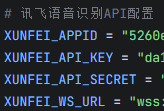
cd AI\_online\_voice#进入功能包python examples/01\_voice\_chat.py#运行示例程序 输入r 开始测试
终端运行效果如下:
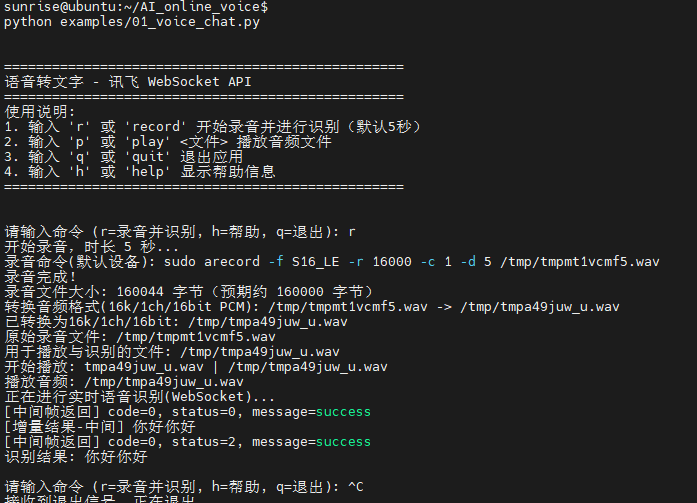
实验效果:开始录音(默认为5秒,如若需要修改时长,输入 r+时长 既可),录音完毕后播放音频,随后将音频上传讯飞语音听写大模型,最后将识别结果返回Linux终端)
"""
01_voice_chat.py
功能:
- 录制语音
- 使用讯飞 WebSocket API 将语音转为文本
- 在终端打印识别结果(专注于语音转文字)
依赖:
- arecord: 用于录制音频(Linux)
- aplay: 用于播放音频(Linux)
- websocket-client: 用于与讯飞 WebSocket API 通信
- 请在 AI_online_voice/config.py 中填写 XUNFEI_APPID / XUNFEI_API_KEY / XUNFEI_API_SECRET / XUNFEI_WS_URL
"""
import os
import sys
import time
from typing import Optional
# 加入父目录,便于示例脚本直接运行
sys.path.append(os.path.dirname(os.path.dirname(os.path.abspath(__file__))))
# 仅保留音频处理,暂不使用豆包对话
from utils.audio_processor import AudioProcessor
# 讯飞 WebSocket 所需依赖与配置
try:
import websocket # websocket-client
except ImportError:
websocket = None
# 新增:导入超时异常类型用于精细日志
try:
from websocket import WebSocketTimeoutException
except Exception:
class WebSocketTimeoutException(Exception):
pass
import json
import base64
import hmac
import hashlib
import ssl
import wave
from email.utils import formatdate
from urllib.parse import urlparse, quote
from config import (
XUNFEI_APPID,
XUNFEI_API_KEY,
XUNFEI_API_SECRET,
XUNFEI_WS_URL,
REQUEST_TIMEOUT,
)
class XunfeiRealtimeSpeechClient:
"""讯飞语音识别(IAT流式WebSocket版)客户端(更新的消息格式与解析)"""
def __init__(self, app_id: str = None, api_key: str = None, api_secret: str = None, ws_url: str = None):
self.app_id = app_id or XUNFEI_APPID
self.api_key = api_key or XUNFEI_API_KEY
self.api_secret = api_secret or XUNFEI_API_SECRET
self.ws_url = ws_url or XUNFEI_WS_URL
self.timeout = REQUEST_TIMEOUT
self._validate_config()
def _validate_config(self):
if not self.app_id or self.app_id == "你的讯飞APPID":
raise ValueError("请配置正确的讯飞APPID")
if not self.api_key or self.api_key == "你的讯飞API_KEY":
raise ValueError("请配置正确的讯飞API_KEY")
if not self.api_secret or self.api_secret == "你的讯飞API_SECRET":
raise ValueError("请配置正确的讯飞API_SECRET")
if websocket is None:
raise RuntimeError("未安装 websocket-client,请先安装:python -m pip install websocket-client")
def _rfc1123_date(self) -> str:
# 生成GMT时间,RFC1123格式
return formatdate(usegmt=True)
def _assemble_auth_url(self) -> str:
"""根据APIKey与APISecret生成带鉴权参数的WS URL"""
parsed = urlparse(self.ws_url)
host = parsed.netloc
path = parsed.path
date = self._rfc1123_date()
# signature 原始串:
signature_origin = f"host: {host}\n" + f"date: {date}\n" + f"GET {path} HTTP/1.1"
# 使用 apiSecret 做 HMAC-SHA256
signature_sha = hmac.new(self.api_secret.encode("utf-8"), signature_origin.encode("utf-8"), hashlib.sha256).digest()
signature = base64.b64encode(signature_sha).decode("utf-8")
# authorization 原始串
authorization_origin = (
f"api_key=\"{self.api_key}\", "
f"algorithm=\"hmac-sha256\", "
f"headers=\"host date request-line\", "
f"signature=\"{signature}\""
)
authorization = base64.b64encode(authorization_origin.encode("utf-8")).decode("utf-8")
# 拼接最终URL
auth_url = (
f"{self.ws_url}?authorization={quote(authorization)}&date={quote(date)}&host={quote(host)}"
)
return auth_url
def _parse_result_segments(self, result_obj: dict) -> str:
"""解析服务端 data.result.ws 结构为纯文本"""
try:
parts = []
ws_arr = result_obj.get("ws")
if isinstance(ws_arr, list):
for ws in ws_arr:
cw_arr = ws.get("cw") if isinstance(ws, dict) else None
if isinstance(cw_arr, list):
for cw in cw_arr:
w = cw.get("w") if isinstance(cw, dict) else None
if w:
parts.append(w)
return "".join(parts)
except Exception:
return ""
def _safe_json_loads(self, text: str):
try:
return json.loads(text)
except Exception:
try:
cleaned = text.strip()
start = cleaned.find("{")
end = cleaned.rfind("}")
if start != -1 and end != -1 and end > start:
return json.loads(cleaned[start:end+1])
except Exception:
return None
def transcribe_audio_ws(self, audio_file: str) -> Optional[str]:
"""将音频文件以流式方式发送到讯飞IAT WS接口并获取识别文本"""
if not os.path.exists(audio_file):
print(f"音频文件不存在: {audio_file}")
return None
# 解析wav
try:
wf = wave.open(audio_file, "rb")
except Exception as e:
print(f"打开音频文件失败: {e}")
return None
framerate = wf.getframerate()
channels = wf.getnchannels()
sampwidth = wf.getsampwidth() # bytes per sample
# 建议参数:16k, 单声道, 16bit
if framerate not in (8000, 16000):
print(f"采样率异常({framerate}),建议使用16k或8k")
if channels != 1:
print(f"通道数为{channels},建议使用单声道")
if sampwidth != 2:
print(f"位深为{sampwidth*8}bit,建议16bit")
auth_url = self._assemble_auth_url()
ws = None
try:
ws = websocket.create_connection(
auth_url,
timeout=self.timeout,
sslopt={"cert_reqs": ssl.CERT_NONE},
)
ws.settimeout(self.timeout)
# 计算每帧40ms对应的帧数
frames_per_chunk = max(1, int(framerate * 0.04))
# 构建格式字符串,例如 audio/L16;rate=16000;channel=1
fmt = f"audio/L{sampwidth*8};rate={framerate};channel={channels}"
# 初始化增量聚合与最终状态标记
final_text_parts = []
saw_final_status = False
# 发送首帧(status=0)
first_chunk = wf.readframes(frames_per_chunk)
first_payload = base64.b64encode(first_chunk).decode("utf-8") if first_chunk else ""
first_frame = {
"common": {"app_id": self.app_id},
"business": {
"domain": "iat",
"language": "zh_cn",
"accent": "mandarin",
"vinfo": 1,
"vad_eos": 2000,
"ptt": 0,
},
"data": {
"status": 0,
"format": fmt,
"encoding": "raw",
"audio": first_payload,
},
}
try:
ws.send(json.dumps(first_frame, separators=(",", ":")))
except Exception as e:
print(f"发送首帧失败: {e}")
print("可能原因:鉴权失败或 WS URL 错误导致服务端立即关闭连接")
return None
# 增强:首帧后循环尝试接收,打印并积累增量结果
try:
ws.settimeout(1.0)
for _ in range(3):
try:
pre_resp_text = ws.recv()
except WebSocketTimeoutException:
break
if not pre_resp_text:
break
pre_resp = self._safe_json_loads(pre_resp_text)
if not pre_resp:
print(f"[首帧返回-非JSON] {pre_resp_text}")
break
code = pre_resp.get("code")
message = pre_resp.get("message")
if code is None:
header = pre_resp.get("header", {})
code = header.get("code", 0)
message = header.get("message")
data = pre_resp.get("data", {})
status = data.get("status")
print(f"[首帧返回] code={code}, status={status}, message={message}")
if code != 0:
desc = message or "识别错误"
print(f"识别错误(连接初期): code={code}, message={desc}")
return None
result = data.get("result")
if result:
segment = self._parse_result_segments(result)
if segment:
final_text_parts.append(segment)
print(f"[增量结果-首帧] {segment}")
if status == 2:
saw_final_status = True
break
except Exception as e:
print(f"[首帧接收日志] {e}")
finally:
ws.settimeout(self.timeout)
# 发送中间帧(status=1)
while True:
chunk = wf.readframes(frames_per_chunk)
if not chunk or saw_final_status:
break
frame = {
"common": {"app_id": self.app_id},
"data": {
"status": 1,
"format": fmt,
"encoding": "raw",
"audio": base64.b64encode(chunk).decode("utf-8"),
},
}
try:
ws.send(json.dumps(frame, separators=(",", ":")))
except Exception as e:
print(f"发送中间帧失败: {e}")
print("可能原因:连接已被服务端关闭(鉴权/配置错误、URL错误、参数不匹配)")
return None
# 每次发送后短暂接收,积累增量结果
try:
ws.settimeout(0.5)
resp_text_mid = ws.recv()
if resp_text_mid:
resp_mid = self._safe_json_loads(resp_text_mid)
if not resp_mid:
print(f"[中间帧返回-非JSON] {resp_text_mid}")
else:
code_mid = resp_mid.get("code")
msg_mid = resp_mid.get("message")
if code_mid is None:
header_mid = resp_mid.get("header", {})
code_mid = header_mid.get("code", 0)
msg_mid = header_mid.get("message")
data_mid = resp_mid.get("data", {})
status_mid = data_mid.get("status")
print(f"[中间帧返回] code={code_mid}, status={status_mid}, message={msg_mid}")
if code_mid != 0:
print(f"识别错误(发送中间帧后): code={code_mid}, message={msg_mid}")
return None
result_mid = data_mid.get("result")
if result_mid:
seg_mid = self._parse_result_segments(result_mid)
if seg_mid:
final_text_parts.append(seg_mid)
print(f"[增量结果-中间] {seg_mid}")
if status_mid == 2:
saw_final_status = True
break
except WebSocketTimeoutException:
pass
except Exception as e:
print(f"接收中间帧返回失败: {e}")
return None
finally:
ws.settimeout(self.timeout)
time.sleep(0.04)
# 若尚未收到最终状态,发送结束帧
if not saw_final_status:
last_frame = {
"common": {"app_id": self.app_id},
"data": {
"status": 2,
"format": fmt,
"encoding": "raw",
"audio": "",
},
}
try:
ws.send(json.dumps(last_frame, separators=(",", ":")))
except Exception as e:
print(f"发送结束帧失败: {e}")
# 即使结束帧发送失败,只要已有增量文本也返回
return "".join(final_text_parts) if final_text_parts else None
# 接收最终结果(容错:超时但已有增量文本则直接返回)
if not saw_final_status:
while True:
try:
resp_text = ws.recv()
except Exception as e:
print(f"接收结果失败: {e}")
return "".join(final_text_parts) if final_text_parts else None
if not resp_text:
continue
resp = self._safe_json_loads(resp_text)
if not resp:
continue
code = resp.get("code")
message = resp.get("message")
if code is None:
header = resp.get("header", {})
code = header.get("code", 0)
message = header.get("message")
if code != 0:
desc = message or "识别错误"
print(f"识别错误: code={code}, message={desc}")
break
data = resp.get("data", {})
status = data.get("status")
result = resp.get("result") or data.get("result")
if result:
segment = self._parse_result_segments(result)
if segment:
final_text_parts.append(segment)
if status == 2:
break
return "".join(final_text_parts) if final_text_parts else None
finally:
try:
wf.close()
except Exception:
pass
if ws is not None:
try:
ws.close()
except Exception:
pass
class VoiceChatApp:
"""语音对话应用(仅语音转文字与打印)"""
def __init__(self):
"""初始化应用"""
self.processor = None
self.xunfei_ws_client = None
self.running = False
def initialize(self) -> bool:
"""初始化客户端和处理器"""
try:
self.processor = AudioProcessor()
self.xunfei_ws_client = XunfeiRealtimeSpeechClient()
return True
except Exception as e:
print(f"初始化失败: {e}")
return False
def print_welcome(self):
"""打印欢迎信息"""
print("\n" + "=" * 50)
print("语音转文字 - 讯飞 WebSocket API")
print("=" * 50)
print("使用说明:")
print("1. 输入 'r' 或 'record' 开始录音并进行识别(默认5秒)")
print("2. 输入 'p' 或 'play' <文件> 播放音频文件")
print("3. 输入 'q' 或 'quit' 退出应用")
print("4. 输入 'h' 或 'help' 显示帮助信息")
print("=" * 50 + "\n")
def print_help(self):
"""打印帮助信息"""
print("\n" + "=" * 50)
print("命令列表:")
print(" r, record [秒数] - 录制语音 (默认5秒) 并用WebSocket识别,终端打印文本")
print(" p, play <文件> - 播放音频文件")
print(" q, quit - 退出应用")
print(" h, help - 显示帮助信息")
print("=" * 50 + "\n")
def handle_command(self, command: str) -> bool:
"""处理命令"""
parts = command.strip().split()
if not parts:
return True
cmd = parts[0].lower()
if cmd in ('q', 'quit', 'exit'):
return False
elif cmd in ('h', 'help'):
self.print_help()
elif cmd in ('r', 'record'):
# 解析录音时长
duration = 5
if len(parts) > 1:
try:
duration = int(parts[1])
except ValueError:
print("无效的时长,使用默认值5秒")
# 录制音频
audio_file = self.processor.record(duration)
if not audio_file:
print("录音失败")
return True
# 新增:录音后强制转换为 16k/1ch/16bit PCM WAV
converted_file = self.processor.convert_to_wav(audio_file)
use_file = converted_file or audio_file
if converted_file:
print(f"已转换为16k/1ch/16bit: {converted_file}")
else:
print("转换失败,使用原始录音进行识别")
# 新增:打印文件名与完整路径,并先播放音频
try:
import os
file_name = os.path.basename(use_file)
print(f"原始录音文件: {audio_file}")
print(f"用于播放与识别的文件: {use_file}")
print(f"开始播放: {file_name} | {use_file}")
play_ok = self.processor.play(use_file)
if not play_ok:
print("播放失败,但继续进行识别")
except Exception as e:
print(f"播放流程异常: {e},继续进行识别")
# 使用讯飞WS实时识别
print("正在进行实时语音识别(WebSocket)...")
text = self.xunfei_ws_client.transcribe_audio_ws(use_file)
if text:
print(f"识别结果: {text}")
else:
print("语音识别失败")
elif cmd in ('p', 'play'):
if len(parts) < 2:
print("请指定要播放的音频文件")
return True
audio_file = parts[1]
self.processor.play(audio_file)
else:
print(f"未知命令: {cmd}")
print("输入 'h' 或 'help' 获取帮助")
return True
def run(self):
"""运行应用"""
if not self.initialize():
print("应用初始化失败,请检查配置")
return
self.print_welcome()
self.running = True
while self.running:
try:
command = input("\n请输入命令 (r=录音并识别, h=帮助, q=退出): ")
self.running = self.handle_command(command)
except KeyboardInterrupt:
print("\n接收到退出信号,正在退出...")
self.running = False
except Exception as e:
print(f"发生错误: {e}")
print("应用已退出")
def main():
"""主函数"""
app = VoiceChatApp()
app.run()
if __name__ == "__main__":
main()## 实验02-语音对话
实验准备:(注册登录豆包AI账号,如有直接填入信息即可)
(实验前提:已完成实验01的依赖包下载及讯飞账号注册等操作)
- 获取API Key: https://console.volcengine.com/ark/region:ark+cn-beijing/apiKey
- 获取模型接入点ID: https://console.volcengine.com/ark/region:ark+cn-beijing/endpoint
- 在config.py中替换个人API Key和模型接入点,模型接入点以ep-开头
实验步骤:(确保语音模块已连接)
cd AI\_online\_voice#进入主目录python examples/02\_voice\_dialogue.py#运行示例程序
实验结果如下:
# -*- coding: utf-8 -*-
"""
02_voice_dialogue.py

实验说明:
- 在 01_voice_chat.py 的基础上,复用录音、播放与实时讯飞语音识别流程;
- 将识别出的中文文本发送给豆包,并把豆包的回答打印到终端;
- 不修改其他文件,仅新增本实验脚本;
- 参考 01_image_analysis.py 的豆包返回方式,调用 DoubaoAPIClient.chat_text。

使用方法:
- python examples/02_voice_dialogue.py
- 交互命令:
  - r [秒数]:录音指定秒数,识别,并将结果发给豆包,打印豆包回复
  - p:回放最近一次录音(如果存在)
  - q:退出
  - h:帮助
"""

import os
import sys
import json
import time
import base64
import hmac
import ssl
import hashlib
import wave   #语音音频处理重要文件
from email.utils import formatdate
from urllib.parse import quote, urlparse

# 允许作为独立脚本运行时导入上级目录
CURRENT_DIR = os.path.dirname(os.path.abspath(__file__))
PROJECT_ROOT = os.path.dirname(CURRENT_DIR)
sys.path.append(PROJECT_ROOT)

# 加载根目录 config.py 以获取豆包API的正确配置
WORKSPACE_ROOT = os.path.dirname(PROJECT_ROOT)
import importlib.util  # noqa: E402
ROOT_CONFIG = None
_root_cfg_path = os.path.join(WORKSPACE_ROOT, "config.py")
if os.path.exists(_root_cfg_path):
    try:
        _spec = importlib.util.spec_from_file_location("root_config", _root_cfg_path)
        ROOT_CONFIG = importlib.util.module_from_spec(_spec)
        _spec.loader.exec_module(ROOT_CONFIG)
    except Exception:
        ROOT_CONFIG = None

from utils.audio_processor import AudioProcessor  # noqa: E402
import requests  # 本地实现豆包客户端,避免导入冲突
import config  # noqa: E402

class DoubaoAPIClient:
    """简化版豆包API客户端,内联实现文本聊天以避免导入冲突"""
    def __init__(self):
        cfg = ROOT_CONFIG if ROOT_CONFIG else config
        self.api_key = getattr(cfg, "API_KEY", None)
        self.model_endpoint = getattr(cfg, "MODEL_ENDPOINT", None)
        self.base_url = getattr(cfg, "API_BASE_URL", None)
        self.timeout = getattr(cfg, "REQUEST_TIMEOUT", 30)
        if not self.api_key or not self.model_endpoint or not self.base_url:
            raise ValueError("请在 config.py 中配置 API_KEY / MODEL_ENDPOINT / API_BASE_URL")

    def _make_request(self, messages, **kwargs):
        try:
            base = (self.base_url or "").rstrip('/')
            url = base if base.endswith('chat/completions') else f"{base}/chat/completions"
            headers = {
                "Authorization": f"Bearer {self.api_key}",
                "Content-Type": "application/json",
                "Accept": "application/json",
            }
            data = {
                "model": self.model_endpoint,
                "messages": messages,
                "temperature": kwargs.get("temperature", 0.7),
                "max_tokens": kwargs.get("max_tokens", 1000),
                "top_p": kwargs.get("top_p", 0.9),
                "stream": kwargs.get("stream", False),
            }
            for k, v in kwargs.items():
                if k not in data:
                    data[k] = v
            resp = requests.post(url, json=data, headers=headers, timeout=self.timeout)
            if resp.status_code == 200:
                try:
                    return resp.json()
                except Exception as e:
                    print(f"[豆包] JSON解析失败: {e}")
                    print(f"[豆包] 响应文本片段: {resp.text[:500]}")
                    return None
            else:
                print(f"[豆包] API请求失败: {resp.status_code}")
                print(f"[豆包] 请求URL: {url}")
                print(f"[豆包] 模型: {self.model_endpoint}")
                try:
                    err_json = resp.json()
                    print(f"[豆包] 错误详情(JSON): {json.dumps(err_json, ensure_ascii=False)[:500]}")
                except Exception:
                    print(f"[豆包] 错误详情(Text): {resp.text[:500]}")
                if resp.status_code == 401:
                    print("[豆包] 认证失败,请检查 API_KEY")
                elif resp.status_code == 404:
                    print("[豆包] 接入点不存在,请检查 MODEL_ENDPOINT")
                elif resp.status_code == 429:
                    print("[豆包] 请求频率过高,请稍后重试")
                elif resp.status_code == 500:
                    print("[豆包] 服务器内部错误,请稍后重试")
                return None
        except Exception as e:
            print(f"豆包请求异常: {e}")
            return None

    def chat_text(self, text: str, system_prompt: str = None, **kwargs):
        try:
            messages = []
            if system_prompt:
                messages.append({"role": "system", "content": system_prompt})
            messages.append({"role": "user", "content": text})
            result = self._make_request(messages, **kwargs)
            if result and "choices" in result and result["choices"]:
                return result["choices"][0]["message"]["content"]
            return None
        except Exception as e:
            print(f"文本对话失败: {e}")
            return None

try:
    import websocket
    from websocket import WebSocketTimeoutException
except Exception:  # pragma: no cover
    websocket = None
    WebSocketTimeoutException = Exception


class XunfeiRealtimeSpeechClient:
    """简化版的讯飞实时语音识别客户端(WebSocket)。
    - 复用我们在 01_voice_chat.py 中优化过的健壮性:
      - 安全 JSON 解析
      - 增量文本聚合
      - 超时容错,返回已识别的文本
    """

    def __init__(self):
        self.app_id = getattr(config, "XUNFEI_APPID", "")
        self.api_key = getattr(config, "XUNFEI_API_KEY", "")
        self.api_secret = getattr(config, "XUNFEI_API_SECRET", "")
        self.host_url = getattr(config, "XUNFEI_WS_URL", "")
        self.timeout = getattr(config, "REQUEST_TIMEOUT", 15)

    def _safe_json_loads(self, s):
        try:
            return json.loads(s)
        except Exception:
            return None

    def _build_auth_url(self):
        url = self.host_url
        # 使用标准库解析,兼容不同 websocket-client 版本
        try:
            parsed = urlparse(url)
            host = parsed.netloc or url.split("//")[-1].split("/")[0]
            path = parsed.path or "/v2/iat"
        except Exception:
            host = url.split("//")[-1].split("/")[0]
            path = "/v2/iat"
        # 鉴权:生成签名字符串
        date = formatdate(timeval=None, localtime=False, usegmt=True)
        signature_origin = f"host: {host}\ndate: {date}\nGET {path} HTTP/1.1"
        signature_sha = hmac.new(
            self.api_secret.encode("utf-8"),
            signature_origin.encode("utf-8"),
            digestmod=hashlib.sha256,
        ).digest()
        signature = base64.b64encode(signature_sha).decode("utf-8")
        authorization_origin = (
            f"api_key=\"{self.api_key}\", algorithm=\"hmac-sha256\", headers=\"host date request-line\", signature=\"{signature}\""
        )
        authorization = base64.b64encode(authorization_origin.encode("utf-8")).decode("utf-8")

        auth_url = f"{url}?authorization={quote(authorization)}&date={quote(date)}&host={quote(host)}"
        return auth_url

    def transcribe_audio_ws(self, wav_path):
        if websocket is None:
            print("[错误] 缺少 websocket-client 依赖,请安装后重试:pip install websocket-client")
            return None

        # 读取音频数据
        try:
            with open(wav_path, "rb") as f:
                audio_bytes = f.read()
        except Exception as e:
            print(f"[错误] 读取音频失败: {e}")
            return None

        # 初始化增量聚合
        final_text_parts = []
        saw_final_status = False

        url = self._build_auth_url()
        print(f"[WS] 连接: {url}")
        ws = websocket.create_connection(url, timeout=self.timeout, sslopt={"cert_reqs": ssl.CERT_NONE})

        try:
            # 发送首帧
            init_payload = {
                "common": {"app_id": self.app_id},
                "business": {
                    "language": "zh_cn",
                    "domain": "iat",
                    "accent": "mandarin",
                    "vad_eos": 2000,
                },
                "data": {
                    "status": 0,
                    "format": "audio/L16;rate=16000",
                    "audio": base64.b64encode(audio_bytes[:1200]).decode("utf-8"),
                    "encoding": "raw",
                },
            }
            ws.send(json.dumps(init_payload))
            print("[首帧发送] bytes=", len(audio_bytes[:1200]))

            # 发送中间帧(简单一次性发送余下数据)
            middle_payload = {
                "data": {
                    "status": 1,
                    "format": "audio/L16;rate=16000",
                    "audio": base64.b64encode(audio_bytes[1200:]).decode("utf-8"),
                    "encoding": "raw",
                }
            }
            ws.send(json.dumps(middle_payload))
            print("[中间帧发送] bytes=", len(audio_bytes[1200:]))

            # 发送结束帧
            end_payload = {
                "data": {"status": 2, "format": "audio/L16;rate=16000", "audio": "", "encoding": "raw"}
            }
            ws.send(json.dumps(end_payload))
            print("[结束帧发送]")

            # 接收返回,聚合文本
            while True:
                try:
                    msg = ws.recv()
                except WebSocketTimeoutException:
                    print("[WS] 接收超时,返回已聚合文本")
                    break
                except Exception as e:
                    print(f"[WS] 接收异常: {e}")
                    break

                data = self._safe_json_loads(msg)
                if not data:
                    print("[WS] 非法 JSON,忽略")
                    continue

                code = data.get("code", -1)
                status = data.get("data", {}).get("status")
                message = data.get("message")
                print(f"[WS返回] code={code}, status={status}, message={message}")

                if code != 0:
                    print("[WS] 识别失败: ", data)
                    break

                # 解析增量识别文本
                result = data.get("data", {}).get("result")
                if result and result.get("ws"):
                    # 将分段结果拼接
                    parts = []
                    for ws_seg in result.get("ws", []):
                        for cw in ws_seg.get("cw", []):
                            w = cw.get("w")
                            if w:
                                parts.append(w)
                    if parts:
                        final_text_parts.append("".join(parts))
                        print("[增量结果] ", "".join(parts))

                if status == 2:
                    saw_final_status = True
                    print("[WS] 收到最终状态,结束接收")
                    break
        finally:
            try:
                ws.close()
            except Exception:
                pass

        aggregated = "".join(final_text_parts).strip()
        if aggregated:
            return aggregated
        if saw_final_status:
            return aggregated  # 为空也返回
        return None


class VoiceDialogueApp:
    def __init__(self):
        self.processor = AudioProcessor()
        self.asr_client = XunfeiRealtimeSpeechClient()
        self.doubao = DoubaoAPIClient()
        self.last_audio = None
        self.last_wav = None

    def print_help(self):
        print("\n指令帮助:")
        print("  r [秒数]  录音指定秒数,识别,并发给豆包")
        print("  p        回放最近一次录音")
        print("  h        查看帮助")
        print("  q        退出\n")

    def handle_record(self, duration_sec: int):
        print(f"[操作] 开始录音 {duration_sec} 秒…")
        audio_file = self.processor.record(duration_sec)
        if not audio_file:
            print("[错误] 录音失败")
            return
        self.last_audio = audio_file
        print(f"[录音完成] 文件: {audio_file}")
        try:
            with wave.open(audio_file, "rb") as wf:
                print(f"[原始音频信息] rate={wf.getframerate()}, ch={wf.getnchannels()}, width={wf.getsampwidth()*8}bit, frames={wf.getnframes()}")
        except Exception as e:
            print(f"[原始音频信息读取失败] {e}")

        wav_path = self.processor.convert_to_wav(audio_file)
        if not wav_path:
            print("[错误] 转换 WAV 失败")
            return
        self.last_wav = wav_path
        print(f"[转换完成] WAV 文件: {wav_path}")
        try:
            with wave.open(wav_path, "rb") as wf:
                duration = (wf.getnframes() / float(wf.getframerate())) if wf.getframerate() else 0.0
                print(f"[转换后音频信息] rate={wf.getframerate()}, ch={wf.getnchannels()}, width={wf.getsampwidth()*8}bit, secs={duration:.2f}")
        except Exception as e:
            print(f"[转换后音频信息读取失败] {e}")


        print("[识别] 发送至讯飞实时识别…")
        text = self.asr_client.transcribe_audio_ws(wav_path)
        if not text:
            print("[识别失败] 未获取到文本")
            return
        print(f"[识别结果] {text}")

        print("[豆包] 发送识别结果到豆包,等待回复…")
        try:
            sys_prompt = getattr(ROOT_CONFIG, "SYSTEM_PROMPT", None) if ROOT_CONFIG else None
            reply = self.doubao.chat_text(text, system_prompt=sys_prompt)
            if reply:
                print("[豆包回复]", reply)
            else:
                print("[豆包回复] None")
        except Exception as e:
            print("[豆包错误] ", e)

    def handle_play(self):
        if not self.last_audio:
            print("[提示] 尚无可回放的录音。请先使用 r 指令录音。")
            return
        print("[播放] 回放最近一次录音…")
        self.processor.play(self.last_audio)

    def run(self):
        print("\n=== 02 语音对话(讯飞 + 豆包)实验 ===")
        print("已接入讯飞语音识别;将识别结果发送给豆包并返回终端。")
        self.print_help()

        while True:
            try:
                cmd = input("请输入指令 (r/p/h/q): ").strip()
            except (EOFError, KeyboardInterrupt):
                print("\n[退出]")
                break

            if not cmd:
                continue
            if cmd == "q":
                print("[退出]")
                break
            if cmd == "h":
                self.print_help()
                continue
            if cmd == "p":
                self.handle_play()
                continue

            if cmd.startswith("r"):
                parts = cmd.split()
                duration = 5
                if len(parts) >= 2:
                    try:
                        duration = int(parts[1])
                    except Exception:
                        print("[提示] 秒数无效,使用默认 5 秒")
                self.handle_record(duration)
                continue

            print("[提示] 未知指令。输入 h 查看帮助。")


if __name__ == "__main__":
    VoiceDialogueApp().run()
## 实验03-多模态图片分析-语音对话
实验准备:
- 确保已接入火山引擎豆包AI以及讯飞AI(参考实验01、实验02)
- 寻找图片,作为实验素材。图片导入分为相对路径以及绝对路径,相对路径默认设置为AI_online_voice/assets/sample.jpg (功能包中已添加了默认的相对路径图片,可更改相对路劲图片,但命名需为sample.jpg)
实验步骤:(确保语音模块已连接)
cd AI\_online\_voice#进入主目录python examples/03\_voice\_image\_dialogue.py#运行示例程序- 进入程序后根据终端提示,先输入y,进入图片选择,可语音选择绝对路径以及相对路径,绝对路径手动输入图片路劲,相对路劲默认设置为assets/sample.jpg 。
终端运行示例:
相对路径选择:
绝对路径选择:
图片分析:
# -*- coding: utf-8 -*-
"""
03_voice_image_dialogue.py
实验03:语音选择上传图片 + 语音交互分析图片
- 基于 02_voice_dialogue.py:保留录音与讯飞实时识别,新增图像路径选择与图像+文本联合分析
- 路径选择支持语音选择“绝对路径/相对路径”,并以终端输入方式给出实际路径字符串
- 图像仅支持 JPG/JPEG/PNG;相对路径相对于项目根目录(AI_online_voice)解析
使用方法:
- python examples/03_voice_image_dialogue.py
- 交互命令:
- i:选择并上传图像(语音选择绝对/相对路径)
- r [秒数]:录音指定秒数,识别,并将结果与已选图片一起发给豆包
- p:回放最近一次录音(如果存在)
- h:帮助
- q:退出
"""
import os
import sys
import json
import base64
import wave
from typing import Optional
CURRENT_DIR = os.path.dirname(os.path.abspath(__file__))
PROJECT_ROOT = os.path.dirname(CURRENT_DIR)
sys.path.append(PROJECT_ROOT)
# 尝试加载根目录 config.py(与 02_voice_dialogue 保持一致)
WORKSPACE_ROOT = os.path.dirname(PROJECT_ROOT)
import importlib.util
ROOT_CONFIG = None
_root_cfg_path = os.path.join(WORKSPACE_ROOT, "config.py")
if os.path.exists(_root_cfg_path):
try:
_spec = importlib.util.spec_from_file_location("root_config", _root_cfg_path)
ROOT_CONFIG = importlib.util.module_from_spec(_spec)
_spec.loader.exec_module(ROOT_CONFIG)
except Exception:
ROOT_CONFIG = None
from utils.audio_processor import AudioProcessor
import config
import requests
from urllib.parse import urlparse, quote
import time, hmac, ssl, hashlib
import email.utils as email_utils
# 参考实验02的实现,内联定义讯飞 WS 客户端与豆包文本客户端
class DoubaoAPIClient:
"""简化版豆包API客户端,内联实现文本聊天以避免导入冲突"""
def __init__(self):
cfg = ROOT_CONFIG if ROOT_CONFIG else config
self.api_key = getattr(cfg, "API_KEY", None)
self.model_endpoint = getattr(cfg, "MODEL_ENDPOINT", None)
self.base_url = getattr(cfg, "API_BASE_URL", None)
self.timeout = getattr(cfg, "REQUEST_TIMEOUT", 30)
if not self.api_key or not self.model_endpoint or not self.base_url:
raise ValueError("请在 config.py 中配置 API_KEY / MODEL_ENDPOINT / API_BASE_URL")
def _make_request(self, messages, **kwargs):
try:
base = (self.base_url or "").rstrip('/')
url = base if base.endswith('chat/completions') else f"{base}/chat/completions"
headers = {
"Authorization": f"Bearer {self.api_key}",
"Content-Type": "application/json",
"Accept": "application/json",
}
data = {
"model": self.model_endpoint,
"messages": messages,
"temperature": kwargs.get("temperature", 0.7),
"max_tokens": kwargs.get("max_tokens", 1000),
"top_p": kwargs.get("top_p", 0.9),
"stream": kwargs.get("stream", False),
}
for k, v in kwargs.items():
if k not in data:
data[k] = v
resp = requests.post(url, json=data, headers=headers, timeout=self.timeout)
if resp.status_code == 200:
try:
return resp.json()
except Exception as e:
print(f"[豆包] JSON解析失败: {e}")
print(f"[豆包] 响应文本片段: {resp.text[:500]}")
return None
else:
print(f"[豆包] API请求失败: {resp.status_code}")
print(f"[豆包] 请求URL: {url}")
print(f"[豆包] 模型: {self.model_endpoint}")
try:
err_json = resp.json()
print(f"[豆包] 错误详情(JSON): {json.dumps(err_json, ensure_ascii=False)[:500]}")
except Exception:
print(f"[豆包] 错误详情(Text): {resp.text[:500]}")
if resp.status_code == 401:
print("[豆包] 认证失败,请检查 API_KEY")
elif resp.status_code == 404:
print("[豆包] 接入点不存在,请检查 MODEL_ENDPOINT")
elif resp.status_code == 429:
print("[豆包] 请求频率过高,请稍后重试")
elif resp.status_code == 500:
print("[豆包] 服务器内部错误,请稍后重试")
return None
except Exception as e:
print(f"豆包请求异常: {e}")
return None
def chat_text(self, text: str, system_prompt: str = None, **kwargs):
try:
messages = []
if system_prompt:
messages.append({"role": "system", "content": system_prompt})
messages.append({"role": "user", "content": text})
result = self._make_request(messages, **kwargs)
if result and "choices" in result and result["choices"]:
return result["choices"][0]["message"]["content"]
return None
except Exception as e:
print(f"文本对话失败: {e}")
return None
try:
import websocket
from websocket import WebSocketTimeoutException
except Exception: # pragma: no cover
websocket = None
WebSocketTimeoutException = Exception
class XunfeiRealtimeSpeechClient:
"""简化版的讯飞实时语音识别客户端(WebSocket)。
- 复用我们在 01_voice_chat.py 中优化过的健壮性:
- 安全 JSON 解析
- 增量文本聚合
- 超时容错,返回已识别的文本
"""
def __init__(self):
self.app_id = getattr(config, "XUNFEI_APPID", "")
self.api_key = getattr(config, "XUNFEI_API_KEY", "")
self.api_secret = getattr(config, "XUNFEI_API_SECRET", "")
self.host_url = getattr(config, "XUNFEI_WS_URL", "")
self.timeout = getattr(config, "REQUEST_TIMEOUT", 15)
def _safe_json_loads(self, s):
try:
return json.loads(s)
except Exception:
return None
def _build_auth_url(self):
url = self.host_url
# 使用标准库解析,兼容不同 websocket-client 版本
try:
parsed = urlparse(url)
host = parsed.netloc or url.split("//")[-1].split("/")[0]
path = parsed.path or "/v2/iat"
except Exception:
host = url.split("//")[-1].split("/")[0]
path = "/v2/iat"
# 鉴权:生成签名字符串
try:
date = email_utils.formatdate(timeval=None, localtime=False, usegmt=True)
except Exception:
# 回退到 RFC 7231 格式
date = time.strftime("%a, %d %b %Y %H:%M:%S GMT", time.gmtime())
signature_origin = f"host: {host}\ndate: {date}\nGET {path} HTTP/1.1"
signature_sha = hmac.new(
self.api_secret.encode("utf-8"),
signature_origin.encode("utf-8"),
digestmod=hashlib.sha256,
).digest()
signature = base64.b64encode(signature_sha).decode("utf-8")
authorization_origin = (
f"api_key=\"{self.api_key}\", algorithm=\"hmac-sha256\", headers=\"host date request-line\", signature=\"{signature}\""
)
authorization = base64.b64encode(authorization_origin.encode("utf-8")).decode("utf-8")
auth_url = f"{url}?authorization={quote(authorization)}&date={quote(date)}&host={quote(host)}"
return auth_url
def transcribe_audio_ws(self, wav_path):
if websocket is None:
print("[错误] 缺少 websocket-client 依赖,请安装后重试:pip install websocket-client")
return None
# 读取音频数据
try:
with open(wav_path, "rb") as f:
audio_bytes = f.read()
except Exception as e:
print(f"[错误] 读取音频失败: {e}")
return None
# 初始化增量聚合
final_text_parts = []
saw_final_status = False
url = self._build_auth_url()
print(f"[WS] 连接: {url}")
ws = websocket.create_connection(url, timeout=self.timeout, sslopt={"cert_reqs": ssl.CERT_NONE})
try:
# 发送首帧
init_payload = {
"common": {"app_id": self.app_id},
"business": {
"language": "zh_cn",
"domain": "iat",
"accent": "mandarin",
"vad_eos": 2000,
},
"data": {
"status": 0,
"format": "audio/L16;rate=16000",
"audio": base64.b64encode(audio_bytes[:1200]).decode("utf-8"),
"encoding": "raw",
},
}
ws.send(json.dumps(init_payload))
print("[首帧发送] bytes=", len(audio_bytes[:1200]))
# 发送中间帧(简单一次性发送余下数据)
middle_payload = {
"data": {
"status": 1,
"format": "audio/L16;rate=16000",
"audio": base64.b64encode(audio_bytes[1200:]).decode("utf-8"),
"encoding": "raw",
}
}
ws.send(json.dumps(middle_payload))
print("[中间帧发送] bytes=", len(audio_bytes[1200:]))
# 发送结束帧
end_payload = {
"data": {"status": 2, "format": "audio/L16;rate=16000", "audio": "", "encoding": "raw"}
}
ws.send(json.dumps(end_payload))
print("[结束帧发送]")
# 接收返回,聚合文本
while True:
try:
msg = ws.recv()
except WebSocketTimeoutException:
print("[WS] 接收超时,返回已聚合文本")
break
except Exception as e:
print(f"[WS] 接收异常: {e}")
break
data = self._safe_json_loads(msg)
if not data:
print("[WS] 非法 JSON,忽略")
continue
code = data.get("code", -1)
status = data.get("data", {}).get("status")
message = data.get("message")
print(f"[WS返回] code={code}, status={status}, message={message}")
if code != 0:
print("[WS] 识别失败: ", data)
break
# 解析增量识别文本
result = data.get("data", {}).get("result")
if result and result.get("ws"):
# 将分段结果拼接
parts = []
for ws_seg in result.get("ws", []):
for cw in ws_seg.get("cw", []):
w = cw.get("w")
if w:
parts.append(w)
if parts:
final_text_parts.append("".join(parts))
print("[增量结果] ", "".join(parts))
if status == 2:
saw_final_status = True
print("[WS] 收到最终状态,结束接收")
break
finally:
try:
ws.close()
except Exception:
pass
aggregated = "".join(final_text_parts).strip()
if aggregated:
return aggregated
if saw_final_status:
return aggregated # 为空也返回
return None
class DoubaoImageClient(DoubaoAPIClient):
"""在豆包文本客户端基础上,扩展图像+文本联合对话能力。
通过 data URI 作为 image_url,将本地图片以 Base64 嵌入消息。
"""
def chat_with_image_file(self, text: str, image_path: str, system_prompt: str = None, **kwargs) -> Optional[str]:
try:
if not image_path or not os.path.exists(image_path):
print(f"[豆包图像] 文件不存在: {image_path}")
return None
ext = os.path.splitext(image_path)[1].lower()
if ext not in (".jpg", ".jpeg", ".png"):
print("[豆包图像] 仅支持 JPG/JPEG/PNG 格式")
return None
mime = "image/jpeg" if ext in (".jpg", ".jpeg") else "image/png"
with open(image_path, "rb") as f:
b64 = base64.b64encode(f.read()).decode("utf-8")
messages = []
if system_prompt:
messages.append({"role": "system", "content": system_prompt})
content = [
{"type": "text", "text": text},
{"type": "image_url", "image_url": {"url": f"data:{mime};base64,{b64}"}},
]
messages.append({"role": "user", "content": content})
# 复用父类的请求方法
result = self._make_request(messages, **kwargs)
if result and "choices" in result and result["choices"]:
return result["choices"][0]["message"]["content"]
return None
except Exception as e:
print(f"[豆包图像] 发送失败: {e}")
return None
class VoiceImageDialogueApp:
def __init__(self):
self.processor = AudioProcessor()
self.asr_client = XunfeiRealtimeSpeechClient()
self.doubao = DoubaoImageClient()
self.last_audio = None
self.last_wav = None
self.image_path = None
def _resolve_path(self, p: str, is_absolute: bool = False) -> Optional[str]:
if not p:
return None
p = os.path.expanduser(p)
if os.name != "nt":
p = p.replace("\\", "/")
if is_absolute or os.path.isabs(p):
return os.path.abspath(p)
# 相对路径相对于项目根目录(AI_online_voice)
return os.path.abspath(os.path.join(PROJECT_ROOT, p))
def print_help(self):
print("\n指令帮助:")
print(" i 选择并上传图像(绝对路径手动输入;相对路径默认 assets/sample.jpg)")
print(" r [秒数] 录音指定秒数,识别,并发给豆包进行图像分析")
print(" p 回放最近一次录音")
print(" h 查看帮助")
print(" q 退出\n")
def handle_image_select(self):
print("[图片选择] 录音 5 秒选择路径类型(说:绝对路径 或 相对路径;相对路径默认 assets/sample.jpg)")
audio_file = self.processor.record(5)
if not audio_file:
print("[错误] 路径类型录音失败")
return
wav_path = self.processor.convert_to_wav(audio_file) or audio_file
selection_text = None
try:
selection_text = self.asr_client.transcribe_audio_ws(wav_path)
except Exception as e:
print(f"[识别异常] {e}")
choice = None
if selection_text:
t = selection_text.lower()
if ("绝对" in t) or ("absolute" in t):
choice = "abs"
elif ("相对" in t) or ("relative" in t):
choice = "rel"
if not choice:
print("[提示] 未识别到路径类型。请输入:abs(绝对) 或 rel(相对)")
try:
choice = input("路径类型(abs/rel): ").strip().lower()
except Exception:
return
is_abs = choice.startswith("a")
if is_abs:
path_input = input("请输入图片绝对路径: ").strip()
final_path = self._resolve_path(path_input, is_absolute=True)
else:
rel_default = "assets/sample.jpg"
print(f"[使用默认相对路径] {rel_default}")
final_path = self._resolve_path(rel_default, is_absolute=False)
if not final_path or not os.path.exists(final_path):
print(f"[错误] 图像文件不存在: {final_path}")
print("[示例] 绝对: /home/user/pic.jpg | 相对: assets/sample.jpg")
return
ext = os.path.splitext(final_path)[1].lower()
if ext not in (".jpg", ".jpeg", ".png"):
print("[错误] 仅支持 JPG/JPEG/PNG 格式")
return
self.image_path = final_path
print(f"[图片已设置] {final_path}")
def handle_record(self, duration_sec: int):
print(f"[操作] 开始录音 {duration_sec} 秒…")
audio_file = self.processor.record(duration_sec)
if not audio_file:
print("[错误] 录音失败")
return
self.last_audio = audio_file
try:
with wave.open(audio_file, "rb") as wf:
print(f"[原始音频信息] rate={wf.getframerate()}, ch={wf.getnchannels()}, width={wf.getsampwidth()*8}bit, frames={wf.getnframes()}")
except Exception as e:
print(f"[原始音频信息读取失败] {e}")
wav_path = self.processor.convert_to_wav(audio_file)
if not wav_path:
print("[错误] 转换 WAV 失败")
return
self.last_wav = wav_path
print(f"[识别] 发送至讯飞实时识别…")
text = self.asr_client.transcribe_audio_ws(wav_path)
if not text:
print("[识别失败] 未获取到文本")
return
print(f"[识别结果] {text}")
print("[豆包] 发送到豆包进行图像分析…")
try:
sys_prompt = getattr(ROOT_CONFIG, "SYSTEM_PROMPT", None) if ROOT_CONFIG else None
if self.image_path:
reply = self.doubao.chat_with_image_file(text, self.image_path, system_prompt=sys_prompt)
else:
# 未设置图片时,退化为纯文本对话
reply = self.doubao.chat_text(text, system_prompt=sys_prompt)
if reply:
print("[豆包回复]", reply)
else:
print("[豆包回复] None")
except Exception as e:
print("[豆包错误] ", e)
def handle_play(self):
if not self.last_audio:
print("[提示] 尚且有回放的录音。请先使用 r 指令录音。")
return
print("[播放] 回放最近一次录音…")
self.processor.play(self.last_audio)
def run(self):
print("\n=== 03 语音选择图片并分析(讯飞 + 豆包)实验 ===")
print("启动时可先进行图片选择(i),之后用 r 进行语音分析")
self.print_help()
# 启动阶段建议先选择图片(可跳过)
try:
first = input("是否立即选择图片? (y/n): ").strip().lower()
if first.startswith("y"):
self.handle_image_select()
except Exception:
pass
while True:
try:
cmd = input("请输入指令 (i/r/p/h/q): ").strip()
except (EOFError, KeyboardInterrupt):
print("\n[退出]")
break
if not cmd:
continue
if cmd == "q":
print("[退出]")
break
if cmd == "h":
self.print_help()
continue
if cmd == "p":
self.handle_play()
continue
if cmd == "i":
self.handle_image_select()
continue
if cmd.startswith("r"):
parts = cmd.split()
duration = 5
if len(parts) >= 2:
try:
duration = int(parts[1])
except Exception:
print("[提示] 秒数无效,使用默认 5 秒")
self.handle_record(duration)
continue
print("[提示] 未知指令。输入 h 查看帮助。")
if __name__ == "__main__":
VoiceImageDialogueApp().run()## 实验04-多模态图片比较-语音对话
实验准备:
- 确保已接入火山引擎豆包AI以及讯飞AI(参考实验01、实验02)
- 寻找图片,作为实验素材。图片导入分为相对路径以及绝对路径,相对路径默认设置为AI_online_voice/assets/sample.jpg(功能包中已添加了默认的相对路径图片,可更改相对路劲图片,但命名需为sample.jpg)
实验步骤:(确保语音模块已连接)
cd AI\_online\_voice#进入主目录python examples/04\_voice\_image\_comparison.py#运行示例程序- 进入程序后根据终端提示,先输入y,进入图片选择,可语音选择绝对路径以及相对路径,绝对路径手动输入图片路径,相对路劲默认设置为assets/sample.jpg 。
终端运行示例:
图片设置:
图文对比分析:
# -*- coding: utf-8 -*-
"""
04_voice_image_comparison.py

实验04:图片比较 - 语音输入
- 参考实验03:语音选择路径(绝对/相对),相对路径默认 assets/sample.jpg
- 选择图片一与图片二;录音文本与两图一起提交给豆包进行比较分析

指令:
- i1:选择图片一(语音选择绝对/相对路径)
- i2:选择图片二(语音选择绝对/相对路径)
- r [秒数]:录音并提交到豆包进行两图分析(默认5秒)
- p:回放最近一次录音
- h:帮助
- q:退出
"""

import os
import sys
import json
import base64
import wave
from typing import Optional
import importlib.util

CURRENT_DIR = os.path.dirname(os.path.abspath(__file__))
PROJECT_ROOT = os.path.dirname(CURRENT_DIR)
sys.path.append(PROJECT_ROOT)

from utils.audio_processor import AudioProcessor
import config

# 动态导入实验03模块,复用内联的客户端
EXP03_PATH = os.path.join(PROJECT_ROOT, "examples", "03_voice_image_dialogue.py")
spec = importlib.util.spec_from_file_location("exp03", EXP03_PATH)
exp03 = importlib.util.module_from_spec(spec)
spec.loader.exec_module(exp03)

DoubaoAPIClient = exp03.DoubaoAPIClient
XunfeiRealtimeSpeechClient = exp03.XunfeiRealtimeSpeechClient


class VoiceImageComparisonApp:
    def __init__(self):
        self.processor = AudioProcessor()
        self.asr = XunfeiRealtimeSpeechClient()
        self.doubao = DoubaoAPIClient()
        self.last_audio: Optional[str] = None
        self.last_wav: Optional[str] = None
        self.image_path1: Optional[str] = None
        self.image_path2: Optional[str] = None

    def _resolve_path(self, p: str, is_absolute: bool = False) -> Optional[str]:
        if not p:
            return None
        p = os.path.expanduser(p)
        if os.name != "nt":
            p = p.replace("\\", "/")
        if is_absolute or os.path.isabs(p):
            return os.path.abspath(p)
        return os.path.abspath(os.path.join(PROJECT_ROOT, p))

    def print_help(self):
        print("\n指令帮助:")
        print("  i1       选择图片一(绝对路径手动;相对路径默认 assets/sample.jpg)")
        print("  i2       选择图片二(绝对路径手动;相对路径默认 assets/sample.jpg)")
        print("  r [秒数]  录音并提交两图分析(默认 5 秒)")
        print("  p        回放最近一次录音")
        print("  h        查看帮助")
        print("  q        退出\n")

    def _select_image(self, which: int):
        label = "图片一" if which == 1 else "图片二"
        print(f"[选择{label}] 录音 5 秒选择路径类型(说:绝对路径 或 相对路径;相对路径默认 assets/sample.jpg)")
        audio_file = self.processor.record(5)
        if not audio_file:
            print("[错误] 路径类型录音失败")
            return
        wav_path = self.processor.convert_to_wav(audio_file) or audio_file
        selection_text = None
        try:
            selection_text = self.asr.transcribe_audio_ws(wav_path)
        except Exception as e:
            print(f"[识别异常] {e}")
        choice = None
        if selection_text:
            t = selection_text.lower()
            if ("绝对" in t) or ("absolute" in t):
                choice = "abs"
            elif ("相对" in t) or ("relative" in t):
                choice = "rel"
        if not choice:
            print("[提示] 未识别到路径类型。请输入:abs(绝对) 或 rel(相对)")
            try:
                choice = input("路径类型(abs/rel): ").strip().lower()
            except Exception:
                return
        is_abs = choice.startswith("a")
        if is_abs:
            path_input = input(f"请输入{label}绝对路径: ").strip()
            final_path = self._resolve_path(path_input, is_absolute=True)
        else:
            rel_default = "assets/sample.jpg"
            print(f"[使用默认相对路径] {rel_default}")
            final_path = self._resolve_path(rel_default, is_absolute=False)
        if not final_path or not os.path.exists(final_path):
            print(f"[错误] 图像文件不存在: {final_path}")
            print("[示例] 绝对: /home/user/pic.jpg | 相对: assets/sample.jpg")
            return
        ext = os.path.splitext(final_path)[1].lower()
        if ext not in (".jpg", ".jpeg", ".png"):
            print("[错误] 仅支持 JPG/JPEG/PNG 格式")
            return
        if which == 1:
            self.image_path1 = final_path
        else:
            self.image_path2 = final_path
        print(f"[已设置{label}] {final_path}")

    def _build_image_content(self, text: str) -> list:
        content = [{"type": "text", "text": text}]
        for p in [self.image_path1, self.image_path2]:
            if not p:
                continue
            ext = os.path.splitext(p)[1].lower()
            mime = "image/jpeg" if ext in (".jpg", ".jpeg") else "image/png"
            with open(p, "rb") as f:
                b64 = base64.b64encode(f.read()).decode("utf-8")
            content.append({"type": "image_url", "image_url": {"url": f"data:{mime};base64,{b64}"}})
        return content

    def handle_record(self, duration_sec: int):
        print(f"[操作] 开始录音 {duration_sec} 秒…")
        audio_file = self.processor.record(duration_sec)
        if not audio_file:
            print("[错误] 录音失败")
            return
        self.last_audio = audio_file
        try:
            with wave.open(audio_file, "rb") as wf:
                print(f"[音频信息] rate={wf.getframerate()}, ch={wf.getnchannels()}, bits={wf.getsampwidth()*8}")
        except Exception:
            pass
        wav_path = self.processor.convert_to_wav(audio_file)
        if not wav_path:
            print("[错误] 转换 WAV 失败")
            return
        self.last_wav = wav_path
        print("[识别] 讯飞实时识别…")
        text = self.asr.transcribe_audio_ws(wav_path)
        if not text:
            print("[识别失败] 未获取到文本")
            return
        print(f"[识别结果] {text}")

        print("[豆包] 提交两图比较分析…")
        try:
            sys_prompt = getattr(exp03, "ROOT_CONFIG", None)
            sys_prompt = getattr(sys_prompt, "SYSTEM_PROMPT", None) if sys_prompt else None
            messages = []
            if sys_prompt:
                messages.append({"role": "system", "content": sys_prompt})
            messages.append({"role": "user", "content": self._build_image_content(text)})
            result = self.doubao._make_request(messages)
            if result and result.get("choices"):
                print("[豆包回复]", result["choices"][0]["message"]["content"])
            else:
                print("[豆包回复] None")
        except Exception as e:
            print("[豆包错误]", e)

    def handle_play(self):
        if not self.last_audio:
            print("[提示] 尚无可回放的录音。请先使用 r 指令录音。")
            return
        print("[播放] 回放最近一次录音…")
        self.processor.play(self.last_audio)

    def run(self):
        print("\n=== 04 图片比较(语音选择两图 + 讯飞 + 豆包)实验 ===")
        self.print_help()
        try:
            first = input("是否先选择图片一? (y/n): ").strip().lower()
            if first.startswith("y"):
                self._select_image(1)
            second = input("是否选择图片二? (y/n): ").strip().lower()
            if second.startswith("y"):
                self._select_image(2)
        except Exception:
            pass
        while True:
            try:
                cmd = input("请输入指令 (i1/i2/r/p/h/q): ").strip()
            except (EOFError, KeyboardInterrupt):
                print("\n[退出]")
                break
            if not cmd:
                continue
            if cmd == "q":
                print("[退出]")
                break
            if cmd == "h":
                self.print_help()
                continue
            if cmd == "p":
                self.handle_play()
                continue
            if cmd == "i1":
                self._select_image(1)
                continue
            if cmd == "i2":
                self._select_image(2)
                continue
            if cmd.startswith("r"):
                parts = cmd.split()
                duration = 5
                if len(parts) >= 2:
                    try:
                        duration = int(parts[1])
                    except Exception:
                        print("[提示] 秒数无效,使用默认 5 秒")
                self.handle_record(duration)
                continue
            print("[提示] 未知指令。输入 h 查看帮助。")


if __name__ == "__main__":
    VoiceImageComparisonApp().run()
## 实验05-多模态文档分析-语音对话
实验准备:
- 确保已接入火山引擎豆包AI以及讯飞AI(参考实验01、实验02)
- 寻找文档,作为实验素材。文档导入分为相对路径以及绝对路径,相对路径默认设置为AI_online_voice/assets/text.docx (功能包中已添加了默认的相对路径文档,可更改相对路劲文档,但命名需为text.docx )
- 下载相关依赖(若已下载可自动忽略)
(1) pip install python-docx
(2) pip install openpyxl
实验步骤:(确保语音模块已连接)
cd AI\_online\_voice#进入主目录python examples/05\_voice\_document\_analysis.py#运行示例程序- 进入程序后根据终端提示,先输入y,进入文档选择,可语音选择绝对路径以及相对路径,绝对路径手动输入文档路劲,相对路劲默认设置为assets/text.docx 。
终端运行结果示例:
# -*- coding: utf-8 -*-
"""
05_voice_document_analysis.py

实验05:文档分析 - 语音
- 参考实验03的语音选择方式与运行逻辑
- 文档导入分为绝对路径与相对路径:
  - 绝对路径:用户手动输入
  - 相对路径:默认 /home/sunrise/AI_online_voice/assets/text.docx(若不存在则回退为项目根下 assets/text.docx)
- 支持文档类型:Word(.docx)与 Excel(.xlsx)

指令:
- i:选择并导入文档(语音选择绝对/相对路径)
- r [秒数]:录音并提交到豆包进行文档分析(默认5秒)
- p:回放最近一次录音
- h:帮助
- q:退出
"""

import os
import sys
import wave
import base64
from typing import Optional
import importlib.util

CURRENT_DIR = os.path.dirname(os.path.abspath(__file__))
PROJECT_ROOT = os.path.dirname(CURRENT_DIR)
sys.path.append(PROJECT_ROOT)

from utils.audio_processor import AudioProcessor
import config

# 动态导入实验03模块,复用内联客户端(讯飞 WS 与豆包)
EXP03_PATH = os.path.join(PROJECT_ROOT, "examples", "03_voice_image_dialogue.py")
spec = importlib.util.spec_from_file_location("exp03", EXP03_PATH)
exp03 = importlib.util.module_from_spec(spec)
spec.loader.exec_module(exp03)

DoubaoAPIClient = exp03.DoubaoAPIClient
XunfeiRealtimeSpeechClient = exp03.XunfeiRealtimeSpeechClient
ROOT_CONFIG = getattr(exp03, "ROOT_CONFIG", None)


class DocumentLoader:
    """解析文档为纯文本。支持 .docx 与 .xlsx。
    - 对 .docx:提取段落文本。
    - 对 .xlsx:提取前几个工作表的前若干行,合并为文本。
    - 对大文档进行截断,避免请求过长。
    """

    def __init__(self, max_chars: int = 8000):
        self.max_chars = max_chars

    def load_text(self, path: str) -> Optional[str]:
        if not path or not os.path.exists(path):
            return None
        ext = os.path.splitext(path)[1].lower()
        try:
            if ext == ".docx":
                return self._load_docx(path)
            elif ext == ".xlsx":
                return self._load_xlsx(path)
            else:
                print("[文档] 当前仅支持 .docx 与 .xlsx")
                return None
        except Exception as e:
            print(f"[文档] 解析失败: {e}")
            return None

    def _truncate(self, text: str) -> str:
        if text and len(text) > self.max_chars:
            return text[: self.max_chars] + "\n[...内容截断...]"
        return text

    def _load_docx(self, path: str) -> str:
        try:
            import docx  # python-docx
        except Exception:
            print("[依赖缺失] 未安装 python-docx,请先安装:pip install python-docx")
            raise
        doc = docx.Document(path)
        parts = []
        for p in doc.paragraphs:
            txt = (p.text or "").strip()
            if txt:
                parts.append(txt)
        text = "\n".join(parts)
        return self._truncate(text)

    def _load_xlsx(self, path: str) -> str:
        try:
            import openpyxl
        except Exception:
            print("[依赖缺失] 未安装 openpyxl,请先安装:pip install openpyxl")
            raise
        wb = openpyxl.load_workbook(path, read_only=True, data_only=True)
        parts = []
        sheet_limit = 3
        row_limit = 100
        for si, sheet in enumerate(wb.worksheets):
            if si >= sheet_limit:
                break
            parts.append(f"[Sheet] {sheet.title}")
            rows = sheet.iter_rows(min_row=1, max_row=row_limit, values_only=True)
            for row in rows:
                vals = [str(v) if v is not None else "" for v in row]
                line = "\t".join(vals).strip()
                if line:
                    parts.append(line)
        text = "\n".join(parts)
        return self._truncate(text)


class VoiceDocumentAnalysisApp:
    def __init__(self):
        self.processor = AudioProcessor()
        self.asr = XunfeiRealtimeSpeechClient()
        self.doubao = DoubaoAPIClient()
        self.loader = DocumentLoader()
        self.last_audio: Optional[str] = None
        self.last_wav: Optional[str] = None
        self.doc_path: Optional[str] = None

    def _resolve_path(self, p: str, is_absolute: bool = False) -> Optional[str]:
        if not p:
            return None
        p = os.path.expanduser(p)
        if os.name != "nt":
            p = p.replace("\\", "/")
        if is_absolute or os.path.isabs(p):
            return os.path.abspath(p)
        return os.path.abspath(os.path.join(PROJECT_ROOT, p))

    def print_help(self):
        print("\n指令帮助:")
        print("  i        选择并导入文档(绝对路径手动;相对路径默认 /home/sunrise/AI_online_voice/assets/text.docx)")
        print("  r [秒数]  录音并提交文档分析(默认 5 秒)")
        print("  p        回放最近一次录音")
        print("  h        查看帮助")
        print("  q        退出\n")

    def handle_doc_select(self):
        print("[文档选择] 录音 5 秒选择路径类型(说:绝对路径 或 相对路径;相对默认 /home/sunrise/AI_online_voice/assets/text.docx)")
        audio_file = self.processor.record(5)
        if not audio_file:
            print("[错误] 路径类型录音失败")
            return
        wav_path = self.processor.convert_to_wav(audio_file) or audio_file
        selection_text = None
        try:
            selection_text = self.asr.transcribe_audio_ws(wav_path)
        except Exception as e:
            print(f"[识别异常] {e}")
        choice = None
        if selection_text:
            t = selection_text.lower()
            if ("绝对" in t) or ("absolute" in t):
                choice = "abs"
            elif ("相对" in t) or ("relative" in t):
                choice = "rel"
        if not choice:
            print("[提示] 未识别到路径类型。请输入:abs(绝对) 或 rel(相对)")
            try:
                choice = input("路径类型(abs/rel): ").strip().lower()
            except Exception:
                return
        is_abs = choice.startswith("a")
        if is_abs:
            path_input = input("请输入文档绝对路径: ").strip()
            final_path = self._resolve_path(path_input, is_absolute=True)
        else:
            rel_default_linux = "/home/sunrise/AI_online_voice/assets/text.docx"
            rel_default_local = "assets/text.docx"
            use_path = rel_default_linux if os.path.exists(rel_default_linux) else rel_default_local
            print(f"[使用默认相对路径] {use_path}")
            final_path = self._resolve_path(use_path, is_absolute=False)
        if not final_path or not os.path.exists(final_path):
            print(f"[错误] 文档文件不存在: {final_path}")
            print("[示例] 绝对: /home/user/doc.docx | 相对: assets/text.docx")
            return
        ext = os.path.splitext(final_path)[1].lower()
        if ext not in (".docx", ".xlsx"):
            print("[错误] 仅支持 .docx 与 .xlsx")
            return
        self.doc_path = final_path
        print(f"[文档已设置] {final_path}")

    def handle_record(self, duration_sec: int):
        print(f"[操作] 开始录音 {duration_sec} 秒…")
        audio_file = self.processor.record(duration_sec)
        if not audio_file:
            print("[错误] 录音失败")
            return
        self.last_audio = audio_file
        try:
            with wave.open(audio_file, "rb") as wf:
                print(f"[音频信息] rate={wf.getframerate()}, ch={wf.getnchannels()}, bits={wf.getsampwidth()*8}")
        except Exception:
            pass
        wav_path = self.processor.convert_to_wav(audio_file)
        if not wav_path:
            print("[错误] 转换 WAV 失败")
            return
        self.last_wav = wav_path
        print("[识别] 讯飞实时识别…")
        text = self.asr.transcribe_audio_ws(wav_path)
        if not text:
            print("[识别失败] 未获取到文本")
            return
        print(f"[识别结果] {text}")

        # 加载文档内容
        doc_text = None
        if self.doc_path:
            doc_text = self.loader.load_text(self.doc_path)
            if not doc_text:
                print("[文档] 解析失败或为空,按纯文本对话处理")
        else:
            print("[文档] 未设置文档,将按纯文本对话处理")

        print("[豆包] 提交文档分析…")
        try:
            sys_prompt = getattr(ROOT_CONFIG, "SYSTEM_PROMPT", None) if ROOT_CONFIG else None
            messages = []
            if sys_prompt:
                messages.append({"role": "system", "content": sys_prompt})
            # 构造用户消息:识别文本 + 文档内容
            if doc_text:
                combined = (
                    "用户问题/指令:\n" + text + "\n\n" + "文档内容片段:\n" + doc_text
                )
            else:
                combined = text
            messages.append({"role": "user", "content": combined})
            result = self.doubao._make_request(messages)
            if result and result.get("choices"):
                print("[豆包回复]", result["choices"][0]["message"]["content"])
            else:
                print("[豆包回复] None")
        except Exception as e:
            print("[豆包错误]", e)

    def handle_play(self):
        if not self.last_audio:
            print("[提示] 尚无可回放的录音。请先使用 r 指令录音。")
            return
        print("[播放] 回放最近一次录音…")
        self.processor.play(self.last_audio)

    def run(self):
        print("\n=== 05 文档分析(语音选择文档 + 讯飞 + 豆包)实验 ===")
        self.print_help()
        try:
            first = input("是否先选择文档? (y/n): ").strip().lower()
            if first.startswith("y"):
                self.handle_doc_select()
        except Exception:
            pass
        while True:
            try:
                cmd = input("请输入指令 (i/r/p/h/q): ").strip()
            except (EOFError, KeyboardInterrupt):
                print("\n[退出]")
                break
            if not cmd:
                continue
            if cmd == "q":
                print("[退出]")
                break
            if cmd == "h":
                self.print_help()
                continue
            if cmd == "p":
                self.handle_play()
                continue
            if cmd == "i":
                self.handle_doc_select()
                continue
            if cmd.startswith("r"):
                parts = cmd.split()
                duration = 5
                if len(parts) >= 2:
                    try:
                        duration = int(parts[1])
                    except Exception:
                        print("[提示] 秒数无效,使用默认 5 秒")
                self.handle_record(duration)
                continue
            print("[提示] 未知指令。输入 h 查看帮助。")


if __name__ == "__main__":
    VoiceDocumentAnalysisApp().run()
## 实验06-多模态视觉运用-语音对话
实验准备:
- 确保已接入火山引擎豆包AI以及讯飞AI(参考实验01、实验02)
- 接入usb摄像头(本实验以usb摄像头为例),运行ls /dev/video*,检查摄像头是否接入,程序中使用默认摄像头接口video0,如接口不符可自行更改。
- 安装 OpenCV: pip install opencv-python (如已安装可跳过)
实验步骤:(确保语音模块已连接)
- cd AI_online_voice #进入主目录
- python examples/06_voice_camera_analysis.py #运行示例程序
终端运行示例:
# -*- coding: utf-8 -*-
"""
06_voice_camera_analysis.py

实验06:以摄像头接入-语音分析为主题
流程:接入摄像头 → 实时小窗口显示 → 语音输入指令 → 截图当前画面 → 将截图与语音指令一起提交给豆包分析

参考:
- 摄像头接入:AI/examples/06_camera_input_loop.py
- 语音分析指令:AI_online_voice/examples/05_voice_document_analysis.py

指令:
- r [秒数]:录音指定秒数(默认5秒),识别文本并提交当前截图进行联合分析
- p:回放最近一次录音
- h:帮助
- q:退出
"""

import os
import sys
import time
import threading
import wave
import base64
from typing import Optional

# OpenCV 依赖
try:
    import cv2
except Exception:
    cv2 = None
    print("[依赖缺失] 未安装 opencv-python,请先安装:pip install opencv-python")

CURRENT_DIR = os.path.dirname(os.path.abspath(__file__))
PROJECT_ROOT = os.path.dirname(CURRENT_DIR)
sys.path.append(PROJECT_ROOT)

from utils.audio_processor import AudioProcessor
import config

# 复用实验03中的客户端(已内联并修复鉴权逻辑)
import importlib.util
EXP03_PATH = os.path.join(PROJECT_ROOT, "examples", "03_voice_image_dialogue.py")
spec = importlib.util.spec_from_file_location("exp03", EXP03_PATH)
exp03 = importlib.util.module_from_spec(spec)
spec.loader.exec_module(exp03)

DoubaoImageClient = exp03.DoubaoImageClient
XunfeiRealtimeSpeechClient = exp03.XunfeiRealtimeSpeechClient
ROOT_CONFIG = getattr(exp03, "ROOT_CONFIG", None)


class CameraStreamer:
    """摄像头实时显示与帧维护。"""
    def __init__(self, cam_index='video0', window_name: str = "Camera Feed", width: int = 1280, height: int = 720):
        self.cam_index = cam_index  # 可为索引(int)或设备名/路径(str)
        self.window_name = window_name
        self.width = width
        self.height = height
        self.cap = None
        self.thread = None
        self.running = False
        self.current_frame = None

    def _open_capture(self, source):
        """在不同平台尝试打开摄像头,支持 'video0' 语义。"""
        # 将 'video0' 规范化为平台兼容的来源
        if isinstance(source, str):
            s = source.lower().strip()
            if s == 'video0':
                if os.name == 'nt':
                    # Windows 不存在 /dev/video0,映射为索引 0
                    source = 0
                else:
                    # 非 Windows 按设备路径打开
                    source = "/dev/video0"
            elif s.startswith("/dev/video"):
                # Linux/WSL 等直接使用设备路径
                source = s
            else:
                # 尝试将字符串转换为索引
                try:
                    source = int(s)
                except Exception:
                    # 无法解析则回退到索引 0
                    source = 0
        # 按平台选择后端
        if os.name == 'nt':
            # 依次尝试 DSHOW -> MSMF -> 默认
            cap = cv2.VideoCapture(source, cv2.CAP_DSHOW)
            if not cap or not cap.isOpened():
                cap = cv2.VideoCapture(source, cv2.CAP_MSMF)
            if not cap or not cap.isOpened():
                cap = cv2.VideoCapture(source)
        else:
            # 非 Windows 默认后端通常为 V4L2
            cap = cv2.VideoCapture(source)
        return cap

    def start(self) -> bool:
        if cv2 is None:
            print("[错误] OpenCV 未安装,无法启动摄像头窗口")
            return False
        try:
            # 打开摄像头(支持 'video0' 映射)
            self.cap = self._open_capture(self.cam_index)
            if not self.cap or not self.cap.isOpened():
                print(f"[错误] 无法打开摄像头源:{self.cam_index},请检查设备或权限")
                print("[提示] 可尝试:--camera 0 / --camera video0 / --camera /dev/video0")
                return False
            # 对齐示例参数:设置采集分辨率为 1280x720(若设备支持)
            try:
                self.cap.set(cv2.CAP_PROP_FRAME_WIDTH, 1280)
                self.cap.set(cv2.CAP_PROP_FRAME_HEIGHT, 720)
            except Exception:
                pass
            # 打印实际分辨率,便于诊断
            try:
                actual_w = int(self.cap.get(cv2.CAP_PROP_FRAME_WIDTH))
                actual_h = int(self.cap.get(cv2.CAP_PROP_FRAME_HEIGHT))
                print(f"[摄像头] 已打开源={self.cam_index},实际分辨率={actual_w}x{actual_h}")
            except Exception:
                pass
            cv2.namedWindow(self.window_name, cv2.WINDOW_NORMAL)
            cv2.resizeWindow(self.window_name, 1280, 720)
            self.running = True
            # 不再在子线程中显示画面,改由主线程循环显示,避免部分平台窗口不出现的问题
            return True
        except Exception as e:
            print(f"[摄像头启动失败] {e}")
            return False

    def _loop(self):
        while self.running:
            ret, frame = self.cap.read()
            if not ret:
                time.sleep(0.05)
                continue
            # 按原始分辨率显示,避免缩小
            self.current_frame = frame.copy()
            cv2.imshow(self.window_name, frame)
            # 处理窗口事件
            if cv2.waitKey(1) & 0xFF == 27:  # ESC 退出显示,仅关闭窗口,不退出程序
                pass
        try:
            cv2.destroyWindow(self.window_name)
        except Exception:
            pass
    def update_display(self) -> int:
        """读取一帧并显示在窗口,由主线程循环调用。返回按键码(无按键为 -1)。"""
        if not self.cap:
            return -1
        ret, frame = self.cap.read()
        if not ret:
            time.sleep(0.05)
            return -1
        self.current_frame = frame.copy()
        cv2.imshow(self.window_name, frame)
        key = cv2.waitKey(1) & 0xFF
        return key

    def snapshot_to_file(self, path: str) -> Optional[str]:
        if cv2 is None:
            return None
        frame = self.current_frame
        if frame is None:
            print("[提示] 当前没有可用帧,请稍后重试")
            return None
        try:
            # 将 BGR 帧编码为 JPEG 并保存
            ok, buf = cv2.imencode(".jpg", frame)
            if not ok:
                print("[错误] 帧编码失败")
                return None
            with open(path, "wb") as f:
                f.write(buf.tobytes())
            return path
        except Exception as e:
            print(f"[快照保存失败] {e}")
            return None

    def stop(self):
        self.running = False
        try:
            time.sleep(0.1)
        except Exception:
            pass
        try:
            if self.cap:
                self.cap.release()
        except Exception:
            pass


class VoiceCameraAnalysisApp:
    def __init__(self, cam_source: Optional[str] = None):
        self.processor = AudioProcessor()
        self.asr = XunfeiRealtimeSpeechClient()
        self.doubao = DoubaoImageClient()
        # 允许通过参数或环境变量选择摄像头源,默认使用 'video0'
        source = cam_source if cam_source is not None else os.getenv("CAMERA_SOURCE", "video0")
        self.camera = CameraStreamer(cam_index=source)
        self.last_audio: Optional[str] = None
        self.last_wav: Optional[str] = None
        self.snapshot_path = os.path.join(PROJECT_ROOT, "assets", "camera_snapshot.jpg")
        self._ensure_assets_dir()

    def _ensure_assets_dir(self):
        assets_dir = os.path.join(PROJECT_ROOT, "assets")
        os.makedirs(assets_dir, exist_ok=True)

    def print_help(self):
        print("\n指令帮助:")
        print("  r [秒数]  录音指定秒数(默认5秒),并提交当前摄像头截图 + 语音文本进行分析")
        print("  p        回放最近一次录音")
        print("  h        查看帮助")
        print("  q        退出\n")

    def _take_snapshot(self) -> Optional[str]:
        path = self.snapshot_path
        snap = self.camera.snapshot_to_file(path)
        if not snap:
            print("[错误] 无法获取截图。请确认摄像头已启动且有画面。")
            return None
        return snap

    def handle_record(self, duration_sec: int):
        print(f"[操作] 开始录音 {duration_sec} 秒…")
        audio_file = self.processor.record(duration_sec)
        if not audio_file:
            print("[错误] 录音失败")
            return
        self.last_audio = audio_file
        try:
            with wave.open(audio_file, "rb") as wf:
                print(f"[音频信息] rate={wf.getframerate()}, ch={wf.getnchannels()}, bits={wf.getsampwidth()*8}")
        except Exception:
            pass
        wav_path = self.processor.convert_to_wav(audio_file)
        if not wav_path:
            print("[错误] 转换 WAV 失败")
            return
        self.last_wav = wav_path
        print("[识别] 讯飞实时识别…")
        text = self.asr.transcribe_audio_ws(wav_path)
        if not text:
            print("[识别失败] 未获取到文本")
            return
        print(f"[识别结果] {text}")

        print("[摄像头] 获取当前画面截图…")
        snap_path = self._take_snapshot()
        if not snap_path:
            return
        print(f"[截图] {snap_path}")

        print("[豆包] 提交截图 + 指令进行分析…")
        try:
            sys_prompt = getattr(ROOT_CONFIG, "SYSTEM_PROMPT", None) if ROOT_CONFIG else None
            # 复用豆包图像接口:文本 + 图片
            reply = self.doubao.chat_with_image_file(text, snap_path, system_prompt=sys_prompt)
            if reply:
                print("[豆包回复]", reply)
            else:
                print("[豆包回复] None")
        except Exception as e:
            print("[豆包错误]", e)

    def handle_play(self):
        if not self.last_audio:
            print("[提示] 尚无可回放的录音。请先使用 r 指令录音。")
            return
        print("[播放] 回放最近一次录音…")
        self.processor.play(self.last_audio)

    def run_legacy(self):
        print("\n=== 06 摄像头接入 + 语音分析(讯飞 + 豆包)实验 ===")
        self.print_help()
        ok = self.camera.start()
        if not ok:
            print("[错误] 摄像头未能启动,后续分析将无法截图")
        else:
            print("[提示] 摄像头窗口已启动(ESC 可关闭窗口但不影响程序)。")
        while True:
            try:
                cmd = input("请输入指令 (r/p/h/q): ").strip()
            except (EOFError, KeyboardInterrupt):
                print("\n[退出]")
                break
            if not cmd:
                continue
            if cmd == "q":
                print("[退出]")
                break
            if cmd == "h":
                self.print_help()
                continue
            if cmd == "p":
                self.handle_play()
                continue
            if cmd.startswith("r"):
                parts = cmd.split()
                duration = 5
                if len(parts) >= 2:
                    try:
                        duration = int(parts[1])
                    except Exception:
                        print("[提示] 秒数无效,使用默认 5 秒")
                self.handle_record(duration)
    def run(self):
        print("\n=== 06 摄像头接入 + 语音分析(讯飞 + 豆包)实验 ===")
        self.print_help()
        ok = self.camera.start()
        if not ok:
            print("[错误] 摄像头未能启动,无法显示实时画面与截图分析。")
            return
        print("[提示] 摄像头窗口已启动(窗口内按 Q 退出,或在终端输入 q)。")

        stop_flag = False

        def input_loop():
            nonlocal stop_flag
            while not stop_flag:
                try:
                    cmd = input("请输入指令 (r/p/h/q): ").strip()
                except (EOFError, KeyboardInterrupt):
                    print("\n[退出]")
                    stop_flag = True
                    break
                if not cmd:
                    continue
                if cmd == "q":
                    print("[退出]")
                    stop_flag = True
                    break
                if cmd == "h":
                    self.print_help()
                    continue
                if cmd == "p":
                    self.handle_play()
                    continue
                if cmd.startswith("r"):
                    parts = cmd.split()
                    duration = 5
                    if len(parts) >= 2:
                        try:
                            duration = int(parts[1])
                        except Exception:
                            print("[提示] 秒数无效,使用默认 5 秒")
                    self.handle_record(duration)

        t = threading.Thread(target=input_loop, daemon=True)
        t.start()

        # 主线程循环显示摄像头画面
        while not stop_flag:
            try:
                key = self.camera.update_display()
                if key in (ord('q'), ord('Q')):
                    stop_flag = True
                    break
            except Exception:
                time.sleep(0.05)
                continue

        self.camera.stop()


if __name__ == "__main__":
    import argparse
    parser = argparse.ArgumentParser(description="摄像头接入 + 语音分析")
    parser.add_argument("--camera", type=str, default=os.getenv("CAMERA_SOURCE", "video0"),
                        help="摄像头源: 索引(如 0)或设备名(如 video0)/路径(/dev/video0)")
    args = parser.parse_args()
    VoiceCameraAnalysisApp(cam_source=args.camera).run()