
Sophgo SDK Development
1. SDK Introduction
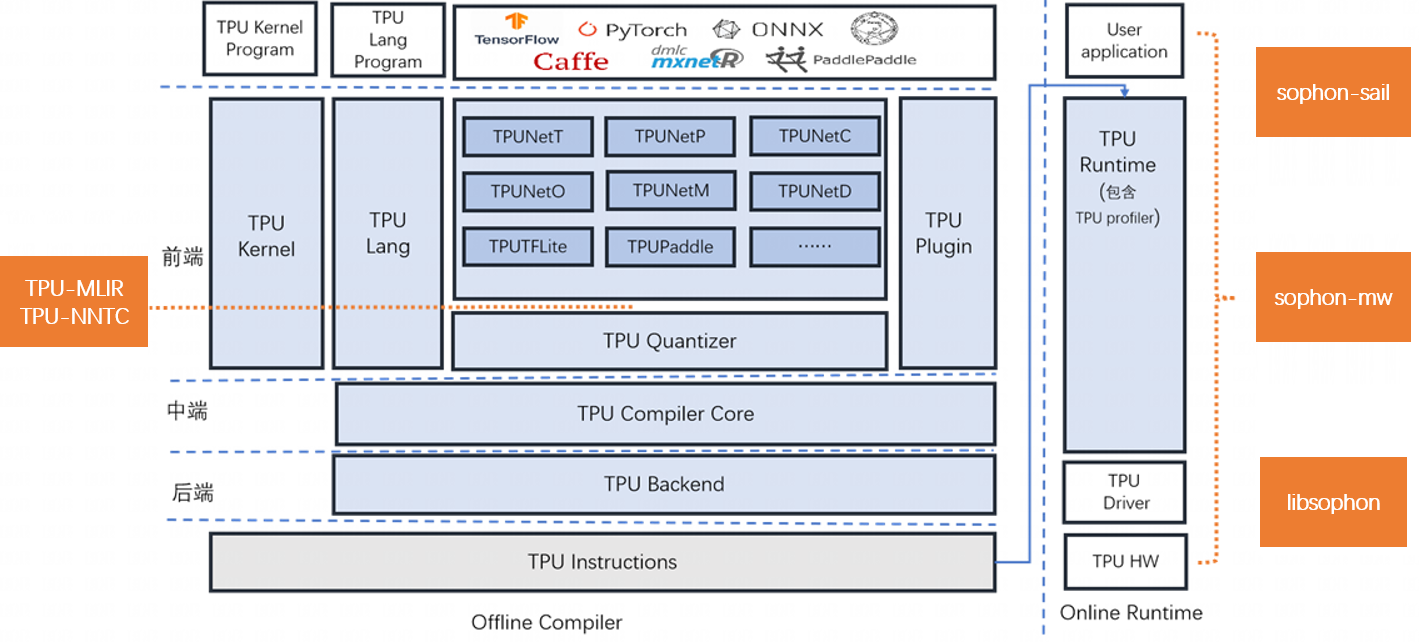
SOPHONSDK is a deep learning SDK customized by Suanneng Technology based on BM1684 and BM1684X. It covers the model optimization and efficient operation support capabilities required in the neural network inference stage, providing an easy-to-use and efficient full-stack solution for deep learning application development and deployment.
1. Basic toolkit
The basic toolkit includes:
- tpu-nntc is responsible for offline compilation and optimization of the neural network model trained in a third-party deep learning framework, and generates the BModel required for the final runtime. Currently, it supports Caffe, Darknet, MXNet, ONNX, PyTorch, PaddlePaddle, TensorFlow, etc.
- libsophon provides libraries such as BMCV, BMRuntime, and BMLib to drive hardware such as VPP and intelligent vision deep learning processor modules to complete operations such as image processing, tensor operations, and model reasoning for users to develop deep learning applications.
- sophon-mw encapsulates SOPHON-OpenCV, SOPHON-FFmpeg and other libraries to drive VPU, JPU and other hardware, supports RTSP stream, GB28181 stream parsing, video image encoding and decoding acceleration, etc., for users to develop deep learning applications.
- sophon-sail provides a high-level interface that supports Python/C++. It is an encapsulation of the underlying library interfaces such as BMRuntime, BMCV, sophon-mw, BMLib, etc., for users to develop deep learning applications.
2. Advanced Toolkit
The Advanced Toolkit includes:
- tpu-mlir provides a complete toolchain for the Tensor Processing Unit compiler project, which can convert pre-trained neural networks under different frameworks into binary files BModel that can run efficiently on the Suanneng intelligent vision deep learning processor. Currently directly supported frameworks include tflite, onnx and Caffe.
- tpu-perf provides a complete toolkit for model performance and accuracy verification.
- tpu-kernel is the underlying development interface of the Tensor Processing Unit. It can call dedicated instructions to accelerate deep learning business logic, and can also call general instructions to accelerate various customized algorithms.
For details, please refer to the calculation document
Tips
- sophon-demo provides comprehensive routines for single models or scenarios in x86 and SoC environments for users to refer to during deep learning application development.
- sophon-pipeline provides a simple pipeline-based high-performance inference framework that can run pre-processing/inference/post-processing on three threads respectively, maximizing parallelism for users to refer to during deep learning application development.
3. SOPHONSDK folder directory
| Folders | Remark |
|---|---|
| libsophon | Libraries that support hardware-accelerated image processing, tensor operations, model reasoning, etc. on SOPHON devices |
| sophon-mw | Multimedia library that supports hardware acceleration on SOPHON devices |
| tpu-kernel | Low-level development interface |
| tpu-mlir | Tensor Processing Unit compiler toolchain |
| tpu-nntc | Tensor Processing Unit compiler toolchain |
| tpu-perf | Model performance and accuracy verification toolkit |
| sophon-pipeline | High-performance reasoning framework based on pipeline |
| sophon-img | SoC mode installation package |
| sophon-demo | Comprehensive routines for a single model or scenario |
| sophon-sail | An interface library that encapsulates the underlying interface with C++/Python API |
| sophon-rpc | On PCIe card products, some computing tasks are offloaded to the ARM on the card. |
| docker-image | Docker image |
4. The folder directory after SOPHONSDK is unzipped
as follows:
    SOPHONSDK
    ├── docker-image
    │   ├── md5sum.txt
    │   ├── sophgo-tpuc_dev-v2.1-82d75f5c633d.tar.bz2
    │   └── sophgo-tpuc_dev-v2.2-f72913f3a83d.tar.bz2
    ├── libsophon_20240108_210425
    │   ├── BMCV开发参考手册.pdf
    │   ├── BMCV_Technical_Reference_Manual.pdf
    │   ├── BMLIB开发参考手册.pdf
    │   ├── BMLib_Technical_Reference_Manual.pdf
    │   ├── BMRUNTIME开发参考手册.pdf
    │   ├── BMRuntime Technical Reference Manual.pdf
    │   ├── centos
    │   ├── libsophon_0.4.9-LTS_aarch64.tar.gz
    │   ├── libsophon_0.4.9-LTS_loongarch64.tar.gz
    │   ├── libsophon_0.4.9-LTS_x86_64.tar.gz
    │   ├── LIBSOPHON使用手册.pdf
    │   ├── libsophon_dockerfile
    │   ├── libsophon.MD5
    │   ├── LIBSOPHON_User_Guide.pdf
    │   ├── release_version.txt
    │   ├── sophon-driver_0.4.9-LTS_amd64.deb
    │   ├── sophon-driver_0.4.9-LTS_arm64.deb
    │   ├── sophon-libsophon_0.4.9-LTS_amd64.deb
    │   ├── sophon-libsophon_0.4.9-LTS_arm64.deb
    │   ├── sophon-libsophon-dev_0.4.9-LTS_amd64.deb
    │   └── sophon-libsophon-dev_0.4.9-LTS_arm64.deb
    ├── sophon-demo_20231116_085900
    │   ├── release_version.txt
    │   ├── sophon-demo.MD5
    │   ├── sophon-demo_v0.1.8_dbb4632_20231116
    │   └── sophon-demo_v0.1.8_dbb4632_20231116.tar.gz
    ├── sophon-img_20240116_212937
    │   ├── bsp-debs
    │   ├── bsp_update.tgz
    │   ├── libsophon_soc_0.4.9-LTS_aarch64.tar.gz
    │   ├── release_version.txt
    │   ├── sdcard.tgz
    │   ├── SOPHON BSP开发参考手册.pdf
    │   ├── SOPHON_BSP_Technical_Reference_Manual.pdf
    │   ├── sophon-img.MD5
    │   ├── system.tgz
    │   └── tftp.tgz
    ├── sophon-mw_20240116_152830
    │   ├── MULTIMEDIA常见问题手册.pdf
    │   ├── MULTIMEDIA开发参考手册.pdf
    │   ├── MULTIMEDIA使用手册.pdf
    │   ├── Multimedia FAQ.pdf
    │   ├── Multimedia Technical Reference Manual.pdf
    │   ├── Multimedia User Guide.pdf
    │   ├── release_version.txt
    │   ├── sophon-mw_0.8.0_aarch64.tar.gz
    │   ├── sophon-mw_0.8.0_loongarch64.tar.gz
    │   ├── sophon-mw_0.8.0_x86_64.tar.gz
    │   ├── sophon-mw.MD5
    │   ├── sophon-mw-soc_0.8.0_aarch64.tar.gz
    │   ├── sophon-mw-soc-sophon-ffmpeg_0.8.0_arm64.deb
    │   ├── sophon-mw-soc-sophon-ffmpeg-dev_0.8.0_arm64.deb
    │   ├── sophon-mw-soc-sophon-opencv_0.8.0_arm64.deb
    │   ├── sophon-mw-soc-sophon-opencv-dev_0.8.0_arm64.deb
    │   ├── sophon-mw-soc-sophon-sample_0.8.0_arm64.deb
    │   ├── sophon-mw-sophon-ffmpeg_0.8.0_amd64.deb
    │   ├── sophon-mw-sophon-ffmpeg_0.8.0_amd64.rpm
    │   ├── sophon-mw-sophon-ffmpeg_0.8.0_arm64.deb
    │   ├── sophon-mw-sophon-ffmpeg_0.8.0_arm64.rpm
    │   ├── sophon-mw-sophon-ffmpeg_0.8.0_loongarch64.deb
    │   ├── sophon-mw-sophon-ffmpeg-dev_0.8.0_amd64.deb
    │   ├── sophon-mw-sophon-ffmpeg-dev_0.8.0_amd64.rpm
    │   ├── sophon-mw-sophon-ffmpeg-dev_0.8.0_arm64.deb
    │   ├── sophon-mw-sophon-ffmpeg-dev_0.8.0_arm64.rpm
    │   ├── sophon-mw-sophon-ffmpeg-dev_0.8.0_loongarch64.deb
    │   ├── sophon-mw-sophon-opencv_0.8.0_amd64.deb
    │   ├── sophon-mw-sophon-opencv_0.8.0_arm64.deb
    │   ├── sophon-mw-sophon-opencv_0.8.0_loongarch64.deb
    │   ├── sophon-mw-sophon-opencv-abi0_0.8.0_amd64.rpm
    │   ├── sophon-mw-sophon-opencv-abi0_0.8.0_arm64.rpm
    │   ├── sophon-mw-sophon-opencv-abi0-dev_0.8.0_amd64.rpm
    │   ├── sophon-mw-sophon-opencv-abi0-dev_0.8.0_arm64.rpm
    │   ├── sophon-mw-sophon-opencv-dev_0.8.0_amd64.deb
    │   ├── sophon-mw-sophon-opencv-dev_0.8.0_arm64.deb
    │   ├── sophon-mw-sophon-opencv-dev_0.8.0_loongarch64.deb
    │   ├── sophon-mw-sophon-sample_0.8.0_amd64.deb
    │   ├── sophon-mw-sophon-sample_0.8.0_amd64.rpm
    │   ├── sophon-mw-sophon-sample_0.8.0_arm64.deb
    │   ├── sophon-mw-sophon-sample_0.8.0_arm64.rpm
    │   └── sophon-mw-sophon-sample_0.8.0_loongarch64.deb
    ├── sophon-rpc_20231208_174527
    │   ├── release_version.txt
    │   ├── sophon-rpc_3.2.0-LTS_amd64.deb
    │   ├── sophon-rpc_3.2.0-LTS_amd64.rpm
    │   ├── sophon-rpc_3.2.0-LTS_arm64.deb
    │   ├── sophon-rpc_3.2.0-LTS_arm64.rpm
    │   ├── sophon-rpc_3.2.0-LTS.tar.gz
    │   ├── sophon-rpc使用指南.pdf
    │   └── sophon-rpc.MD5
    ├── sophon-sail_20231116_085400
    │   ├── release_version.txt
    │   ├── sophon-sail_3.7.0.tar.gz
    │   ├── sophon-sail_en.pdf
    │   ├── sophon-sail.MD5
    │   └── sophon-sail_zh.pdf
    ├── sophon-stream_20231116_011200
    │   ├── release_version.txt
    │   ├── sophon-stream.MD5
    │   └── sophon-stream_v0.0.4-rc4_10a8ed8_20231115.tar.gz
    ├── tpu-kernel_20231130_055600
    │   ├── release_version.txt
    │   ├── tpu-kernel-1684x_v3.1.7-520261d8-231130.tar.gz
    │   └── tpu-kernel.MD5
    ├── tpu-mlir_20231116_054500
    │   ├── release_version.txt
    │   ├── tpu-mlir.MD5
    │   └── tpu-mlir_v1.3.140-g3180ff37-20231116.tar.gz
    ├── tpu-nntc_20231130_054100
    │   ├── release_version.txt
    │   ├── tpu-nntc.MD5
    │   └── tpu-nntc_v3.1.9-29fa956b-231130.tar.gz
    └── tpu-perf_v1.2.37
        ├── tpu_perf-1.2.37-py3-none-manylinux2014_aarch64.whl
        ├── tpu_perf-1.2.37-py3-none-manylinux2014_x86_64.whl
        ├── tpu-perf-v1.2.37.tar.gz
        └── tpu-perf-v1.2.37.zip
5. SDK main modules
- Hardware driver and runtime library LIBSOPHON : Contains libraries such as BMCV, BMRuntime, BMLib, etc., which are used to drive hardware such as VPP and intelligent vision deep learning processor to complete image processing, tensor operations, model reasoning and other operations.
- Multimedia library SOPHON-MW : SOPHON-OpenCV and SOPHON-FFmpeg that support hardware acceleration of SOPHON devices, support parsing of RTSP streams and GB28181 streams, and encoding and decoding of videos and pictures.
- Model compilation and quantization toolchain TPU-MLIR : Supports model conversion of framework models such as Caffe, TFLite, and ONNX; supports model quantization: original model -> MLIR Model -> FP32 BModel or original model -> MLIR Model -> cali_table -> INT8 BModel, and provides model_deploy.py quantization script.
- Model compilation and quantization toolchain TPU-NNTC : supports model conversion of framework models such as Caffe, Tensorflow, Pytorch, MXNet, Darknet, Paddle Paddle, ONNX, etc.; supports model quantization: original model -> FP32 UModel -> INT8 UModel -> INT8 BModel, and provides auto-cali automatic quantization tools.
- Tensor operation and image processing library BMCV : color space conversion, scale transformation, affine transformation, projection transformation, linear transformation, picture frame, JPEG encoding, BASE64 encoding, NMS, sorting, feature matching.
- Device management BMLib: Basic interface : device handle management, memory management, data handling, API sending and synchronization, A53 enabling, etc.
- SAIL, the Suanfeng deep learning processing acceleration library : supports high-level interfaces of Python/C++ and is an encapsulation of underlying library interfaces such as BMRuntime, BMCV, and sophon-mw.
- Custom operator high-level programming library BMLang : A C++-based high-level programming library for SOPHON intelligent vision deep learning processors. It is decoupled from hardware information and does not require understanding of the hardware architecture. Code is written using tensor data (bmlang::Tensor) and computational operations (bmlang::Operator). Finally, bmlang::compile or bmlang::compile_with_check is used to generate a BModel that can be run by the intelligent vision deep learning processor. In addition, it also supports the use of the arm processor in BM168X to implement operators that are not yet supported by the intelligent vision deep learning processor.
- Algorithm parallel acceleration programming library TPUKernel : A low-level programming interface based on the low-level atomic operation interface of SOPHON BM1684 and BM1684X, which requires users to be familiar with the device hardware architecture and instruction set.
- Model performance and accuracy verification tool TPUPerf : can perform performance analysis and accuracy verification on the model.
2. SDK acquisition and installation
3. More information
Tips