
AI在线开发
实验04-多模态图文比较分析
实验准备:
- 确保已接入火山引擎豆包ai
- 寻找一张格式为jpg图片,作为实验素材
实验步骤:
- cd AI_online #进入主目录
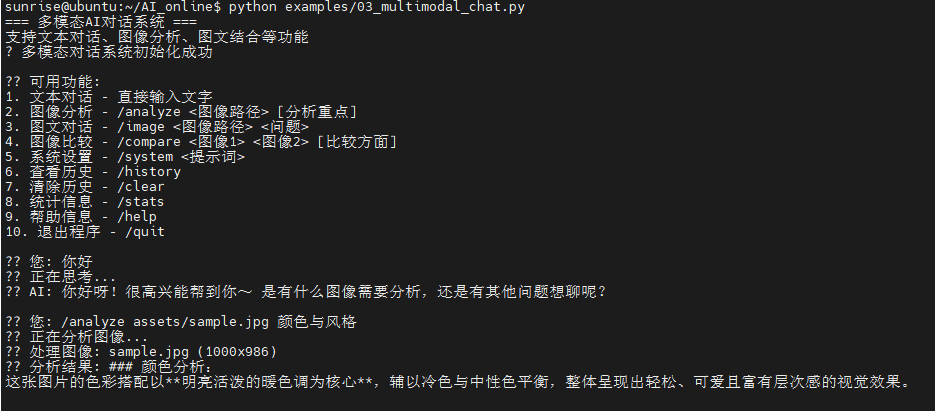
- python examples/03_multimodal_chat.py #运行示例程序
参考运行指令:
- 你好(直接输入文字对话即可)
- /analyze assets/sample.jpg 颜色与风格 (分析图片)
- /image assets/sample.jpg 这张图片里描述的场景是什么?(图文对话)
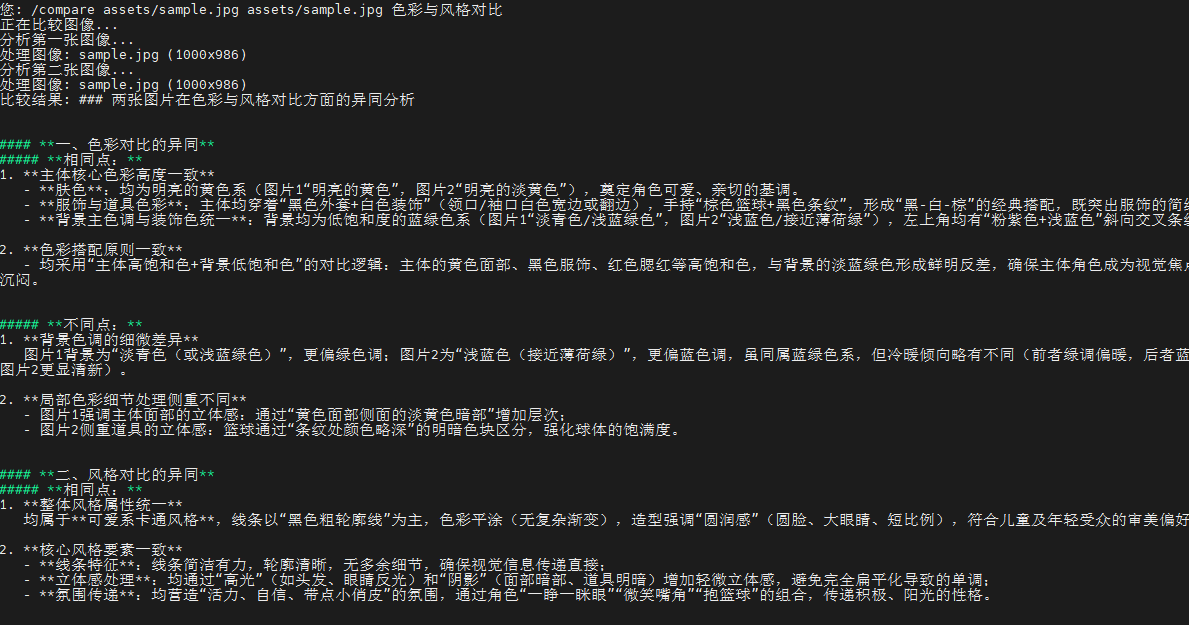
- /compare assets/sample.jpg assets/sample.jpg 色彩与风格对比 (两图比较,可自行额外添加图片)
终端打印如下:
# -*- coding: utf-8 -*-
"""
图像对话功能示例
支持上传图像并进行多轮对话
"""

import os
import sys
import requests
import base64
from typing import List, Dict, Optional

# 添加父目录到路径
sys.path.append(os.path.dirname(os.path.dirname(os.path.abspath(__file__))))

from config import API_KEY, MODEL_ENDPOINT, API_BASE_URL, REQUEST_TIMEOUT
from utils.image_processor import ImageProcessor

class ImageChatBot:
    """图像对话机器人"""

    def __init__(self):
        self.api_key = API_KEY
        self.model_endpoint = MODEL_ENDPOINT
        self.base_url = API_BASE_URL
        self.timeout = REQUEST_TIMEOUT
        self.processor = ImageProcessor()

        # 对话历史
        self.chat_history: List[Dict] = []
        self.current_image_base64: Optional[str] = None
        self.current_image_path: Optional[str] = None

        # 检查配置
        self._check_config()

    def _check_config(self):
        """检查API配置"""
        if not self.api_key or self.api_key == "你的API_KEY":
            raise ValueError("请在config.py中配置正确的API_KEY")

        if not self.model_endpoint or self.model_endpoint == "你的接入点ID":
            raise ValueError("请在config.py中配置正确的MODEL_ENDPOINT")

    def load_image(self, image_path: str) -> bool:
        """
        加载图像

        Args:
            image_path: 图像文件路径

        Returns:
            bool: 是否成功加载
        """
        try:
            # 对齐 01 的行为:仅按扩展名检查 JPG/JPEG
            ext = os.path.splitext(image_path)[1].lower()
            if ext not in [".jpg", ".jpeg"]:
                print("仅支持JPG/JPEG格式,请选择 .jpg 或 .jpeg 文件")
                return False

            if not os.path.exists(image_path):
                print(f"图像文件不存在: {image_path}")
                return False

            # 转换为base64(与 01 一致,直接读取文件字节)
            base64_data = self.processor.image_to_base64(image_path)
            if not base64_data:
                print("图像编码失败")
                return False

            self.current_image_base64 = base64_data
            self.current_image_path = image_path

            # 获取图像信息(用于提示显示,不作为严格格式校验)
            image_info = self.processor.get_image_info(image_path)
            width = image_info.get('width', 0)
            height = image_info.get('height', 0)
            file_size = image_info.get('file_size', 0)
            print(f"? 图像加载成功: {os.path.basename(image_path)}")
            print(f"  尺寸: {width}x{height}")
            print(f"  大小: {file_size / 1024:.1f}KB")

            return True

        except Exception as e:
            print(f"图像加载失败: {e}")
            return False

    def send_message(self, message: str, include_image: bool = True) -> Optional[str]:
        """
        发送消息并获取回复

        Args:
            message: 用户消息
            include_image: 是否包含当前图像

        Returns:
            str: AI回复,失败返回None
        """
        try:
            # 构建消息内容
            content = [{"type": "text", "text": message}]

            # 如果需要包含图像且有当前图像
            if include_image and self.current_image_base64:
                content.append({
                    "type": "image_url",
                    "image_url": {
                        "url": f"data:image/jpeg;base64,{self.current_image_base64}"
                    }
                })

            # 添加到对话历史
            user_message = {"role": "user", "content": content}

            # 构建完整的消息列表(包含历史)
            messages = self.chat_history + [user_message]

            # 构建API请求
            # 1) API_BASE_URL 已配置为完整端点(.../chat/completions),直接使用
            # 2) API_BASE_URL 为基础路径(.../api/v3),则补齐 /chat/completions
            base = self.base_url.rstrip('/')
            url = base if base.endswith('chat/completions') else f"{base}/chat/completions"
            headers = {
                "Authorization": f"Bearer {self.api_key}",
                "Content-Type": "application/json"
            }
            data = {
                "model": self.model_endpoint,
                "messages": messages,
                "temperature": 0.7,
                "max_tokens": 1000
            }

            print("?? AI正在思考...")
            response = requests.post(url, json=data, headers=headers, timeout=self.timeout)

            if response.status_code == 200:
                result = response.json()
                if 'choices' in result and len(result['choices']) > 0:
                    ai_reply = result['choices'][0]['message']['content']

                    # 更新对话历史
                    self.chat_history.append(user_message)
                    self.chat_history.append({
                        "role": "assistant",
                        "content": ai_reply
                    })

                    return ai_reply
                else:
                    print("API响应格式异常")
                    return None
            else:
                print(f"API请求失败: {response.status_code}")
                if response.status_code == 401:
                    print("认证失败,请检查API_KEY")
                elif response.status_code == 404:
                    print("模型端点不存在,请检查MODEL_ENDPOINT")
                else:
                    print(f"错误详情: {response.text}")
                return None

        except requests.exceptions.Timeout:
            print("请求超时,请检查网络连接")
            return None
        except requests.exceptions.RequestException as e:
            print(f"网络请求错误: {e}")
            return None
        except Exception as e:
            print(f"发送消息失败: {e}")
            return None

    def clear_history(self):
        """清除对话历史"""
        self.chat_history = []
        print("? 对话历史已清除")

    def show_history(self):
        """显示对话历史"""
        if not self.chat_history:
            print("暂无对话历史")
            return

        print("\n=== 对话历史 ===")
        for i, msg in enumerate(self.chat_history, 1):
            role = "用户" if msg["role"] == "user" else "AI"
            content = msg["content"]

            if isinstance(content, list):
                # 提取文本内容
                text_content = ""
                has_image = False
                for item in content:
                    if item["type"] == "text":
                        text_content = item["text"]
                    elif item["type"] == "image_url":
                        has_image = True

                print(f"{i}. {role}: {text_content}")
                if has_image:
                    print("   [包含图像]")
            else:
                print(f"{i}. {role}: {content}")
        print("=" * 30)

def main():
    """主函数"""
    print("=== 火山引擎图像对话系统 ===")
    print("支持上传图像并进行多轮对话")

    # 创建对话机器人
    try:
        chatbot = ImageChatBot()
    except ValueError as e:
        print(f"配置错误: {e}")
        return

    print("\n可用命令:")
    print("- /load <图像路径>  : 加载图像")
    print("- /clear           : 清除对话历史")
    print("- /history         : 显示对话历史")
    print("- /help            : 显示帮助")
    print("- /quit            : 退出程序")
    print("- 直接输入文字进行对话")
    print("\n[路径提示] 可使用以下示例路径:")
    if os.name == 'nt':
        print("1. 绝对路径: C:\\Users\\Administrator\\Pictures\\image.jpg")
        print("2. 相对路径: assets\\sample.jpg")
        print("3. 当前目录: .\\assets\\sample.jpg")
    else:
        print("1. 绝对路径: /home/sunrise/Pictures/image.jpg")
        print("2. 相对路径: assets/sample.jpg")
        print("3. 当前目录: ./assets/sample.jpg")
    print("注意: 仅支持JPG/JPEG格式")

    while True:
        try:
            user_input = input("\n?? 您: ").strip()

            if not user_input:
                continue

            # 处理命令(仅识别已知命令,避免把 Linux 绝对路径当作命令)
            recognized_commands = {"/load", "/clear", "/history", "/help", "/quit"}
            if user_input.startswith("/") and user_input.split(" ", 1)[0].lower() in recognized_commands:
                command_parts = user_input.split(" ", 1)
                command = command_parts[0].lower()

                if command == "/quit":
                    print("感谢使用图像对话系统!")
                    break

                elif command == "/load":
                    if len(command_parts) < 2:
                        print("请提供图像路径: /load <图像路径>")
                        continue

                    image_path = command_parts[1].strip().strip('\"').strip("'")
                    # 非 Windows 平台将反斜杠转换为正斜杠,并展开 ~
                    if os.name != 'nt':
                        image_path = image_path.replace('\\', '/')
                    image_path = os.path.expanduser(image_path)
                    # 与 01 保持一致:支持项目根相对路径与当前工作目录相对路径
                    project_root = os.path.dirname(os.path.dirname(os.path.abspath(__file__)))
                    full_path = os.path.join(project_root, image_path)
                    if os.path.exists(full_path):
                        image_path = full_path
                    elif os.path.exists(image_path):
                        pass
                    else:
                        print(f"图像文件不存在: {image_path}")
                        print("路径示例:")
                        if os.name == 'nt':
                            print("  - 绝对路径: C:\\Users\\Administrator\\Pictures\\image.jpg")
                            print("  - 相对路径: assets\\sample.jpg")
                            print("  - 当前目录: .\\assets\\sample.jpg")
                        else:
                            print("  - 绝对路径: /home/sunrise/Pictures/image.jpg")
                            print("  - 相对路径: assets/sample.jpg")
                            print("  - 当前目录: ./assets/sample.jpg")
                        print("  - 仅支持JPG/JPEG格式 (.jpg/.jpeg)")
                        continue

                    ext = os.path.splitext(image_path)[1].lower()
                    if ext not in [".jpg", ".jpeg"]:
                        print("仅支持JPG/JPEG格式,请选择 .jpg 或 .jpeg 文件")
                        continue
                    if chatbot.load_image(image_path):
                        print("现在可以开始关于这张图片的对话了!")
                    else:
                        print("图像加载失败")

                elif command == "/clear":
                    chatbot.clear_history()

                elif command == "/history":
                    chatbot.show_history()

                elif command == "/help":
                    print("\n可用命令:")
                    print("- /load <图像路径>  : 加载图像")
                    print("- /clear           : 清除对话历史")
                    print("- /history         : 显示对话历史")
                    print("- /help            : 显示帮助")
                    print("- /quit            : 退出程序")
                    print("- 直接输入文字进行对话")
                    print("\n[路径提示] 可使用以下示例路径:")
                    if os.name == 'nt':
                        print("1. 绝对路径: C:\\Users\\Administrator\\Pictures\\image.jpg")
                        print("2. 相对路径: assets\\sample.jpg")
                        print("3. 当前目录: .\\assets\\sample.jpg")
                    else:
                        print("1. 绝对路径: /home/sunrise/Pictures/image.jpg")
                        print("2. 相对路径: assets/sample.jpg")
                        print("3. 当前目录: ./assets/sample.jpg")
                    print("注意: 仅支持JPG/JPEG格式")

                else:
                    print("未知命令,输入 /help 查看帮助")

            else:
                # 支持直接输入路径进行加载(参考 01 的交互方式)
                possible_path = user_input.strip().strip('\"').strip("'")
                looks_like_path = any(sep in possible_path for sep in ['\\', '/']) or possible_path.lower().endswith(('.jpg', '.jpeg'))
                # 非 Windows 平台将反斜杠转换为正斜杠,并展开 ~
                if os.name != 'nt':
                    possible_path = possible_path.replace('\\', '/')
                possible_path = os.path.expanduser(possible_path)
                if looks_like_path:
                    project_root = os.path.dirname(os.path.dirname(os.path.abspath(__file__)))
                    full_path = os.path.join(project_root, possible_path)
                    target_path = full_path if os.path.exists(full_path) else possible_path
                    if not os.path.exists(target_path):
                        print(f"图像文件不存在: {possible_path}")
                        print("路径示例:")
                        if os.name == 'nt':
                            print("  - 绝对路径: C:\\Users\\Administrator\\Pictures\\image.jpg")
                            print("  - 相对路径: assets\\sample.jpg")
                            print("  - 当前目录: .\\assets\\sample.jpg")
                        else:
                            print("  - 绝对路径: /home/sunrise/Pictures/image.jpg")
                            print("  - 相对路径: assets/sample.jpg")
                            print("  - 当前目录: ./assets/sample.jpg")
                        print("  - 仅支持JPG/JPEG格式 (.jpg/.jpeg)")
                    else:
                        ext = os.path.splitext(target_path)[1].lower()
                        if ext not in [".jpg", ".jpeg"]:
                            print("仅支持JPG/JPEG格式,请选择 .jpg 或 .jpeg 文件")
                        elif chatbot.load_image(target_path):
                            print("现在可以开始关于这张图片的对话了!")
                        else:
                            print("图像加载失败")
                    continue

                # 普通对话
                if not chatbot.current_image_base64:
                    print("提示: 还未加载图像,使用 /load <图像路径> 加载图像后可进行图像相关对话")

                reply = chatbot.send_message(user_input)
                if reply:
                    print(f"?? AI: {reply}")
                else:
                    print("? 获取回复失败,请重试")

        except KeyboardInterrupt:
            print("\n\n程序被用户中断")
            break
        except Exception as e:
            print(f"发生错误: {e}")

if __name__ == "__main__":
    main()