
实验3-手势识别体验
第一步:系统准备
sudo apt update && sudo apt upgrade -y
sudo apt install -y build-essential cmake pkg-config python3-dev python3-pip(如若已装python3可忽略)
第二步:创建虚拟环境
cd OPENCV
python3 -m venv rdkx5_vision_envsource rdkx5_vision_env/bin/activate
第三步:安装依赖
pip install --upgrade pip
pip install -r requirements.txt
第四步:测试环境
python3 mediapipe_gesture_demo.py

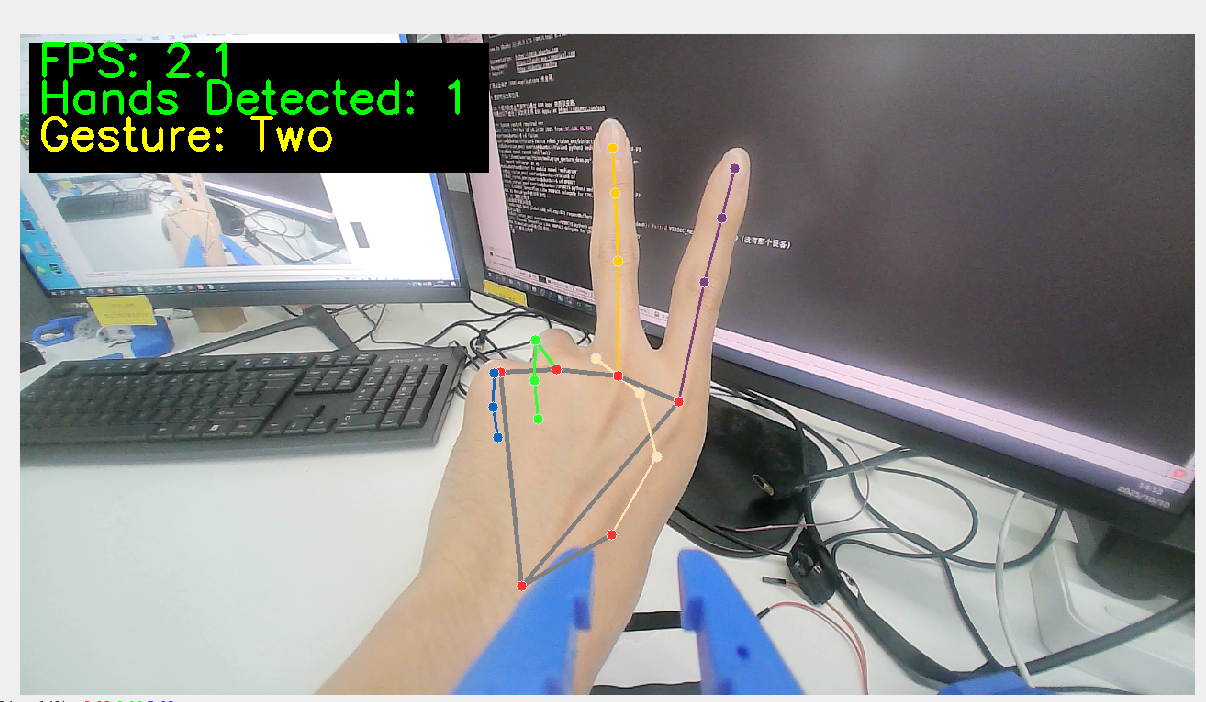
示例程序包含以下功能:
✅ 实时手势检测 - 支持双手同时识别
✅ 数字手势识别 - 识别1-5的手指数量
✅ 特殊手势识别 - OK手势、点赞手势
✅ 性能监控 - 实时FPS显示
✅ 可视化反馈 - 手部关键点绘制
import cv2
import numpy as np
import math
import time

# 初始化摄像头
cap = cv2.VideoCapture(0)

# 设置窗口大小
window_width = 1280
window_height = 720

# 调整摄像头分辨率
cap.set(cv2.CAP_PROP_FRAME_WIDTH, window_width)
cap.set(cv2.CAP_PROP_FRAME_HEIGHT, window_height)

# 创建窗口
cv2.namedWindow('Hand Gesture Recognition', cv2.WINDOW_NORMAL)
cv2.resizeWindow('Hand Gesture Recognition', window_width, window_height)

# 创建调整肤色阈值的滑动条窗口
cv2.namedWindow('Skin Detection Controls')
cv2.resizeWindow('Skin Detection Controls', 400, 250)

# 创建肤色检测的HSV阈值滑动条
cv2.createTrackbar('H_min', 'Skin Detection Controls', 0, 179, lambda x: None)
cv2.createTrackbar('H_max', 'Skin Detection Controls', 20, 179, lambda x: None)
cv2.createTrackbar('S_min', 'Skin Detection Controls', 30, 255, lambda x: None)
cv2.createTrackbar('S_max', 'Skin Detection Controls', 150, 255, lambda x: None)
cv2.createTrackbar('V_min', 'Skin Detection Controls', 60, 255, lambda x: None)
cv2.createTrackbar('V_max', 'Skin Detection Controls', 255, 255, lambda x: None)

# 设置默认值
cv2.setTrackbarPos('H_min', 'Skin Detection Controls', 0)
cv2.setTrackbarPos('H_max', 'Skin Detection Controls', 20)
cv2.setTrackbarPos('S_min', 'Skin Detection Controls', 30)
cv2.setTrackbarPos('S_max', 'Skin Detection Controls', 150)
cv2.setTrackbarPos('V_min', 'Skin Detection Controls', 60)
cv2.setTrackbarPos('V_max', 'Skin Detection Controls', 255)

# 计算手指数量的函数
def count_fingers(contour, drawing):
    # 计算凸包
    hull = cv2.convexHull(contour, returnPoints=False)

    # 如果凸包点数太少,无法计算缺陷
    if len(hull) < 3:
        return 0

    # 计算凸包缺陷
    defects = cv2.convexityDefects(contour, hull)
    if defects is None:
        return 0

    # 计数有效的凸包缺陷(手指之间的缝隙)
    finger_count = 0

    for i in range(defects.shape[0]):
        s, e, f, d = defects[i, 0]
        start = tuple(contour[s][0])
        end = tuple(contour[e][0])
        far = tuple(contour[f][0])

        # 计算三角形三边长度
        a = math.sqrt((end[0] - start[0]) ** 2 + (end[1] - start[1]) ** 2)
        b = math.sqrt((far[0] - start[0]) ** 2 + (far[1] - start[1]) ** 2)
        c = math.sqrt((end[0] - far[0]) ** 2 + (end[1] - far[1]) ** 2)

        # 使用余弦定理计算角度
        angle = math.degrees(math.acos((b ** 2 + c ** 2 - a ** 2) / (2 * b * c)))

        # 如果角度小于90度,认为是手指之间的缝隙
        if angle <= 90:
            # 在图像上标记缺陷点
            cv2.circle(drawing, far, 5, [0, 0, 255], -1)
            finger_count += 1

    # 缺陷数加1等于手指数(因为缺陷是指手指之间的空隙)
    return finger_count + 1

# 主循环
while cap.isOpened():
    success, image = cap.read()
    if not success:
        print("无法获取摄像头画面")
        break

    # 水平翻转图像,使其更像镜子
    image = cv2.flip(image, 1)

    # 创建一个副本用于绘制
    drawing = image.copy()

    # 转换为HSV颜色空间
    hsv = cv2.cvtColor(image, cv2.COLOR_BGR2HSV)

    # 获取当前肤色阈值
    h_min = cv2.getTrackbarPos('H_min', 'Skin Detection Controls')
    h_max = cv2.getTrackbarPos('H_max', 'Skin Detection Controls')
    s_min = cv2.getTrackbarPos('S_min', 'Skin Detection Controls')
    s_max = cv2.getTrackbarPos('S_max', 'Skin Detection Controls')
    v_min = cv2.getTrackbarPos('V_min', 'Skin Detection Controls')
    v_max = cv2.getTrackbarPos('V_max', 'Skin Detection Controls')

    # 创建肤色掩码
    lower_skin = np.array([h_min, s_min, v_min])
    upper_skin = np.array([h_max, s_max, v_max])
    mask = cv2.inRange(hsv, lower_skin, upper_skin)

    # 应用形态学操作改善掩码
    kernel = np.ones((5, 5), np.uint8)
    mask = cv2.dilate(mask, kernel, iterations=2)
    mask = cv2.erode(mask, kernel, iterations=1)
    mask = cv2.GaussianBlur(mask, (5, 5), 100)

    # 查找轮廓
    contours, _ = cv2.findContours(mask, cv2.RETR_TREE, cv2.CHAIN_APPROX_SIMPLE)

    # 找到最大的轮廓(假设是手)
    if contours:
        max_contour = max(contours, key=cv2.contourArea)

        # 只处理足够大的轮廓
        if cv2.contourArea(max_contour) > 5000:
            # 绘制轮廓
            cv2.drawContours(drawing, [max_contour], 0, (0, 255, 0), 2)

            # 计算并显示手指数量
            finger_count = count_fingers(max_contour, drawing)

            # 限制手指数量在1-5之间
            finger_count = max(1, min(5, finger_count))

            # 在图像上显示数字
            cv2.putText(
                drawing,
                f"Fingers: {finger_count}",
                (50, 50),
                cv2.FONT_HERSHEY_SIMPLEX,
                1,
                (0, 255, 0),
                2,
                cv2.LINE_AA
            )

    # 显示肤色检测结果
    cv2.imshow('Skin Detection', mask)

    # 显示最终结果
    cv2.imshow('Hand Gesture Recognition', drawing)

    # 显示使用说明
    cv2.putText(
        drawing,
        "Adjust sliders to detect skin color properly",
        (10, drawing.shape[0] - 40),
        cv2.FONT_HERSHEY_SIMPLEX,
        0.5,
        (0, 0, 255),
        1,
        cv2.LINE_AA
    )

    cv2.putText(
        drawing,
        "Press 'q' to quit",
        (10, drawing.shape[0] - 10),
        cv2.FONT_HERSHEY_SIMPLEX,
        0.5,
        (0, 0, 255),
        1,
        cv2.LINE_AA
    )

    # 按'q'退出
    if cv2.waitKey(5) & 0xFF == ord('q'):
        break

# 释放资源
cap.release()
cv2.destroyAllWindows()