
语音LLM应用
实验03-多模态图片分析-语音对话
实验准备:
- 确保已接入火山引擎豆包AI以及讯飞AI(参考实验01、实验02)
- 寻找图片,作为实验素材。图片导入分为相对路径以及绝对路径,相对路径默认设置为AI_online_voice/assets/sample.jpg (功能包中已添加了默认的相对路径图片,可更改相对路劲图片,但命名需为sample.jpg)
实验步骤:(确保语音模块已连接)
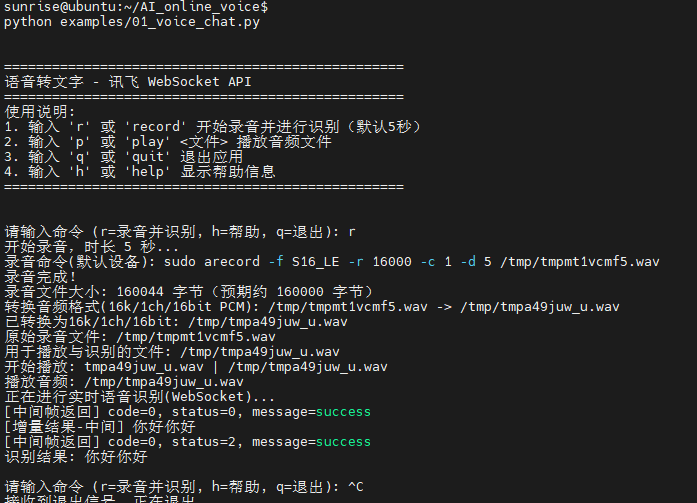
cd AI_online_voice#进入主目录python examples/03_voice_image_dialogue.py#运行示例程序- 进入程序后根据终端提示,先输入y,进入图片选择,可语音选择绝对路径以及相对路径,绝对路径手动输入图片路劲,相对路劲默认设置为assets/sample.jpg 。
终端运行示例:
相对路径选择:
绝对路径选择:
图片分析:
# -*- coding: utf-8 -*-
"""
03_voice_image_dialogue.py
实验03:语音选择上传图片 + 语音交互分析图片
- 基于 02_voice_dialogue.py:保留录音与讯飞实时识别,新增图像路径选择与图像+文本联合分析
- 路径选择支持语音选择“绝对路径/相对路径”,并以终端输入方式给出实际路径字符串
- 图像仅支持 JPG/JPEG/PNG;相对路径相对于项目根目录(AI_online_voice)解析
使用方法:
- python examples/03_voice_image_dialogue.py
- 交互命令:
- i:选择并上传图像(语音选择绝对/相对路径)
- r [秒数]:录音指定秒数,识别,并将结果与已选图片一起发给豆包
- p:回放最近一次录音(如果存在)
- h:帮助
- q:退出
"""
import os
import sys
import json
import base64
import wave
from typing import Optional
CURRENT_DIR = os.path.dirname(os.path.abspath(__file__))
PROJECT_ROOT = os.path.dirname(CURRENT_DIR)
sys.path.append(PROJECT_ROOT)
# 尝试加载根目录 config.py(与 02_voice_dialogue 保持一致)
WORKSPACE_ROOT = os.path.dirname(PROJECT_ROOT)
import importlib.util
ROOT_CONFIG = None
_root_cfg_path = os.path.join(WORKSPACE_ROOT, "config.py")
if os.path.exists(_root_cfg_path):
try:
_spec = importlib.util.spec_from_file_location("root_config", _root_cfg_path)
ROOT_CONFIG = importlib.util.module_from_spec(_spec)
_spec.loader.exec_module(ROOT_CONFIG)
except Exception:
ROOT_CONFIG = None
from utils.audio_processor import AudioProcessor
import config
import requests
from urllib.parse import urlparse, quote
import time, hmac, ssl, hashlib
import email.utils as email_utils
# 参考实验02的实现,内联定义讯飞 WS 客户端与豆包文本客户端
class DoubaoAPIClient:
"""简化版豆包API客户端,内联实现文本聊天以避免导入冲突"""
def __init__(self):
cfg = ROOT_CONFIG if ROOT_CONFIG else config
self.api_key = getattr(cfg, "API_KEY", None)
self.model_endpoint = getattr(cfg, "MODEL_ENDPOINT", None)
self.base_url = getattr(cfg, "API_BASE_URL", None)
self.timeout = getattr(cfg, "REQUEST_TIMEOUT", 30)
if not self.api_key or not self.model_endpoint or not self.base_url:
raise ValueError("请在 config.py 中配置 API_KEY / MODEL_ENDPOINT / API_BASE_URL")
def _make_request(self, messages, **kwargs):
try:
base = (self.base_url or "").rstrip('/')
url = base if base.endswith('chat/completions') else f"{base}/chat/completions"
headers = {
"Authorization": f"Bearer {self.api_key}",
"Content-Type": "application/json",
"Accept": "application/json",
}
data = {
"model": self.model_endpoint,
"messages": messages,
"temperature": kwargs.get("temperature", 0.7),
"max_tokens": kwargs.get("max_tokens", 1000),
"top_p": kwargs.get("top_p", 0.9),
"stream": kwargs.get("stream", False),
}
for k, v in kwargs.items():
if k not in data:
data[k] = v
resp = requests.post(url, json=data, headers=headers, timeout=self.timeout)
if resp.status_code == 200:
try:
return resp.json()
except Exception as e:
print(f"[豆包] JSON解析失败: {e}")
print(f"[豆包] 响应文本片段: {resp.text[:500]}")
return None
else:
print(f"[豆包] API请求失败: {resp.status_code}")
print(f"[豆包] 请求URL: {url}")
print(f"[豆包] 模型: {self.model_endpoint}")
try:
err_json = resp.json()
print(f"[豆包] 错误详情(JSON): {json.dumps(err_json, ensure_ascii=False)[:500]}")
except Exception:
print(f"[豆包] 错误详情(Text): {resp.text[:500]}")
if resp.status_code == 401:
print("[豆包] 认证失败,请检查 API_KEY")
elif resp.status_code == 404:
print("[豆包] 接入点不存在,请检查 MODEL_ENDPOINT")
elif resp.status_code == 429:
print("[豆包] 请求频率过高,请稍后重试")
elif resp.status_code == 500:
print("[豆包] 服务器内部错误,请稍后重试")
return None
except Exception as e:
print(f"豆包请求异常: {e}")
return None
def chat_text(self, text: str, system_prompt: str = None, **kwargs):
try:
messages = []
if system_prompt:
messages.append({"role": "system", "content": system_prompt})
messages.append({"role": "user", "content": text})
result = self._make_request(messages, **kwargs)
if result and "choices" in result and result["choices"]:
return result["choices"][0]["message"]["content"]
return None
except Exception as e:
print(f"文本对话失败: {e}")
return None
try:
import websocket
from websocket import WebSocketTimeoutException
except Exception: # pragma: no cover
websocket = None
WebSocketTimeoutException = Exception
class XunfeiRealtimeSpeechClient:
"""简化版的讯飞实时语音识别客户端(WebSocket)。
- 复用我们在 01_voice_chat.py 中优化过的健壮性:
- 安全 JSON 解析
- 增量文本聚合
- 超时容错,返回已识别的文本
"""
def __init__(self):
self.app_id = getattr(config, "XUNFEI_APPID", "")
self.api_key = getattr(config, "XUNFEI_API_KEY", "")
self.api_secret = getattr(config, "XUNFEI_API_SECRET", "")
self.host_url = getattr(config, "XUNFEI_WS_URL", "")
self.timeout = getattr(config, "REQUEST_TIMEOUT", 15)
def _safe_json_loads(self, s):
try:
return json.loads(s)
except Exception:
return None
def _build_auth_url(self):
url = self.host_url
# 使用标准库解析,兼容不同 websocket-client 版本
try:
parsed = urlparse(url)
host = parsed.netloc or url.split("//")[-1].split("/")[0]
path = parsed.path or "/v2/iat"
except Exception:
host = url.split("//")[-1].split("/")[0]
path = "/v2/iat"
# 鉴权:生成签名字符串
try:
date = email_utils.formatdate(timeval=None, localtime=False, usegmt=True)
except Exception:
# 回退到 RFC 7231 格式
date = time.strftime("%a, %d %b %Y %H:%M:%S GMT", time.gmtime())
signature_origin = f"host: {host}\ndate: {date}\nGET {path} HTTP/1.1"
signature_sha = hmac.new(
self.api_secret.encode("utf-8"),
signature_origin.encode("utf-8"),
digestmod=hashlib.sha256,
).digest()
signature = base64.b64encode(signature_sha).decode("utf-8")
authorization_origin = (
f"api_key=\"{self.api_key}\", algorithm=\"hmac-sha256\", headers=\"host date request-line\", signature=\"{signature}\""
)
authorization = base64.b64encode(authorization_origin.encode("utf-8")).decode("utf-8")
auth_url = f"{url}?authorization={quote(authorization)}&date={quote(date)}&host={quote(host)}"
return auth_url
def transcribe_audio_ws(self, wav_path):
if websocket is None:
print("[错误] 缺少 websocket-client 依赖,请安装后重试:pip install websocket-client")
return None
# 读取音频数据
try:
with open(wav_path, "rb") as f:
audio_bytes = f.read()
except Exception as e:
print(f"[错误] 读取音频失败: {e}")
return None
# 初始化增量聚合
final_text_parts = []
saw_final_status = False
url = self._build_auth_url()
print(f"[WS] 连接: {url}")
ws = websocket.create_connection(url, timeout=self.timeout, sslopt={"cert_reqs": ssl.CERT_NONE})
try:
# 发送首帧
init_payload = {
"common": {"app_id": self.app_id},
"business": {
"language": "zh_cn",
"domain": "iat",
"accent": "mandarin",
"vad_eos": 2000,
},
"data": {
"status": 0,
"format": "audio/L16;rate=16000",
"audio": base64.b64encode(audio_bytes[:1200]).decode("utf-8"),
"encoding": "raw",
},
}
ws.send(json.dumps(init_payload))
print("[首帧发送] bytes=", len(audio_bytes[:1200]))
# 发送中间帧(简单一次性发送余下数据)
middle_payload = {
"data": {
"status": 1,
"format": "audio/L16;rate=16000",
"audio": base64.b64encode(audio_bytes[1200:]).decode("utf-8"),
"encoding": "raw",
}
}
ws.send(json.dumps(middle_payload))
print("[中间帧发送] bytes=", len(audio_bytes[1200:]))
# 发送结束帧
end_payload = {
"data": {"status": 2, "format": "audio/L16;rate=16000", "audio": "", "encoding": "raw"}
}
ws.send(json.dumps(end_payload))
print("[结束帧发送]")
# 接收返回,聚合文本
while True:
try:
msg = ws.recv()
except WebSocketTimeoutException:
print("[WS] 接收超时,返回已聚合文本")
break
except Exception as e:
print(f"[WS] 接收异常: {e}")
break
data = self._safe_json_loads(msg)
if not data:
print("[WS] 非法 JSON,忽略")
continue
code = data.get("code", -1)
status = data.get("data", {}).get("status")
message = data.get("message")
print(f"[WS返回] code={code}, status={status}, message={message}")
if code != 0:
print("[WS] 识别失败: ", data)
break
# 解析增量识别文本
result = data.get("data", {}).get("result")
if result and result.get("ws"):
# 将分段结果拼接
parts = []
for ws_seg in result.get("ws", []):
for cw in ws_seg.get("cw", []):
w = cw.get("w")
if w:
parts.append(w)
if parts:
final_text_parts.append("".join(parts))
print("[增量结果] ", "".join(parts))
if status == 2:
saw_final_status = True
print("[WS] 收到最终状态,结束接收")
break
finally:
try:
ws.close()
except Exception:
pass
aggregated = "".join(final_text_parts).strip()
if aggregated:
return aggregated
if saw_final_status:
return aggregated # 为空也返回
return None
class DoubaoImageClient(DoubaoAPIClient):
"""在豆包文本客户端基础上,扩展图像+文本联合对话能力。
通过 data URI 作为 image_url,将本地图片以 Base64 嵌入消息。
"""
def chat_with_image_file(self, text: str, image_path: str, system_prompt: str = None, **kwargs) -> Optional[str]:
try:
if not image_path or not os.path.exists(image_path):
print(f"[豆包图像] 文件不存在: {image_path}")
return None
ext = os.path.splitext(image_path)[1].lower()
if ext not in (".jpg", ".jpeg", ".png"):
print("[豆包图像] 仅支持 JPG/JPEG/PNG 格式")
return None
mime = "image/jpeg" if ext in (".jpg", ".jpeg") else "image/png"
with open(image_path, "rb") as f:
b64 = base64.b64encode(f.read()).decode("utf-8")
messages = []
if system_prompt:
messages.append({"role": "system", "content": system_prompt})
content = [
{"type": "text", "text": text},
{"type": "image_url", "image_url": {"url": f"data:{mime};base64,{b64}"}},
]
messages.append({"role": "user", "content": content})
# 复用父类的请求方法
result = self._make_request(messages, **kwargs)
if result and "choices" in result and result["choices"]:
return result["choices"][0]["message"]["content"]
return None
except Exception as e:
print(f"[豆包图像] 发送失败: {e}")
return None
class VoiceImageDialogueApp:
def __init__(self):
self.processor = AudioProcessor()
self.asr_client = XunfeiRealtimeSpeechClient()
self.doubao = DoubaoImageClient()
self.last_audio = None
self.last_wav = None
self.image_path = None
def _resolve_path(self, p: str, is_absolute: bool = False) -> Optional[str]:
if not p:
return None
p = os.path.expanduser(p)
if os.name != "nt":
p = p.replace("\\", "/")
if is_absolute or os.path.isabs(p):
return os.path.abspath(p)
# 相对路径相对于项目根目录(AI_online_voice)
return os.path.abspath(os.path.join(PROJECT_ROOT, p))
def print_help(self):
print("\n指令帮助:")
print(" i 选择并上传图像(绝对路径手动输入;相对路径默认 assets/sample.jpg)")
print(" r [秒数] 录音指定秒数,识别,并发给豆包进行图像分析")
print(" p 回放最近一次录音")
print(" h 查看帮助")
print(" q 退出\n")
def handle_image_select(self):
print("[图片选择] 录音 5 秒选择路径类型(说:绝对路径 或 相对路径;相对路径默认 assets/sample.jpg)")
audio_file = self.processor.record(5)
if not audio_file:
print("[错误] 路径类型录音失败")
return
wav_path = self.processor.convert_to_wav(audio_file) or audio_file
selection_text = None
try:
selection_text = self.asr_client.transcribe_audio_ws(wav_path)
except Exception as e:
print(f"[识别异常] {e}")
choice = None
if selection_text:
t = selection_text.lower()
if ("绝对" in t) or ("absolute" in t):
choice = "abs"
elif ("相对" in t) or ("relative" in t):
choice = "rel"
if not choice:
print("[提示] 未识别到路径类型。请输入:abs(绝对) 或 rel(相对)")
try:
choice = input("路径类型(abs/rel): ").strip().lower()
except Exception:
return
is_abs = choice.startswith("a")
if is_abs:
path_input = input("请输入图片绝对路径: ").strip()
final_path = self._resolve_path(path_input, is_absolute=True)
else:
rel_default = "assets/sample.jpg"
print(f"[使用默认相对路径] {rel_default}")
final_path = self._resolve_path(rel_default, is_absolute=False)
if not final_path or not os.path.exists(final_path):
print(f"[错误] 图像文件不存在: {final_path}")
print("[示例] 绝对: /home/user/pic.jpg | 相对: assets/sample.jpg")
return
ext = os.path.splitext(final_path)[1].lower()
if ext not in (".jpg", ".jpeg", ".png"):
print("[错误] 仅支持 JPG/JPEG/PNG 格式")
return
self.image_path = final_path
print(f"[图片已设置] {final_path}")
def handle_record(self, duration_sec: int):
print(f"[操作] 开始录音 {duration_sec} 秒…")
audio_file = self.processor.record(duration_sec)
if not audio_file:
print("[错误] 录音失败")
return
self.last_audio = audio_file
try:
with wave.open(audio_file, "rb") as wf:
print(f"[原始音频信息] rate={wf.getframerate()}, ch={wf.getnchannels()}, width={wf.getsampwidth()*8}bit, frames={wf.getnframes()}")
except Exception as e:
print(f"[原始音频信息读取失败] {e}")
wav_path = self.processor.convert_to_wav(audio_file)
if not wav_path:
print("[错误] 转换 WAV 失败")
return
self.last_wav = wav_path
print(f"[识别] 发送至讯飞实时识别…")
text = self.asr_client.transcribe_audio_ws(wav_path)
if not text:
print("[识别失败] 未获取到文本")
return
print(f"[识别结果] {text}")
print("[豆包] 发送到豆包进行图像分析…")
try:
sys_prompt = getattr(ROOT_CONFIG, "SYSTEM_PROMPT", None) if ROOT_CONFIG else None
if self.image_path:
reply = self.doubao.chat_with_image_file(text, self.image_path, system_prompt=sys_prompt)
else:
# 未设置图片时,退化为纯文本对话
reply = self.doubao.chat_text(text, system_prompt=sys_prompt)
if reply:
print("[豆包回复]", reply)
else:
print("[豆包回复] None")
except Exception as e:
print("[豆包错误] ", e)
def handle_play(self):
if not self.last_audio:
print("[提示] 尚且有回放的录音。请先使用 r 指令录音。")
return
print("[播放] 回放最近一次录音…")
self.processor.play(self.last_audio)
def run(self):
print("\n=== 03 语音选择图片并分析(讯飞 + 豆包)实验 ===")
print("启动时可先进行图片选择(i),之后用 r 进行语音分析")
self.print_help()
# 启动阶段建议先选择图片(可跳过)
try:
first = input("是否立即选择图片? (y/n): ").strip().lower()
if first.startswith("y"):
self.handle_image_select()
except Exception:
pass
while True:
try:
cmd = input("请输入指令 (i/r/p/h/q): ").strip()
except (EOFError, KeyboardInterrupt):
print("\n[退出]")
break
if not cmd:
continue
if cmd == "q":
print("[退出]")
break
if cmd == "h":
self.print_help()
continue
if cmd == "p":
self.handle_play()
continue
if cmd == "i":
self.handle_image_select()
continue
if cmd.startswith("r"):
parts = cmd.split()
duration = 5
if len(parts) >= 2:
try:
duration = int(parts[1])
except Exception:
print("[提示] 秒数无效,使用默认 5 秒")
self.handle_record(duration)
continue
print("[提示] 未知指令。输入 h 查看帮助。")
if __name__ == "__main__":
VoiceImageDialogueApp().run()