
语音LLM应用 - 实验06-多模态视觉运用-语音对话
实验准备:
- 确保已接入火山引擎豆包AI以及讯飞AI(参考实验01、实验02)
- 接入usb摄像头(本实验以usb摄像头为例),运行ls /dev/video*,检查摄像头是否接入,程序中使用默认摄像头接口video0,如接口不符可自行更改。
- 安装 OpenCV: pip install opencv-python (如已安装可跳过)
实验步骤:(确保语音模块已连接)
- cd AI_online_voice #进入主目录
- python examples/06_voice_camera_analysis.py #运行示例程序
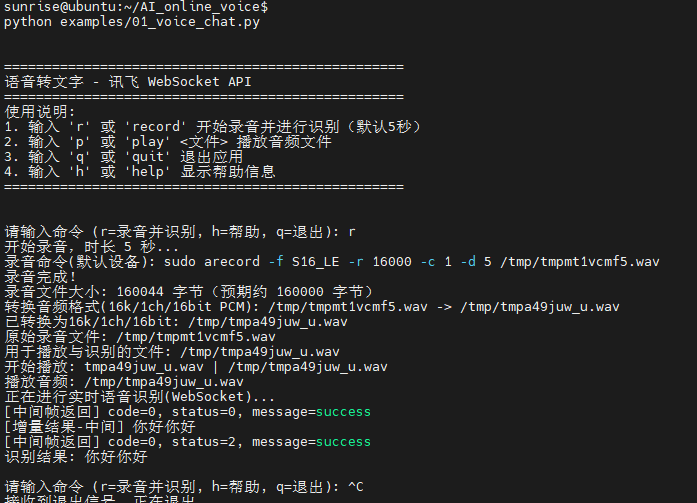
终端运行示例:
# -*- coding: utf-8 -*-
"""
06_voice_camera_analysis.py

实验06:以摄像头接入-语音分析为主题
流程:接入摄像头 → 实时小窗口显示 → 语音输入指令 → 截图当前画面 → 将截图与语音指令一起提交给豆包分析

参考:
- 摄像头接入:AI/examples/06_camera_input_loop.py
- 语音分析指令:AI_online_voice/examples/05_voice_document_analysis.py

指令:
- r [秒数]:录音指定秒数(默认5秒),识别文本并提交当前截图进行联合分析
- p:回放最近一次录音
- h:帮助
- q:退出
"""

import os
import sys
import time
import threading
import wave
import base64
from typing import Optional

# OpenCV 依赖
try:
    import cv2
except Exception:
    cv2 = None
    print("[依赖缺失] 未安装 opencv-python,请先安装:pip install opencv-python")

CURRENT_DIR = os.path.dirname(os.path.abspath(__file__))
PROJECT_ROOT = os.path.dirname(CURRENT_DIR)
sys.path.append(PROJECT_ROOT)

from utils.audio_processor import AudioProcessor
import config

# 复用实验03中的客户端(已内联并修复鉴权逻辑)
import importlib.util
EXP03_PATH = os.path.join(PROJECT_ROOT, "examples", "03_voice_image_dialogue.py")
spec = importlib.util.spec_from_file_location("exp03", EXP03_PATH)
exp03 = importlib.util.module_from_spec(spec)
spec.loader.exec_module(exp03)

DoubaoImageClient = exp03.DoubaoImageClient
XunfeiRealtimeSpeechClient = exp03.XunfeiRealtimeSpeechClient
ROOT_CONFIG = getattr(exp03, "ROOT_CONFIG", None)


class CameraStreamer:
    """摄像头实时显示与帧维护。"""
    def __init__(self, cam_index='video0', window_name: str = "Camera Feed", width: int = 1280, height: int = 720):
        self.cam_index = cam_index  # 可为索引(int)或设备名/路径(str)
        self.window_name = window_name
        self.width = width
        self.height = height
        self.cap = None
        self.thread = None
        self.running = False
        self.current_frame = None

    def _open_capture(self, source):
        """在不同平台尝试打开摄像头,支持 'video0' 语义。"""
        # 将 'video0' 规范化为平台兼容的来源
        if isinstance(source, str):
            s = source.lower().strip()
            if s == 'video0':
                if os.name == 'nt':
                    # Windows 不存在 /dev/video0,映射为索引 0
                    source = 0
                else:
                    # 非 Windows 按设备路径打开
                    source = "/dev/video0"
            elif s.startswith("/dev/video"):
                # Linux/WSL 等直接使用设备路径
                source = s
            else:
                # 尝试将字符串转换为索引
                try:
                    source = int(s)
                except Exception:
                    # 无法解析则回退到索引 0
                    source = 0
        # 按平台选择后端
        if os.name == 'nt':
            # 依次尝试 DSHOW -> MSMF -> 默认
            cap = cv2.VideoCapture(source, cv2.CAP_DSHOW)
            if not cap or not cap.isOpened():
                cap = cv2.VideoCapture(source, cv2.CAP_MSMF)
            if not cap or not cap.isOpened():
                cap = cv2.VideoCapture(source)
        else:
            # 非 Windows 默认后端通常为 V4L2
            cap = cv2.VideoCapture(source)
        return cap

    def start(self) -> bool:
        if cv2 is None:
            print("[错误] OpenCV 未安装,无法启动摄像头窗口")
            return False
        try:
            # 打开摄像头(支持 'video0' 映射)
            self.cap = self._open_capture(self.cam_index)
            if not self.cap or not self.cap.isOpened():
                print(f"[错误] 无法打开摄像头源:{self.cam_index},请检查设备或权限")
                print("[提示] 可尝试:--camera 0 / --camera video0 / --camera /dev/video0")
                return False
            # 对齐示例参数:设置采集分辨率为 1280x720(若设备支持)
            try:
                self.cap.set(cv2.CAP_PROP_FRAME_WIDTH, 1280)
                self.cap.set(cv2.CAP_PROP_FRAME_HEIGHT, 720)
            except Exception:
                pass
            # 打印实际分辨率,便于诊断
            try:
                actual_w = int(self.cap.get(cv2.CAP_PROP_FRAME_WIDTH))
                actual_h = int(self.cap.get(cv2.CAP_PROP_FRAME_HEIGHT))
                print(f"[摄像头] 已打开源={self.cam_index},实际分辨率={actual_w}x{actual_h}")
            except Exception:
                pass
            cv2.namedWindow(self.window_name, cv2.WINDOW_NORMAL)
            cv2.resizeWindow(self.window_name, 1280, 720)
            self.running = True
            # 不再在子线程中显示画面,改由主线程循环显示,避免部分平台窗口不出现的问题
            return True
        except Exception as e:
            print(f"[摄像头启动失败] {e}")
            return False

    def _loop(self):
        while self.running:
            ret, frame = self.cap.read()
            if not ret:
                time.sleep(0.05)
                continue
            # 按原始分辨率显示,避免缩小
            self.current_frame = frame.copy()
            cv2.imshow(self.window_name, frame)
            # 处理窗口事件
            if cv2.waitKey(1) & 0xFF == 27:  # ESC 退出显示,仅关闭窗口,不退出程序
                pass
        try:
            cv2.destroyWindow(self.window_name)
        except Exception:
            pass
    def update_display(self) -> int:
        """读取一帧并显示在窗口,由主线程循环调用。返回按键码(无按键为 -1)。"""
        if not self.cap:
            return -1
        ret, frame = self.cap.read()
        if not ret:
            time.sleep(0.05)
            return -1
        self.current_frame = frame.copy()
        cv2.imshow(self.window_name, frame)
        key = cv2.waitKey(1) & 0xFF
        return key

    def snapshot_to_file(self, path: str) -> Optional[str]:
        if cv2 is None:
            return None
        frame = self.current_frame
        if frame is None:
            print("[提示] 当前没有可用帧,请稍后重试")
            return None
        try:
            # 将 BGR 帧编码为 JPEG 并保存
            ok, buf = cv2.imencode(".jpg", frame)
            if not ok:
                print("[错误] 帧编码失败")
                return None
            with open(path, "wb") as f:
                f.write(buf.tobytes())
            return path
        except Exception as e:
            print(f"[快照保存失败] {e}")
            return None

    def stop(self):
        self.running = False
        try:
            time.sleep(0.1)
        except Exception:
            pass
        try:
            if self.cap:
                self.cap.release()
        except Exception:
            pass


class VoiceCameraAnalysisApp:
    def __init__(self, cam_source: Optional[str] = None):
        self.processor = AudioProcessor()
        self.asr = XunfeiRealtimeSpeechClient()
        self.doubao = DoubaoImageClient()
        # 允许通过参数或环境变量选择摄像头源,默认使用 'video0'
        source = cam_source if cam_source is not None else os.getenv("CAMERA_SOURCE", "video0")
        self.camera = CameraStreamer(cam_index=source)
        self.last_audio: Optional[str] = None
        self.last_wav: Optional[str] = None
        self.snapshot_path = os.path.join(PROJECT_ROOT, "assets", "camera_snapshot.jpg")
        self._ensure_assets_dir()

    def _ensure_assets_dir(self):
        assets_dir = os.path.join(PROJECT_ROOT, "assets")
        os.makedirs(assets_dir, exist_ok=True)

    def print_help(self):
        print("\n指令帮助:")
        print("  r [秒数]  录音指定秒数(默认5秒),并提交当前摄像头截图 + 语音文本进行分析")
        print("  p        回放最近一次录音")
        print("  h        查看帮助")
        print("  q        退出\n")

    def _take_snapshot(self) -> Optional[str]:
        path = self.snapshot_path
        snap = self.camera.snapshot_to_file(path)
        if not snap:
            print("[错误] 无法获取截图。请确认摄像头已启动且有画面。")
            return None
        return snap

    def handle_record(self, duration_sec: int):
        print(f"[操作] 开始录音 {duration_sec} 秒…")
        audio_file = self.processor.record(duration_sec)
        if not audio_file:
            print("[错误] 录音失败")
            return
        self.last_audio = audio_file
        try:
            with wave.open(audio_file, "rb") as wf:
                print(f"[音频信息] rate={wf.getframerate()}, ch={wf.getnchannels()}, bits={wf.getsampwidth()*8}")
        except Exception:
            pass
        wav_path = self.processor.convert_to_wav(audio_file)
        if not wav_path:
            print("[错误] 转换 WAV 失败")
            return
        self.last_wav = wav_path
        print("[识别] 讯飞实时识别…")
        text = self.asr.transcribe_audio_ws(wav_path)
        if not text:
            print("[识别失败] 未获取到文本")
            return
        print(f"[识别结果] {text}")

        print("[摄像头] 获取当前画面截图…")
        snap_path = self._take_snapshot()
        if not snap_path:
            return
        print(f"[截图] {snap_path}")

        print("[豆包] 提交截图 + 指令进行分析…")
        try:
            sys_prompt = getattr(ROOT_CONFIG, "SYSTEM_PROMPT", None) if ROOT_CONFIG else None
            # 复用豆包图像接口:文本 + 图片
            reply = self.doubao.chat_with_image_file(text, snap_path, system_prompt=sys_prompt)
            if reply:
                print("[豆包回复]", reply)
            else:
                print("[豆包回复] None")
        except Exception as e:
            print("[豆包错误]", e)

    def handle_play(self):
        if not self.last_audio:
            print("[提示] 尚无可回放的录音。请先使用 r 指令录音。")
            return
        print("[播放] 回放最近一次录音…")
        self.processor.play(self.last_audio)

    def run_legacy(self):
        print("\n=== 06 摄像头接入 + 语音分析(讯飞 + 豆包)实验 ===")
        self.print_help()
        ok = self.camera.start()
        if not ok:
            print("[错误] 摄像头未能启动,后续分析将无法截图")
        else:
            print("[提示] 摄像头窗口已启动(ESC 可关闭窗口但不影响程序)。")
        while True:
            try:
                cmd = input("请输入指令 (r/p/h/q): ").strip()
            except (EOFError, KeyboardInterrupt):
                print("\n[退出]")
                break
            if not cmd:
                continue
            if cmd == "q":
                print("[退出]")
                break
            if cmd == "h":
                self.print_help()
                continue
            if cmd == "p":
                self.handle_play()
                continue
            if cmd.startswith("r"):
                parts = cmd.split()
                duration = 5
                if len(parts) >= 2:
                    try:
                        duration = int(parts[1])
                    except Exception:
                        print("[提示] 秒数无效,使用默认 5 秒")
                self.handle_record(duration)
    def run(self):
        print("\n=== 06 摄像头接入 + 语音分析(讯飞 + 豆包)实验 ===")
        self.print_help()
        ok = self.camera.start()
        if not ok:
            print("[错误] 摄像头未能启动,无法显示实时画面与截图分析。")
            return
        print("[提示] 摄像头窗口已启动(窗口内按 Q 退出,或在终端输入 q)。")

        stop_flag = False

        def input_loop():
            nonlocal stop_flag
            while not stop_flag:
                try:
                    cmd = input("请输入指令 (r/p/h/q): ").strip()
                except (EOFError, KeyboardInterrupt):
                    print("\n[退出]")
                    stop_flag = True
                    break
                if not cmd:
                    continue
                if cmd == "q":
                    print("[退出]")
                    stop_flag = True
                    break
                if cmd == "h":
                    self.print_help()
                    continue
                if cmd == "p":
                    self.handle_play()
                    continue
                if cmd.startswith("r"):
                    parts = cmd.split()
                    duration = 5
                    if len(parts) >= 2:
                        try:
                            duration = int(parts[1])
                        except Exception:
                            print("[提示] 秒数无效,使用默认 5 秒")
                    self.handle_record(duration)

        t = threading.Thread(target=input_loop, daemon=True)
        t.start()

        # 主线程循环显示摄像头画面
        while not stop_flag:
            try:
                key = self.camera.update_display()
                if key in (ord('q'), ord('Q')):
                    stop_flag = True
                    break
            except Exception:
                time.sleep(0.05)
                continue

        self.camera.stop()


if __name__ == "__main__":
    import argparse
    parser = argparse.ArgumentParser(description="摄像头接入 + 语音分析")
    parser.add_argument("--camera", type=str, default=os.getenv("CAMERA_SOURCE", "video0"),
                        help="摄像头源: 索引(如 0)或设备名(如 video0)/路径(/dev/video0)")
    args = parser.parse_args()
    VoiceCameraAnalysisApp(cam_source=args.camera).run()