
AI在线开发
实验05-多模态文档表格分析
实验准备:
- 确保已接入火山引擎豆包ai
- 寻找一张格式为jpg图片,作为实验素材
- 下载python-docx,命令:pip install python-docx (本文档以分析word文档为例,如需分析Excel等其他文件,请根据终端提示操作)
实验步骤:
- cd AI_online #进入主目录
- python examples/04_document_analyzer.py #运行示例程序
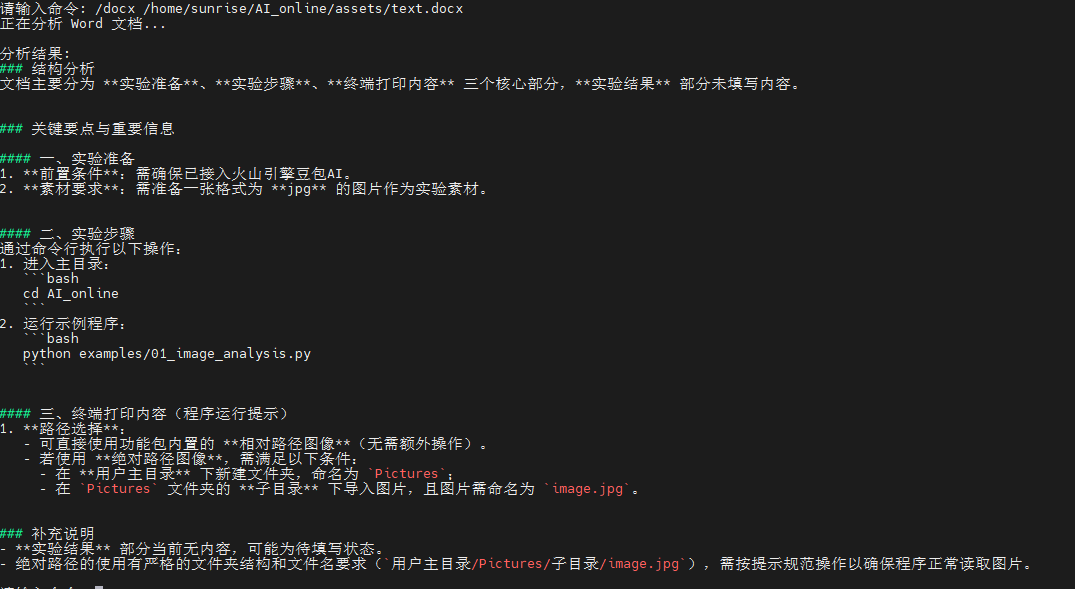
参考命令:/docx /home/sunrise/AI_online/assets/text.docx
终端运行结果如下:
"""
文档分析器示例
专门用于分析文档、表格、图表等结构化内容
"""
import os
import sys
from typing import Dict, List, Optional
try:
import docx
except ImportError:
docx = None
try:
import openpyxl
except ImportError:
openpyxl = None
# 添加父目录到路径
sys.path.append(os.path.dirname(os.path.dirname(os.path.abspath(__file__))))
from utils.api_client import DoubaoAPIClient
from utils.image_processor import ImageProcessor
class DocumentAnalyzer:
"""文档分析器"""
def __init__(self):
"""初始化分析器"""
try:
self.client = DoubaoAPIClient()
self.processor = ImageProcessor()
# 预定义的分析模板
self.analysis_templates = {
"ocr": "请识别并提取这个文档中的所有文字内容,保持原有的格式和结构。",
"table": "请分析这个表格的结构和内容,并以结构化的方式描述表格数据。",
"chart": "请分析这个图表,包括图表类型、数据趋势、关键信息等。",
"form": "请识别这个表单的字段和内容,并整理成结构化格式。",
"invoice": "请分析这张发票,提取关键信息如金额、日期、商品等。",
"contract": "请分析这份合同文档,提取关键条款和重要信息。",
"report": "请分析这份报告,总结主要内容和关键数据。",
"presentation": "请分析这个演示文稿页面,提取主要观点和信息。"
}
print("文档分析器初始化成功")
except Exception as e:
print(f"初始化失败: {e}")
raise
def analyze_document(self, image_path: str, doc_type: str = "auto",
custom_prompt: str = None) -> Optional[Dict]:
"""
分析文档
Args:
image_path: 文档图像路径
doc_type: 文档类型 (auto, ocr, table, chart, form, invoice, contract, report, presentation)
custom_prompt: 自定义分析提示词
Returns:
Dict: 分析结果
"""
try:
# 验证图像
if not self.processor.validate_image(image_path):
return None
# 获取图像信息
image_info = self.processor.get_image_info(image_path)
print(f"分析文档: {os.path.basename(image_path)}")
print(f" 尺寸: {image_info.get('width')}x{image_info.get('height')}")
# 确定分析提示词
if custom_prompt:
prompt = custom_prompt
elif doc_type == "auto":
prompt = self._auto_detect_prompt(image_path)
else:
prompt = self.analysis_templates.get(doc_type, self.analysis_templates["ocr"])
print(f"分析类型: {doc_type}")
print(f"分析提示: {prompt[:50]}...")
# 执行分析
result = self.client.chat_with_image_file(prompt, image_path)
if result:
return {
"file_path": image_path,
"file_name": os.path.basename(image_path),
"doc_type": doc_type,
"image_info": image_info,
"analysis_prompt": prompt,
"result": result,
"success": True
}
else:
return {
"file_path": image_path,
"success": False,
"error": "分析失败"
}
except Exception as e:
print(f"文档分析失败: {e}")
return {
"file_path": image_path,
"success": False,
"error": str(e)
}
def _auto_detect_prompt(self, image_path: str) -> str:
"""
自动检测文档类型并生成提示词
Args:
image_path: 图像路径
Returns:
str: 分析提示词
"""
# 基于文件名推测文档类型
filename = os.path.basename(image_path).lower()
if any(word in filename for word in ["table", "表格", "excel", "sheet"]):
return self.analysis_templates["table"]
elif any(word in filename for word in ["chart", "graph", "图表", "统计"]):
return self.analysis_templates["chart"]
elif any(word in filename for word in ["form", "表单", "申请"]):
return self.analysis_templates["form"]
elif any(word in filename for word in ["invoice", "发票", "账单"]):
return self.analysis_templates["invoice"]
elif any(word in filename for word in ["contract", "合同", "协议"]):
return self.analysis_templates["contract"]
elif any(word in filename for word in ["report", "报告", "总结"]):
return self.analysis_templates["report"]
elif any(word in filename for word in ["ppt", "slide", "演示", "幻灯片"]):
return self.analysis_templates["presentation"]
else:
# 默认使用OCR
return self.analysis_templates["ocr"]
def extract_text(self, image_path: str) -> Optional[str]:
"""
提取文档中的文字(OCR功能)
Args:
image_path: 文档图像路径
Returns:
str: 提取的文字内容
"""
result = self.analyze_document(image_path, "ocr")
return result["result"] if result and result["success"] else None
def analyze_table(self, image_path: str) -> Optional[str]:
"""
分析表格结构和内容
Args:
image_path: 表格图像路径
Returns:
str: 表格分析结果
"""
result = self.analyze_document(image_path, "table")
return result["result"] if result and result["success"] else None
def analyze_chart(self, image_path: str) -> Optional[str]:
"""
分析图表内容
Args:
image_path: 图表图像路径
Returns:
str: 图表分析结果
"""
result = self.analyze_document(image_path, "chart")
return result["result"] if result and result["success"] else None
def analyze_word(self, file_path: str) -> Optional[str]:
"""
分析 Word 文档内容(.docx)
"""
try:
if not os.path.exists(file_path):
print(f"文件不存在: {file_path}")
return None
if not file_path.lower().endswith(".docx"):
print("仅支持 .docx 格式的 Word 文档")
return None
if docx is None:
print("未安装 python-docx,请先安装:pip install python-docx")
return None
document = docx.Document(file_path)
paragraphs = [p.text.strip() for p in document.paragraphs if p.text.strip()]
table_texts = []
for table in document.tables:
for row in table.rows:
cells = [cell.text.strip() for cell in row.cells]
if any(cells):
table_texts.append(" | ".join(cells))
content = "\n".join(paragraphs)
if table_texts:
content += "\n\n表格内容:\n" + "\n".join(table_texts)
if len(content) > 8000:
content = content[:8000] + "\n...(内容已截断)"
prompt = f"请分析以下 Word 文档内容,提取关键要点、结构和重要信息:\n\n{content}"
result = self.client.chat_text(prompt)
return result if result else None
except Exception as e:
print(f"Word 文档分析失败: {e}")
return None
def analyze_excel(self, file_path: str) -> Optional[str]:
"""
分析 Excel 表格内容(.xlsx)
"""
try:
if not os.path.exists(file_path):
print(f"文件不存在: {file_path}")
return None
if not file_path.lower().endswith(".xlsx"):
print("仅支持 .xlsx 格式的 Excel 表格")
return None
if openpyxl is None:
print("未安装 openpyxl,请先安装:pip install openpyxl")
return None
wb = openpyxl.load_workbook(file_path, data_only=True)
ws = wb.active
rows_data = []
max_rows = 50
max_cols = 20
for r_idx, row in enumerate(ws.iter_rows(values_only=True), start=1):
if r_idx > max_rows:
break
cells = []
for c_idx, cell in enumerate(row, start=1):
if c_idx > max_cols:
break
cells.append("" if cell is None else str(cell))
rows_data.append(", ".join(cells))
content = "\n".join(rows_data)
prompt = f"请分析以下 Excel 表格的结构与数据,提取关键指标、趋势与异常,并给出简要总结:\n\n{content}"
result = self.client.chat_text(prompt)
return result if result else None
except Exception as e:
print(f"Excel 表格分析失败: {e}")
return None
def batch_analyze(self, folder_path: str, doc_type: str = "auto") -> List[Dict]:
"""
批量分析文档
Args:
folder_path: 文档文件夹路径
doc_type: 文档类型
Returns:
List[Dict]: 批量分析结果
"""
results = []
if not os.path.exists(folder_path):
print(f"文件夹不存在: {folder_path}")
return results
# 支持的图像格式
supported_formats = ['.jpg', '.jpeg']
# 遍历文件夹
files = [f for f in os.listdir(folder_path)
if os.path.splitext(f.lower())[1] in supported_formats]
if not files:
print("文件夹中没有找到支持的图像文件(仅支持JPG/JPEG)")
return results
print(f"开始批量分析,共 {len(files)} 个文件")
for i, filename in enumerate(files, 1):
file_path = os.path.join(folder_path, filename)
print(f"\n[{i}/{len(files)}] 分析文件: {filename}")
result = self.analyze_document(file_path, doc_type)
if result:
results.append(result)
if result["success"]:
print("分析成功")
else:
print(f"分析失败: {result.get('error', '未知错误')}")
else:
print("分析失败")
print(f"\n批量分析完成,成功: {sum(1 for r in results if r['success'])}/{len(results)}")
return results
def save_results(self, results: List[Dict], output_file: str = "analysis_results.txt"):
"""
保存分析结果到文件
Args:
results: 分析结果列表
output_file: 输出文件路径
"""
try:
with open(output_file, 'w', encoding='utf-8') as f:
f.write("=== 文档分析结果 ===\n\n")
for i, result in enumerate(results, 1):
f.write(f"[{i}] 文件: {result['file_name']}\n")
f.write(f"路径: {result['file_path']}\n")
f.write(f"类型: {result.get('doc_type', 'unknown')}\n")
f.write(f"状态: {'成功' if result['success'] else '失败'}\n")
if result['success']:
f.write(f"分析结果:\n{result['result']}\n")
else:
f.write(f"错误信息: {result.get('error', '未知错误')}\n")
f.write("-" * 50 + "\n\n")
print(f"结果已保存到: {output_file}")
except Exception as e:
print(f"保存结果失败: {e}")
def main():
"""主函数"""
print("=== 火山引擎文档分析器 ===")
try:
analyzer = DocumentAnalyzer()
print("\n可用功能:")
print("1. 单文档分析 - /analyze <文件路径> [类型]")
print("2. 批量分析 - /batch <文件夹路径> [类型]")
print("3. OCR提取 - /ocr <文件路径>")
print("4. 表格分析 - /table <文件路径>")
print("5. 图表分析 - /chart <文件路径>")
print("6. 查看类型 - /types")
print("7. 帮助信息 - /help")
print("8. 退出程序 - /quit")
print("9. Word 文档分析 - /docx <文件路径>")
print("10. Excel 表格分析 - /xlsx <文件路径>")
print("\n[路径提示] 可使用以下示例路径:")
print("1. 绝对路径: C:\\Users\\Administrator\\Pictures\\image.jpg")
print("2. 相对路径: assets\\sample.jpg")
print("3. 当前目录: .\\assets\\sample.jpg")
print("支持 JPG/JPEG(.jpg/.jpeg)、Word(.docx)、Excel(.xlsx) 文件")
while True:
try:
user_input = input("\n请输入命令: ").strip()
if not user_input:
continue
parts = user_input.split(" ", 2)
command = parts[0].lower()
if command == "/quit":
print("感谢使用文档分析器!")
break
elif command == "/help":
print("\n可用功能:")
print("1. 单文档分析 - /analyze <文件路径> [类型]")
print("2. 批量分析 - /batch <文件夹路径> [类型]")
print("3. OCR提取 - /ocr <文件路径>")
print("4. 表格分析 - /table <文件路径>")
print("5. 图表分析 - /chart <文件路径>")
print("6. 查看类型 - /types")
print("7. 帮助信息 - /help")
print("8. 退出程序 - /quit")
print("9. Word 文档分析 - /docx <文件路径>")
print("10. Excel 表格分析 - /xlsx <文件路径>")
print("\n[路径提示] 可使用以下示例路径:")
print("1. 绝对路径: C:\\Users\\Administrator\\Pictures\\image.jpg")
print("2. 相对路径: assets\\sample.jpg")
print("3. 当前目录: .\\assets\\sample.jpg")
print("支持 JPG/JPEG(.jpg/.jpeg)、Word(.docx)、Excel(.xlsx) 文件")
print("注意: 路径含空格请使用引号: /analyze \"C:\\My Pics\\a.jpg\"")
print("Word: /docx \"C:\\Docs\\test.docx\" Excel: /xlsx \"C:\\Docs\\table.xlsx\"")
elif command == "/analyze":
if len(parts) < 2:
print("用法:/analyze <文件路径> [类型]")
print("示例:/analyze assets\\sample.jpg auto")
continue
file_path = parts[1]
doc_type = parts[2] if len(parts) > 2 else "auto"
# 统一路径解析(项目根优先 + 当前目录)
project_root = os.path.dirname(os.path.dirname(os.path.abspath(__file__)))
candidate = os.path.join(project_root, file_path) if not os.path.isabs(file_path) else file_path
if not os.path.isabs(file_path):
if os.path.exists(candidate):
file_path = candidate
elif os.path.exists(file_path):
pass
else:
print(f"文件不存在: {file_path}")
print("路径示例:\n - 绝对路径: C:\\Users\\Administrator\\Pictures\\a.jpg\n - 相对路径: assets\\sample.jpg\n - 当前目录: .\\assets\\sample.jpg\n - 支持: JPG/JPEG(.jpg/.jpeg)、Word(.docx)、Excel(.xlsx)")
continue
elif not os.path.exists(file_path):
print(f"文件不存在: {file_path}")
continue
lower = file_path.lower()
if lower.endswith((".jpg", ".jpeg")):
print("正在分析图像...")
result = analyzer.analyze_document(file_path, doc_type)
if result and result["success"]:
print(f"\n分析结果:")
print(result["result"])
else:
print("分析失败")
elif lower.endswith(".docx"):
print("正在分析 Word 文档...")
result = analyzer.analyze_word(file_path)
if result:
print("\n分析结果:")
print(result)
else:
print("分析失败")
elif lower.endswith(".xlsx"):
print("正在分析 Excel 表格...")
result = analyzer.analyze_excel(file_path)
if result:
print("\n分析结果:")
print(result)
else:
print("分析失败")
else:
print("仅支持 JPG/JPEG(.jpg/.jpeg)、Word(.docx)、Excel(.xlsx) 文件")
continue
elif command == "/batch":
if len(parts) < 2:
print("请提供文件夹路径: /batch <文件夹路径> [类型]")
continue
folder_path = parts[1].strip().strip('"').strip("'")
doc_type = parts[2] if len(parts) > 2 else "auto"
project_root = os.path.dirname(os.path.dirname(os.path.abspath(__file__)))
candidate = os.path.join(project_root, folder_path) if not os.path.isabs(folder_path) else folder_path
if not os.path.isabs(folder_path):
if os.path.isdir(candidate):
folder_path = candidate
elif os.path.isdir(folder_path):
pass
else:
print(f"文件夹不存在: {folder_path}")
print("路径示例:\n - 绝对路径: C:\\Users\\Administrator\\Desktop\\AI\\assets\n - 相对路径: assets\n - 当前目录: .\\assets")
continue
elif not os.path.isdir(folder_path):
print(f"文件夹不存在: {folder_path}")
continue
# 批量分析支持的格式: 图片(JPG/JPEG)、Word(docx)、Excel(xlsx)
results = []