
HOME
Shop
  • English
  • 简体中文
HOME
Shop
  • English
  • 简体中文
  • Product Series

    • FPGA+ARM

      • GM-3568JHF

        • 1. Introduction

          • GM-3568JHF Introduction
        • 2. Quick Start

          • 01 Environment Construction
          • 02 Compilation Instructions
          • 03 Burning Guide
          • 04 Debugging Tools
          • 05 Software Update
          • 06 View information
          • 07 Test Command
          • 08 Application Compilation
          • 09 Source code acquisition
        • 3. Peripherals and Interfaces

          • USB
          • Display and touch
          • Ethernet
          • WIFI
          • Bluetooth
          • TF-Card
          • Audio
          • Serial Port
          • CAN
          • RTC
        • 4. Application Development

          • 01 UART read and write case
          • 02 Key detection case
          • 03 LED light flashing case
          • 04 MIPI screen detection case
          • 05 Read USB device information example
          • 06 FAN Detection Case
          • 07 FPGA FSPI Communication Case
          • 08 FPGA DMA read and write case
          • 09 GPS debugging case
          • 10 Ethernet Test Cases
          • 11 RS485 reading and writing examples
          • 12 FPGA IIC read and write examples
          • 13 PN532 NFC card reader case
          • 14 TF card reading and writing case
        • 5. QT Development

          • 01 ARM64 cross compiler environment construction
          • 02 QT program added automatic startup service
        • 6. Others

          • 01 Modification of the root directory file system
          • 02 System auto-start service
    • ShimetaPi

      • M4-R1

        • Introduction

          • M4-R1 Introduction
        • Get started quickly

          • OpenHarmony概述
          • 镜像烧录
          • 开发环境准备
          • Hello World应用以及部署
        • Application Development

          • getting Started

            • 第一章 ArkTS语言简介
            • 第二章 UI组件介绍和实际应用(上)
            • 第三章 UI组件介绍和实际应用(中)
            • 第四章 UI组件介绍和实际应用(下)
          • Advanced

            • 第一章 入门指引
            • 第二章 三方库的引用和使用
            • 第三章 应用编译以及部署
            • 第四章 命令行恢复出厂设置
            • 第五章 系统调试--HDC调试
            • 第六章 APP 稳定性测试
            • 第七章 应用测试
        • Equipment Development

          • 第一章 环境搭建
          • 第二章 下载源码
          • 第三章 编译源码
        • Peripherals and interfaces

          • 树莓派接口
          • GPIO 接口
          • I2C 接口
          • SPI通信
          • PWM控制
          • 串口通讯
          • TF Card
          • 屏幕
          • 触摸
          • 音频
          • RTC
          • Ethernet
          • M.2
          • MINI-PCIE
          • Camera
          • WIFI&BT
          • 树莓派拓展板
        • Frequently asked questions

          • 资源下载
      • M5-R1

        • Introduction

          • Introduction to ShimetaPi M5-R1
    • OpenHarmony

      • SC-3568HA

        • Introduction

          • SC-3568HA Overview
        • Quick Start Guide

          • OpenHarmony Overview
          • Image Flashing
          • Setting Up the Development Environment
          • Hello World Application and Deployment
        • Application Development

          • ArkUI

            • Chapter 1 Introduction to ArkTS Language
            • Chapter 2 Introduction to UI Components and Practical Applications (Part 1)
            • Chapter 3 Introduction to UI Components and Practical Applications (Part 2)
            • Chapter 4 Introduction to UI Components and Practical Applications (Part 3)
          • Expand

            • Chapter 1 Getting Started Guide
            • Chapter 2 Referencing and Using Third-Party Libraries
            • Chapter 3: Application Compilation and Deployment
            • Chapter 4: Command-Line Factory Reset
            • Chapter 5: System Debugging -- HDC (Huawei Device Connector) Debugging
            • Chapter 6 APP Stability Testing
            • Chapter 7 Application Testing
        • Device Development

          • Chapter 1 Environment Setup
          • Chapter 2 Download Source Code
          • Chapter 3 Compiling Source Code
        • Peripheral And Iinterface

          • Raspberry Pi interface
          • GPIO Interface
          • I2C Interface
          • SPI communication
          • PWM (Pulse Width Modulation) control
          • Serial port communication
          • TF Card
          • Display Screen
          • Touch
          • Audio
          • RTC
          • Ethernet
          • M.2
          • MINI-PCIE
          • Camera
          • WIFI&BT
          • Raspberry Pi expansion board
        • Frequently Asked Questions

          • Resource Downloads
      • M-K1HSE

        • Introduction

          • M-K1HSE Introduction
        • Quick Start

          • Development environment construction
          • Source code acquisition
          • Compilation Notes
          • Burning Guide
        • Peripherals and interfaces

          • 01 Audio
          • 02 RS485
          • 03 Display
        • System customization development

          • System transplant
          • System customization
          • Driver Development
          • System Debugging
          • OTA Update
    • EVS-Camera

      • CF-NRS1

        • 1. Introduction

          • Event Camera Technical Documentation
        • 2. Quick Start

          • Host driver and software installation
        • 3. SDK application development

          • API Usage Instructions
      • CF-CRA2

        • Introduction

          • About CF-NRS1
    • AI-model

      • 1684XB-32T

        • Introduction

          • AIBOX-1684XB-32 Introduction
        • Get started quickly

          • First time use
          • Network Configuration
          • Disk usage
          • Memory allocation
          • Fan Strategy
          • Firmware Upgrade
        • Deployment Tutorial

          • Algorithm deployment
          • Deploy Llama3 Example
        • Application Development

          • Sophgo SDK Development
          • Sophon LLM_api_server development
          • Deploy MiniCPM-V-2_6
          • Qwen-2-5-VL Image and Video Recognition DEMO
          • Qwen3-chat-DEMO
          • Qwen3-Qwen Agent-MCP-Demo
          • Qwen3-langchain-AI Agent
      • 1684X-416T

        • Introduction

          • AIBOX-1684X-416 Introduction
        • Demo simple operation guide

          • Simple instructions for using shimeta smart monitoring demo
    • Core-Board

      • C-3568BQ

        • Introduction

          • C-3568BQ Overview
      • C-3588LQ

        • Introduction

          • C-3588LQ Introduction
      • GC-3568JBAF

        • Introduction

          • GC-3568JBAF Introduction
      • C-K1BA

        • Introduction

          • C-K1BA Introduction

WIFI

开发板使用RTL8723DU模块,默认已适配好WIFI部分

连接WIFI

如图所示,找到系统右上角点击网络图标连接WIFI WIFI

使用ifconfig命令查看ip地址等信息

root@linaro-alip:/# ifconfig
···
wlx78228877b4a5: flags=4163<UP,BROADCAST,RUNNING,MULTICAST>  mtu 1500
        inet 192.168.137.149  netmask 255.255.255.0  broadcast 192.168.137.255
        inet6 fe80::d175:3cd1:73ca:ecc8  prefixlen 64  scopeid 0x20<link>
        ether 78:22:88:77:b4:a5  txqueuelen 1000  (Ethernet)
        RX packets 69  bytes 954099 (931.7 KiB)
        RX errors 0  dropped 143  overruns 0  frame 0
        TX packets 72  bytes 116372 (113.6 KiB)
        TX errors 0  dropped 23 overruns 0  carrier 0  collisions 0

连通性测试

执行如下命令查看获取的 IP 地址,并通过 ping 命令测试开发板与 PC 机通信是否正常。 192.168.49.85为PC实际的IP地址,请确保开发板与 PC 机在同一局域网内。

root@linaro-alip:/# ping 192.168.49.85 -I wlx78228877b4a5 -c 8
ping 192.168.49.85 -I wlx78228877b4a5 -c 8
PING 192.168.49.85 (192.168.49.85) from 192.168.137.149 wlx78228877b4a5: 56(84) bytes of data.
64 bytes from 192.168.49.85: icmp_seq=1 ttl=127 time=5.14 ms
64 bytes from 192.168.49.85: icmp_seq=2 ttl=127 time=3.66 ms
64 bytes from 192.168.49.85: icmp_seq=3 ttl=127 time=2.83 ms
64 bytes from 192.168.49.85: icmp_seq=4 ttl=127 time=2.81 ms
64 bytes from 192.168.49.85: icmp_seq=5 ttl=127 time=9.44 ms
64 bytes from 192.168.49.85: icmp_seq=6 ttl=127 time=2.77 ms
64 bytes from 192.168.49.85: icmp_seq=7 ttl=127 time=3.46 ms
64 bytes from 192.168.49.85: icmp_seq=8 ttl=127 time=3.09 ms

--- 192.168.49.85 ping statistics ---
8 packets transmitted, 8 received, 0% packet loss, time 7011ms
rtt min/avg/max/mdev = 2.771/4.150/9.442/2.128 ms

TCP带宽测试

如下使用iperf3工具测试开发板与 PC 机的网络通信带宽。

服务端

在开发板上联网安装iperf3工具,执行如下命令:

root@linaro-alip:/# sudo apt update
root@linaro-alip:/# sudo apt install iperf3

开发板做服务端,执行以下命令:

root@linaro-alip:/# iperf3 -s
-----------------------------------------------------------
Server listening on 5201 (test #1)
-----------------------------------------------------------

客户端
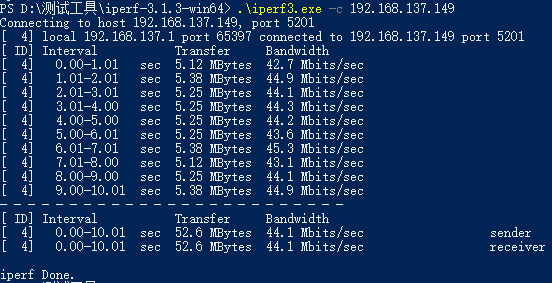
windows的iperf3工具可以在测试工具包中获取。

在windows系统中打开powershell,进入iperf3工具所在路径下 windows做客户端发送数据,执行以下命令:

.\iperf3.exe -c 192.168.137.149 // 192.168.137.149为服务端IP地址

测试结果

  • 服务端
root@linaro-alip:/# iperf3 -s
-----------------------------------------------------------
Server listening on 5201 (test #1)
-----------------------------------------------------------
Accepted connection from 192.168.137.1, port 65396
[  5] local 192.168.137.149 port 5201 connected to 192.168.137.1 port 65397
[ ID] Interval           Transfer     Bitrate
[  5]   0.00-1.00   sec  4.88 MBytes  40.9 Mbits/sec
[  5]   1.00-2.00   sec  5.40 MBytes  45.3 Mbits/sec
[  5]   2.00-3.00   sec  5.22 MBytes  43.8 Mbits/sec
[  5]   3.00-4.00   sec  5.36 MBytes  45.0 Mbits/sec
[  5]   4.00-5.00   sec  5.14 MBytes  43.1 Mbits/sec
[  5]   5.00-6.00   sec  5.22 MBytes  43.8 Mbits/sec
[  5]   6.00-7.00   sec  5.40 MBytes  45.3 Mbits/sec
[  5]   7.00-8.00   sec  5.12 MBytes  43.0 Mbits/sec
[  5]   8.00-9.00   sec  5.38 MBytes  45.1 Mbits/sec
[  5]   9.00-10.00  sec  5.24 MBytes  43.9 Mbits/sec
[  5]  10.00-10.05  sec   266 KBytes  45.9 Mbits/sec
- - - - - - - - - - - - - - - - - - - - - - - - -
[ ID] Interval           Transfer     Bitrate
[  5]   0.00-10.05  sec  52.6 MBytes  43.9 Mbits/sec                  receiver
-----------------------------------------------------------
  • 客户端

WIFI_2

Edit this page on GitHub
Last Updated:
Contributors: zsl