HOME
Shop
  • English
  • 简体中文
HOME
Shop
  • English
  • 简体中文
  • Product Series

    • FPGA+ARM

      • GM-3568JHF

        • 1. Introduction

          • About GM-3568JHF
        • 2. Quick Start

          • 00 Introduction
          • 01 Environment Setup
          • 02 Compilation Instructions
          • 03 Flashing Guide
          • 04 Debug Tools
          • 05 Software Update
          • 06 View Information
          • 07 Test Commands
          • 08 App Compilation
          • 09 Source Code Acquisition
        • 3. Peripherals and Interfaces

          • 01 USB
          • 02 Display and Touch
          • 03 Ethernet
          • 04 WIFI
          • 05 Bluetooth
          • 06 TF-Card
          • 07 Audio
          • 08 Serial Port
          • 09 CAN
          • 10 RTC
        • 4. Application Development

          • 01 UART read and write case
          • 02 Key detection case
          • 03 LED light flashing case
          • 04 MIPI screen detection case
          • 05 Read USB device information example
          • 06 FAN Detection Case
          • 07 FPGA FSPI Communication Case
          • 08 FPGA DMA read and write case
          • 09 GPS debugging case
          • 10 Ethernet Test Cases
          • 11 RS485 reading and writing examples
          • 12 FPGA IIC read and write examples
          • 13 PN532 NFC card reader case
          • 14 TF card reading and writing case
        • 5. QT Development

          • 01 ARM64 cross compiler environment construction
          • 02 QT program added automatic startup service
        • 6. RKNN_NPU Development

          • 01 RK3568 NPU Overview
          • 02 Development Environment Setup
          • Run Official YOLOv5 Example
          • Model Conversion Detailed Explanation
          • Run Custom Model on Board
        • 7. FPGA Development

          • ARM and FPGA Communication
          • /fpga-arm/GM-3568JHF/FPGA/ch02-FPGA-Development-Manual.html
        • 8. Others

          • 01 Modification of the root directory file system
          • 02 System auto-start service
        • 9. Download

          • Download Resources
    • ShimetaPi

      • M4-R1

        • 1. Introduction

          • 1.1 About M4-R1
        • 2. Quick Start

          • 2.1 OpenHarmony Overview
          • 2.2 Image Burning
          • 2.3 Development Environment Preparation
          • 2.4 Hello World Application
        • 3. Application Development

          • 3.1 Getting Started

            • 3.1.1 ArkTS Language Overview
            • 3.1.2 UI Components (Part 1)
            • 3.1.3 UI Components (Part 2)
            • 3.1.4 UI Components (Part 3)
          • 3.2 Advanced

            • 3.2.1 Getting Started Guide
            • 3.2.2 Usage of Third Party Libraries
            • 3.2.3 Deployment of the Application
            • 3.2.4 Factory Reset
            • 3.2.5 System Debug
            • 3.2.6 APP Stability Testing
            • 3.2.7 Application Testing
          • 3.3 Getting Docs

            • 3.3.1 Official Website Information
          • 3.4 Development Instructions

            • 3.4.1 Full SDK
            • 3.4.2 Introduction of Third Party Libraries
            • 3.4.3 Introduction of HDC Tool
            • 3.4.4 Restore Factory Mode
            • 3.4.5 Update System API
          • 3.5 First Application

            • 3.5.1 First ArkTS App
          • 3.6 Application Demo

            • 3.6.1 UART Tool
            • 3.6.2 Graphics Tablet
            • 3.6.3 Digital Clock
            • 3.6.4 WIFI Tool
        • 4. Device Development

          • 4.1 Ubuntu Environment Development

            • 4.1.1 Environment Setup
            • 4.1.2 Download Source Code
            • 4.1.3 Compile Source Code
          • 4.2 Using DevEco Device Tool

            • 4.2.1 Tool Introduction
            • 4.2.2 Environment Construction
            • 4.2.3 Import SDK
            • 4.2.4 Function Introduction
        • 5. Peripherals and Interfaces

          • 5.1 Raspberry Pi Interfaces
          • 5.2 GPIO Interface
          • 5.3 I2C Interface
          • 5.4 SPI Communication
          • 5.5 PWM Control
          • 5.6 Serial Port Communication
          • 5.7 TF Card Slot
          • 5.8 Display Screen
          • 5.9 Touch Screen
          • 5.10 Audio
          • 5.11 RTC
          • 5.12 Ethernet
          • 5.13 M.2
          • 5.14 MINI PCIE
          • 5.15 Camera
          • 5.16 WIFI BT
          • 5.17 HAT
        • 6. FAQ

          • 6.1 Download Link
      • M5-R1

        • 1. Introduction

          • M5-R1 Development Documentation
        • 2. Quick Start

          • OpenHarmony Overview
          • Image Burning
          • Development Environment Preparation
          • Hello World Application and Deployment
        • 3. Peripherals and Interfaces

          • 3.1 Raspberry Pi Interfaces
          • 3.2 GPIO Interface
          • 3.3 I2C Interface
          • 3.4 SPI Communication
          • 3.5 PWM Control
          • 3.6 Serial Port Communication
          • 3.7 TF Card Slot
          • 3.8 Display Screen
          • 3.9 Touch Screen
          • 3.10 Audio
          • 3.11 RTC
          • 3.12 Ethernet
          • 3.13 M.2
          • 3.14 MINI PCIE
          • 3.15 Camera
          • 3.16 WIFI BT
          • 3.17 HAT
        • 4. Application Development

          • 4.1 Getting Started

            • 4.1.1 ArkTS Language Overview
            • 4.1.2 UI Components (Part 1)
            • 4.1.3 UI Components (Part 2)
            • 4.1.4 UI Components (Part 3)
          • 4.2 Advanced

            • 4.2.1 Getting Started Guide
            • 4.2.2 Usage of Third Party Libraries
            • 4.2.3 Deployment of the Application
            • 4.2.4 Factory Reset
            • 4.2.5 System Debug
            • 4.2.6 APP Stability Testing
            • 4.2.7 Application Testing
        • 5. Device Development

          • 5.1 Environment Setup
          • 5.2 Download Source Code
          • 5.3 Compile Source Code
        • 6. Download

          • Data Download
    • OpenHarmony

      • SC-3568HA

        • 1. Introduction

          • 1.1 About SC-3568HA
        • 2. Quick Start

          • 2.1 OpenHarmony Overview
          • 2.2 Image Burning
          • 2.3 Development Environment Preparation
          • 2.4 Hello World Application
        • 3. Application Development

          • 3.1 ArkUI

            • 3.1.1 ArkTS Language Overview
            • 3.1.2 UI Components (Part 1)
            • 3.1.3 UI Components (Part 2)
            • 3.1.4 UI Components (Part 3)
          • 3.2 Advanced

            • 3.2.1 Getting Started Guide
            • 3.2.2 Usage of Third Party Libraries
            • 3.2.3 Deployment of the Application
            • 3.2.4 Factory Reset
            • 3.2.5 System Debug
            • 3.2.6 APP Stability Testing
            • 3.2.7 Application Testing
        • 4. Device Development

          • 4.1 Environment Setup
          • 4.2 Download Source Code
          • 4.3 Compile Source Code
        • 5. Peripherals and Interfaces

          • 5.1 Raspberry Pi Interfaces
          • 5.2 GPIO Interface
          • 5.3 I2C Interface
          • 5.4 SPI Communication
          • 5.5 PWM Control
          • 5.6 Serial Port Communication
          • 5.7 TF Card Slot
          • 5.8 Display Screen
          • 5.9 Touch Screen
          • 5.10 Audio
          • 5.11 RTC
          • 5.12 Ethernet
          • 5.13 M.2
          • 5.14 MINI PCIE
          • 5.15 Camera
          • 5.16 WIFI BT
          • 5.17 HAT
        • 6. FAQ

          • 6.1 Download Link
      • M-K1HSE

        • 1. Introduction

          • 1.1 Product Introduction
        • 2. Quick Start

          • 2.1 Debug Tool Installation
          • 2.2 Development Environment Setup
          • 2.3 Source Code Download
          • 2.4 Build Instructions
          • 2.5 Flashing Guide
          • 2.6 APT Update Sources
          • 2.7 View Board Info
          • 2.8 CLI LED and Key Test
          • 2.9 GCC Build Programs
        • 3. Application Development

          • 3.1 Basic Application Development

            • 3.1.1 Development Environment Preparation
            • 3.1.2 First Application HelloWorld
            • 3.1.3 Develop HAR Package
          • 3.2 Peripheral Application Cases

            • 3.2.1 UART Read/Write
            • 3.2.2 Key Demo
            • 3.2.3 LED Flash
        • 4. Peripherals and Interfaces

          • 4.1 Standard Peripherals

            • 4.1.1 USB
            • 4.1.2 Display and Touch
            • 4.1.3 Ethernet
            • 4.1.4 WIFI
            • 4.1.5 Bluetooth
            • 4.1.6 TF Card
            • 4.1.7 Audio
            • 4.1.8 Serial Port
            • 4.1.9 CAN
            • 4.1.10 RTC
          • 4.2 Interfaces

            • 4.2.1 Audio
            • 4.2.2 RS485
            • 4.2.3 Display
            • 4.2.4 Touch
        • 5. System Customization Development

          • 5.1 System Porting
          • 5.2 System Customization
          • 5.3 Driver Development
          • 5.4 System Debugging
          • 5.5 OTA Upgrade
        • 6. Download

          • 6.1 Download
    • EVS-Camera

      • CF-NRS1

        • 1. Introduction

          • 1.1 About CF-NRS1
          • 1.2 Event-Based Concepts
          • 1.3 Quick Start
          • 1.4 Resources
        • 2. Development

          • 2.1 Development Overview

            • 2.1.1 Shimetapi Hybrid Camera SDK Introduction
          • 2.2 Environment & API

            • 2.2.1 Environment Overview
            • 2.2.2 Development API Overview
          • 2.3 Linux Development

            • 2.3.1 Linux SDK Introduction
            • 2.3.2 Linux SDK API
            • 2.3.3 Linux Algorithm
            • 2.3.4 Linux Algorithm API
          • 2.4 Service & Web

            • 2.4.1 EVS Server
            • 2.4.2 Time Server
            • 2.4.3 EVS Web
        • 3. Download

          • 3.1 Download
        • 4. Common Problems

          • 4.1 Common Problems
      • CF-CRA2

        • 1. Introduction

          • 1.1 About CF-CRA2
        • 2. Download

          • 2.1 Download
      • EVS Module

        • 1. Related Concepts
        • 2. Hardware Preparation and Environment Configuration
        • 3. Example Program User Guide
        • Resources Download
    • AI-model

      • 1684XB-32T

        • 1. Introduction

          • AIBOX-1684XB-32 Introduction
        • 2. Quick Start

          • First time use
          • Network Configuration
          • Disk usage
          • Memory allocation
          • Fan Strategy
          • Firmware Upgrade
          • Cross-Compilation
          • Model Quantization
        • 3. Application Development

          • 3.1 Development Introduction

            • Sophgo SDK Development
            • SOPHON-DEMO Introduction
          • 3.2 Large Language Models

            • Deploying Llama3 Example
            • /ai-model/AIBOX-1684XB-32/application-development/LLM/Sophon_LLM_api_server-Development-AIBOX-1684XB-32.html
            • /ai-model/AIBOX-1684XB-32/application-development/LLM/MiniCPM-V-2_6-AIBOX-1684XB-32.html
            • /ai-model/AIBOX-1684XB-32/application-development/LLM/Qwen-2-5-VL-demo-Development-AIBOX-1684XB-32.html
            • /ai-model/AIBOX-1684XB-32/application-development/LLM/Qwen-3-chat-demo-Development-AIBOX-1684XB-32.html
            • /ai-model/AIBOX-1684XB-32/application-development/LLM/Qwen3-Qwen Agent-MCP.html
            • /ai-model/AIBOX-1684XB-32/application-development/LLM/Qwen3-langchain-AI Agent.html
          • 3.3 Deep Learning

            • ResNet (Image Classification)
            • LPRNet (License Plate Recognition)
            • SAM (Universal Image Segmentation Foundation Model)
            • YOLOv5 (Object Detection)
            • OpenPose (Human Keypoint Detection)
            • PP-OCR (Optical Character Recognition)
        • 4. Download

          • Resource Download
      • 1684X-416T

        • 1. Introduction

          • AIBOX-1684X-416 Introduction
        • 2. Demo Simple Operation Guide

          • Simple instructions for using shimeta smart monitoring demo
      • RDK-X5

        • 1. Introduction

          • RDK-X5 Hardware Introduction
        • 2. Quick Start

          • RDK-X5 Quick Start
        • 3. Application Development

          • 3.1 AI Online Model Development

            • AI Online Development - Experiment01
            • AI Online Development - Experiment02
            • AI Online Development - Experiment03
            • AI Online Development - Experiment04
            • AI Online Development - Experiment05
            • AI Online Development - Experiment06
          • 3.2 Large Language Models (Voice)

            • Voice LLM Application - Experiment01
            • Voice LLM Application - Experiment02
            • Voice LLM Application - Experiment03
            • Voice LLM Application - Experiment04
            • Voice LLM Application - Experiment05
            • Voice LLM Application - Experiment06
          • 3.3 40pin-IO Development

            • 40pin IO Development - Experiment01
            • 40pin IO Development - Experiment02
            • 40pin IO Development - Experiment03
            • 40pin IO Development - Experiment04
            • 40pin IO Development - Experiment05
            • 40pin IO Development - Experiment06
            • 40pin IO Development - Experiment07
          • 3.4 USB Module Development

            • USB Module Usage - Experiment01
            • USB Module Usage - Experiment02
          • 3.5 Machine Vision

            • Machine Vision Technology Development - Experiment01
            • Machine Vision Technology Development - Experiment02
            • Machine Vision Technology Development - Experiment03
            • Machine Vision Technology Development - Experiment04
          • 3.6 ROS2 Base Development

            • ROS2 Basic Development - Experiment01
            • ROS2 Basic Development - Experiment02
            • ROS2 Basic Development - Experiment03
            • ROS2 Basic Development - Experiment04
      • RDK-S100

        • 1. Introduction

          • 1.1 About RDK-S100
        • 2. Quick Start

          • 2.1 First Use
        • 3. Application Development

          • 3.1 AI Online Model Development

            • 3.1.1 Volcano Engine Doubao AI
            • 3.1.2 Image Analysis
            • 3.1.3 Multimodal Visual Analysis
            • 3.1.4 Multimodal Image Comparison
            • 3.1.5 Multimodal Document Analysis
            • 3.1.6 Camera AI Vision Analysis
          • 3.2 Large Language Models

            • 3.2.1 Speech Recognition
            • 3.2.2 Voice Conversation
            • 3.2.3 Multimodal Image Analysis
            • 3.2.4 Multimodal Image Comparison
            • 3.2.5 Multimodal Document Analysis
            • 3.2.6 Multimodal Vision Application
          • 3.3 40pin-IO Development

            • 3.3.1 GPIO Output LED Blink
            • 3.3.2 GPIO Input
            • 3.3.3 Key Control LED
            • 3.3.4 PWM Output
            • 3.3.5 Serial Output
            • 3.3.6 I2C Experiment
          • 3.4 USB Module Development

            • 3.4.1 USB Voice Module
            • 3.4.2 Sound Source Localization
          • 3.5 Machine Vision

            • 3.5.1 USB Camera
            • 3.5.2 Image Processing Basics
            • 3.5.3 Object Detection
            • 3.5.4 Image Segmentation
          • 3.6 ROS2 Base Development

            • 3.6.1 Environment Setup
            • 3.6.2 Create and Build Workspace
            • 3.6.3 ROS2 Topic Communication
            • 3.6.4 ROS2 Camera Application
    • Core-Board

      • C-3568BQ

        • 1. Introduction

          • C-3568BQ Introduction
      • C-3588LQ

        • 1. Introduction

          • C-3588LQ Introduction
      • GC-3568JBAF

        • 1. Introduction

          • GC-3568JBAF Introduction
      • C-K1BA

        • 1. Introduction

          • C-K1BA Introduction

LPRNet (License Plate Recognition)

1. Introduction

LPRNet (License Plate Recognition via Deep Neural Networks) is a lightweight convolutional neural network that can perform end-to-end license plate recognition without character segmentation.

The advantages of LPRNet can be summarized in the following three points:

(1) LPRNet does not require character pre-segmentation, has high license plate recognition accuracy, strong real-time algorithm performance, and supports variable-length character license plate recognition. It can perform end-to-end training for license plates from different countries with large character differences.

(2) LPRNet is the first real-time lightweight OCR algorithm without RNN, and can run on various devices including embedded devices.

(3) LPRNet has good robustness. Even under complex conditions such as view angle and camera distortion, and poor lighting conditions, it still shows good recognition effects.

Project Directory

LPRNET
│  libsophon_soc_0.5.1-LTS_aarch64.tar.gz	#Compilation required dependencies
│  sophon-mw-soc_0.12.0_aarch64.tar.gz		#Compilation required dependencies
│  stream_dev.tar							#Cross-compilation environment image
│
├─cpp		##C++ example required files
│  ├─dependencies
│  │  ├─include
│  │  │      bmnn_utils.h
│  │  │      bm_wrapper.hpp
│  │  │      ff_decode.hpp
│  │  │      json.hpp
│  │  │      utils.hpp
│  │  │
│  │  └─src
│  │          ff_decode.cpp
│  │
│  ├─lprnet_bmcv	##Files required for bmcv
│  │      CMakeLists.txt
│  │      lprnet.cpp
│  │      lprnet.hpp
│  │      main.cpp
│  │
│  ├─lprnet_opencv	##Files required for opencv
│  │          CMakeLists.txt
│  │          lprnet.cpp
│  │          lprnet.hpp
│  │          main.cpp
│
├─datasets	##Test dataset
│  └─test
│
├─docs		#Tutorial documentation
│  │  LPRNet.md
│  │
│  └─images
│
├─models	#Model weights
│  └─BM1684X
│          lprnet_fp16_1b.bmodel
│          lprnet_fp32_1b.bmodel
│          lprnet_int8_1b.bmodel
│          lprnet_int8_4b.bmodel
│
├─python	#Python example required files
│      lprnet_bmcv.py
│      lprnet_opencv.py
│
└─tools		#Tools possibly needed in development
        compare_statis.py	##Compare test results
        convert_imageset.py	##Convert dataset
        eval_ccpd.py	##Accuracy measurement
        export_onnx.py	##Export onnx model
        LPRNet.py

2. Running Steps

1. Python Examples

1.1 Configure Python Environment

bmcv Environment (for running lprnet_bmcv.py)

Modify .bashrc file to introduce Sophon's Python environment

sudo vim ~/.bashrc

Add the following at the end of the file

export PYTHONPATH=$PYTHONPATH:/opt/sophon/libsophon-current/lib:/opt/sophon/sophon-opencv-latest/opencv-python/

Save and exit with :wq, then reload the terminal

source ~/.bashrc

You can check with echo $PYTHONPATH to see if it corresponds to the field.

opencv Environment (for running lprnet_opencv.py)
pip install opencv-python-headless

1.2 Inference Testing

File Parameter Description

The command parameters for lprnet_opencv.py and lprnet_bmcv.py are the same. Taking lprnet_opencv.py inference as an example, the parameters are described as follows:

usage: lprnet_opencv.py [--input INPUT_PATH] [--bmodel BMODEL] [--dev_id DEV_ID]

--input: Test data path, can input the path of the entire image folder;
--bmodel: bmodel path for inference, default uses stage 0 network for inference;
--dev_id: TPU device id for inference;
Image Testing

Image testing example is as follows. Supports testing the entire image folder. Enter the script directory, for example: /data/LPRNet/python/, then you can debug the required files.

 python3 lprnet_bmcv.py --input ../datasets/test --bmodel ../models/BM1684X/lprnet_fp32_1b.bmodel --dev_id 0

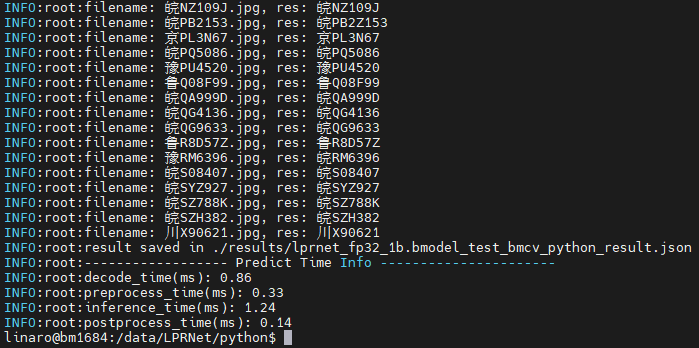
After execution, predicted results will be saved in results/lprnet_fp32_1b.bmodel_test_bmcv_python_result.json, and predicted results, inference time and other information will be printed. Output is as follows:

terminal

2. C++ Examples

1. Cross-compilation Environment Setup

C++ programs need to compile dependency files to run on the board. To save pressure on edge devices, we choose to use an X86 Linux environment for cross-compilation.

Setting up cross-compilation environment, two methods provided:

(1) Install cross-compilation toolchain via apt:

If your system and target SoC platform have the same libc version (can be queried via ldd --version command), you can install using the following command:

sudo apt-get install gcc-aarch64-linux-gnu g++-aarch64-linux-gnu

Uninstall method:

sudo apt remove cpp-*-aarch64-linux-gnu

If your environment does not meet the above requirements, it is recommended to use method (2).

(2) Set up cross-compilation environment via docker:

You can use the provided docker image -- stream_dev.tar as the cross-compilation environment.

If using Docker for the first time, execute the following commands to install and configure (only required for first time):

sudo apt install docker.io
sudo systemctl start docker
sudo systemctl enable docker
sudo groupadd docker
sudo usermod -aG docker $USER
newgrp docker

Load the image in the downloaded image directory

docker load -i stream_dev.tar

You can view loaded images via docker images, default is stream_dev:latest

Create container

docker run --privileged --name stream_dev -v $PWD:/workspace  -it stream_dev:latest
# stream_dev is just an example name, please specify your own container name

The workspace directory in the container will mount to the host directory where you run docker run. You can compile projects in this container. The workspace directory is under root, changes in this directory will map to changes in corresponding files in the local directory.

Note: When creating a container, you need to go to the parent directory of soc-sdk (dependency compilation environment) and above

1.2 Package Dependency Files
  1. Package libsophon

    Extract libsophon_soc_x.y.z_aarch64.tar.gz, where x.y.z is the version number.

    # Create root directory for dependency files
    mkdir -p soc-sdk
    # Extract libsophon_soc_x.y.z_aarch64.tar.gz
    tar -zxf libsophon_soc_${x.y.z}_aarch64.tar.gz
    # Copy related library directories and header file directories to the dependency root directory
    cp -rf libsophon_soc_${x.y.z}_aarch64/opt/sophon/libsophon-${x.y.z}/lib soc-sdk
    cp -rf libsophon_soc_${x.y.z}_aarch64/opt/sophon/libsophon-${x.y.z}/include soc-sdk
  2. Package sophon-ffmpeg and sophon-opencv

    Extract sophon-mw-soc_x.y.z_aarch64.tar.gz, where x.y.z is the version number.

    # Extract sophon-mw-soc_x.y.z_aarch64.tar.gz
    tar -zxf sophon-mw-soc_${x.y.z}_aarch64.tar.gz
    # Copy ffmpeg and opencv library directories and header file directories to soc-sdk directory
    cp -rf sophon-mw-soc_${x.y.z}_aarch64/opt/sophon/sophon-ffmpeg_${x.y.z}/lib soc-sdk
    cp -rf sophon-mw-soc_${x.y.z}_aarch64/opt/sophon/sophon-ffmpeg_${x.y.z}/include soc-sdk
    cp -rf sophon-mw-soc_${x.y.z}_aarch64/opt/sophon/sophon-opencv_${x.y.z}/lib soc-sdk
    cp -rf sophon-mw-soc_${x.y.z}_aarch64/opt/sophon/sophon-opencv_${x.y.z}/include soc-sdk
1.3 Perform Cross-compilation

After setting up the cross-compilation environment, use the cross-compilation toolchain to compile and generate executable files. lprnet_opencv and lprnet_bmcv have the same compilation method. Taking compiling the lprnet_opencv program as an example:

cd cpp/lprnet_opencv
mkdir build && cd build
#Please modify -DSDK path according to actual situation, use absolute path.
cmake -DTARGET_ARCH=soc -DSDK=/workspace/soc-sdk/ ..
make

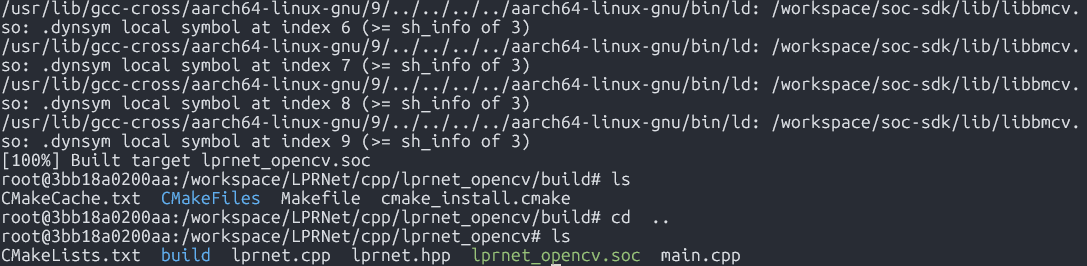
After compilation completes, a .soc file will be generated in the corresponding directory, for example: cpp/lprnet_opencv/lprnet_opencv.soc.

t2

2. Image Testing

You need to copy the executable files generated from cross-compilation and required models and test data to the SoC platform (i.e., BM1684X development board) for testing.

Parameter Description

Usage: lprnet_opencv.soc [params]

        --bmodel (value:../../models/BM1684/lprnet_fp32_1b.bmodel)
                bmodel file path
        --dev_id (value:0)
                TPU device id
        --help (value:true)
                print help information.
        --input (value:../../datasets/test)
                input path, images directory

Image Testing

Image testing example is as follows. Supports testing the entire image folder.

##First add executable permission to the file
chmod +x lprnet_opencv.soc
./lprnet_opencv.soc --input=../../datasets/test --bmodel=../../models/BM1684X/lprnet_fp32_1b.bmodel --dev_id=0

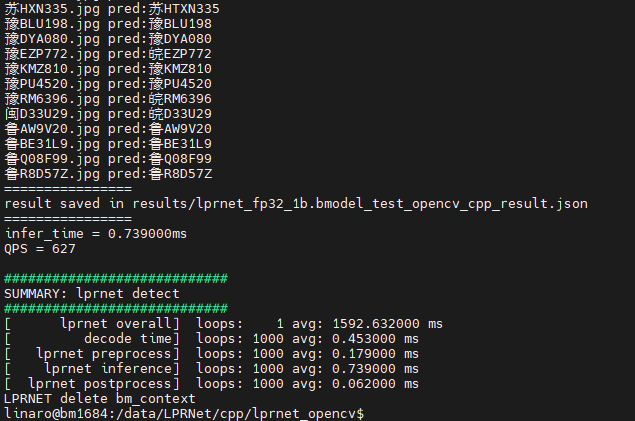
After execution, predicted results will be saved in results/lprnet_fp32_1b.bmodel_test_opencv_cpp_result.json, and predicted results, inference time and other information will be printed. Output is as follows:

t3

Edit this page on GitHub
Last Updated:
Contributors: ZSL
Prev
ResNet (Image Classification)
Next
SAM (Universal Image Segmentation Foundation Model)