
Qwen-2-5-VL Image and Video Recognition Demo
1. Introduction
Qwen-2-5-VL is a multimodal large language model (MLLM) released by Alibaba's Qwen team. It is part of the Qwen-2 series and supports multimodal interaction between vision and language.
1. Features
- Dynamic resolution handling: adaptively adjusts image resolution to balance accuracy and compute efficiency.
- Cross-modal alignment: aligns the vision-language feature space via contrastive learning to improve modality interaction.
- Low-resource adaptation: supports lightweight deployment options such as quantization and LoRA fine-tuning.
2. Project Directory
    Qwen2-5-VL
    ├── datasets
    │   ├──images                        # 默认为一张panda.jpg的图片
    │   └──videos                        # 默认为一段carvana_video.mp4的视频
    ├── models
    │   └── BM1684X
    │       └── qwen2.5-vl-3b_bm1684x_w4bf16_seq2048.bmodel    # BM1684X qwen2.5-vl-3b模型
    ├── python
    │   ├── __pycache__
    │   ├── configs                       # 配置文件
    │   ├── qwen2_5_vl.py                 # 启动程序
    │   ├── README.md                     # 说明文档
    │   ├── vision_process.py             # 视觉数据预处理文件
    │   └── requirements.txt              # python依赖
    ├── scripts
    │   ├── compile.sh
    │   ├── datasets.zip
    │   ├── download_bm1684x_bmodel.sh       # 1684X盒子模型下载脚本
    │   ├── download_bm1688_bmodel.sh        # 1688盒子模型下载脚本
    │   └── download_datasets.sh             # 数据集下载脚本
    └── tools                              # 工具包
2. Running Steps
1. Prepare the Python Environment, Data, and Model
1.1 First upgrade Python to version 3.10
    sudo add-apt-repository ppa:deadsnakes/ppa
    sudo apt update
    sudo apt install python3.10 python3.10-dev

    # 创建虚拟环境(不含pip包),以后每次运行都要按照步骤切换虚拟环境
    cd /data
    # 创建虚拟环境(不包含 pip)
    python3.10 -m venv --without-pip myenv

    # 进入虚拟环境
    source myenv/bin/activate

    # 手动安装 pip
    curl https://bootstrap.pypa.io/get-pip.py -o get-pip.py
    python get-pip.py
    rm get-pip.py

    # 安装依赖库
    pip3 install torchvision pillow qwen_vl_utils transformers --upgrade
1.2 Copy the Sophgo official Qwen2-5-VL project directory (or upload Qwen2_5-VL to /data on the box after copying)
    git clone https://github.com/sophgo/sophon-demo.git
    cd sophon-demo/sample/Qwen2_5-VL
    cd /data/Qwen2_5-VL  ##如果只上传了LLM_api_server,则只需进入此目录下操作
1.3 Prepare the Runtime Environment
On PCIe, no memory change is needed; the following applies to SoC mode. For 1684X-series devices (e.g. SE7/SM7), the environment can be prepared this way to satisfy the Qwen2.5-VL runtime requirements. First, make sure you are using the V24.04.01 SDK; you can check the SDK version with bm_version. If an upgrade is needed, obtain the v24.04.01 SDK from sophgo.com — the flashing package is in sophon-img-xxx/sdcard.tgz; refer to the corresponding product manual to flash.
After confirming the SDK version, on the 1684x SoC environment, modify the device memory with the following commands:
    cd /data/
    mkdir memedit && cd memedit
    wget -nd https://sophon-file.sophon.cn/sophon-prod-s3/drive/23/09/11/13/DeviceMemoryModificationKit.tgz
    tar xvf DeviceMemoryModificationKit.tgz
    cd DeviceMemoryModificationKit
    tar xvf memory_edit_{vx.x}.tar.xz #vx.x是版本号
    cd memory_edit
    ./memory_edit.sh -p #这个命令会打印当前的内存布局信息
    ./memory_edit.sh -c -npu 7615 -vpu 2048 -vpp 2048 #如果是在1688平台上请修改为:./memory_edit.sh -c -npu 10240 -vpu 0 -vpp 3072
    sudo cp /data/memedit/DeviceMemoryModificationKit/memory_edit/emmcboot.itb /boot/emmcboot.itb && sync
    sudo reboot
1.4 Install unzip and prepare the test dataset
    sudo apt install unzip
    chmod -R +x scripts/
    ./scripts/download_bm1684x_bmodel.sh  ##下载模型文件
    ./scripts/download_datasets.sh  ##下载数据集
2. Python Example
2.1 Environment Preparation
    # 此外您可能还需要安装其他库
    cd /data/Qwen2_5-VL/python
    pip3 install dfss -i https://pypi.tuna.tsinghua.edu.cn/simple --upgrade
    pip3 install -r requirements.txt -i https://pypi.tuna.tsinghua.edu.cn/simple

    # 您需要安装SILK2.Tools.logger
    python3 -m dfss --url=open@sophgo.com:tools/silk2/silk2.tools.logger-1.0.2-py3-none-any.whl
    pip3 install silk2.tools.logger-1.0.2-py3-none-any.whl --force-reinstall
    rm -f silk2.tools.logger-1.0.2-py3-none-any.whl

    # 本例程依赖sophon-sail,可直接安装sophon-sail,执行如下命令:
    pip3 install dfss --upgrade
    python3 -m dfss --install sail

    # 需要下载运行配置文件,执行如下命令
    python3 -m dfss --url=open@sophgo.com:sophon-demo/Qwen2_5_VL/configs.zip
    unzip configs.zip
    rm configs.zip
2.2 Start Testing
Parameter Description
You can test by modifying the contents of qwen2_5_vl.py. The content is shown in the image:
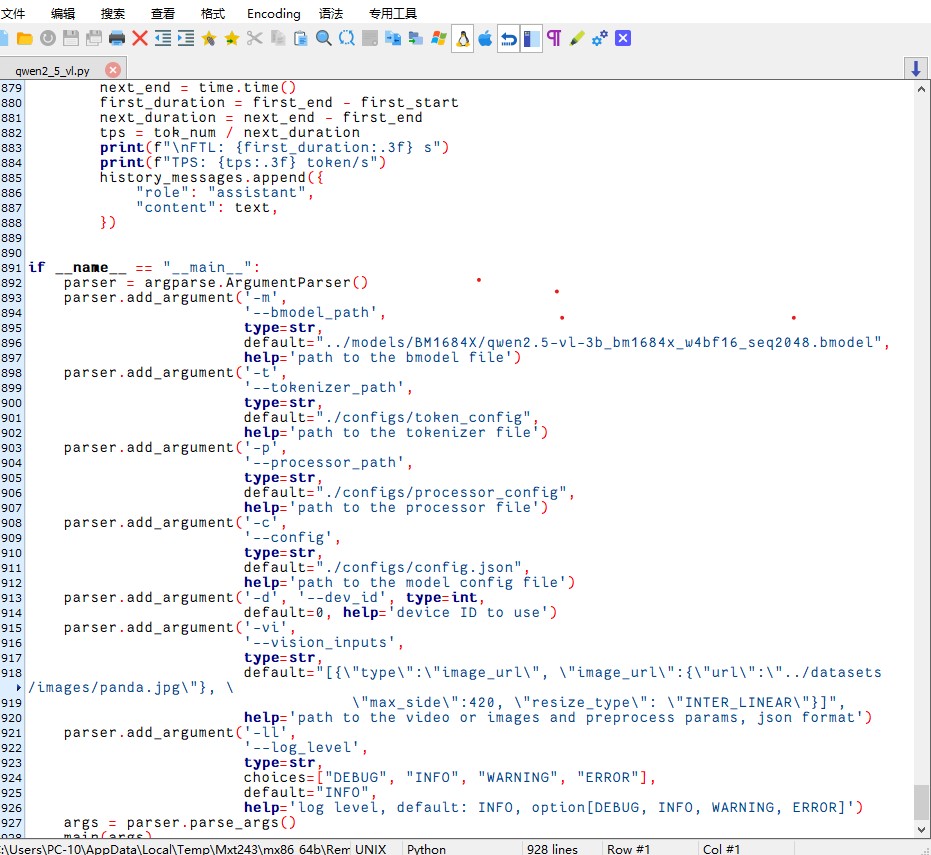
Change the default bmodel path on line 896 to: ../models/BM1684X/qwen2.5-vl-3b_bm1684x_w4bf16_seq2048.bmodel
Usage
    # 视频识别
    python3 qwen2_5_vl.py --vision_inputs="[{\"type\":\"video_url\",\"video_url\":{\"url\": \"../datasets/videos/carvana_video.mp4\"},\"resized_height\":420,\"resized_width\":630,\"nframes\":2}]"

    # 图片识别
    python3 qwen2_5_vl.py --vision_inputs="[{\"type\":\"image_url\",\"image_url\":{\"url\": \"../datasets/images/panda.jpg\"}, \"max_side\":420}]"

    # 同时
    python3 qwen2_5_vl.py --vision_inputs="[{\"type\":\"video_url\",\"video_url\":{\"url\": \"../datasets/videos/carvana_video.mp4\"},\"resized_height\":420,\"resized_width\":630,\"nframes\":2},{\"type\":\"image_url\",\"image_url\":{\"url\": \"../datasets/images/panda.jpg\"}, \"max_side\":840}]"

    # 纯文本对话
    python3 qwen2_5_vl.py --vision_inputs=""
Usage Result
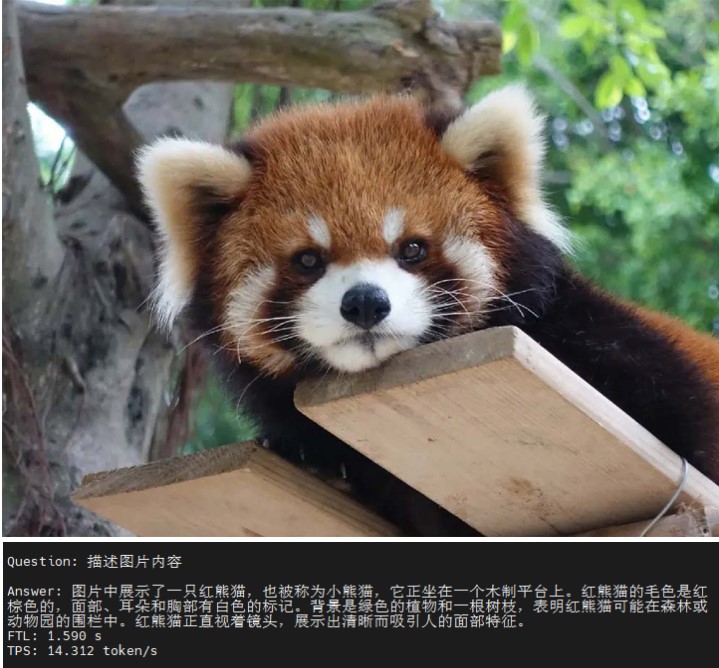
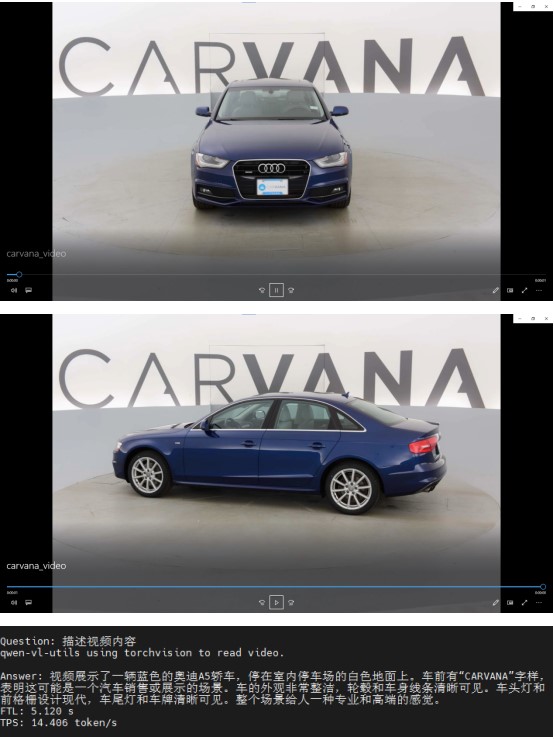
You can add images or videos to the folder for testing.