
40-pin IO Development
Experiment 07 - SPI Experiment
RDK X5 exposes the chip's SPI1 bus on physical pins 19, 21, 23, 24, and 26 of the 40PIN, supporting two chip selects, with IO voltage of 3.3V.
Loopback test: Connect MISO and MOSI together in hardware, then run the SPI test program to perform write and read operations. The expected result is that the read data exactly matches the written data.
Hardware Connection
Connect MISO (IO19) and MOSI (IO21) directly together using a jumper:
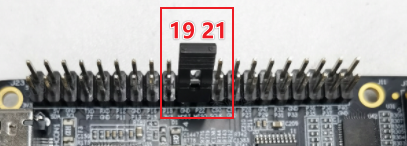
Software Execution
Enter the user home directory and run:
cd usersudo python3 ./test_spi.py
From the listed SPI controllers, choose the bus number and chip select as input options. For example, to test spidev0.0, both the bus num and cs num are 0. Press Enter to confirm:
Terminal output:

When the program runs correctly, it will continuously print 0x55 0xAA. If it prints 0x00 0x00, the SPI loopback test has failed.
Terminal output:

#!/usr/bin/env python3

import sys
import signal
import os
import time

# 导入spidev模块
import spidev

def signal_handler(signal, frame):
    sys.exit(0)

def BytesToHex(Bytes):
    return ''.join(["0x%02X " % x for x in Bytes]).strip()

def spidevTest():
    # 设置spi的bus号(0, 1, 2)和片选(0, 1)
    spi_bus = input("Please input SPI bus num:")
    spi_device = input("Please input SPI cs num:")
    # 创建spidev类的对象以访问基于spidev的Python函数。
    spi=spidev.SpiDev()
    # 打开spi总线句柄
    spi.open(int(spi_bus), int(spi_device))

    # 设置 spi 频率为 12MHz
    spi.max_speed_hz = 12000000

    print("Starting demo now! Press CTRL+C to exit")

    # 发送 [0x55, 0xAA], 接收的数据应该也是 [0x55, 0xAA]
    try:
        while True:
            resp = spi.xfer2([0x55, 0xAA])
            print(BytesToHex(resp))
            time.sleep(1)

    except KeyboardInterrupt:
        spi.close()

if __name__ == '__main__':
    signal.signal(signal.SIGINT, signal_handler)
    print("List of enabled spi controllers:")
    os.system('ls /dev/spidev*')

    spidevTest()