HOME
Shop
  • English
  • 简体中文
HOME
Shop
  • English
  • 简体中文
  • Product Series

    • FPGA+ARM

      • GM-3568JHF

        • 1. Introduction

          • About GM-3568JHF
        • 2. Quick Start

          • 00 Introduction
          • 01 Environment Setup
          • 02 Compilation Instructions
          • 03 Flashing Guide
          • 04 Debug Tools
          • 05 Software Update
          • 06 View Information
          • 07 Test Commands
          • 08 App Compilation
          • 09 Source Code Acquisition
        • 3. Peripherals and Interfaces

          • 01 USB
          • 02 Display and Touch
          • 03 Ethernet
          • 04 WIFI
          • 05 Bluetooth
          • 06 TF-Card
          • 07 Audio
          • 08 Serial Port
          • 09 CAN
          • 10 RTC
        • 4. Application Development

          • 01 UART read and write case
          • 02 Key detection case
          • 03 LED light flashing case
          • 04 MIPI screen detection case
          • 05 Read USB device information example
          • 06 FAN Detection Case
          • 07 FPGA FSPI Communication Case
          • 08 FPGA DMA read and write case
          • 09 GPS debugging case
          • 10 Ethernet Test Cases
          • 11 RS485 reading and writing examples
          • 12 FPGA IIC read and write examples
          • 13 PN532 NFC card reader case
          • 14 TF card reading and writing case
        • 5. QT Development

          • 01 ARM64 cross compiler environment construction
          • 02 QT program added automatic startup service
        • 6. RKNN_NPU Development

          • 01 RK3568 NPU Overview
          • 02 Development Environment Setup
          • Run Official YOLOv5 Example
          • Model Conversion Detailed Explanation
          • Run Custom Model on Board
        • 7. FPGA Development

          • ARM and FPGA Communication
          • /fpga-arm/GM-3568JHF/FPGA/ch02-FPGA-Development-Manual.html
        • 8. Others

          • 01 Modification of the root directory file system
          • 02 System auto-start service
        • 9. Download

          • Download Resources
    • ShimetaPi

      • M4-R1

        • 1. Introduction

          • 1.1 About M4-R1
        • 2. Quick Start

          • 2.1 OpenHarmony Overview
          • 2.2 Image Burning
          • 2.3 Development Environment Preparation
          • 2.4 Hello World Application
        • 3. Application Development

          • 3.1 Getting Started

            • 3.1.1 ArkTS Language Overview
            • 3.1.2 UI Components (Part 1)
            • 3.1.3 UI Components (Part 2)
            • 3.1.4 UI Components (Part 3)
          • 3.2 Advanced

            • 3.2.1 Getting Started Guide
            • 3.2.2 Usage of Third Party Libraries
            • 3.2.3 Deployment of the Application
            • 3.2.4 Factory Reset
            • 3.2.5 System Debug
            • 3.2.6 APP Stability Testing
            • 3.2.7 Application Testing
          • 3.3 Getting Docs

            • 3.3.1 Official Website Information
          • 3.4 Development Instructions

            • 3.4.1 Full SDK
            • 3.4.2 Introduction of Third Party Libraries
            • 3.4.3 Introduction of HDC Tool
            • 3.4.4 Restore Factory Mode
            • 3.4.5 Update System API
          • 3.5 First Application

            • 3.5.1 First ArkTS App
          • 3.6 Application Demo

            • 3.6.1 UART Tool
            • 3.6.2 Graphics Tablet
            • 3.6.3 Digital Clock
            • 3.6.4 WIFI Tool
        • 4. Device Development

          • 4.1 Ubuntu Environment Development

            • 4.1.1 Environment Setup
            • 4.1.2 Download Source Code
            • 4.1.3 Compile Source Code
          • 4.2 Using DevEco Device Tool

            • 4.2.1 Tool Introduction
            • 4.2.2 Environment Construction
            • 4.2.3 Import SDK
            • 4.2.4 Function Introduction
        • 5. Peripherals and Interfaces

          • 5.1 Raspberry Pi Interfaces
          • 5.2 GPIO Interface
          • 5.3 I2C Interface
          • 5.4 SPI Communication
          • 5.5 PWM Control
          • 5.6 Serial Port Communication
          • 5.7 TF Card Slot
          • 5.8 Display Screen
          • 5.9 Touch Screen
          • 5.10 Audio
          • 5.11 RTC
          • 5.12 Ethernet
          • 5.13 M.2
          • 5.14 MINI PCIE
          • 5.15 Camera
          • 5.16 WIFI BT
          • 5.17 HAT
        • 6. FAQ

          • 6.1 Download Link
      • M5-R1

        • 1. Introduction

          • M5-R1 Development Documentation
        • 2. Quick Start

          • OpenHarmony Overview
          • Image Burning
          • Development Environment Preparation
          • Hello World Application and Deployment
        • 3. Peripherals and Interfaces

          • 3.1 Raspberry Pi Interfaces
          • 3.2 GPIO Interface
          • 3.3 I2C Interface
          • 3.4 SPI Communication
          • 3.5 PWM Control
          • 3.6 Serial Port Communication
          • 3.7 TF Card Slot
          • 3.8 Display Screen
          • 3.9 Touch Screen
          • 3.10 Audio
          • 3.11 RTC
          • 3.12 Ethernet
          • 3.13 M.2
          • 3.14 MINI PCIE
          • 3.15 Camera
          • 3.16 WIFI BT
          • 3.17 HAT
        • 4. Application Development

          • 4.1 Getting Started

            • 4.1.1 ArkTS Language Overview
            • 4.1.2 UI Components (Part 1)
            • 4.1.3 UI Components (Part 2)
            • 4.1.4 UI Components (Part 3)
          • 4.2 Advanced

            • 4.2.1 Getting Started Guide
            • 4.2.2 Usage of Third Party Libraries
            • 4.2.3 Deployment of the Application
            • 4.2.4 Factory Reset
            • 4.2.5 System Debug
            • 4.2.6 APP Stability Testing
            • 4.2.7 Application Testing
        • 5. Device Development

          • 5.1 Environment Setup
          • 5.2 Download Source Code
          • 5.3 Compile Source Code
        • 6. Download

          • Data Download
    • OpenHarmony

      • SC-3568HA

        • 1. Introduction

          • 1.1 About SC-3568HA
        • 2. Quick Start

          • 2.1 OpenHarmony Overview
          • 2.2 Image Burning
          • 2.3 Development Environment Preparation
          • 2.4 Hello World Application
        • 3. Application Development

          • 3.1 ArkUI

            • 3.1.1 ArkTS Language Overview
            • 3.1.2 UI Components (Part 1)
            • 3.1.3 UI Components (Part 2)
            • 3.1.4 UI Components (Part 3)
          • 3.2 Advanced

            • 3.2.1 Getting Started Guide
            • 3.2.2 Usage of Third Party Libraries
            • 3.2.3 Deployment of the Application
            • 3.2.4 Factory Reset
            • 3.2.5 System Debug
            • 3.2.6 APP Stability Testing
            • 3.2.7 Application Testing
        • 4. Device Development

          • 4.1 Environment Setup
          • 4.2 Download Source Code
          • 4.3 Compile Source Code
        • 5. Peripherals and Interfaces

          • 5.1 Raspberry Pi Interfaces
          • 5.2 GPIO Interface
          • 5.3 I2C Interface
          • 5.4 SPI Communication
          • 5.5 PWM Control
          • 5.6 Serial Port Communication
          • 5.7 TF Card Slot
          • 5.8 Display Screen
          • 5.9 Touch Screen
          • 5.10 Audio
          • 5.11 RTC
          • 5.12 Ethernet
          • 5.13 M.2
          • 5.14 MINI PCIE
          • 5.15 Camera
          • 5.16 WIFI BT
          • 5.17 HAT
        • 6. FAQ

          • 6.1 Download Link
      • M-K1HSE

        • 1. Introduction

          • 1.1 Product Introduction
        • 2. Quick Start

          • 2.1 Debug Tool Installation
          • 2.2 Development Environment Setup
          • 2.3 Source Code Download
          • 2.4 Build Instructions
          • 2.5 Flashing Guide
          • 2.6 APT Update Sources
          • 2.7 View Board Info
          • 2.8 CLI LED and Key Test
          • 2.9 GCC Build Programs
        • 3. Application Development

          • 3.1 Basic Application Development

            • 3.1.1 Development Environment Preparation
            • 3.1.2 First Application HelloWorld
            • 3.1.3 Develop HAR Package
          • 3.2 Peripheral Application Cases

            • 3.2.1 UART Read/Write
            • 3.2.2 Key Demo
            • 3.2.3 LED Flash
        • 4. Peripherals and Interfaces

          • 4.1 Standard Peripherals

            • 4.1.1 USB
            • 4.1.2 Display and Touch
            • 4.1.3 Ethernet
            • 4.1.4 WIFI
            • 4.1.5 Bluetooth
            • 4.1.6 TF Card
            • 4.1.7 Audio
            • 4.1.8 Serial Port
            • 4.1.9 CAN
            • 4.1.10 RTC
          • 4.2 Interfaces

            • 4.2.1 Audio
            • 4.2.2 RS485
            • 4.2.3 Display
            • 4.2.4 Touch
        • 5. System Customization Development

          • 5.1 System Porting
          • 5.2 System Customization
          • 5.3 Driver Development
          • 5.4 System Debugging
          • 5.5 OTA Upgrade
        • 6. Download

          • 6.1 Download
    • EVS-Camera

      • CF-NRS1

        • 1. Introduction

          • 1.1 About CF-NRS1
          • 1.2 Event-Based Concepts
          • 1.3 Quick Start
          • 1.4 Resources
        • 2. Development

          • 2.1 Development Overview

            • 2.1.1 Shimetapi Hybrid Camera SDK Introduction
          • 2.2 Environment & API

            • 2.2.1 Environment Overview
            • 2.2.2 Development API Overview
          • 2.3 Linux Development

            • 2.3.1 Linux SDK Introduction
            • 2.3.2 Linux SDK API
            • 2.3.3 Linux Algorithm
            • 2.3.4 Linux Algorithm API
          • 2.4 Service & Web

            • 2.4.1 EVS Server
            • 2.4.2 Time Server
            • 2.4.3 EVS Web
        • 3. Download

          • 3.1 Download
        • 4. Common Problems

          • 4.1 Common Problems
      • CF-CRA2

        • 1. Introduction

          • 1.1 About CF-CRA2
        • 2. Download

          • 2.1 Download
      • EVS Module

        • 1. Related Concepts
        • 2. Hardware Preparation and Environment Configuration
        • 3. Example Program User Guide
        • Resources Download
    • AI-model

      • 1684XB-32T

        • 1. Introduction

          • AIBOX-1684XB-32 Introduction
        • 2. Quick Start

          • First time use
          • Network Configuration
          • Disk usage
          • Memory allocation
          • Fan Strategy
          • Firmware Upgrade
          • Cross-Compilation
          • Model Quantization
        • 3. Application Development

          • 3.1 Development Introduction

            • Sophgo SDK Development
            • SOPHON-DEMO Introduction
          • 3.2 Large Language Models

            • Deploying Llama3 Example
            • /ai-model/AIBOX-1684XB-32/application-development/LLM/Sophon_LLM_api_server-Development-AIBOX-1684XB-32.html
            • /ai-model/AIBOX-1684XB-32/application-development/LLM/MiniCPM-V-2_6-AIBOX-1684XB-32.html
            • /ai-model/AIBOX-1684XB-32/application-development/LLM/Qwen-2-5-VL-demo-Development-AIBOX-1684XB-32.html
            • /ai-model/AIBOX-1684XB-32/application-development/LLM/Qwen-3-chat-demo-Development-AIBOX-1684XB-32.html
            • /ai-model/AIBOX-1684XB-32/application-development/LLM/Qwen3-Qwen Agent-MCP.html
            • /ai-model/AIBOX-1684XB-32/application-development/LLM/Qwen3-langchain-AI Agent.html
          • 3.3 Deep Learning

            • ResNet (Image Classification)
            • LPRNet (License Plate Recognition)
            • SAM (Universal Image Segmentation Foundation Model)
            • YOLOv5 (Object Detection)
            • OpenPose (Human Keypoint Detection)
            • PP-OCR (Optical Character Recognition)
        • 4. Download

          • Resource Download
      • 1684X-416T

        • 1. Introduction

          • AIBOX-1684X-416 Introduction
        • 2. Demo Simple Operation Guide

          • Simple instructions for using shimeta smart monitoring demo
      • RDK-X5

        • 1. Introduction

          • RDK-X5 Hardware Introduction
        • 2. Quick Start

          • RDK-X5 Quick Start
        • 3. Application Development

          • 3.1 AI Online Model Development

            • AI Online Development - Experiment01
            • AI Online Development - Experiment02
            • AI Online Development - Experiment03
            • AI Online Development - Experiment04
            • AI Online Development - Experiment05
            • AI Online Development - Experiment06
          • 3.2 Large Language Models (Voice)

            • Voice LLM Application - Experiment01
            • Voice LLM Application - Experiment02
            • Voice LLM Application - Experiment03
            • Voice LLM Application - Experiment04
            • Voice LLM Application - Experiment05
            • Voice LLM Application - Experiment06
          • 3.3 40pin-IO Development

            • 40pin IO Development - Experiment01
            • 40pin IO Development - Experiment02
            • 40pin IO Development - Experiment03
            • 40pin IO Development - Experiment04
            • 40pin IO Development - Experiment05
            • 40pin IO Development - Experiment06
            • 40pin IO Development - Experiment07
          • 3.4 USB Module Development

            • USB Module Usage - Experiment01
            • USB Module Usage - Experiment02
          • 3.5 Machine Vision

            • Machine Vision Technology Development - Experiment01
            • Machine Vision Technology Development - Experiment02
            • Machine Vision Technology Development - Experiment03
            • Machine Vision Technology Development - Experiment04
          • 3.6 ROS2 Base Development

            • ROS2 Basic Development - Experiment01
            • ROS2 Basic Development - Experiment02
            • ROS2 Basic Development - Experiment03
            • ROS2 Basic Development - Experiment04
      • RDK-S100

        • 1. Introduction

          • 1.1 About RDK-S100
        • 2. Quick Start

          • 2.1 First Use
        • 3. Application Development

          • 3.1 AI Online Model Development

            • 3.1.1 Volcano Engine Doubao AI
            • 3.1.2 Image Analysis
            • 3.1.3 Multimodal Visual Analysis
            • 3.1.4 Multimodal Image Comparison
            • 3.1.5 Multimodal Document Analysis
            • 3.1.6 Camera AI Vision Analysis
          • 3.2 Large Language Models

            • 3.2.1 Speech Recognition
            • 3.2.2 Voice Conversation
            • 3.2.3 Multimodal Image Analysis
            • 3.2.4 Multimodal Image Comparison
            • 3.2.5 Multimodal Document Analysis
            • 3.2.6 Multimodal Vision Application
          • 3.3 40pin-IO Development

            • 3.3.1 GPIO Output LED Blink
            • 3.3.2 GPIO Input
            • 3.3.3 Key Control LED
            • 3.3.4 PWM Output
            • 3.3.5 Serial Output
            • 3.3.6 I2C Experiment
          • 3.4 USB Module Development

            • 3.4.1 USB Voice Module
            • 3.4.2 Sound Source Localization
          • 3.5 Machine Vision

            • 3.5.1 USB Camera
            • 3.5.2 Image Processing Basics
            • 3.5.3 Object Detection
            • 3.5.4 Image Segmentation
          • 3.6 ROS2 Base Development

            • 3.6.1 Environment Setup
            • 3.6.2 Create and Build Workspace
            • 3.6.3 ROS2 Topic Communication
            • 3.6.4 ROS2 Camera Application
    • Core-Board

      • C-3568BQ

        • 1. Introduction

          • C-3568BQ Introduction
      • C-3588LQ

        • 1. Introduction

          • C-3588LQ Introduction
      • GC-3568JBAF

        • 1. Introduction

          • GC-3568JBAF Introduction
      • C-K1BA

        • 1. Introduction

          • C-K1BA Introduction

Sophgo SDK Development

1. SDK Introduction

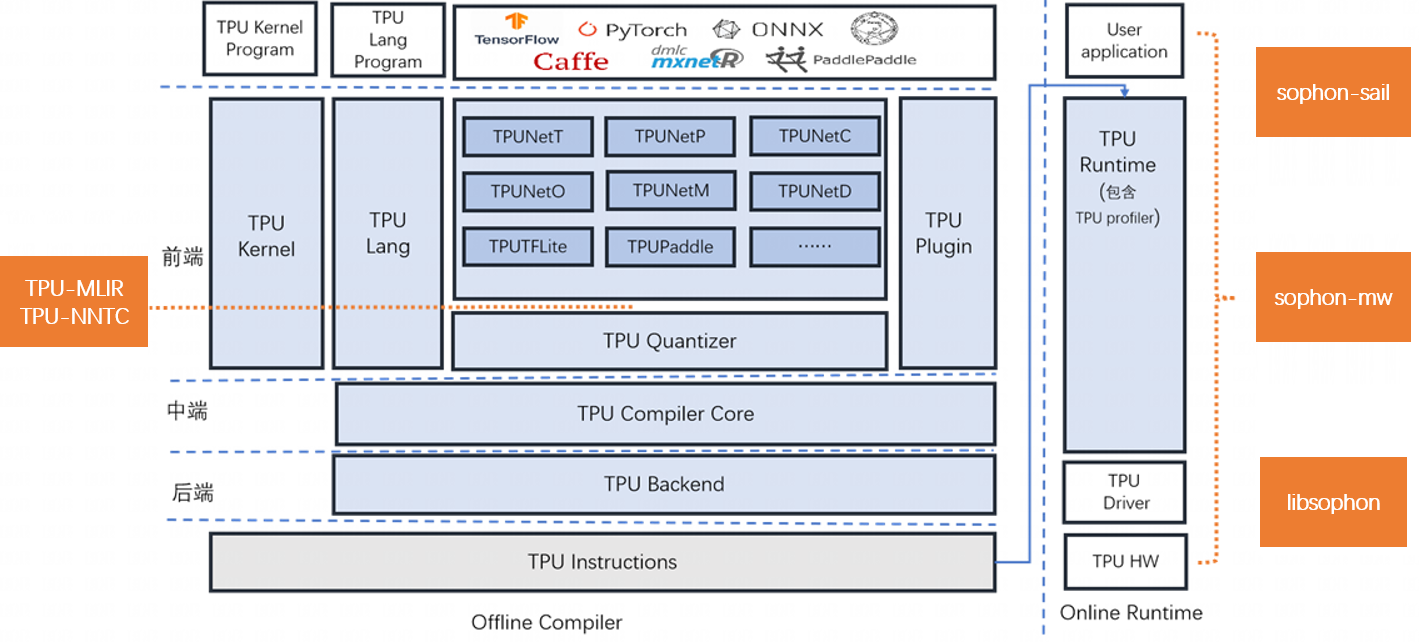
SOPHONSDK is a deep learning SDK customized by Sophgo Technologies based on BM1684 and BM1684X. It covers the capabilities required for neural network inference, including model optimization and efficient runtime support, providing an easy-to-use and efficient full-stack solution for deep learning application development and deployment.

1. Basic Tool Package

The basic tool package includes:

  • tpu-nntc: Responsible for offline compilation and optimization of neural network models trained in third-party deep learning frameworks, generating BModel files required for final runtime. Currently supports Caffe, Darknet, MXNet, ONNX, PyTorch, PaddlePaddle, TensorFlow, etc.
  • libsophon: Provides libraries such as BMCV, BMRuntime, and BMLib, used to drive VPP, intelligent vision deep learning processor modules, and other hardware, completing image processing, tensor operations, model inference, and other operations for deep learning application development.
  • sophon-mw: Encapsulates libraries such as SOPHON-OpenCV and SOPHON-FFmpeg, used to drive VPU, JPU, and other hardware, supporting RTSP stream and GB28181 stream parsing, video image encoding and decoding acceleration, for deep learning application development.
  • sophon-sail: Provides advanced Python/C++ interfaces, encapsulating underlying library interfaces such as BMRuntime, BMCV, sophon-mw, and BMLib, for deep learning application development.

2. Advanced Tool Package

The advanced tool package includes:

  • tpu-mlir: Provides a complete toolchain for the Tensor Processing Unit compiler project, converting pre-trained neural networks from different frameworks into BModel binary files that can run efficiently on Sophgo's intelligent vision deep learning processors. Currently directly supported frameworks include tflite, onnx, and Caffe.
  • tpu-perf: Provides a complete tool package for model performance and accuracy verification.
  • tpu-kernel: Tensor Processing Unit underlying development interface, which can not only call dedicated instructions to accelerate deep learning business logic but also call general instructions to implement various algorithm accelerations.

For details, refer to Sophgo Documentation

Remarks

  • sophon-demo: Provides comprehensive examples for single models or scenarios in both x86 and SoC environments, for reference during deep learning application development.
  • sophon-pipeline: Provides a simple high-performance inference framework based on pipeline, which can run preprocessing/inference/postprocessing on 3 threads respectively, maximizing parallel execution, for reference during deep learning application development.
TOOL

3. SOPHONSDK Folder Directory

FolderRemarks
libsophonLibraries for image processing, tensor operations, model inference, etc. with SOPHON device hardware acceleration
sophon-mwMultimedia library with SOPHON device hardware acceleration
tpu-kernelUnderlying development interface
tpu-mlirTensor Processing Unit compiler toolchain
tpu-nntcTensor Processing Unit compiler toolchain
tpu-perfModel performance and accuracy verification tool package
sophon-pipelineHigh-performance inference framework based on pipeline
sophon-imgSoC mode installation package
sophon-demoComprehensive examples for single models or scenarios
sophon-sailInterface library encapsulating underlying interfaces in C++/Python API
sophon-rpcOffloads some computing tasks to the ARM on the card in PCIe card products
docker-imageDocker image

4. SOPHONSDK Extracted Folder Directory

As follows:

    SOPHONSDK
    ├── docker-image
    │   ├── md5sum.txt
    │   ├── sophgo-tpuc_dev-v2.1-82d75f5c633d.tar.bz2
    │   └── sophgo-tpuc_dev-v2.2-f72913f3a83d.tar.bz2
    ├── libsophon_20240108_210425
    │   ├── BMCV Development Reference Manual.pdf
    │   ├── BMCV Technical Reference Manual.pdf
    │   ├── BMLIB Development Reference Manual.pdf
    │   ├── BMLib Technical Reference Manual.pdf
    │   ├── BMRUNTIME Development Reference Manual.pdf
    │   ├── BMRuntime Technical Reference Manual.pdf
    │   ├── centos
    │   ├── libsophon_0.4.9-LTS_aarch64.tar.gz
    │   ├── libsophon_0.4.9-LTS_loongarch64.tar.gz
    │   ├── libsophon_0.4.9-LTS_x86_64.tar.gz
    │   ├── LIBSOPHON User Manual.pdf
    │   ├── libsophon_dockerfile
    │   ├── libsophon.MD5
    │   ├── LIBSOPHON_User_Guide.pdf
    │   ├── release_version.txt
    │   ├── sophon-driver_0.4.9-LTS_amd64.deb
    │   ├── sophon-driver_0.4.9-LTS_arm64.deb
    │   ├── sophon-libsophon_0.4.9-LTS_amd64.deb
    │   ├── sophon-libsophon_0.4.9-LTS_arm64.deb
    │   ├── sophon-libsophon-dev_0.4.9-LTS_amd64.deb
    │   └── sophon-libsophon-dev_0.4.9-LTS_arm64.deb
    ├── sophon-demo_20231116_085900
    │   ├── release_version.txt
    │   ├── sophon-demo.MD5
    │   ├── sophon-demo_v0.1.8_dbb4632_20231116
    │   └── sophon-demo_v0.1.8_dbb4632_20231116.tar.gz
    ├── sophon-img_20240116_212937
    │   ├── bsp-debs
    │   ├── bsp_update.tgz
    │   ├── libsophon_soc_0.4.9-LTS_aarch64.tar.gz
    │   ├── release_version.txt
    │   ├── sdcard.tgz
    │   ├── SOPHON BSP Development Reference Manual.pdf
    │   ├── SOPHON_BSP_Technical_Reference_Manual.pdf
    │   ├── sophon-img.MD5
    │   ├── system.tgz
    │   └── tftp.tgz
    ├── sophon-mw_20240116_152830
    │   ├── MULTIMEDIA FAQ Manual.pdf
    │   ├── MULTIMEDIA Development Reference Manual.pdf
    │   ├── MULTIMEDIA User Manual.pdf
    │   ├── Multimedia FAQ.pdf
    │   ├── Multimedia Technical Reference Manual.pdf
    │   ├── Multimedia User Guide.pdf
    │   ├── release_version.txt
    │   ├── sophon-mw_0.8.0_aarch64.tar.gz
    │   ├── sophon-mw_0.8.0_loongarch64.tar.gz
    │   ├── sophon-mw_0.8.0_x86_64.tar.gz
    │   ├── sophon-mw.MD5
    │   ├── sophon-mw-soc_0.8.0_aarch64.tar.gz
    │   ├── sophon-mw-soc-sophon-ffmpeg_0.8.0_arm64.deb
    │   ├── sophon-mw-soc-sophon-ffmpeg-dev_0.8.0_arm64.deb
    │   ├── sophon-mw-soc-sophon-opencv_0.8.0_arm64.deb
    │   ├── sophon-mw-soc-sophon-opencv-dev_0.8.0_arm64.deb
    │   ├── sophon-mw-soc-sophon-sample_0.8.0_arm64.deb
    │   ├── sophon-mw-sophon-ffmpeg_0.8.0_amd64.deb
    │   ├── sophon-mw-sophon-ffmpeg_0.8.0_amd64.rpm
    │   ├── sophon-mw-sophon-ffmpeg_0.8.0_arm64.deb
    │   ├── sophon-mw-sophon-ffmpeg_0.8.0_arm64.rpm
    │   ├── sophon-mw-sophon-ffmpeg_0.8.0_loongarch64.deb
    │   ├── sophon-mw-sophon-ffmpeg-dev_0.8.0_amd64.deb
    │   ├── sophon-mw-sophon-ffmpeg-dev_0.8.0_amd64.rpm
    │   ├── sophon-mw-sophon-ffmpeg-dev_0.8.0_arm64.deb
    │   ├── sophon-mw-sophon-ffmpeg-dev_0.8.0_arm64.rpm
    │   ├── sophon-mw-sophon-ffmpeg-dev_0.8.0_loongarch64.deb
    │   ├── sophon-mw-sophon-opencv_0.8.0_amd64.deb
    │   ├── sophon-mw-sophon-opencv_0.8.0_arm64.deb
    │   ├── sophon-mw-sophon-opencv_0.8.0_loongarch64.deb
    │   ├── sophon-mw-sophon-opencv-abi0_0.8.0_amd64.rpm
    │   ├── sophon-mw-sophon-opencv-abi0_0.8.0_arm64.rpm
    │   ├── sophon-mw-sophon-opencv-abi0-dev_0.8.0_amd64.rpm
    │   ├── sophon-mw-sophon-opencv-abi0-dev_0.8.0_arm64.rpm
    │   ├── sophon-mw-sophon-opencv-dev_0.8.0_amd64.deb
    │   ├── sophon-mw-sophon-opencv-dev_0.8.0_arm64.deb
    │   ├── sophon-mw-sophon-opencv-dev_0.8.0_loongarch64.deb
    │   ├── sophon-mw-sophon-sample_0.8.0_amd64.deb
    │   ├── sophon-mw-sophon-sample_0.8.0_amd64.rpm
    │   ├── sophon-mw-sophon-sample_0.8.0_arm64.deb
    │   ├── sophon-mw-sophon-sample_0.8.0_arm64.rpm
    │   └── sophon-mw-sophon-sample_0.8.0_loongarch64.deb
    ├── sophon-rpc_20231208_174527
    │   ├── release_version.txt
    │   ├── sophon-rpc_3.2.0-LTS_amd64.deb
    │   ├── sophon-rpc_3.2.0-LTS_amd64.rpm
    │   ├── sophon-rpc_3.2.0-LTS_arm64.deb
    │   ├── sophon-rpc_3.2.0-LTS_arm64.rpm
    │   ├── sophon-rpc_3.2.0-LTS.tar.gz
    │   ├── sophon-rpc User Guide.pdf
    │   └── sophon-rpc.MD5
    ├── sophon-sail_20231116_085400
    │   ├── release_version.txt
    │   ├── sophon-sail_3.7.0.tar.gz
    │   ├── sophon-sail_en.pdf
    │   ├── sophon-sail.MD5
    │   └── sophon-sail_zh.pdf
    ├── sophon-stream_20231116_011200
    │   ├── release_version.txt
    │   ├── sophon-stream.MD5
    │   └── sophon-stream_v0.0.4-rc4_10a8ed8_20231115.tar.gz
    ├── tpu-kernel_20231130_055600
    │   ├── release_version.txt
    │   ├── tpu-kernel-1684x_v3.1.7-520261d8-231130.tar.gz
    │   └── tpu-kernel.MD5
    ├── tpu-mlir_20231116_054500
    │   ├── release_version.txt
    │   ├── tpu-mlir.MD5
    │   └── tpu-mlir_v1.3.140-g3180ff37-20231116.tar.gz
    ├── tpu-nntc_20231130_054100
    │   ├── release_version.txt
    │   ├── tpu-nntc.MD5
    │   └── tpu-nntc_v3.1.9-29fa956b-231130.tar.gz
    └── tpu-perf_v1.2.37
        ├── tpu_perf-1.2.37-py3-none-manylinux2014_aarch64.whl
        ├── tpu_perf-1.2.37-py3-none-manylinux2014_x86_64.whl
        ├── tpu-perf-v1.2.37.tar.gz
        └── tpu-perf-v1.2.37.zip

5. SDK Main Modules

  • Hardware Driver and Runtime Library LIBSOPHON: Contains libraries such as BMCV, BMRuntime, BMLib, used to drive VPP, intelligent vision deep learning processors, and other hardware, completing image processing, tensor operations, model inference, and other operations.
  • Multimedia Library SOPHON-MW: SOPHON-OpenCV and SOPHON-FFmpeg with SOPHON device hardware acceleration, supporting RTSP stream and GB28181 stream parsing, video and image encoding and decoding.
  • Model Compilation and Quantization Tool Chain TPU-MLIR: Supports model conversion for Caffe, TFLite, ONNX and other frameworks; supports model quantization: original model -> MLIR Model -> FP32 BModel or original model -> MLIR Model -> cali_table -> INT8 BModel, while providing model_deploy.py quantization script.
  • Model Compilation and Quantization Tool Chain TPU-NNTC: Supports model conversion for Caffe, Tensorflow, Pytorch, MXNet, Darknet, Paddle Paddle, ONNX and other frameworks; supports model quantization: original model -> FP32 UModel -> INT8 UModel -> INT8 BModel, while providing auto-cali automatic quantization tool.
  • Tensor Operations and Image Processing Library BMCV: Color space conversion, scale transformation, affine transformation, projection transformation, linear transformation, drawing boxes, JPEG encoding, BASE64 encoding, NMS, sorting, feature matching.
  • Device Management BMLib: Basic Interface: Device handle management, memory management, data transfer, API sending and synchronization, A53 enable, power management, etc.
  • Sophgo Deep Learning Processing Acceleration Library SAIL: Advanced Python/C++ interface, encapsulating underlying library interfaces such as BMRuntime, BMCV, sophon-mw.
  • Custom Operator Advanced Programming Library BMLang: C++ based advanced programming library for SOPHON intelligent vision deep learning processors, decoupled from hardware information, no need to understand hardware architecture, using tensor data (bmlang::Tensor) and computing operations (bmlang::Operator) to write code, finally using bmlang::compile or bmlang::compile_with_check to generate BModels that can run on intelligent vision deep learning processors; also supports using the ARM processor in BM168X to implement operators not yet supported by intelligent vision deep learning processors.
  • Algorithm Parallel Acceleration Programming Library TPUKernel: Underlying programming interface based on SOPHON BM1684, BM1684X underlying atomic operation interfaces, requires users to be familiar with device hardware architecture and instruction set.
  • Model Performance and Accuracy Verification Tool TPUPerf: Can perform performance analysis and accuracy verification on models.

2. SDK Acquisition and Installation

For details

Obtaining v24.04.01 SDK

Installing v24.04.01 SDK

3. More Information

For details

Sophgo Documentation


Edit this page on GitHub
Last Updated:
Contributors: ZSL
Next
SOPHON-DEMO Introduction