
I2C Interface
1. I2C Pins
Two groups of I2C are available on the 40-pin header: i2c-5 and i2c-8.
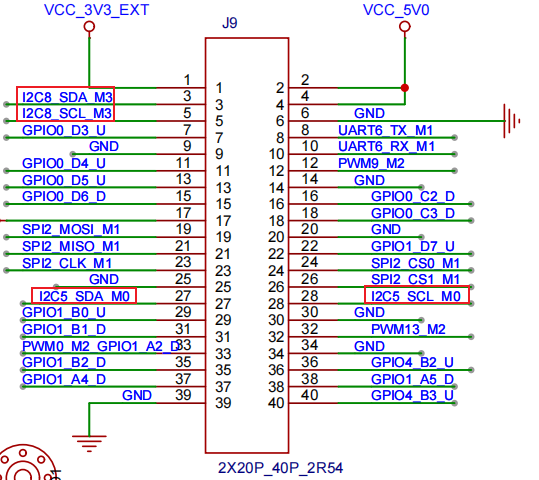
| I2C | Pin | Function |
|---|---|---|
| I2C5-SCL | 27 | I2C5 clock signal line |
| I2C5-SDA | 28 | I2C5 data line |
| I2C8-SCL | 3 | I2C8 clock signal line |
| I2C8-SDA | 5 | I2C8 data line |
2. Enabling the I2C Interface
You can enable both interfaces by modifying the device tree.
    &i2c5{
        status = "okay";
    };

    &i2c8{
        status = "okay";
    };
3. Attaching I2C Devices
When registering an I2C device, the i2c_client structure is required to describe it. In standard Linux, however, the user only needs to provide the corresponding I2C device information and Linux constructs the i2c_client structure based on that information.
The I2C device information provided by the user is written as a node into the DTS file, as shown below:
    &i2c5{
        nca9555:nca9555@20{
            reg=<0x20>;
            compatible = "novosense,nca9555";
            status="okay";
            gpio-controller;
            #gpio-cells = <2>;
        };
    };
The driver attaches the device by reading the node information from the DTS.
Note
The NCA9555 is a 24-pin CMOS device that provides 16-bit general-purpose parallel I2C-bus input/output GPIO expansion.
4. Checking I2C Devices
Use the following command to check whether the I2C bus has been enabled.
As shown:

5. I2C Testing Tools
The board ships with I2C test commands including i2cdetect, i2cdump, i2cset, and i2cget, used to scan devices on the I2C bus and read/write registers of a specific device.
For example, to check the devices on i2c5, the output looks like this:
    # i2cdetect -y 5
        0  1  2  3  4  5  6  7  8  9  a  b  c  d  e  f
    00:          -- -- -- -- -- -- -- -- -- -- -- -- --
    10: -- -- -- -- -- 15 -- -- -- -- -- -- -- -- -- --
    20: -- -- -- -- -- -- -- -- -- -- -- -- -- -- -- --
    30: -- -- -- -- -- -- -- -- -- -- -- -- -- -- -- --
    40: -- -- -- -- -- -- -- -- -- -- -- -- -- -- -- --
    50: -- UU -- -- -- -- -- -- -- -- -- -- -- -- -- --
    60: -- -- -- -- -- -- -- -- -- -- -- -- -- -- -- --
    70: -- -- -- -- -- -- -- --
Tips
Here "15" indicates a device with address 15 is present but its driver is not loaded, while UU means the driver for the device at address 50 has been loaded successfully.
Other common command usage examples:
    # Detect how many I2C buses the system has
    i2cdetect -l

    # Scan devices on the i2c-3 interface
    i2cdetect -a 3

    # Read the values of all registers of the specified device
    i2cdump -f -y 3 0x20

    # Read the value of a specific register of a specified I2C device, for example the register 0x01 of the device at address 0x68
    i2cget -f -y 3 0x20 0x01

    # Write the value of a specific register of a specified I2C device, for example setting register 0x01 of the device at address 0x68 to 0x6f
    i2cset -f -y 3 0x20 0x01 0x6f b