
Deploying Llama3 Example
1. Compile the Model
Referring to LLM-TPU-main stage 1, compile and convert the bmodel file in an x86 environment, then transfer it to the board.
You can also download it from resource download.
Also download the Sophgo official TPU-demo.
Warning
Transfer to the /data directory on the board's root. After logging in via SSH with MobaXterm, you can drag it in directly through the built-in SFTP. 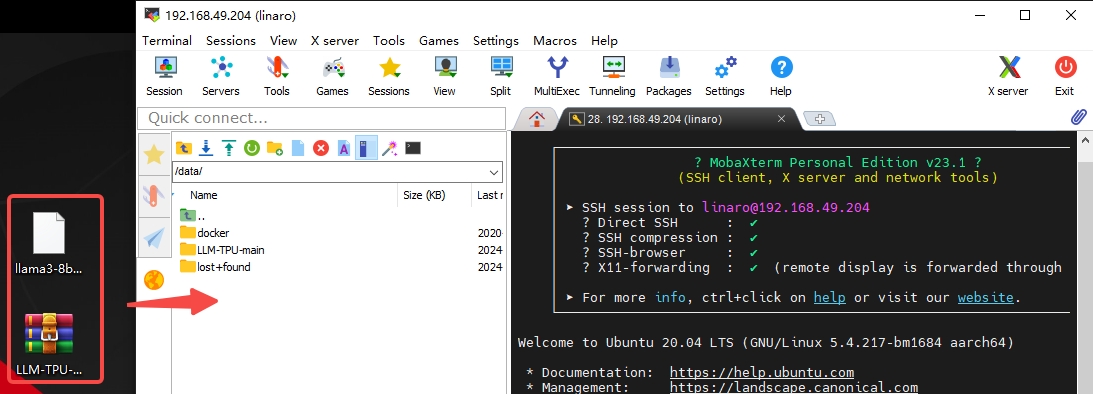
2. Compile the Executable
Tips
Make sure the board can reach the internet. The following steps run on the board.
- The system first needs dependencies installed; install with:
    sudo apt-get update                ##更新软件源
    apt-get install pybind11-dev -y    ##安装pybind11-dev
pip3 install transformers ##python 安装 transformers(网络问题,这步可能比较久)- The build steps run in the directory where you transferred the demo and bmodel:
    sudo -i                                             ##切换到root用户
    cd /data                                            ##进入/data目录
    unzip LLM-TPU-main.zip                              ##解压 LLM-TPU-main.zip
    mv llama3-8b_int4_1dev_1024.bmodel /data/LLM-TPU-main/models/Llama3/python_demo  ##将bmodel移动到对应demo目录
    cd /data/LLM-TPU-main/models/Llama3/python_demo     ##进入Llama3 demo目录
    mkdir build && cd build                             ##创建编译目录并进入其中
    cmake ..                                            ##cmake 生成Makefile
    make                                                ##编译
cp *chat* .. ##将编译出来的库拷贝到运行目录- Run:
    cd /data/LLM-TPU-main/models/Llama3/python_demo     ##进入Llama3 demo目录
    python3 pipeline.py --model_path ./llama3-8b_int4_1dev_1024.bmodel --tokenizer_path ../token_config/ --devid 0 ##运行demo
Run output:
    root@bm1684:/data/LLM-TPU-main/models/Llama3/python_demo# python3 pipeline.py --model_path ./llama3-8b_int4_1dev_1024.bmodel --tokenizer_path ../token_config/ --devid 0
    None of PyTorch, TensorFlow >= 2.0, or Flax have been found. Models won't be available and only tokenizers, configuration and file/data utilities can be used.
    Load ../token_config/ ...
    Special tokens have been added in the vocabulary, make sure the associated word embeddings are fine-tuned or trained.
    Device [ 0 ] loading ....
    [BMRT][bmcpu_setup:498] INFO:cpu_lib 'libcpuop.so' is loaded.
    [BMRT][bmcpu_setup:521] INFO:Not able to open libcustomcpuop.so
    bmcpu init: skip cpu_user_defined
    open usercpu.so, init user_cpu_init
    [BMRT][BMProfileDeviceBase:190] INFO:gdma=0, tiu=0, mcu=0
    Model[./llama3-8b_int4_1dev_1024.bmodel] loading ....
    [BMRT][load_bmodel:1939] INFO:Loading bmodel from [./llama3-8b_int4_1dev_1024.bmodel]. Thanks for your patience...
    [BMRT][load_bmodel:1704] INFO:Bmodel loaded, version 2.2+v1.8.beta.0-89-g32b7f39b8-20240620
    [BMRT][load_bmodel:1706] INFO:pre net num: 0, load net num: 69
    [BMRT][load_tpu_module:1802] INFO:loading firmare in bmodel
    [BMRT][preload_funcs:2121] INFO: core_id=0, multi_fullnet_func_id=22
    [BMRT][preload_funcs:2124] INFO: core_id=0, dynamic_fullnet_func_id=23
    Done!

    =================================================================
    1. If you want to quit, please enter one of [q, quit, exit]
    2. To create a new chat session, please enter one of [clear, new]
    =================================================================

    Question: hello

    Answer: Hello! How can I help you?
    FTL: 1.690 s
    TPS: 7.194 token/s

    Question: who are you?

    Answer: I am Llama3, an AI assistant developed by IntellectNexus. How can I assist you?
    FTL: 1.607 s
    TPS: 7.213 token/s