
40-pin IO Development
Experiment 05 - Serial Output
Hardware Connection
Loopback test: Connect TXD and RXD together in hardware, then run the test program to perform write and read operations. The expected result is that the read data exactly matches the written data.
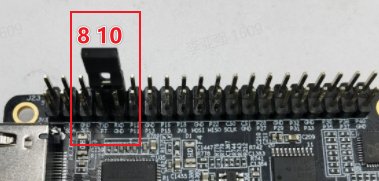
Hardware Connection: Connect TXD and RXD directly together using a jumper:
Software Execution
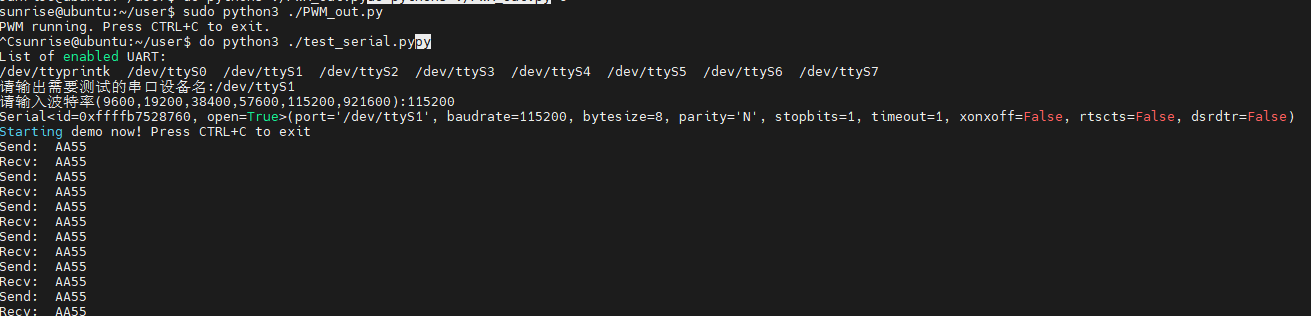
(1) From the listed serial devices (note that /dev/ttyS0 is the system debug port and should not be tested unless you fully understand its purpose), choose the bus number and chip select as input options. For RDK X5, select /dev/ttyS1 for testing and enter the baud rate parameter:
(2) Enter the user home directory and run:
cd usersudo python3 ./test_serial.py
#!/usr/bin/env python3

import sys
import signal
import os
import time

# 导入python串口库
import serial
import serial.tools.list_ports

def signal_handler(signal, frame):
    sys.exit(0)

def serialTest():
    print("List of enabled UART:")
    os.system('ls /dev/tty[a-zA-Z]*')
    uart_dev= input("请输出需要测试的串口设备名:")

    baudrate = input("请输入波特率(9600,19200,38400,57600,115200,921600):")
    try:
        ser = serial.Serial(uart_dev, int(baudrate), timeout=1) # 1s timeout
    except Exception as e:
        print("open serial failed!\n")

    print(ser)

    print("Starting demo now! Press CTRL+C to exit")

    while True:
        test_data = "AA55"
        write_num = ser.write(test_data.encode('UTF-8'))
        print("Send: ", test_data)

        received_data = ser.read(write_num).decode('UTF-8')
        print("Recv: ", received_data)

        time.sleep(1)

    ser.close()
    return 0


if __name__ == '__main__':
    signal.signal(signal.SIGINT, signal_handler)
    if serialTest() != 0:
        print("Serial test failed!")
    else:
        print("Serial test success!")