
HOME
Shop
  • English
  • 简体中文
HOME
Shop
  • English
  • 简体中文
  • Product Series

    • FPGA+ARM

      • GM-3568JHF

        • Introduction

          • GM-3568JHF Introduction
        • Quick Start

          • Preface
          • Environment Setup
          • Compilation Notes
          • Flashing Guide
          • Debugging Tools
          • Software Update
          • Viewing System Information
          • Test Commands
          • Application Compilation
          • Source Code Access
        • Peripherals & Interfaces

          • USB
          • Display and Touch
          • Ethernet
          • WIFI
          • Bluetooth
          • TF-Card
          • Audio
          • Serial Port
          • CAN
          • RTC
        • Application Development

          • UART Read/Write Demo
          • Key Detection Demo
          • LED Blink Demo
          • MIPI Screen Detection Demo
          • Read USB Device Information Demo
          • FAN Detection Demo
          • FPGA FSPI Communication Demo
          • FPGA DMA Read/Write Demo
          • GPS Debugging Demo
          • Ethernet Test Demo
          • RS485 Read/Write Demo
          • FPGA I2C Read/Write Demo
          • PN532 NFC Card-Reading Demo
          • TF Card Read/Write Demo
        • QT Development

          • ARM64 Cross-Compiler Environment Setup
          • Adding a QT Program to Boot Auto-Start
        • RKNN_NPU Development

          • RK3568 NPU Overview
          • Development Environment Setup
          • Run the Official YOLOv5 Example
        • FPGA Development

          • ARM and FPGA Communication
          • FPGA Development Manual
        • Others

          • Modifying the Root Filesystem
          • System Auto-Start Services
        • Downloads

          • Downloads
      • MB-E30P

        • Introduction

          • MB-E30P Introduction
        • Quick Start

          • Preface
          • Environment Setup
          • Compilation Instructions
          • Flashing Guide
          • Debugging Tools
          • Software Update
          • Viewing Information
          • Test Commands
          • Application Compilation
          • Source Code Acquisition
        • Peripherals & Interfaces

          • USB
          • Display and Touch
          • Ethernet
          • WIFI
          • Bluetooth
          • TF-Card
          • Audio
          • RTC
        • Application Development

          • Key Detection Demo
          • LED Blink Demo
          • MIPI Screen Detection Demo
          • Read USB Device Information Demo
          • FAN Detection Demo
          • FPGA FSPI Communication Demo
          • FPGA DMA Read/Write Demo
          • Ethernet Test Demo
          • FPGA IIC Read/Write Demo
          • PN532 NFC Card Reading Demo
          • TF Card Read/Write Demo
        • QT Development

          • ARM64 Cross-Compiler Environment Setup
          • Adding a QT Program to the Boot Auto-Start Service
        • RKNN_NPU Development

          • RK3568 NPU Overview
          • Development Environment Setup
          • Run the Official YOLOv5 Example
          • Model Conversion In Detail
          • Run Custom Models on the Board
        • FPGA Development

          • ARM and FPGA Communication
          • FPGA Development Manual
        • Others

          • Modifying the Root Filesystem
          • System Auto-Start Service
        • Downloads

          • Downloads
    • ShimetaPi

      • M4-R1

        • Introduction

          • M4-R1 Introduction
        • Quick Start

          • OpenHarmony Overview
          • Image Burning
          • Application Development Quick Start
          • Device Development Quick Start
        • Application Development

          • ArkUI

            • ArkTS Language Overview
            • UI Components - Row Container Introduction
            • UI Components - Column Container Introduction
            • UI Components - Text Component
            • UI Components - Toggle Component
            • UI Components - Slider Component
            • UI Components - Animation Component & Transition Component
          • Documentation

            • OpenHarmony Official Materials
          • Development Notes

            • Full-SDK Replacement Tutorial
            • Introducing and Using Third-Party Libraries
            • HDC Debugging
            • Restore Factory Mode via Command Line
            • Upgrade App to System Permission
          • First App

            • Build Your First ArkTS Application - HelloWorld
          • Demos

            • Serial-Debug-Assistant Application Demo
            • Writing-Board Application Demo
            • Digital Clock Application Demo
            • Wi-Fi Information Acquisition Application Demo
        • Device Development

          • Ubuntu Development

            • Environment Setup
            • Download Source Code
            • Compile Source Code
          • DevEco Device Tool

            • Tool Introduction
            • Development Environment Construction
            • Import the SDK
            • HUAWEI DevEco Tool Function Introduction
        • Kernel Peripherals & Interfaces

          • Guide
          • Device Tree Introduction
          • NAPI Introduction
          • ArkTS Introduction
          • NAPI Development Hands-on Demo
          • GPIO Introduction
          • I2C Communication
          • SPI Communication
          • PWM Control
          • UART Communication
          • TF Card (MicroSD)
          • Screen (Display)
          • Touch
          • Ethernet
          • M.2 SSD
          • Audio
          • WIFI & BT
          • Camera
        • Downloads

          • Downloads
      • M5-R1

        • Introduction

          • M5-R1 Development Docs
        • Quick Start

          • Image Burning
          • Environment Setup
          • Download Source Code
        • Peripherals & Interfaces

          • Raspberry Pi Interfaces
          • GPIO Interface
          • I2C Interface
          • SPI Communication
          • PWM Control
          • Serial Port Communication
          • TF Card
          • Display
          • Touch
          • Audio
          • RTC
          • Ethernet
          • M.2
          • MINI-PCIE
          • Camera
          • WIFI & BT
        • Downloads

          • Downloads
      • Pico-G1

        • Product Overview

          • Product Introduction
          • SDK Version Information
        • Quick Start

          • Development Environment Setup
          • Image Build
          • Image Flashing
          • System Login
          • Network Configuration
          • File Transfer
          • SDK Directory Structure
          • Deploying Your First Application
          • Deploying Your First Driver
          • Mounting an SD Card
        • Peripherals & Interfaces

          • GPIO Control
          • UART Serial Communication
          • I2C Communication
          • SPI Communication
        • MPP Media Development

          • MPP Media Processing Software
          • Image Processing Chain
          • Video Input
          • Image Encoding
        • NPU & AI

          • NPU Driver and Runtime Library Architecture
          • .xmm Model Loading
          • SVP Video Processing
          • AI Noise Reduction (AI_NR)
        • Application Samples

          • Encryption/Decryption Application
          • ADC Acquisition Application
          • Low-Power Application
          • Audio Processing Application
          • Video Encoding Application
          • Video Input Application
          • Video Graphics Subsystem (VGS) Application
          • 08 Region Overlay Application
          • 09 Intelligent Video Engine Application
          • 10 UVC Webcam Application
          • 11 All-in-One Quickstart Application
          • 12 FPN Correction Application
          • 13 Regional Motion Detection Application
          • 14 MTCNN Face Detection Application
        • Expansion Board Peripheral Examples

          • 00 - Pico Expansion Board Peripheral Examples Overview
          • 01 - OLED Display Application
          • 02 - TFT Display Application
          • 03 - MPU6050 Gyroscope Application
          • 04 - ADC Acquisition Application
          • 05 - Passive Buzzer Application
          • 06 - MQ Gas Sensor Application
          • 07 - GPS Positioning Application
          • 08 - SHT20 Temperature & Humidity Application
          • 09 - Ultrasonic Ranging Application
          • 10 - SpO2 Sensor Application
          • 11 - DC Motor Control Application
          • 12 - Servo Control Application
    • OpenHarmony

      • SC-3568HA

        • Introduction

          • SC-3568HA Overview
        • Quick Start Guide

          • OpenHarmony Overview
          • Image Flashing
          • Setting Up the Development Environment
          • Hello World Application and Deployment
        • Application Development

          • ArkUI

            • Introduction to ArkTS Language
            • Introduction to UI Components and Practical Applications (Part 1)
            • Introduction to UI Components and Practical Applications (Part 2)
            • Introduction to UI Components and Practical Applications (Part 3)
          • Expand

            • Getting Started Guide
            • Referencing and Using Third-Party Libraries
            • Application Compilation and Deployment
            • Command-Line Factory Reset
            • System Debugging -- HDC Debugging
            • APP Stability Testing
            • Chapter 7 Application Testing
        • Device Development

          • Environment Setup
          • Download Source Code
          • Compiling Source Code
        • Peripheral And Interface

          • Raspberry Pi interface
          • GPIO Interface
          • I2C Interface
          • SPI communication
          • PWM (Pulse Width Modulation) control
          • Serial port communication
          • TF Card
          • Display Screen
          • Touch
          • Audio
          • RTC
          • Ethernet
          • M.2
          • MINI-PCIE
          • Camera
          • WIFI&BT
          • Raspberry Pi expansion board
        • Downloads

          • Downloads
      • M-K1HSE

        • Introduction

          • M-K1HSE Introduction
        • Quick Start

          • Development environment construction
          • Source code acquisition
          • Compilation Notes
          • Burning Guide
        • Application Development

          • Application Development Environment Setup
          • First Application - Hello World
        • Peripherals and interfaces

          • 01 Audio
          • 02 RS485
          • 03 Display
        • System customization development

          • System transplant
          • System customization
          • Driver Development
          • System Debugging
          • OTA Update
        • Downloads

          • Downloads
    • HVS Camera

      • Quick Start

        • SDK Overview
        • Downloads
        • Your First C++ Program
        • Python Data Analysis
        • MultiVision Studio
      • Development

        • Programming Guides

          • Open Camera
          • Read Events
          • Recording & Replay
          • Event Processing (Denoising)
          • Display & Visualization
          • Tuning
          • Capture APS Image
        • Toolkit SDK

          • Hybrid Vision Toolkit
          • Quick Start
          • C++ API
          • Python API
        • Algorithm

          • Hybrid Vision Algo
          • Hybrid Vision Algo API
          • Windows Algo SDK
        • Samples Overview
        • Applications
      • Fundamentals

        • Event Camera Fundamentals
        • HVS Hybrid Vision
        • Event Visualization
        • Data Formats Reference
        • Glossary
        • Bias & Tuning
        • Video Tutorials
      • USB Cameras

        • HVS Camera Quick Start
        • Networking Capabilities

          • HVS Camera System Architecture
          • EVS Network Server
          • EVS Time Sync
          • Web Window
        • HVS Camera Compatibility Matrix
        • FAQ & Troubleshooting Guide
        • Products

          • CF-NRS1 (Lingguang No.1 Hybrid Vision Camera)
      • MIPI Modules

        • MIPI Module Quick Start
        • Carrier Boards

          • RDK X5 Carrier Board Adaptation
          • Raspberry Pi Carrier Board Adaptation
          • Digua Pi Carrier Board Adaptation
          • ShimeTai Board Carrier Board Adaptation
        • MIPI Module Compatibility Matrix
        • Products

          • EVS_003 Sensor Module
    • AI-model

      • 1684XB-32T

        • Introduction

          • AIBOX-1684XB-32 Introduction
        • Quick Start

          • First Use
          • Network Configuration
          • Disk Usage
          • Memory Allocation
          • Fan Control Strategy
          • Firmware Upgrade
          • Cross Compilation
          • Model Quantization
        • Application Development

          • Development Overview

            • Sophgo SDK Development
            • Sophgo Demo Introduction
          • Large Language Models

            • Deploying Llama3 Example
            • Sophon LLM_api_server Development
            • Deploying MiniCPM-V-2_6
            • Qwen-2-5-VL Image and Video Recognition Demo
            • Qwen3-chat Demo
            • Qwen3-Qwen Agent-MCP Development
            • Qwen3-langchain-AI Agent
          • Deep Learning

            • ResNet (Image Classification)
            • LPRNet (License Plate Recognition)
            • SAM (General Image Segmentation Foundation Model)
            • YOLOv5 (Object Detection)
            • OpenPose (Human Keypoint Detection)
            • PP-OCR (Optical Character Recognition)
        • Downloads

          • Downloads
      • 1684X-416T

        • Introduction

          • AIBOX-1684X-416 Introduction
        • Demo Quick Guide

          • ShimeTai Intelligent Monitoring Demo Quick Usage Guide
      • RDK-X5

        • Introduction

          • RDK-X5 Hardware Introduction
        • Quick Start

          • RDK-X5 Quick Start
        • Application Development

          • AI Online Model Development

            • Experiment 01 - Access Volcengine Doubao AI
            • Experiment 02 - Image Analysis
            • Experiment 03 - Multimodal Visual Analysis & Localization
            • Experiment 04 - Multimodal Image-Text Comparison
            • Experiment 05 - Multimodal Document/Table Analysis
            • Experiment 06 - Camera-based AI Visual Analysis
          • Large Language Models

            • Experiment 01 - Speech Recognition
            • Experiment 02 - Voice Conversation
            • Experiment 03 - Multimodal Image Analysis - Voice
            • Experiment 04 - Multimodal Image Comparison - Voice
            • Experiment 05 - Multimodal Document Analysis - Voice
            • Experiment 06 - Multimodal Vision Application - Voice
          • ROS2 Basics

            • Experiment 01 - Environment Setup
            • Experiment 02 - Create & Build a Workspace Package
            • Experiment 03 - Run ROS2 Topic Communication Node
            • Experiment 04 - ROS2 Camera Application
          • 40-pin IO Development

            • Experiment 01 - GPIO Output (LED Blink)
            • Experiment 02 - GPIO Input
            • Experiment 03 - Button-controlled LED
            • Experiment 04 - PWM Output
            • Experiment 05 - Serial Output
            • Experiment 06 - I2C Experiment
            • Experiment 07 - SPI Experiment
          • USB Module Usage

            • Experiment 01 - USB Voice Module Usage
            • Experiment 02 - Sound Source Localization Module
          • Machine Vision Practice

            • Experiment 01 - Open USB Camera
            • Experiment 02 - Color Recognition
            • Experiment 03 - Gesture Recognition
            • Experiment 04 - YOLOv5 Object Detection
      • RDK-S100

        • Introduction

          • RDK-S100 Hardware Introduction
        • Quick Start

          • RDK-S100 Quick Start
        • Application Development

          • AI Online Model Development

            • Experiment 01 - Access Volcengine Doubao AI
            • Experiment 02 - Image Analysis
            • Experiment 03 - Multimodal Visual Analysis & Localization
            • Experiment 04 - Multimodal Image-Text Comparison
            • Experiment 05 - Multimodal Document/Table Analysis
            • Experiment 06 - Camera-based AI Visual Analysis
          • Large Language Models

            • Experiment 01 - Speech Recognition
            • Experiment 02 - Voice Conversation
            • Experiment 03 - Multimodal Image Analysis - Voice
            • Experiment 04 - Multimodal Image Comparison - Voice
            • Experiment 05 - Multimodal Document Analysis - Voice
            • Experiment 06 - Multimodal Vision Application - Voice
          • ROS2 Basics

            • Experiment 01 - Environment Setup
            • Experiment 02 - Create & Build a Workspace Package
            • Experiment 03 - Run ROS2 Topic Communication Node
            • Experiment 04 - ROS2 Camera Application
          • 40-pin IO Development

            • Experiment 01 - GPIO Output (LED Blink)
            • Experiment 02 - GPIO Input
            • Experiment 03 - Button-controlled LED
            • Experiment 04 - PWM Output
            • Experiment 05 - Serial Output
            • Experiment 06 - I2C Experiment
            • Experiment 07 - SPI Experiment
          • USB Module Usage

            • Experiment 01 - USB Voice Module Usage
            • Experiment 02 - Sound Source Localization Module
          • Machine Vision Practice

            • Experiment 01 - Open USB Camera
            • Experiment 02 - Image Processing Basics
            • Experiment 03 - Object Detection
            • Experiment 04 - Image Segmentation
      • RK1828

        • Introduction

          • M5-182X-A1 AI Edge Box - Product Introduction
          • M5-182X-A1 Hardware Specifications
          • M5-182X-A1 Usage & Safety
        • Quick Start

          • M5-182X-A1 Image Flashing
          • RK182X Hardware Installation & Verification
          • RK182X Development Environment Quick Setup
          • RK182X SDK Overview
          • RK182X Environment Setup in Detail
          • RK182X Quick Start
          • Vendor SDK Data Extraction Record
        • Development Guide

          • ClawChips Architecture and Principles
          • SKILL User Manual
          • RK182X Series LLM Inference (RK1828 Model)
          • RK182X Series CNN Inference (RK1828 Model)
          • Model Conversion
          • RK182X AI Agent Application Development Guide
          • RK182X Industrial Anomaly Detection Application
        • SDK Reference

          • RKNN3-SDK Overview

            • RKNN3 SDK Overview
          • RKNN3-Toolkit

            • RKNN3 Toolkit Installation and Usage
          • RKLLM

            • RKLLM On-Device LLM Inference
          • RK182X Series NPU Overview and Architecture (RK1828 Model)
          • RK182X INT8 Quantized Inference Deployment
          • RK182X MPP Multimedia Framework
          • MPP Details

            • RK182X Video Decoding
            • RK182X Video Encoding
          • NPU Details

            • RKNN Model Conversion
            • RK182X NPU INT8 Quantized Inference
            • RK182X Multi-Model Parallel Inference
          • RGA Details

            • RK182X RGA 2D Graphics Acceleration
          • VPU Details

            • RK182X VPU Codec
        • Hardware Reference

          • RK182X Series Hardware Architecture Overview (RK1828 Model)
          • RK182X Pin Definitions and Multiplexing Configuration
          • RK182X Pin Definitions
          • RK182X Power Management
          • RK182X Clock and PLL Configuration
          • RK182X Clock and Frequency Configuration
        • Tutorials

          • Hello World
          • Hello RK1828 - The First Program
          • RTSP Streaming
          • RTSP Streaming + AI Analysis
          • ShiMetaPi AI Lobster One-Click Deployment
          • PaddleOCR-VL Text Recognition
          • Qwen3-1.7B LLM Text Chat
          • AI Multi-View Inspection (Qwen3-VL Wrapper)
          • YOLOv5 Object Detection
        • Downloads

          • Downloads
        • FAQ

          • FAQ
    • Core-Board

      • C-3568BQ

        • Introduction

          • C-3568BQ Overview
      • C-3588LQ

        • Introduction

          • C-3588LQ Overview
      • GC-3568JBAF

        • Introduction

          • GC-3568JBAF Overview
      • C-K1BA

        • Introduction

          • C-K1BA Overview
    • Software Platform

      • ShiMetaPi Workbench

        • Introduction

          • Product Overview
          • Core Architecture
          • Feature Entries
          • Supported Hardware
          • Release Notes
        • Quick Start

          • Install & Login
          • Connect the Device
          • Set Up the Environment
          • Connect to AIHub
          • First Inference
        • User Guide

          • Workspace Overview
          • Device Manager
          • Model Market
          • One-Click Deploy
          • Vision — SVP
          • Vision - Custom Models
          • shimeta-py IDE
          • Terminal
          • Agent Debug Assistant
          • Settings and Resources
        • FAQ

          • Installation & Login
          • Device Connection
          • Models & Deployment
          • Vision & Runtime
          • Settings & Other
      • ShimetaPi Repository

        • Introduction

          • ShimetaPi Software Repository
        • Pico G1 (GK7206)

          • Quick Start

            • Installation & First Inference
            • shimeta_infer — Image Inference
            • shimeta_camera — Real-time Camera Inference
            • SVP Scene Detection
            • File Transfer & Built-in Model Reference
            • FAQ
          • HTTP API & Python SDK

            • HTTP API Reference
      • Model Fine-tuning Platform

        • Introduction

          • Model Training Platform
        • Quick Start

          • Register & Login
          • Create Your First Model (30-Minute Quick Experience)
        • Training Guide

          • Data Preparation & Annotation
          • Training Parameter Configuration
          • Start & Monitor Training
          • Model Evaluation & Testing
        • Model Deployment

          • Export Model
          • Deploy to Edge Device

AI Online Development

Experiment 05 - Multimodal Document/Table Analysis

Experiment preparation:

  1. Ensure you have connected to Volcengine Doubao AI.
  2. Find a JPG image to use as the experiment material.
  3. Install python-docx with: pip install python-docx (this document uses Word document analysis as an example. To analyze Excel or other files, follow the terminal prompts.)

Experiment steps:

  1. cd AI_online # Enter the main directory
  2. python examples/04_document_analyzer.py # Run the example program

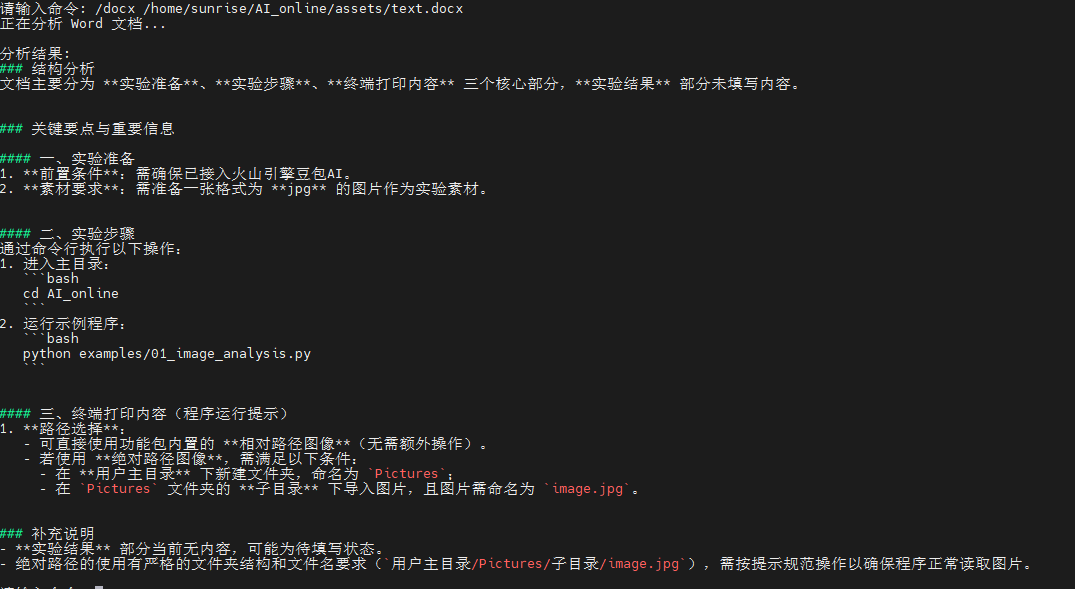
Sample command: /docx /home/sunrise/AI_online/assets/text.docx

Terminal output:
TOOL
"""
文档分析器示例
专门用于分析文档、表格、图表等结构化内容
"""

import os
import sys
from typing import Dict, List, Optional
try:
    import docx
except ImportError:
    docx = None
try:
    import openpyxl
except ImportError:
    openpyxl = None

# 添加父目录到路径
sys.path.append(os.path.dirname(os.path.dirname(os.path.abspath(__file__))))

from utils.api_client import DoubaoAPIClient
from utils.image_processor import ImageProcessor

class DocumentAnalyzer:
    """文档分析器"""

    def __init__(self):
        """初始化分析器"""
        try:
            self.client = DoubaoAPIClient()
            self.processor = ImageProcessor()

            # 预定义的分析模板
            self.analysis_templates = {
                "ocr": "请识别并提取这个文档中的所有文字内容,保持原有的格式和结构。",
                "table": "请分析这个表格的结构和内容,并以结构化的方式描述表格数据。",
                "chart": "请分析这个图表,包括图表类型、数据趋势、关键信息等。",
                "form": "请识别这个表单的字段和内容,并整理成结构化格式。",
                "invoice": "请分析这张发票,提取关键信息如金额、日期、商品等。",
                "contract": "请分析这份合同文档,提取关键条款和重要信息。",
                "report": "请分析这份报告,总结主要内容和关键数据。",
                "presentation": "请分析这个演示文稿页面,提取主要观点和信息。"
            }

            print("文档分析器初始化成功")

        except Exception as e:
            print(f"初始化失败: {e}")
            raise

    def analyze_document(self, image_path: str, doc_type: str = "auto",
                        custom_prompt: str = None) -> Optional[Dict]:
        """
        分析文档

        Args:
            image_path: 文档图像路径
            doc_type: 文档类型 (auto, ocr, table, chart, form, invoice, contract, report, presentation)
            custom_prompt: 自定义分析提示词

        Returns:
            Dict: 分析结果
        """
        try:
            # 验证图像
            if not self.processor.validate_image(image_path):
                return None

            # 获取图像信息
            image_info = self.processor.get_image_info(image_path)
            print(f"分析文档: {os.path.basename(image_path)}")
            print(f"   尺寸: {image_info.get('width')}x{image_info.get('height')}")

            # 确定分析提示词
            if custom_prompt:
                prompt = custom_prompt
            elif doc_type == "auto":
                prompt = self._auto_detect_prompt(image_path)
            else:
                prompt = self.analysis_templates.get(doc_type, self.analysis_templates["ocr"])

            print(f"分析类型: {doc_type}")
            print(f"分析提示: {prompt[:50]}...")

            # 执行分析
            result = self.client.chat_with_image_file(prompt, image_path)

            if result:
                return {
                    "file_path": image_path,
                    "file_name": os.path.basename(image_path),
                    "doc_type": doc_type,
                    "image_info": image_info,
                    "analysis_prompt": prompt,
                    "result": result,
                    "success": True
                }
            else:
                return {
                    "file_path": image_path,
                    "success": False,
                    "error": "分析失败"
                }

        except Exception as e:
            print(f"文档分析失败: {e}")
            return {
                "file_path": image_path,
                "success": False,
                "error": str(e)
            }

    def _auto_detect_prompt(self, image_path: str) -> str:
        """
        自动检测文档类型并生成提示词

        Args:
            image_path: 图像路径

        Returns:
            str: 分析提示词
        """
        # 基于文件名推测文档类型
        filename = os.path.basename(image_path).lower()

        if any(word in filename for word in ["table", "表格", "excel", "sheet"]):
            return self.analysis_templates["table"]
        elif any(word in filename for word in ["chart", "graph", "图表", "统计"]):
            return self.analysis_templates["chart"]
        elif any(word in filename for word in ["form", "表单", "申请"]):
            return self.analysis_templates["form"]
        elif any(word in filename for word in ["invoice", "发票", "账单"]):
            return self.analysis_templates["invoice"]
        elif any(word in filename for word in ["contract", "合同", "协议"]):
            return self.analysis_templates["contract"]
        elif any(word in filename for word in ["report", "报告", "总结"]):
            return self.analysis_templates["report"]
        elif any(word in filename for word in ["ppt", "slide", "演示", "幻灯片"]):
            return self.analysis_templates["presentation"]
        else:
            # 默认使用OCR
            return self.analysis_templates["ocr"]

    def extract_text(self, image_path: str) -> Optional[str]:
        """
        提取文档中的文字(OCR功能)

        Args:
            image_path: 文档图像路径

        Returns:
            str: 提取的文字内容
        """
        result = self.analyze_document(image_path, "ocr")
        return result["result"] if result and result["success"] else None

    def analyze_table(self, image_path: str) -> Optional[str]:
        """
        分析表格结构和内容

        Args:
            image_path: 表格图像路径

        Returns:
            str: 表格分析结果
        """
        result = self.analyze_document(image_path, "table")
        return result["result"] if result and result["success"] else None

    def analyze_chart(self, image_path: str) -> Optional[str]:
        """
        分析图表内容

        Args:
            image_path: 图表图像路径

        Returns:
            str: 图表分析结果
        """
        result = self.analyze_document(image_path, "chart")
        return result["result"] if result and result["success"] else None

    def analyze_word(self, file_path: str) -> Optional[str]:
        """
        分析 Word 文档内容(.docx)
        """
        try:
            if not os.path.exists(file_path):
                print(f"文件不存在: {file_path}")
                return None
            if not file_path.lower().endswith(".docx"):
                print("仅支持 .docx 格式的 Word 文档")
                return None
            if docx is None:
                print("未安装 python-docx,请先安装:pip install python-docx")
                return None
            document = docx.Document(file_path)
            paragraphs = [p.text.strip() for p in document.paragraphs if p.text.strip()]
            table_texts = []
            for table in document.tables:
                for row in table.rows:
                    cells = [cell.text.strip() for cell in row.cells]
                    if any(cells):
                        table_texts.append(" | ".join(cells))
            content = "\n".join(paragraphs)
            if table_texts:
                content += "\n\n表格内容:\n" + "\n".join(table_texts)
            if len(content) > 8000:
                content = content[:8000] + "\n...(内容已截断)"
            prompt = f"请分析以下 Word 文档内容,提取关键要点、结构和重要信息:\n\n{content}"
            result = self.client.chat_text(prompt)
            return result if result else None
        except Exception as e:
            print(f"Word 文档分析失败: {e}")
            return None

    def analyze_excel(self, file_path: str) -> Optional[str]:
        """
        分析 Excel 表格内容(.xlsx)
        """
        try:
            if not os.path.exists(file_path):
                print(f"文件不存在: {file_path}")
                return None
            if not file_path.lower().endswith(".xlsx"):
                print("仅支持 .xlsx 格式的 Excel 表格")
                return None
            if openpyxl is None:
                print("未安装 openpyxl,请先安装:pip install openpyxl")
                return None
            wb = openpyxl.load_workbook(file_path, data_only=True)
            ws = wb.active
            rows_data = []
            max_rows = 50
            max_cols = 20
            for r_idx, row in enumerate(ws.iter_rows(values_only=True), start=1):
                if r_idx > max_rows:
                    break
                cells = []
                for c_idx, cell in enumerate(row, start=1):
                    if c_idx > max_cols:
                        break
                    cells.append("" if cell is None else str(cell))
                rows_data.append(", ".join(cells))
            content = "\n".join(rows_data)
            prompt = f"请分析以下 Excel 表格的结构与数据,提取关键指标、趋势与异常,并给出简要总结:\n\n{content}"
            result = self.client.chat_text(prompt)
            return result if result else None
        except Exception as e:
            print(f"Excel 表格分析失败: {e}")
            return None

    def batch_analyze(self, folder_path: str, doc_type: str = "auto") -> List[Dict]:
        """
        批量分析文档

        Args:
            folder_path: 文档文件夹路径
            doc_type: 文档类型

        Returns:
            List[Dict]: 批量分析结果
        """
        results = []

        if not os.path.exists(folder_path):
            print(f"文件夹不存在: {folder_path}")
            return results

        # 支持的图像格式
        supported_formats = ['.jpg', '.jpeg']

        # 遍历文件夹
        files = [f for f in os.listdir(folder_path)
                if os.path.splitext(f.lower())[1] in supported_formats]

        if not files:
            print("文件夹中没有找到支持的图像文件(仅支持JPG/JPEG)")
            return results

        print(f"开始批量分析,共 {len(files)} 个文件")

        for i, filename in enumerate(files, 1):
            file_path = os.path.join(folder_path, filename)
            print(f"\n[{i}/{len(files)}] 分析文件: {filename}")

            result = self.analyze_document(file_path, doc_type)
            if result:
                results.append(result)
                if result["success"]:
                    print("分析成功")
                else:
                    print(f"分析失败: {result.get('error', '未知错误')}")
            else:
                print("分析失败")

        print(f"\n批量分析完成,成功: {sum(1 for r in results if r['success'])}/{len(results)}")
        return results

    def save_results(self, results: List[Dict], output_file: str = "analysis_results.txt"):
        """
        保存分析结果到文件

        Args:
            results: 分析结果列表
            output_file: 输出文件路径
        """
        try:
            with open(output_file, 'w', encoding='utf-8') as f:
                f.write("=== 文档分析结果 ===\n\n")

                for i, result in enumerate(results, 1):
                    f.write(f"[{i}] 文件: {result['file_name']}\n")
                    f.write(f"路径: {result['file_path']}\n")
                    f.write(f"类型: {result.get('doc_type', 'unknown')}\n")
                    f.write(f"状态: {'成功' if result['success'] else '失败'}\n")

                    if result['success']:
                        f.write(f"分析结果:\n{result['result']}\n")
                    else:
                        f.write(f"错误信息: {result.get('error', '未知错误')}\n")

                    f.write("-" * 50 + "\n\n")

            print(f"结果已保存到: {output_file}")

        except Exception as e:
            print(f"保存结果失败: {e}")

def main():
    """主函数"""
    print("=== 火山引擎文档分析器 ===")

    try:
        analyzer = DocumentAnalyzer()

        print("\n可用功能:")
        print("1. 单文档分析 - /analyze <文件路径> [类型]")
        print("2. 批量分析 - /batch <文件夹路径> [类型]")
        print("3. OCR提取 - /ocr <文件路径>")
        print("4. 表格分析 - /table <文件路径>")
        print("5. 图表分析 - /chart <文件路径>")
        print("6. 查看类型 - /types")
        print("7. 帮助信息 - /help")
        print("8. 退出程序 - /quit")
        print("9. Word 文档分析 - /docx <文件路径>")
        print("10. Excel 表格分析 - /xlsx <文件路径>")
        print("\n[路径提示] 可使用以下示例路径:")
        print("1. 绝对路径: C:\\Users\\Administrator\\Pictures\\image.jpg")
        print("2. 相对路径: assets\\sample.jpg")
        print("3. 当前目录: .\\assets\\sample.jpg")
        print("支持 JPG/JPEG(.jpg/.jpeg)、Word(.docx)、Excel(.xlsx) 文件")

        while True:
            try:
                user_input = input("\n请输入命令: ").strip()

                if not user_input:
                    continue

                parts = user_input.split(" ", 2)
                command = parts[0].lower()

                if command == "/quit":
                    print("感谢使用文档分析器!")
                    break

                elif command == "/help":
                    print("\n可用功能:")
                    print("1. 单文档分析 - /analyze <文件路径> [类型]")
                    print("2. 批量分析 - /batch <文件夹路径> [类型]")
                    print("3. OCR提取 - /ocr <文件路径>")
                    print("4. 表格分析 - /table <文件路径>")
                    print("5. 图表分析 - /chart <文件路径>")
                    print("6. 查看类型 - /types")
                    print("7. 帮助信息 - /help")
                    print("8. 退出程序 - /quit")
                    print("9. Word 文档分析 - /docx <文件路径>")
                    print("10. Excel 表格分析 - /xlsx <文件路径>")
                    print("\n[路径提示] 可使用以下示例路径:")
                    print("1. 绝对路径: C:\\Users\\Administrator\\Pictures\\image.jpg")
                    print("2. 相对路径: assets\\sample.jpg")
                    print("3. 当前目录: .\\assets\\sample.jpg")
                    print("支持 JPG/JPEG(.jpg/.jpeg)、Word(.docx)、Excel(.xlsx) 文件")
                    print("注意: 路径含空格请使用引号: /analyze \"C:\\My Pics\\a.jpg\"")
                    print("Word: /docx \"C:\\Docs\\test.docx\"  Excel: /xlsx \"C:\\Docs\\table.xlsx\"")

                elif command == "/analyze":
                    if len(parts) < 2:
                        print("用法:/analyze <文件路径> [类型]")
                        print("示例:/analyze assets\\sample.jpg auto")
                        continue

                    file_path = parts[1]
                    doc_type = parts[2] if len(parts) > 2 else "auto"

                    # 统一路径解析(项目根优先 + 当前目录)
                    project_root = os.path.dirname(os.path.dirname(os.path.abspath(__file__)))
                    candidate = os.path.join(project_root, file_path) if not os.path.isabs(file_path) else file_path
                    if not os.path.isabs(file_path):
                        if os.path.exists(candidate):
                            file_path = candidate
                        elif os.path.exists(file_path):
                            pass
                        else:
                            print(f"文件不存在: {file_path}")
                            print("路径示例:\n  - 绝对路径: C:\\Users\\Administrator\\Pictures\\a.jpg\n  - 相对路径: assets\\sample.jpg\n  - 当前目录: .\\assets\\sample.jpg\n  - 支持: JPG/JPEG(.jpg/.jpeg)、Word(.docx)、Excel(.xlsx)")
                            continue
                    elif not os.path.exists(file_path):
                        print(f"文件不存在: {file_path}")
                        continue

                    lower = file_path.lower()
                    if lower.endswith((".jpg", ".jpeg")):
                        print("正在分析图像...")
                        result = analyzer.analyze_document(file_path, doc_type)
                        if result and result["success"]:
                            print(f"\n分析结果:")
                            print(result["result"])
                        else:
                            print("分析失败")
                    elif lower.endswith(".docx"):
                        print("正在分析 Word 文档...")
                        result = analyzer.analyze_word(file_path)
                        if result:
                            print("\n分析结果:")
                            print(result)
                        else:
                            print("分析失败")
                    elif lower.endswith(".xlsx"):
                        print("正在分析 Excel 表格...")
                        result = analyzer.analyze_excel(file_path)
                        if result:
                            print("\n分析结果:")
                            print(result)
                        else:
                            print("分析失败")
                    else:
                        print("仅支持 JPG/JPEG(.jpg/.jpeg)、Word(.docx)、Excel(.xlsx) 文件")
                        continue

                elif command == "/batch":
                    if len(parts) < 2:
                        print("请提供文件夹路径: /batch <文件夹路径> [类型]")
                        continue

                    folder_path = parts[1].strip().strip('"').strip("'")
                    doc_type = parts[2] if len(parts) > 2 else "auto"

                    project_root = os.path.dirname(os.path.dirname(os.path.abspath(__file__)))
                    candidate = os.path.join(project_root, folder_path) if not os.path.isabs(folder_path) else folder_path
                    if not os.path.isabs(folder_path):
                        if os.path.isdir(candidate):
                            folder_path = candidate
                        elif os.path.isdir(folder_path):
                            pass
                        else:
                            print(f"文件夹不存在: {folder_path}")
                            print("路径示例:\n  - 绝对路径: C:\\Users\\Administrator\\Desktop\\AI\\assets\n  - 相对路径: assets\n  - 当前目录: .\\assets")
                            continue
                    elif not os.path.isdir(folder_path):
                        print(f"文件夹不存在: {folder_path}")
                        continue

                    # 批量分析支持的格式: 图片(JPG/JPEG)、Word(docx)、Excel(xlsx)
                    results = []
                    files = [f for f in os.listdir(folder_path)
                             if os.path.splitext(f.lower())[1] in [
                                 '.jpg', '.jpeg', '.docx', '.xlsx']]
                    if not files:
                        print("文件夹中没有找到支持的文件(支持 JPG/JPEG、DOCX、XLSX)")
                        continue

                    print(f"开始批量分析,共 {len(files)} 个文件")
Edit this page on GitHub
Prev
Experiment 04 - Multimodal Image-Text Comparison
Next
Experiment 06 - Camera-based AI Visual Analysis