
RDK-S100 Hardware Introduction
# RDK-S100 Hardware Introduction
## Overview
RDK-S100 is a development board designed for machine vision and robotics applications. It provides rich peripheral interfaces to meet the development requirements of cameras, sensors, displays, and communication scenarios. This document summarizes the commonly used hardware interfaces and basic operations to help you get started and debug quickly.
Interface Overview
- RDK S100
- RDK S100 Module
RDK S100 provides functional interfaces such as Ethernet, USB, camera, LCD, HDMI, CANFD, and 40PIN, making it easy for users to develop and test imaging multimedia and deep learning applications. The interface layout of the development board is shown below:
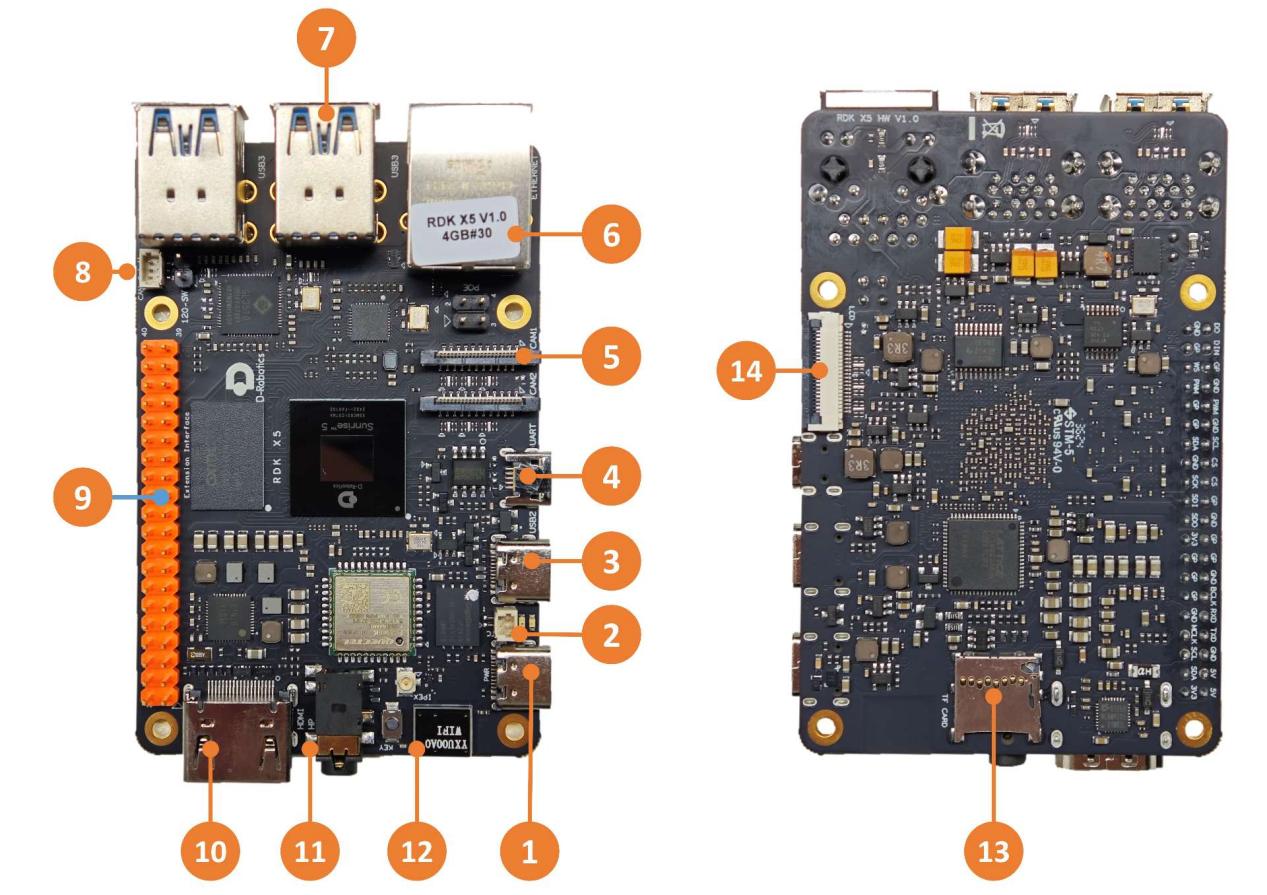
No. | Function | No. | Function | No. | Function |
|---|---|---|---|---|---|
1 | Power interface (USB Type C) | 2 | RTC battery interface | 3 | Flash connection interface (USB Type C) |
4 | Debug serial port (Micro USB) | 5 | 2x MIPI Camera interfaces | 6 | Gigabit Ethernet port, supports PoE |
7 | 4x USB 3.0 Type A ports | 8 | CAN FD high-speed interface | 9 | 40PIN interface |
10 | HDMI display interface | 11 | Multi-standard compatible headphone jack | 12 | Onboard Wi-Fi antenna |
13 | TF card slot (bottom side) | 14 | LCD display interface (MIPI DSI) |
Warning
When the RTC is powering the battery, the battery voltage and discharge current requirements are: 2~3.3V, >2.5uA. After boot, when the PMIC detects that the RTC voltage has dropped to the charging threshold, it will automatically charge the RTC. The battery requirements are: maximum withstand charging voltage >=3.3V, maximum allowable charging current >1mA. In addition, non-rechargeable RTC batteries cannot be used for power supply.
Core Module Interface
- RDK S100
- RDK S100 Module
Fully onboard design, no core module.
Power Interface
- RDK S100
- RDK S100 Module
The development board provides one USB Type C interface (interface 1) as the power supply interface. A power adapter supporting 5V/5A is required to power the board. After connecting the power adapter, the green power indicator lights up, indicating normal power supply. From version 3.1.0 onward, the orange status indicator blinks, indicating normal system operation.
Warning
Do not use a computer USB port to power the development board, otherwise insufficient power supply may cause abnormal power off or repeated reboots.
Debug Serial Port
- RDK S100
- RDK S100 Module
The development board provides one debug serial port (interface 4) for serial login and debugging. The PC serial tool parameters should be configured as follows:
- Baud rate: 115200
- Data bits: 8
- Parity: None
- Stop bits: 1
- Flow Control: None
For serial connection, use a Micro-USB cable to connect interface 4 of the board to the PC.
During kernel boot, the baud rate configuration is located in the /boot/boot.cmd file.
After modifying the serial configuration, regenerate the boot.scr file with the following command: mkimage -C none -A arm -T script -d boot.cmd boot.scr.
Typically, when using this interface for the first time, you need to install the CH340 driver on the PC. You can search for "CH340 serial driver" to download and install it.
Wired Ethernet Port
The development board provides one Gigabit Ethernet interface (interface 6), supporting 1000BASE-T and 100BASE-T standards. It uses a static IP mode by default, with the IP address 192.168.127.10. To confirm the board IP address, log in to the device via serial port and use the ifconfig command to view the eth0 configuration.
In addition, this interface supports PoE (Power over Ethernet), which can transmit data and power simultaneously over the network cable without an additional power cord, making device installation simpler and more flexible.
HDMI Display Interface
- RDK S100
- RDK S100 Module
The development board provides one HDMI display interface (interface 10), supporting up to 1080P resolution. Through the HDMI interface, the board outputs the Ubuntu desktop on a display (the Ubuntu Server version displays a logo). In addition, the HDMI interface supports real-time display of camera and network stream screens.
USB Interface
- RDK S100
- RDK S100 Module
The development board implements multi-port USB expansion through hardware circuits to meet the need for connecting multiple USB devices. The interfaces are described as follows:
Interface Type | Interface No. | Quantity | Description |
|---|---|---|---|
USB 2.0 Type C | Interface 3 | 1 | USB Device mode, used to connect to a host for ADB, Fastboot, system flashing, etc. |
USB 3.0 Type A | Interface 7 | 4 | USB Host mode, expands 4 USB ports through a HUB for connecting USB 3.0 peripherals |
Connecting a USB Drive
The USB Type A interface of the board supports USB drives. It can automatically detect USB drive insertion and mount it. The default mount directory is /media/sda1.
Connecting a USB Serial Adapter
The USB Type A interface supports USB serial adapters. It can automatically detect the adapter and create device nodes /dev/ttyUSB* or /dev/ttyACM* (the asterisk represents a number starting from 0).
USB Camera
The USB Type A interface supports USB cameras. It can automatically detect a USB camera and create the device node /dev/video0.
MIPI Camera Interface
- RDK S100
- RDK S100 Module
The development board provides 2x 22-pin MIPI CSI interfaces (interface 5) for connecting up to 2 MIPI cameras and supports binocular cameras. The board is currently adapted to several camera modules. The module models and specifications are as follows:
No. | Sensor | Resolution | FOV | I2C Device Address |
|---|---|---|---|---|
1 | IMX219 | 8MP | ||
2 | OV5647 | 5MP | ||
3 | IMX477 | 12.3MP |
The camera module is connected to the development board via a 22-pin same-direction ribbon cable. Insert the cable with the metal surface facing away from the black buckle into the connector.
After installation, you can use the i2cdetect command to confirm whether the module's I2C address can be detected.
Query the I2C device address of the Camera Sensor on the mipi_host0 interface near the Ethernet port:
echo 353 > /sys/class/gpio/export
echo out > /sys/class/gpio/gpio353/direction
echo 0 > /sys/class/gpio/gpio353/value
sleep 0.1
echo 1 > /sys/class/gpio/gpio353/value

i2cdetect -y -r 6
Query the I2C device address of the Camera Sensor on the mipi_host2 interface away from the Ethernet port:
echo 351 > /sys/class/gpio/export
echo out > /sys/class/gpio/gpio351/direction
echo 0 > /sys/class/gpio/gpio351/value
sleep 0.1
echo 1 > /sys/class/gpio/gpio351/value

i2cdetect -y -r 4
When the Camera Sensor I2C device address is successfully detected, you will see output like the following (taking probing IMX219 on interface mipi_host2 as an example, you can see address 10 is printed):
root@ubuntu:~# i2cdetect -y -r 4
0 1 2 3 4 5 6 7 8 9 a b c d e f
00: -- -- -- -- -- -- -- --
10: 10 -- -- -- -- -- -- -- -- -- -- -- -- -- -- --
20: -- -- -- -- -- -- -- -- -- -- -- -- -- -- -- --
30: -- -- -- -- -- -- -- -- -- -- -- -- -- -- -- --
40: -- -- -- -- -- -- -- -- -- -- -- -- -- -- -- --
50: -- -- -- -- -- -- -- -- -- -- -- -- -- -- -- --
60: -- -- -- -- -- -- -- -- -- -- -- -- -- -- -- --
70: -- -- -- -- -- -- -- --
Warning
Important: Never plug or unplug the camera while the board is powered on, otherwise the camera module can easily be damaged.
LCD Display Interface
- RDK S100
- RDK S100 Module
RDK S100 provides one MIPI DSI LCD display interface (interface 14) for connecting LCD displays. The interface is 22-pin and can use a DSI-Cable-12cm cable to connect directly to several Raspberry Pi LCD displays.
Micro SD Interface
- RDK S100
- RDK S100 Module
The development board provides one Micro SD card slot (interface 13). A card with at least 16GB capacity is recommended to meet the installation requirements of the Ubuntu operating system and related packages.
Warning
Do not hot-swap the TF card while the board is running, otherwise it may cause system malfunction or even damage the card's file system.
Wi-Fi Antenna Interface
- RDK S100
- RDK S100 Module
The board's wireless network supports both onboard and external antenna configurations. Under normal conditions, the onboard antenna is sufficient. When the board is installed in a metal enclosure, connect an external antenna (to the antenna port next to interface 12) to enhance signal strength.
CANFD Interface
- RDK S100
- RDK S100 Module
The RDK S100 board provides a CANFD interface (interface 8) and a CAN termination resistor switch (the 2-pin connector behind interface 8; high-speed communication requires enabling termination resistors at both ends to prevent signal reflection and improve anti-interference). It can be used for CAN and CAN FD communication. For details, please refer to the CAN Usage section.
40PIN Interface
- RDK S100
- RDK S100 Module
The RDK S100 board provides a 40PIN interface with IO signals using 3.3V level design. The pin definitions are compatible with Raspberry Pi and similar products. For detailed pin definitions and multiplexing, refer to the hardware development section.
Connector Models
- RDK S100
- RDK S100 Module
Connector | Model | Vendor | Description |
|---|---|---|---|
J1 | HDGC1002WV-S-2P | HDGC | RTC battery interface |
J14/J15 | AFC11-S22ICA-00 | JS | MIPI Camera interface |
J16 | AFC01-S22FCA-00 | JS | LCD display interface |
J18 | HDGC1002WV-S-3P | HDGC | CAN FD high-speed interface |
Interface Power Load Capacity
The following data shows the load current that a single interface can provide. When multiple interfaces are used simultaneously, performance may be affected.
- RDK S100
- RDK S100 Module
Interface | Load Capacity |
|---|---|
CAN interface | 500mA @ 3.3V |
DSI interface | 500mA @ 3.3V |
40Pin interface | 1A @ 3.3V / 1A @ 5V |
USB3 interface | 1A @ 5V |