
01 Environment Setup
To help developers quickly complete the development environment setup, we provide two methods: development environment setup and cross-compiler Docker image environment setup. Developers can choose one of them.
Tips
Note: We recommend developers to set up the Docker image environment to shorten the build time of the compilation environment.
1 Development Environment Setup
1.1 Prepare Development Environment
We recommend using Ubuntu 22.04 or higher versions for compilation. Other Linux versions may require corresponding adjustments to software packages. In addition to system requirements, there are other hardware and software requirements.
- Hardware requirements: 64-bit system, at least 8GB RAM, 100GB hard disk space. If you perform multiple builds, you will need larger hard disk space.
- Software requirements: Ubuntu 22.04 or higher version system.
1.2 Install Libraries and Tools
When using the command line for device development, you can install the libraries and tools required for compiling the SDK through the following steps. Use the following apt-get command to install the libraries and tools required for subsequent operations:
sudo apt-get update && sudo apt-get install git ssh make gcc libssl-dev \
liblz4-tool expect expect-dev g++ patchelf chrpath gawk texinfo chrpath \
diffstat binfmt-support qemu-user-static live-build bison flex fakeroot \
cmake gcc-multilib g++-multilib unzip device-tree-compiler ncurses-dev \
libgucharmap-2-90-dev bzip2 expat gpgv2 cpp-aarch64-linux-gnu libgmp-dev \
libmpc-dev bc python-is-python3 python2
Tips
Note: The installation command applies to Ubuntu 22.04. For other versions, please use the corresponding installation command according to the package name. If you encounter errors during compilation, you can install the corresponding software packages according to the error message. Among them:
- python requires version 3.6 or above, here python 3.6 is used as an example.
- make requires version 4.0 or above, here make 4.2 is used as an example.
- lz4 requires version 1.7.3 or above.
- Compiling Yocto requires a VPN network.
i Check and Upgrade Host Python Version
The method to check and upgrade the host python version is as follows:
- Check host python version
$ python3 --version
Python 3.10.6
If the requirement of python>=3.6 is not met, you can upgrade it in the following way:
- Upgrade to python 3.6.15 new version
PYTHON3_VER=3.6.15
echo "wget
https://www.python.org/ftp/python/${PYTHON3_VER}/Python-${PYTHON3_VER}.tgz"
echo "tar xf Python-${PYTHON3_VER}.tgz"
echo "cd Python-${PYTHON3_VER}"
echo "sudo apt-get install libsqlite3-dev"
echo "./configure --enable-optimizations"
echo "sudo make install -j8"
ii Check and Upgrade Host Make Version
The method to check and upgrade the host make version is as follows:
- Check host make version
$ make -v
GNU Make 4.2
Built for x86_64-pc-linux-gnu- Upgrade to make 4.2 new version
$ sudo apt update && sudo apt install -y autoconf autopoint
git clone https://gitee.com/mirrors/make.git
cd make
git checkout 4.2
git am $BUILDROOT_DIR/package/make/*.patch
autoreconf -f -i
./configure
make make -j8
sudo install -m 0755 make /usr/bin/make
iii Check and Upgrade Host LZ4 Version
The method to check and upgrade the host lz4 version is as follows:
- Check host lz4 version
$ lz4 -v
*** LZ4 command line interface 64-bits v1.9.3, by Yann Collet ***- Upgrade to lz4 new version
git clone https://gitee.com/mirrors/LZ4_old1.git
cd LZ4_old1
make
sudo make install
sudo install -m 0755 lz4 /usr/bin/lz4
2 VM Environment Setup
2.1 Download and Unzip Compressed Package
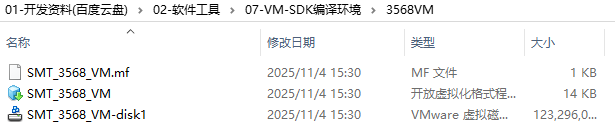
Download the compressed package from the cloud disk data and unzip it (the package is about 117G, pay attention to the disk space).
Tips
The compressed package is located in 01-Development Materials / 02-Software Tools / 07-VM-SDK Compilation Environment / 3568VM directory.
2.2 Import Files in VMware
Open VMware, click "File" in the upper left corner, and click "Open" in the drop-down menu:
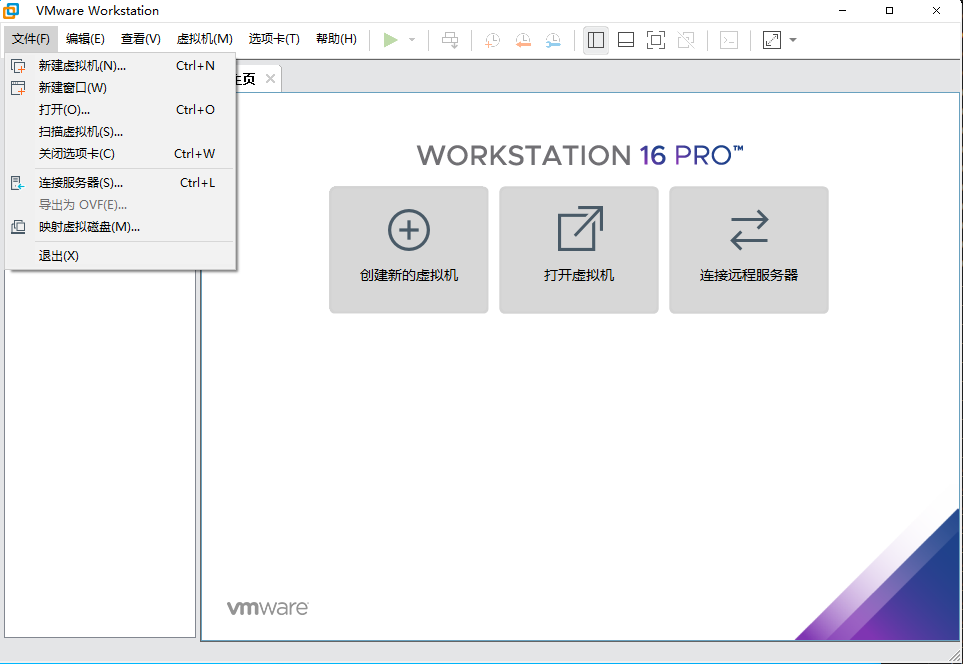
Enter the directory where the file is stored and select the SMT_3568_VM file:

2.3 SDK Auto Compilation Command
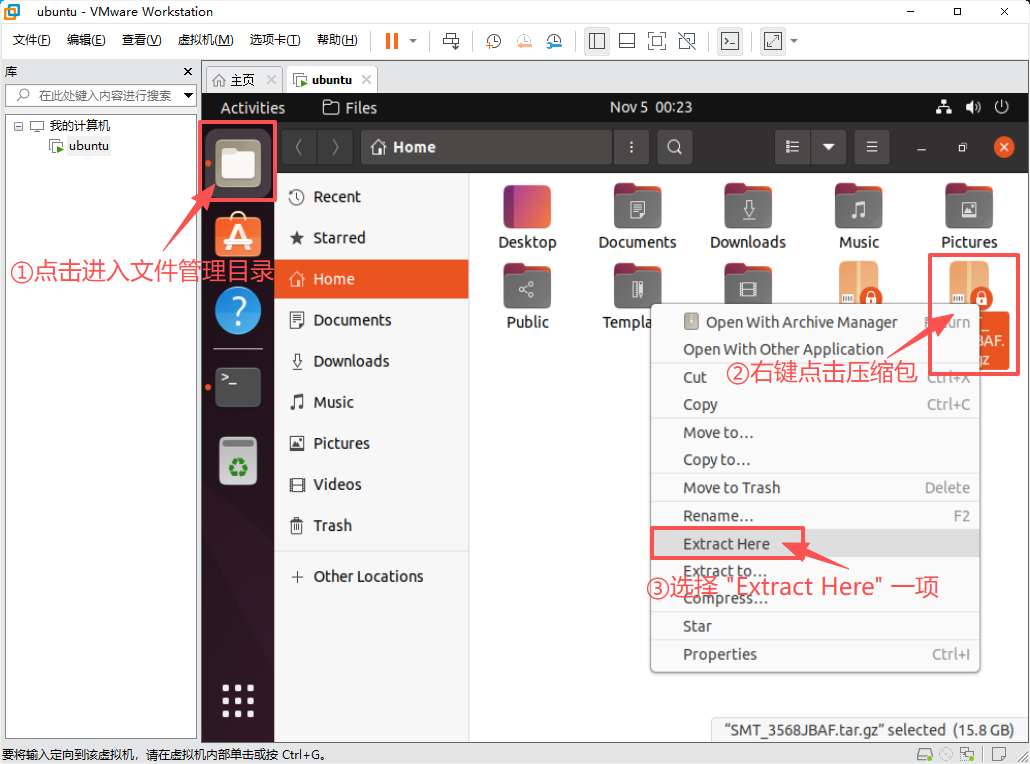
Wait for the import to complete (it takes some time, please be patient), start the ubuntu environment, enter the password "123456" to enter the virtual machine, then find the source code compressed package in the file management interface, right-click and select "Extract Here" to unzip to the current directory:
The interface after unzipping is as follows:
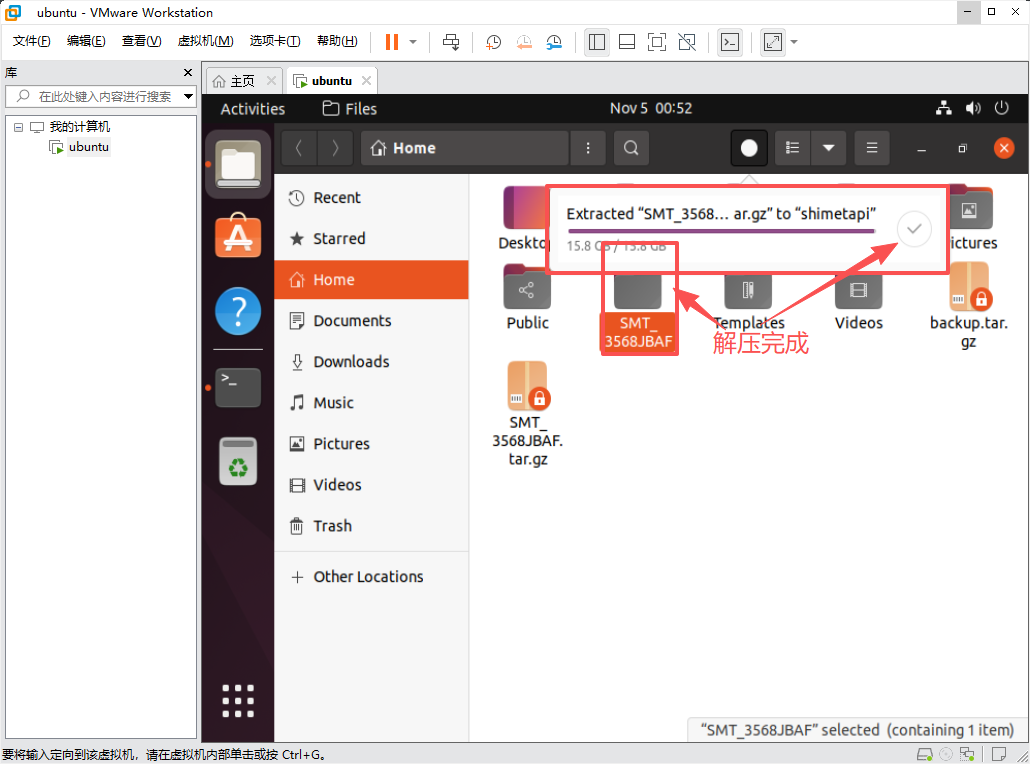
After the source code is unzipped, press "Ctrl + Alt + T" at the same time to enter the virtual machine terminal, enter the command to enter the unzipped directory, and start executing the "build.sh" script to compile the source code:
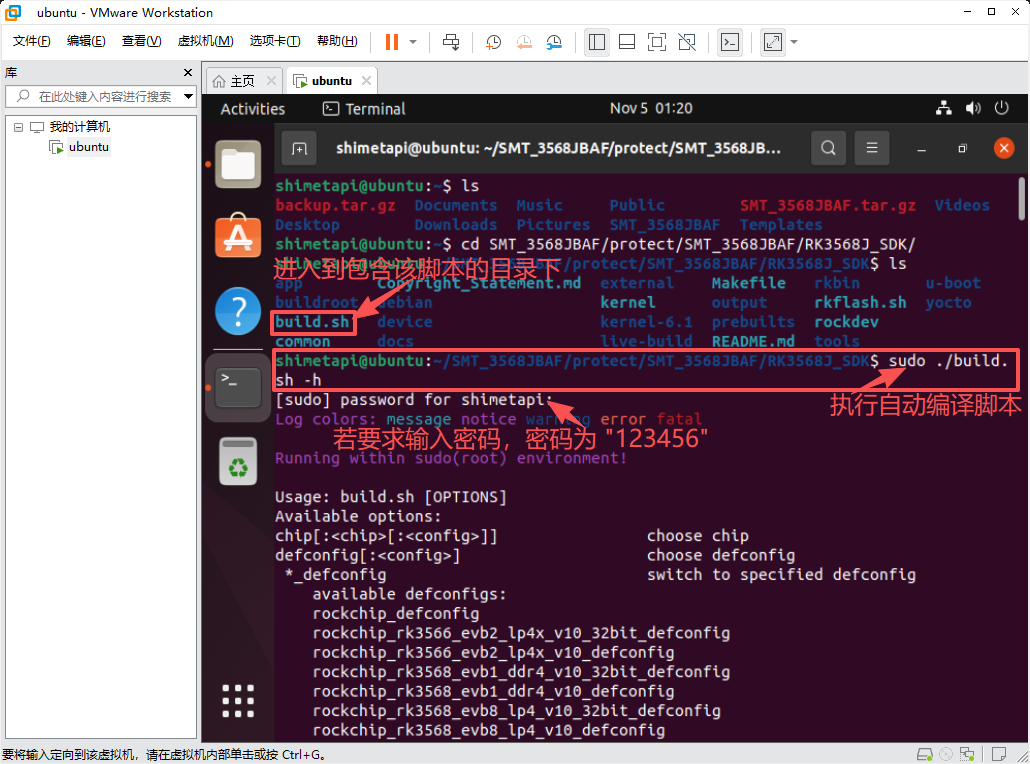
# View files or directories under the directory
ls
# Enter the specified directory
cd

# Query compilation help
sudo ./build.sh -h

# Enable multi-threading (optional)
export MAKEFLAGS="-j4"    #4: number of threads

# Specify Debian to enable automatic compilation
sudo RK_ROOTFS_SYSTEM=debian ./build.sh
Wait for the compilation to complete.