
OpenHarmony Overview
1. Project Introduction
OpenHarmony is an open-source project incubated and operated by the OpenAtom Foundation. The goal is to build a framework and platform for intelligent terminal device operating systems for the era of full-scene, full-connectivity, and full-intelligence, and to promote the prosperity and development of the Internet of Things industry through open-source approaches.
1.1 Technical Architecture
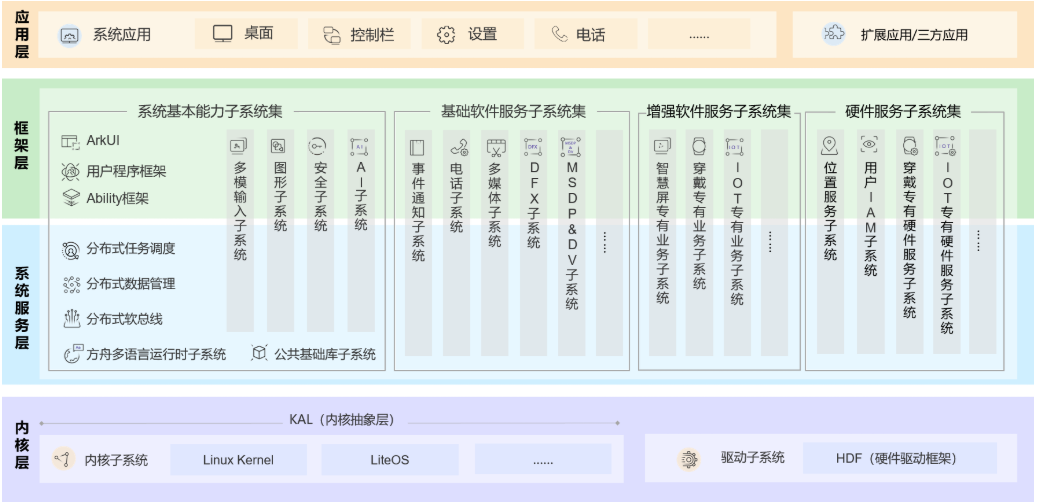
OpenHarmony follows a layered design from the bottom up: kernel layer, system service layer, framework layer, and application layer. System functions are organized by "system > subsystem > component", and in multi-device deployment scenarios, unnecessary components can be cropped according to actual needs. The OpenHarmony technical architecture is shown below.
1.1.1 Kernel Layer
Kernel Subsystem: Adopts a multi-kernel design (Linux kernel or LiteOS) to support different resource-constrained devices with appropriate OS kernels. The Kernel Abstract Layer (KAL) shields kernel differences and provides basic kernel capabilities to upper layers, including process/thread management, memory management, file system, network management, and peripheral management.
Driver Subsystem: The driver framework (HDF) is the foundation of the system's hardware ecosystem openness, providing unified peripheral access capabilities and driver development and management frameworks.
1.1.2 System Service Layer
The system service layer is the core capability set of OpenHarmony, providing services to applications through the framework layer. This layer includes the following parts:
System Basic Capability Subsystem Set: Provides basic capabilities for distributed applications running, scheduling, and migrating across multiple devices, consisting of subsystems such as distributed soft bus, distributed data management, distributed task scheduling, common foundation library, multi-modal input, graphics, security, and AI.
Basic Software Service Subsystem Set: Provides common and general software services, consisting of event notification, telephone, multimedia, DFX (Design For X), etc.
Enhanced Software Service Subsystem Set: Provides differentiated capability-enhanced software services for different devices, consisting of subsystems such as smart screen specific business, wearable specific business, and IoT specific business.
Hardware Service Subsystem Set: Provides hardware services, consisting of subsystems such as location services, user IAM, wearable specific hardware services, and IoT specific hardware services.
Note:
Depending on the deployment environment of different device forms, the Basic Software Service Subsystem Set, Enhanced Software Service Subsystem Set, and Hardware Service Subsystem Set can be cropped at the subsystem level, and each subsystem can also be cropped at the functional level.
1.1.3 Framework Layer
The framework layer provides C/C++/JS and other multi-language user program frameworks and Ability frameworks for application development, the ArkUI framework suitable for JS language, and multi-language framework APIs that open up various software and hardware services. Depending on the system's component cropping degree, the APIs supported by devices will also vary.
1.1.4 Application Layer
The application layer includes system applications and third-party non-system applications. An application consists of one or more FAs (Feature Abilities) or PAs (Particle Abilities). Among them, FA has a UI interface to provide interaction capabilities with users; while PA has no UI interface to provide background task execution capabilities and unified data access abstraction. Applications developed based on FA/PA can implement specific business functions, support cross-device scheduling and distribution, and provide users with a consistent and efficient application experience.
1.2 Technical Features
1.2.1 Hardware Collaboration, Resource Sharing
Distributed Soft Bus:
- The distributed soft bus is the unified foundation for multi-device terminals, providing unified distributed communication capabilities for seamless interconnection between devices, enabling quick discovery and connection of devices, and efficient transmission of tasks and data.
Distributed Data Management:
- Distributed data management, based on the distributed soft bus, implements distributed management of application data and user data. User data is no longer bound to a single physical device; business logic and data storage are separated; when applications run across devices, data connects seamlessly, creating the basic conditions for building a consistent and smooth user experience.
Distributed Task Scheduling:
- Distributed task scheduling, based on distributed soft bus, distributed data management, distributed Profile and other technical features, builds a unified distributed service management mechanism (discovery, synchronization, registration, invocation), supporting remote startup, remote invocation, binding/unbinding, and migration of applications across devices. It can select the most suitable device to run distributed tasks based on device capabilities, location, business running status, resource usage, combined with user habits and intentions.
Device Virtualization:
- The distributed device virtualization platform can implement resource integration, device management, and data processing of different devices, using peripheral devices as extensions of phone capabilities to form a super virtual terminal together.
1.2.2 Develop Once, Deploy to Multiple Terminals
OpenHarmony provides user program framework, Ability framework, and UI framework to ensure that developed applications maintain consistency when running on multiple terminals. Develop once, deploy to multiple terminals.
Multi-terminal software platform API has consistency to ensure runtime compatibility of user programs.
Supports previewing terminal capability adaptation during development (CPU/memory/peripheral/software resources, etc.).
Supports scheduling user presentations based on compatibility between user programs and software platforms.
1.2.3 Unified OS, Flexible Deployment
OpenHarmony, through componentization and flexible component design methods, achieves scalable hardware resources and flexible deployment among various terminal devices, comprehensively covering ARM, RISC-V, x86 and other CPUs, from hundreds of KiB to GiB level RAM.