
GPIO Interface
1. GPIO Overview
GPIO stands for General Purpose I/O — general-purpose input/output ports. Simply put, these are pins that an MCU/CPU can control. These pins typically support multiple functions; the most basic are high/low level input detection and output. Some pins are also bound to on-chip peripherals of the host controller, for example as communication pins for serial (UART), I2C, network, or voltage detection.
2. GPIO Naming
Rockchip pin IDs are composed of controller (bank) + port + pin index.
- The controller corresponds to the GPIO controller index.
- The port is fixed to A, B, C, and D, with each port having only 8 indices (a=0, b=1, c=2, d=3).
- The index is fixed to 0, 1, 2, 3, 4, 5, 6, 7.
The RK3568 has 5 GPIO controllers, each controlling 32 IOs. When used as GPIO functions, the port behavior is configured through GPIO controller registers.
Tips
GPIO1_A4 means controller group 1, port A, index 4. The pin number is computed as 32 x 1 + 0 x 8 + 4 = 36.
3. Controlling IO via the GPIO sysfs Interface
Command-line approach
In Linux, the most common way to read and write GPIOs is the GPIO sysfs interface. It works by manipulating files such as export, unexport, gpio{N}/direction, and gpio{N}/value (replace {N} with the actual pin number) under the /sys/class/gpio directory, and is frequently used in shell scripts. Starting with kernel 4.8, libgpiod is supported; the legacy sysfs-based access will be gradually deprecated.
Using M4-R1 as an example, three GPIOs are picked from the 40-pin header.
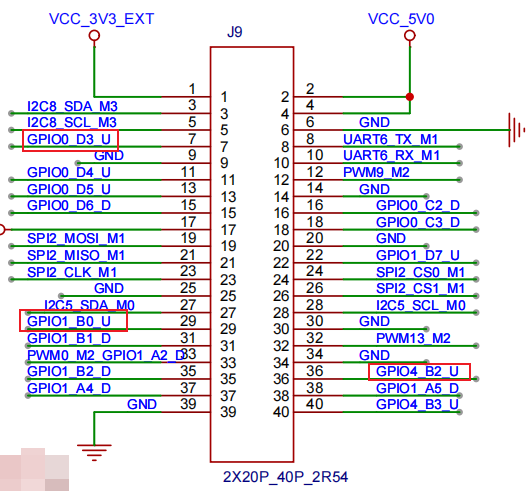
| Pin | Controller | Port | Index | Result | PIN |
|---|---|---|---|---|---|
| GPIO0_D3 | 0 | D | 3 | 27 (32 x 0 + 8 x 3 + 3) | 7 |
| GPIO1_B0 | 1 | B | 0 | 40 (32 x 1 + 8 x 1 + 0) | 29 |
| GPIO4_B2 | 4 | B | 2 | 138 (32 x 4 + 8 x 1 + 2) | 36 |
    # Note: if a driver has claimed this pin, it cannot be exported for user-space control this way.
    # Enable pin GPIO4_D2
    echo 138 > /sys/class/gpio/export

    # Set the pin to input mode
    echo in > /sys/class/gpio/gpio138/direction
    # Read the pin value
    cat /sys/class/gpio/gpio138/value

    # Set the pin to output mode
    echo out > /sys/class/gpio/gpio138/direction
    # Set the pin to low level
    echo 0 > /sys/class/gpio/gpio138/value
    # Set the pin to high level
    echo 1 > /sys/class/gpio/gpio138/value

    # Release the pin
    echo 138 > /sys/class/gpio/unexport