
40-pin IO Development
Experiment 02 - GPIO Input
Hardware Connection
Connect the button circuit to IO37 (dupont jumper wires can be used in place of a button).
Software Execution
Enter the user home directory and run:
cd usersudo python3 ./GPIO_input.py
Terminal output:
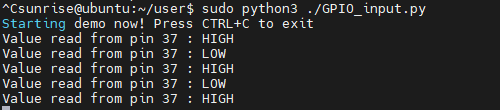
You will see the terminal output a low level when the button is pressed, and a high level when the button is released.
#!/usr/bin/env python3
import sys
import signal
import Hobot.GPIO as GPIO
import time

def signal_handler(signal, frame):
    sys.exit(0)

# 定义使用的GPIO通道为37
input_pin = 37 # BOARD 编码 37

GPIO.setwarnings(False)

def main():
    prev_value = None

    # 设置管脚编码模式为硬件编号 BOARD
    GPIO.setmode(GPIO.BOARD)
    # 设置为输入模式
    GPIO.setup(input_pin, GPIO.IN)

    print("Starting demo now! Press CTRL+C to exit")
    try:
        while True:
            # 读取管脚电平
            value = GPIO.input(input_pin)
            if value != prev_value:
                if value == GPIO.HIGH:
                    value_str = "HIGH"
                else:
                    value_str = "LOW"
                print("Value read from pin {} : {}".format(input_pin, value_str))
                prev_value = value
            time.sleep(1)
    finally:
        GPIO.cleanup()

if __name__=='__main__':
    signal.signal(signal.SIGINT, signal_handler)
    main()