
Digital Clock Application Demo
Through the study of the previous chapters, we have gained an initial understanding of some basic OpenHarmony components and layout methods. In this chapter, we will combine the use of multiple components through a complete digital-clock example to further consolidate what we have learned. This example will show how to use OpenHarmony's animation functions, state management, and components such as sliders and toggle switches, helping you better understand and apply the ArkUI framework.
1. Example Demo
Through the study of the previous chapters, we have a rough understanding of some basic components. For more information, you can visit the OpenHarmony official website to learn more.
We will implement a dynamic digital clock that can display the time updated in real time, and includes the following:
Core functions: dynamic time update: the flip effect of numbers is achieved through animation. Brightness adjustment: use a slider component to dynamically set the screen brightness. Full-screen mode switching: use a switch component to switch between full-screen mode and regular mode. Key components:
- Text: used to display clock digits.
- Slider: a slider used to adjust the screen brightness.
- Toggle: a switch used for full-screen switching. Animation function: implements the digit flip effect.
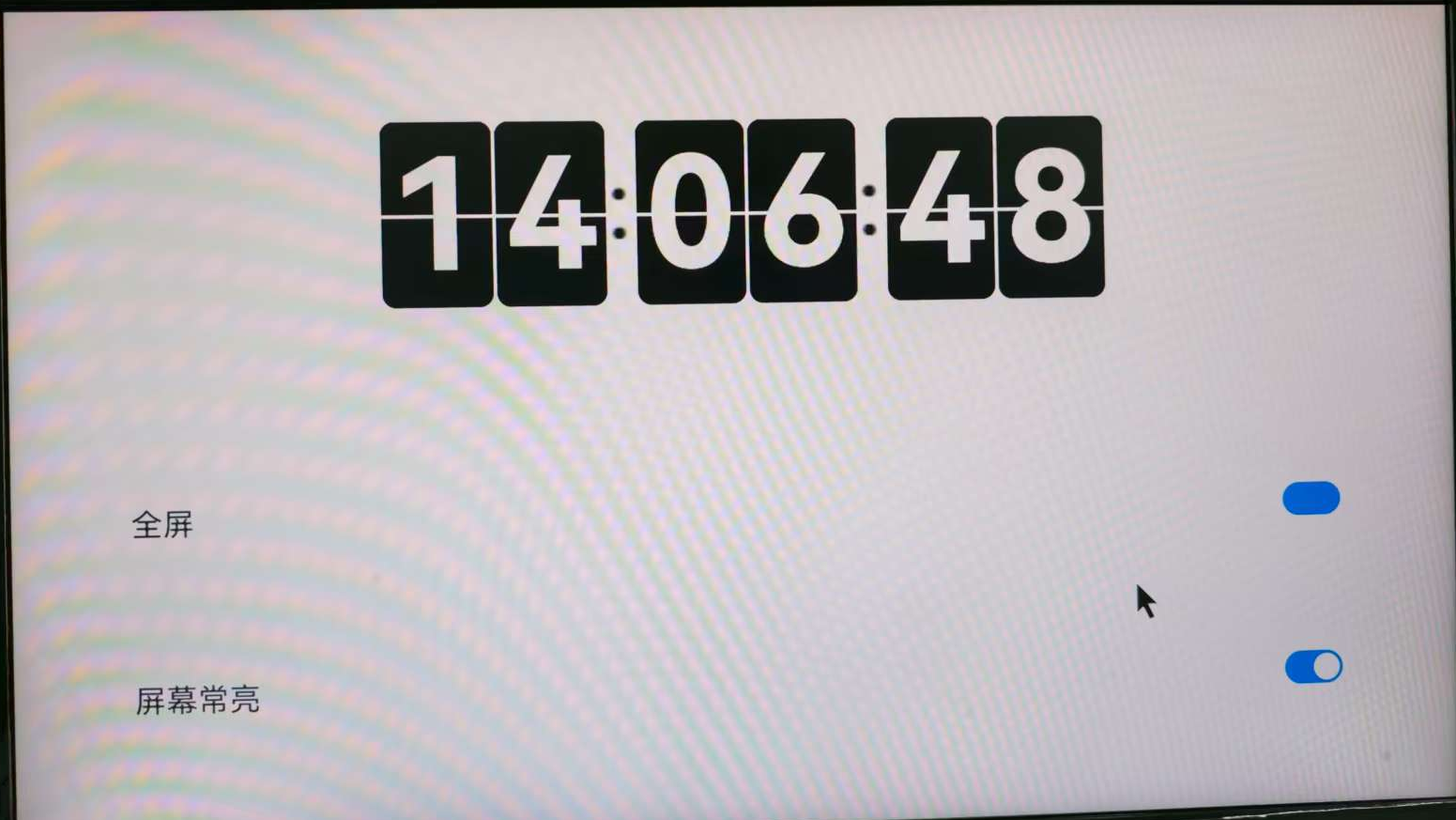
1.1 Main Part Code of the Digital Clock
//修改时间
changeTime(): Array<number> {
	const time = new Date()
	const hour = time.getHours()
	const hourOne = Math.floor(hour / 10)
	const hourTwo = hour % 10
	const minutesOne = Math.floor(time.getMinutes() / 10)
	const minutesTwo = time.getMinutes() % 10
	const secondsOne = Math.floor(time.getSeconds() / 10)
	const secondsTwo = time.getSeconds() % 10
	return [hourOne, hourTwo, minutesOne, minutesTwo, secondsOne, secondsTwo]
}

@Builder box(num : number) {
	Column() {
	  Divider()
		.zIndex(5)
		.strokeWidth(2)
		.color(Color.White)
		.position({ x: 0, y: '50%' })

		Text(`${this.timeOne[num]}`)
			.zIndex(1)
			.height(108)
			.width('100%')
			.borderRadius(8)
			.fontWeight(700)
			.padding({ top: 0 })
			.fontSize(90)
			.position({ x: 0, y: 0 })
			.fontColor(Color.White)
			.fontFamily('Monospace')
			.backgroundColor($r('app.color.text_bg'))
			.textAlign(TextAlign.Center)

		Text(`${this.timeTwo[num]}`)
			.zIndex(2)
			.height(64)
			.width('100%')
			.fontWeight(700)
			.borderRadius(8)
			.padding({ top: 3 })
			.fontSize(90)
			.position({ x: 0, y: 0 })
			.fontColor(Color.White)
			.fontFamily('Monospace')
			.backgroundColor($r('app.color.text_bg'))
			.textAlign(TextAlign.Center)

		Text(`${this.timeThree[num]}`)
			.zIndex(4)
			.height(64)
			.width('100%')
			.fontWeight(700)
			.borderRadius(8)
			.padding({ top: 3 })
			.fontSize(90)
			.position({ x: 0, y: 0 })
			.fontColor(Color.White)
			.fontFamily('Monospace')
			.textAlign(TextAlign.Center)
			.backgroundColor($r('app.color.text_bg'))
			.rotate({
			  x: 1,
			  y: 0,
			  z: 0,
			  centerX: '50%',
			  centerY: '100%',
			  angle: this.angleOne[num]
			})

		Text(`${this.timeFour[num]}`)
			.zIndex(3)
			.height(108)
			.width('100%')
			.fontWeight(700)
			.borderRadius(8)
			.padding({ top: 0 })
			.fontSize(90)
			.position({ x: 0, y: 0 })
			.fontColor(Color.White)
			.fontFamily('Monospace')
			.backgroundColor($r('app.color.text_bg'))
			.textAlign(TextAlign.Center)
			.rotate({
			  x: 1,
			  y: 0,
			  z: 0,
			  centerX: '50%',
			  centerY: '50%',
			  angle: this.angleTwo[num]
			})
	}
	.height(108)
	.width('50%')
}
1.2 Animation Rotation Part Code
animationOne(i : number): void {
	animateTo({
		duration: 250,
		delay: 0,
		iterations: 1,
		onFinish: () => {
			this.animationTwo(i)
			this.angleOne[i] = 0
		}
	}, () => this.angleOne[i] = 90)
}

animationTwo(i : number): void {
	animateTo({
		duration: 250,
		delay: 0,
		iterations: 1,
		onFinish: () => {
			this.angleTwo[i] = -90
		}
	}, () => this.angleTwo[i] = 0)
}
1.3 Full-Screen Part Code
this.isFullScreen = !this.isFullScreen
  try {
		let win = await window.getLastWindow(getContext(this))
		let names = this.isFullScreen ? [] : ['status', 'navigation']
		await win.setWindowSystemBarEnable(names as Array<'status' | 'navigation'>)
	}
2. Complete Code Listing
import { brightness } from '@kit.BasicServicesKit';
import { LockSwitch } from './LockSwitch';
import { window } from '@kit.ArkUI';

@Entry
@Component
struct Index {
	@State message: string = 'Hello World';
	@State timeOne: Array<number> = []
	@State timeTwo: Array<number> = []
	@State timeThree: Array<number> = []
	@State timeFour: Array<number> = []
	@State angleOne: Array<number> = [0, 0, 0, 0, 0, 0]
	@State angleTwo: Array<number> = [-90, -90, -90, -90, -90, -90]

	@State isFullScreen: boolean = false
	@State inSetValue: number = 40


	aboutToAppear() {
		const arr = this.changeTime()
		this.timeOne = [...arr]
		this.timeTwo = [...arr]
		this.timeThree = [...arr]
		this.timeFour = [...arr]
		setInterval(() => {
		  const time = new Date()
		  if (this.timeOne[5] != time.getSeconds() % 10) {
			  const arr = this.changeTime()
			  for (let i = 0;i < 6; i++) {
			    if (arr[i] != this.timeFour[i]) {
				    this.timeFour[i] = arr[i]
				    this.animationOne(i)
				    setTimeout(() => {
				      this.timeTwo[i] = arr[i]
				    }, 100)
				    setTimeout(() => {
				      this.timeThree[i] = arr[i]
				    }, 150)
				    setTimeout(() => {
				      this.timeOne[i] = arr[i]
				    }, 240)
			    }
			  }
		  }
		}, 1000)
	}

	animationOne(i : number): void {
		animateTo({
		  duration: 250,
		  delay: 0,
		  iterations: 1,
		  onFinish: () => {
			  this.animationTwo(i)
			  this.angleOne[i] = 0
		  }
		}, () => this.angleOne[i] = 90)
	}

	animationTwo(i : number): void {
		animateTo({
		  duration: 250,
		  delay: 0,
		  iterations: 1,
		  onFinish: () => {
			  this.angleTwo[i] = -90
		  }
		}, () => this.angleTwo[i] = 0)
	}

	setBrightness(): void {
		brightness.setValue(this.inSetValue)
	}

	//修改时间
	changeTime(): Array<number> {
		const time = new Date()
		const hour = time.getHours()
		const hourOne = Math.floor(hour / 10)
		const hourTwo = hour % 10
		const minutesOne = Math.floor(time.getMinutes() / 10)
		const minutesTwo = time.getMinutes() % 10
		const secondsOne = Math.floor(time.getSeconds() / 10)
		const secondsTwo = time.getSeconds() % 10
		return [hourOne, hourTwo, minutesOne, minutesTwo, secondsOne, secondsTwo]
	}

	@Builder box(num : number) {
		Column() {
		Divider()
			.zIndex(5)
			.strokeWidth(2)
			.color(Color.White)
			.position({ x: 0, y: '50%' })

		Text(`${this.timeOne[num]}`)
			.zIndex(1)
			.height(108)
			.width('100%')
			.borderRadius(8)
			.fontWeight(700)
			.padding({ top: 0 })
			.fontSize(90)
			.position({ x: 0, y: 0 })
			.fontColor(Color.White)
			.fontFamily('Monospace')
			.backgroundColor($r('app.color.text_bg'))
			.textAlign(TextAlign.Center)

		Text(`${this.timeTwo[num]}`)
			.zIndex(2)
			.height(64)
			.width('100%')
			.fontWeight(700)
			.borderRadius(8)
			.padding({ top: 3 })
			.fontSize(90)
			.position({ x: 0, y: 0 })
			.fontColor(Color.White)
			.fontFamily('Monospace')
			.backgroundColor($r('app.color.text_bg'))
			.textAlign(TextAlign.Center)

		Text(`${this.timeThree[num]}`)
			.zIndex(4)
			.height(64)
			.width('100%')
			.fontWeight(700)
			.borderRadius(8)
			.padding({ top: 3 })
			.fontSize(90)
			.position({ x: 0, y: 0 })
			.fontColor(Color.White)
			.fontFamily('Monospace')
			.textAlign(TextAlign.Center)
			.backgroundColor($r('app.color.text_bg'))
			.rotate({
			x: 1,
			y: 0,
			z: 0,
			centerX: '50%',
			centerY: '100%',
			angle: this.angleOne[num]
			})

		Text(`${this.timeFour[num]}`)
			.zIndex(3)
			.height(108)
			.width('100%')
			.fontWeight(700)
			.borderRadius(8)
			.padding({ top: 0 })
			.fontSize(90)
			.position({ x: 0, y: 0 })
			.fontColor(Color.White)
			.fontFamily('Monospace')
			.backgroundColor($r('app.color.text_bg'))
			.textAlign(TextAlign.Center)
			.rotate({
			x: 1,
			y: 0,
			z: 0,
			centerX: '50%',
			centerY: '50%',
			angle: this.angleTwo[num]
			})
		}
		.height(108)
		.width('50%')
	}

	build() {
		Column() {
		  Row() {
			  Row({ space: 2 }) {
			    this.box(0)
			    this.box(1)
			  }
			  .width('30%')
			  .height('30%')

			  Image($r('app.media.dot'))
			  .width(20)
			  .height(50)

			  Row({ space: 2 }) {
			    this.box(2)
			    this.box(3)
			  }
			  .width('30%')
			  .height('30%')

			  Image($r('app.media.dot'))
			  .width(20)
			  .height(50)

			  Row({ space: 2 }) {
			    this.box(4)
			    this.box(5)
			  }
			  .width('30%')
			  .height('30%')
		  }
		  .id('currentTimeBox')
		  .width('50%')
		  .height('50%')


		  Column({ space: 10 }) {
			  Divider()
			  .strokeWidth(5)
			  .color($r('app.color.divider_bg'))

			  Row() {
			    Text($r("app.string.fullScreen")).fontSize(18)

			    Blank()

			    Toggle({ type: ToggleType.Switch, isOn: this.isFullScreen })
				  .switchPointColor(0xe5ffffff)
				  .onChange(async () => {
				    this.isFullScreen = !this.isFullScreen
				    try {
					    let win = await window.getLastWindow(getContext(this))
					    let names = this.isFullScreen ? [] : ['status', 'navigation']
					    await win.setWindowSystemBarEnable(names as Array<'status' | 'navigation'>)
				    } catch (err) {
					    console.info(`setFullScreen fail, code = ${err.code}`)
				    }
				  })
			  }
			  .width('90%')
			  .height(62)
			  .borderRadius(24)
			  .margin({ top: 10 })
			  .backgroundColor(Color.White)
			  .padding({ left: '3%', right: '3%' })

			  Divider()
			  .strokeWidth(5)
			  .color($r('app.color.divider_bg'))

			  Row() {
			    Lock()
			  }
			  .width('90%')
			  .height(62)
			  .borderRadius(24)
			  .margin({ top: 10 })
			  .backgroundColor(Color.White)
			  .padding({ left: '3%', right: '3%' })

			  Divider()
			  .strokeWidth(5)
			  .color($r('app.color.divider_bg'))

			  Row() {
			    Text($r("app.string.brightness"))
				  .fontSize(18)

			  Slider({
				  value: this.inSetValue,
				  min: 0,
				  max: 255,
				  step: 5,
				  style: SliderStyle.OutSet
			  })
				.id('brightness')
				.width('90%')
				.showTips(false)
				.showSteps(false)
				.blockColor(0xCCCCCC)
				.trackColor(Color.Black)
				.selectedColor(0xCCCCCC)
				.onChange((value: number, mode: SliderChangeMode) => {
				  this.inSetValue = value
				  this.setBrightness()
				})
			}
			.width('90%')
			.height(62)
			.borderRadius(24)
			.margin({ top: 10 })
			.backgroundColor(Color.White)
			.padding({ left: '3%', right: '3%' })

			Divider()
			.strokeWidth(5)
			.color($r('app.color.divider_bg'))
		}
		.height('100%')

		}
		.width('100%')
		.height('100%')
		.backgroundColor('#F1F3F5')
		.justifyContent(FlexAlign.Center)
	}
}

@Component
struct Lock {
	@State isComTime: boolean = true

	build() {
		Flex({ direction: FlexDirection.Column, alignItems: ItemAlign.Center, justifyContent: FlexAlign.Center }) {
		  Column() {
			  LockSwitch({ isComTime: $isComTime })
		  }
		  .width('100%')
		}
	}
}
3. Demo Source Code and HAP Package Acquisition
3.1 Demo Source Code Acquisition
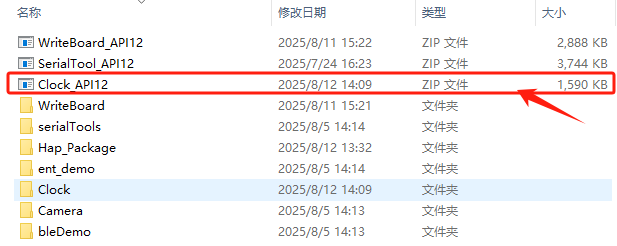
- Download Clock_API12.zip from the Baidu Netdisk materials. Link: Extraction code:
Note:
Project path:ShimetaPi OpenHarmony Materials>SC-3568HA>05-Development Materials>01-OpenHarmory Development Materials>APP Demo>Clock_API12.zip
- After extracting the compressed package, open the project through DevEco Studio to view the source code.
3.2 Demo HAP Package Acquisition
- Download Clock_API12.hap from the Baidu Netdisk materials. Link: Extraction code:

Note:
File path:ShimetaPi OpenHarmony Materials>SC-3568HA>05-Development Materials>01-OpenHarmory Development Materials>APP Demo>Hap_Package>Clock_API12.hap
- The HAP installation process for this demo is the same as the previous serial-debug-assistant and writing-board demos, and will not be repeated here.
4. Demo Function Introduction
This demo implements an animated clock that displays the time in real time. Click the full-screen button to make its frame cover the entire screen.