
02 Display and Touch
GM-3568JHF development board is designed based on Rockchip RK3568J chip, providing rich display interfaces and supporting multiple display output methods. The development board is equipped with mainstream display interfaces such as HDMI and MIPI DSI, which can meet the display needs of different application scenarios.
1 Display Interface Overview
1.1 Supported Display Interfaces
| Interface Type | Quantity | Max Resolution | Features |
|---|---|---|---|
| HDMI | 1 | 4K@60Hz | Standard Type-A interface, supports hot plug |
| MIPI DSI | 1 | 1920×1080 | Low power consumption, suitable for embedded display |
| eDP | 1 | 2560×1600@60Hz | High performance embedded display interface |
1.2 Display Controller Features
- GPU: ARM G52 2EE, supports OpenGL ES 1.1/2.0/3.2, OpenCL 2.0, Vulkan 1.1
- 2D Acceleration: Embedded high-performance 2D acceleration hardware
- Multi-display Output: Supports simultaneous output to multiple display devices
- Color Support: Supports RGB 4:4:4 color format
- Hardware Acceleration: Supports video decoding and graphics rendering hardware acceleration
2 MIPI DSI Interface
2.1 MIPI DSI Technology Introduction
MIPI DSI (Display Serial Interface) is a display interface standard designed specifically for mobile devices by the MIPI Alliance, with the following characteristics:
- Low Power Design: Optimized for mobile and embedded devices
- High Integration: Reduces PCB routing complexity
- Strong Anti-interference Ability: Differential signal transmission, anti-EMI interference
- Flexible Configuration: Supports 1-4 data lanes configuration
2.2 Hardware Connection
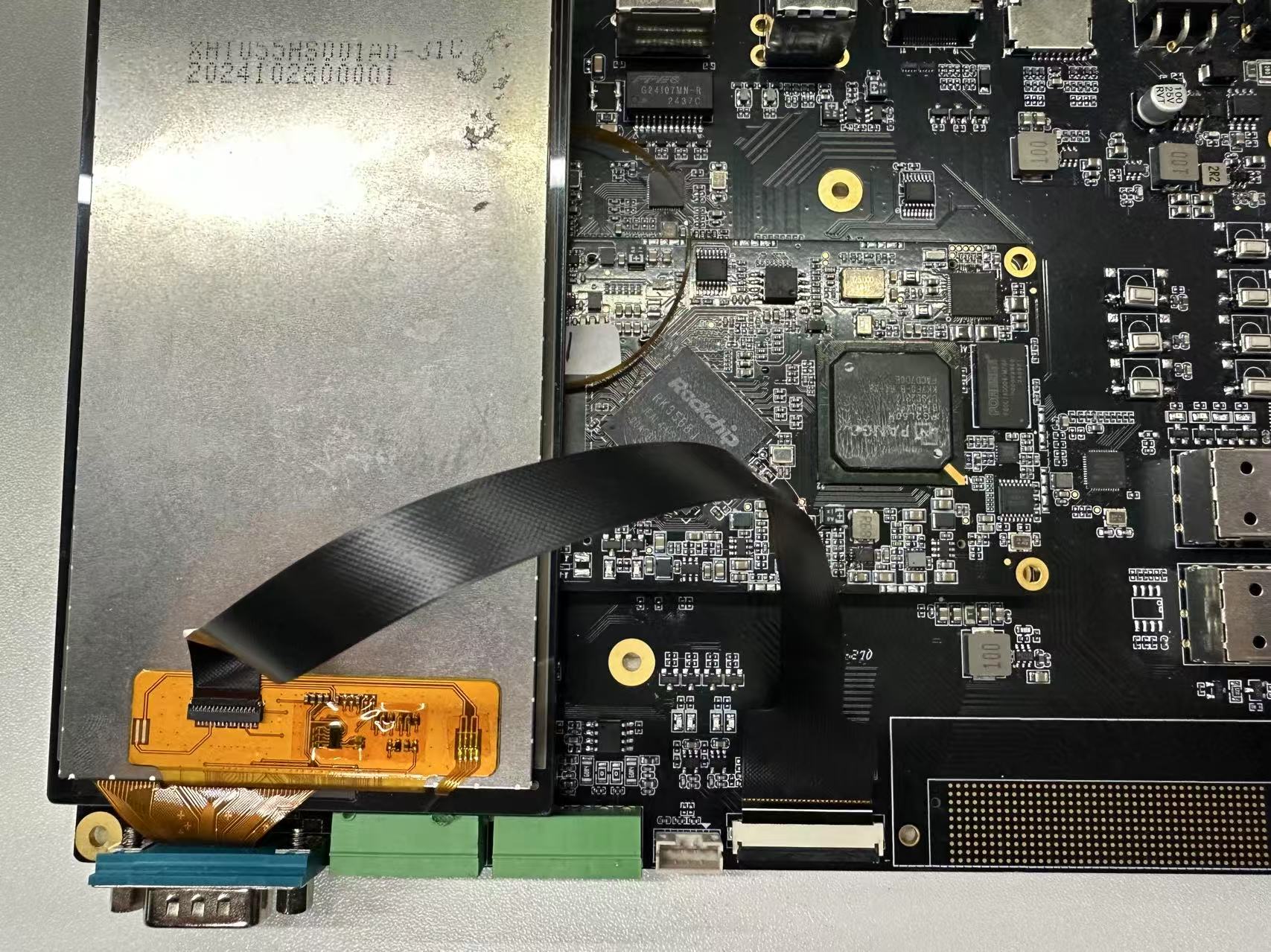
Connect the MIPI display screen to the MIPI interface of the development board via FPC cable as shown in the figure. Ensure that the power supply and signal lines of the display screen are connected correctly.
2.3 MIPI Screen Display Test
After the development board is powered on, you can see the following interface on the MIPI screen.

2.4 Backlight Test
Execute the following command to change the screen brightness by modifying the brightness level.
root@linaro-alip:/# echo 1 > /sys/class/backlight/backlight/brightness
root@linaro-alip:/# echo 255 > /sys/class/backlight/backlight/brightness
3 HDMI Interface
3.1 HDMI Technology Introduction
HDMI (High Definition Multimedia Interface) is a high-definition multimedia interface, which is a purely digital audio and video transmission interface that can transmit audio and video data simultaneously through a single cable.
3.2 HDMI Interface Type
The development board uses a standard HDMI Type-A interface, with pin definitions as follows:
| Pin | Signal Name | Description |
|---|---|---|
| 1 | TMDS Data2+ | TMDS Data Channel 2 Positive |
| 2 | TMDS Data2 Shield | TMDS Data Channel 2 Shield |
| 3 | TMDS Data2- | TMDS Data Channel 2 Negative |
| 4 | TMDS Data1+ | TMDS Data Channel 1 Positive |
| 5 | TMDS Data1 Shield | TMDS Data Channel 1 Shield |
| 6 | TMDS Data1- | TMDS Data Channel 1 Negative |
| 7 | TMDS Data0+ | TMDS Data Channel 0 Positive |
| 8 | TMDS Data0 Shield | TMDS Data Channel 0 Shield |
| 9 | TMDS Data0- | TMDS Data Channel 0 Negative |
| 10 | TMDS Clock+ | TMDS Clock Positive |
| 11 | TMDS Clock Shield | TMDS Clock Shield |
| 12 | TMDS Clock- | TMDS Clock Negative |
| 13 | CEC | Consumer Electronics Control |
| 14 | Reserved | Reserved |
| 15 | SCL | I2C Clock Line |
| 16 | SDA | I2C Data Line |
| 17 | DDC/CEC Ground | DDC/CEC Ground |
| 18 | +5V Power | +5V Power |
| 19 | Hot Plug Detect | Hot Plug Detect |
The HDMI interface of the development board is standard HDMI, supporting hot plug and adaptive resolution.
3.3 Desktop Resolution Switching
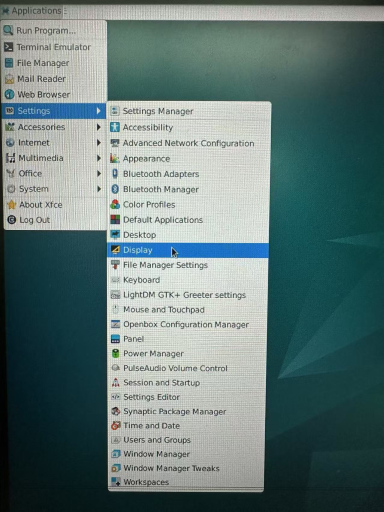
- Open System Settings and find Display
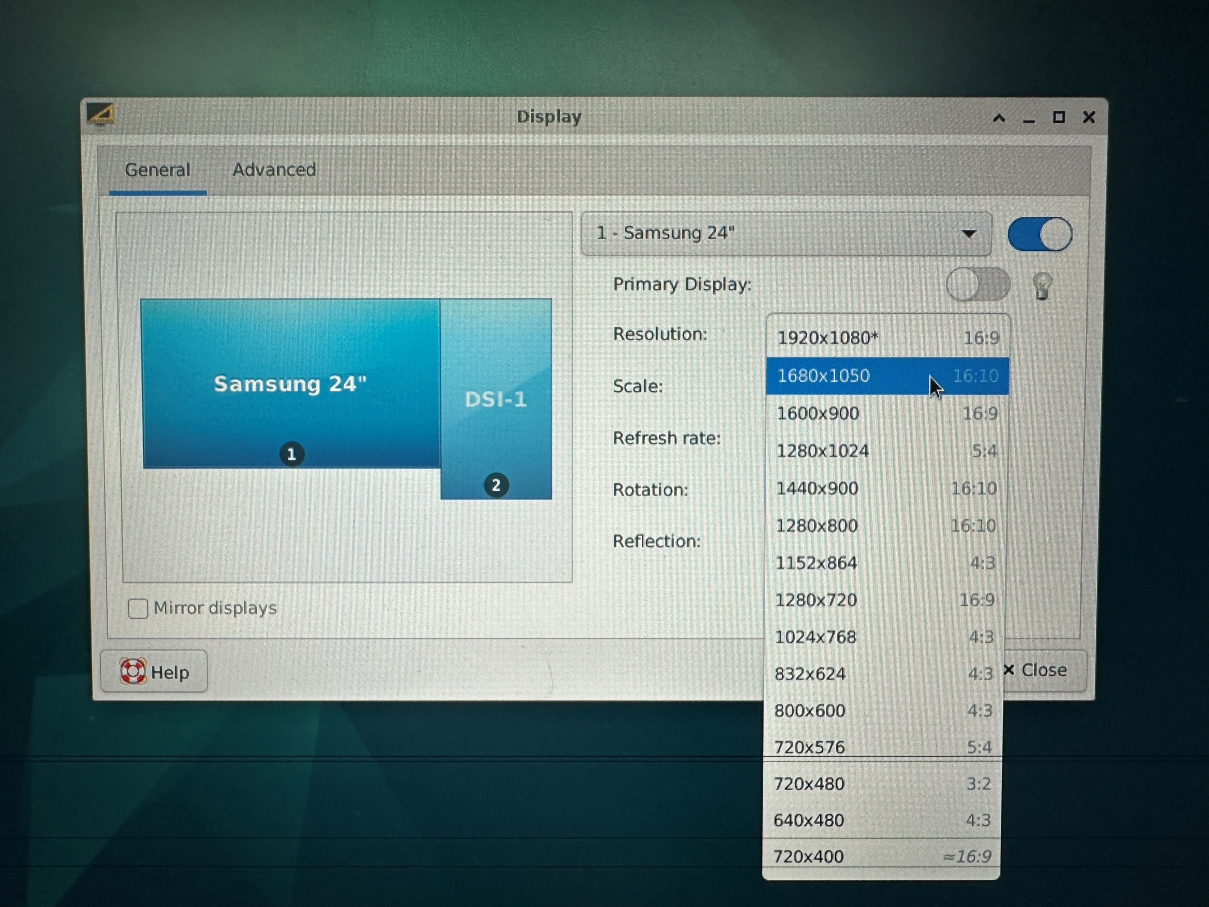
- Click Resolution to switch between different resolutions
3.4 Switching Resolution via Command Line
- Use
xrandr -qparameter to view the resolutions currently supported by your screen
root@linaro-alip:/# xrandr -q
Screen 0: minimum 320 x 200, current 2640 x 1280, maximum 16384 x 16384
HDMI-1 connected 1920x1080+0+0 (normal left inverted right x axis y axis) 527mm x 296mm
   1920x1080     60.00*+  74.97    50.00    59.94
   1680x1050     59.88
   1600x900      60.00
   1280x1024     75.02    60.02
   1440x900      59.90
   1280x800      59.91
   1152x864      75.00
   1280x720      60.00    50.00    59.94
   1024x768      75.03    70.07    60.00
   832x624       74.55
   800x600       72.19    75.00    60.32    56.25
   720x576       50.00
   720x480       60.00    59.94
   640x480       75.00    72.81    66.67    60.00    59.94
   720x400       70.08
Use
xrandr -s 0command to restore the screen to its original resolutionUse
xrandr -sto specify the screen resolution size
For example:
xrandr -s 1280x8004 eDP Interface
4.1 eDP Technology Introduction
eDP (Embedded DisplayPort) is a digital display interface standard designed for internal connections, developed by the Video Electronics Standards Association (VESA). eDP is an optimized version of the DisplayPort standard for embedded applications, mainly used for connecting the motherboard to the built-in display in devices such as laptops, tablets, and all-in-one PCs.
4.2 RK3568J eDP Controller Features
- eDP Version: Supports eDP 1.3 standard
- Max Resolution: 2560×1600@60Hz
- Data Lanes: Supports up to 4 physical lanes
- Color Depth: Supports up to 10-bit color depth
- Link Rate: Supports 1.62Gbps, 2.7Gbps, 5.4Gbps
- Audio Support: Supports audio data transmission
- Adaptive: Supports link training and adaptive adjustment
4.3 eDP Interface Composition
The eDP interface mainly contains the following signals:
| Signal Name | Description |
|---|---|
| Main-Link | Main link, used for transmitting video/audio data |
| TX0+/TX0- | Data Lane 0 differential signal pair |
| TX1+/TX1- | Data Lane 1 differential signal pair |
| TX2+/TX2- | Data Lane 2 differential signal pair |
| TX3+/TX3- | Data Lane 3 differential signal pair |
| AUX+/AUX- | Auxiliary channel, used for transmitting configuration commands |
| HPD | Hot Plug Detect signal |
5 Touch Screen
There is a set of I2C TP interfaces on the development board, and the default touch IC driver is gt911.
The connection is shown in the figure below:

Swipe or tap the screen to test if it works properly.