HOME
Shop
  • English
  • 简体中文
HOME
Shop
  • English
  • 简体中文
  • Product Series

    • FPGA+ARM

      • GM-3568JHF

        • 1. Introduction

          • About GM-3568JHF
        • 2. Quick Start

          • 00 Introduction
          • 01 Environment Setup
          • 02 Compilation Instructions
          • 03 Flashing Guide
          • 04 Debug Tools
          • 05 Software Update
          • 06 View Information
          • 07 Test Commands
          • 08 App Compilation
          • 09 Source Code Acquisition
        • 3. Peripherals and Interfaces

          • 01 USB
          • 02 Display and Touch
          • 03 Ethernet
          • 04 WIFI
          • 05 Bluetooth
          • 06 TF-Card
          • 07 Audio
          • 08 Serial Port
          • 09 CAN
          • 10 RTC
        • 4. Application Development

          • 01 UART read and write case
          • 02 Key detection case
          • 03 LED light flashing case
          • 04 MIPI screen detection case
          • 05 Read USB device information example
          • 06 FAN Detection Case
          • 07 FPGA FSPI Communication Case
          • 08 FPGA DMA read and write case
          • 09 GPS debugging case
          • 10 Ethernet Test Cases
          • 11 RS485 reading and writing examples
          • 12 FPGA IIC read and write examples
          • 13 PN532 NFC card reader case
          • 14 TF card reading and writing case
        • 5. QT Development

          • 01 ARM64 cross compiler environment construction
          • 02 QT program added automatic startup service
        • 6. RKNN_NPU Development

          • 01 RK3568 NPU Overview
          • 02 Development Environment Setup
          • Run Official YOLOv5 Example
          • Model Conversion Detailed Explanation
          • Run Custom Model on Board
        • 7. FPGA Development

          • ARM and FPGA Communication
          • /fpga-arm/GM-3568JHF/FPGA/ch02-FPGA-Development-Manual.html
        • 8. Others

          • 01 Modification of the root directory file system
          • 02 System auto-start service
        • 9. Download

          • Download Resources
    • ShimetaPi

      • M4-R1

        • 1. Introduction

          • 1.1 About M4-R1
        • 2. Quick Start

          • 2.1 OpenHarmony Overview
          • 2.2 Image Burning
          • 2.3 Development Environment Preparation
          • 2.4 Hello World Application
        • 3. Application Development

          • 3.1 Getting Started

            • 3.1.1 ArkTS Language Overview
            • 3.1.2 UI Components (Part 1)
            • 3.1.3 UI Components (Part 2)
            • 3.1.4 UI Components (Part 3)
          • 3.2 Advanced

            • 3.2.1 Getting Started Guide
            • 3.2.2 Usage of Third Party Libraries
            • 3.2.3 Deployment of the Application
            • 3.2.4 Factory Reset
            • 3.2.5 System Debug
            • 3.2.6 APP Stability Testing
            • 3.2.7 Application Testing
          • 3.3 Getting Docs

            • 3.3.1 Official Website Information
          • 3.4 Development Instructions

            • 3.4.1 Full SDK
            • 3.4.2 Introduction of Third Party Libraries
            • 3.4.3 Introduction of HDC Tool
            • 3.4.4 Restore Factory Mode
            • 3.4.5 Update System API
          • 3.5 First Application

            • 3.5.1 First ArkTS App
          • 3.6 Application Demo

            • 3.6.1 UART Tool
            • 3.6.2 Graphics Tablet
            • 3.6.3 Digital Clock
            • 3.6.4 WIFI Tool
        • 4. Device Development

          • 4.1 Ubuntu Environment Development

            • 4.1.1 Environment Setup
            • 4.1.2 Download Source Code
            • 4.1.3 Compile Source Code
          • 4.2 Using DevEco Device Tool

            • 4.2.1 Tool Introduction
            • 4.2.2 Environment Construction
            • 4.2.3 Import SDK
            • 4.2.4 Function Introduction
        • 5. Peripherals and Interfaces

          • 5.1 Raspberry Pi Interfaces
          • 5.2 GPIO Interface
          • 5.3 I2C Interface
          • 5.4 SPI Communication
          • 5.5 PWM Control
          • 5.6 Serial Port Communication
          • 5.7 TF Card Slot
          • 5.8 Display Screen
          • 5.9 Touch Screen
          • 5.10 Audio
          • 5.11 RTC
          • 5.12 Ethernet
          • 5.13 M.2
          • 5.14 MINI PCIE
          • 5.15 Camera
          • 5.16 WIFI BT
          • 5.17 HAT
        • 6. FAQ

          • 6.1 Download Link
      • M5-R1

        • 1. Introduction

          • M5-R1 Development Documentation
        • 2. Quick Start

          • OpenHarmony Overview
          • Image Burning
          • Development Environment Preparation
          • Hello World Application and Deployment
        • 3. Peripherals and Interfaces

          • 3.1 Raspberry Pi Interfaces
          • 3.2 GPIO Interface
          • 3.3 I2C Interface
          • 3.4 SPI Communication
          • 3.5 PWM Control
          • 3.6 Serial Port Communication
          • 3.7 TF Card Slot
          • 3.8 Display Screen
          • 3.9 Touch Screen
          • 3.10 Audio
          • 3.11 RTC
          • 3.12 Ethernet
          • 3.13 M.2
          • 3.14 MINI PCIE
          • 3.15 Camera
          • 3.16 WIFI BT
          • 3.17 HAT
        • 4. Application Development

          • 4.1 Getting Started

            • 4.1.1 ArkTS Language Overview
            • 4.1.2 UI Components (Part 1)
            • 4.1.3 UI Components (Part 2)
            • 4.1.4 UI Components (Part 3)
          • 4.2 Advanced

            • 4.2.1 Getting Started Guide
            • 4.2.2 Usage of Third Party Libraries
            • 4.2.3 Deployment of the Application
            • 4.2.4 Factory Reset
            • 4.2.5 System Debug
            • 4.2.6 APP Stability Testing
            • 4.2.7 Application Testing
        • 5. Device Development

          • 5.1 Environment Setup
          • 5.2 Download Source Code
          • 5.3 Compile Source Code
        • 6. Download

          • Data Download
    • OpenHarmony

      • SC-3568HA

        • 1. Introduction

          • 1.1 About SC-3568HA
        • 2. Quick Start

          • 2.1 OpenHarmony Overview
          • 2.2 Image Burning
          • 2.3 Development Environment Preparation
          • 2.4 Hello World Application
        • 3. Application Development

          • 3.1 ArkUI

            • 3.1.1 ArkTS Language Overview
            • 3.1.2 UI Components (Part 1)
            • 3.1.3 UI Components (Part 2)
            • 3.1.4 UI Components (Part 3)
          • 3.2 Advanced

            • 3.2.1 Getting Started Guide
            • 3.2.2 Usage of Third Party Libraries
            • 3.2.3 Deployment of the Application
            • 3.2.4 Factory Reset
            • 3.2.5 System Debug
            • 3.2.6 APP Stability Testing
            • 3.2.7 Application Testing
        • 4. Device Development

          • 4.1 Environment Setup
          • 4.2 Download Source Code
          • 4.3 Compile Source Code
        • 5. Peripherals and Interfaces

          • 5.1 Raspberry Pi Interfaces
          • 5.2 GPIO Interface
          • 5.3 I2C Interface
          • 5.4 SPI Communication
          • 5.5 PWM Control
          • 5.6 Serial Port Communication
          • 5.7 TF Card Slot
          • 5.8 Display Screen
          • 5.9 Touch Screen
          • 5.10 Audio
          • 5.11 RTC
          • 5.12 Ethernet
          • 5.13 M.2
          • 5.14 MINI PCIE
          • 5.15 Camera
          • 5.16 WIFI BT
          • 5.17 HAT
        • 6. FAQ

          • 6.1 Download Link
      • M-K1HSE

        • 1. Introduction

          • 1.1 Product Introduction
        • 2. Quick Start

          • 2.1 Debug Tool Installation
          • 2.2 Development Environment Setup
          • 2.3 Source Code Download
          • 2.4 Build Instructions
          • 2.5 Flashing Guide
          • 2.6 APT Update Sources
          • 2.7 View Board Info
          • 2.8 CLI LED and Key Test
          • 2.9 GCC Build Programs
        • 3. Application Development

          • 3.1 Basic Application Development

            • 3.1.1 Development Environment Preparation
            • 3.1.2 First Application HelloWorld
            • 3.1.3 Develop HAR Package
          • 3.2 Peripheral Application Cases

            • 3.2.1 UART Read/Write
            • 3.2.2 Key Demo
            • 3.2.3 LED Flash
        • 4. Peripherals and Interfaces

          • 4.1 Standard Peripherals

            • 4.1.1 USB
            • 4.1.2 Display and Touch
            • 4.1.3 Ethernet
            • 4.1.4 WIFI
            • 4.1.5 Bluetooth
            • 4.1.6 TF Card
            • 4.1.7 Audio
            • 4.1.8 Serial Port
            • 4.1.9 CAN
            • 4.1.10 RTC
          • 4.2 Interfaces

            • 4.2.1 Audio
            • 4.2.2 RS485
            • 4.2.3 Display
            • 4.2.4 Touch
        • 5. System Customization Development

          • 5.1 System Porting
          • 5.2 System Customization
          • 5.3 Driver Development
          • 5.4 System Debugging
          • 5.5 OTA Upgrade
        • 6. Download

          • 6.1 Download
    • EVS-Camera

      • CF-NRS1

        • 1. Introduction

          • 1.1 About CF-NRS1
          • 1.2 Event-Based Concepts
          • 1.3 Quick Start
          • 1.4 Resources
        • 2. Development

          • 2.1 Development Overview

            • 2.1.1 Shimetapi Hybrid Camera SDK Introduction
          • 2.2 Environment & API

            • 2.2.1 Environment Overview
            • 2.2.2 Development API Overview
          • 2.3 Linux Development

            • 2.3.1 Linux SDK Introduction
            • 2.3.2 Linux SDK API
            • 2.3.3 Linux Algorithm
            • 2.3.4 Linux Algorithm API
          • 2.4 Service & Web

            • 2.4.1 EVS Server
            • 2.4.2 Time Server
            • 2.4.3 EVS Web
        • 3. Download

          • 3.1 Download
        • 4. Common Problems

          • 4.1 Common Problems
      • CF-CRA2

        • 1. Introduction

          • 1.1 About CF-CRA2
        • 2. Download

          • 2.1 Download
      • EVS Module

        • 1. Related Concepts
        • 2. Hardware Preparation and Environment Configuration
        • 3. Example Program User Guide
        • Resources Download
    • AI-model

      • 1684XB-32T

        • 1. Introduction

          • AIBOX-1684XB-32 Introduction
        • 2. Quick Start

          • First time use
          • Network Configuration
          • Disk usage
          • Memory allocation
          • Fan Strategy
          • Firmware Upgrade
          • Cross-Compilation
          • Model Quantization
        • 3. Application Development

          • 3.1 Development Introduction

            • Sophgo SDK Development
            • SOPHON-DEMO Introduction
          • 3.2 Large Language Models

            • Deploying Llama3 Example
            • /ai-model/AIBOX-1684XB-32/application-development/LLM/Sophon_LLM_api_server-Development-AIBOX-1684XB-32.html
            • /ai-model/AIBOX-1684XB-32/application-development/LLM/MiniCPM-V-2_6-AIBOX-1684XB-32.html
            • /ai-model/AIBOX-1684XB-32/application-development/LLM/Qwen-2-5-VL-demo-Development-AIBOX-1684XB-32.html
            • /ai-model/AIBOX-1684XB-32/application-development/LLM/Qwen-3-chat-demo-Development-AIBOX-1684XB-32.html
            • /ai-model/AIBOX-1684XB-32/application-development/LLM/Qwen3-Qwen Agent-MCP.html
            • /ai-model/AIBOX-1684XB-32/application-development/LLM/Qwen3-langchain-AI Agent.html
          • 3.3 Deep Learning

            • ResNet (Image Classification)
            • LPRNet (License Plate Recognition)
            • SAM (Universal Image Segmentation Foundation Model)
            • YOLOv5 (Object Detection)
            • OpenPose (Human Keypoint Detection)
            • PP-OCR (Optical Character Recognition)
        • 4. Download

          • Resource Download
      • 1684X-416T

        • 1. Introduction

          • AIBOX-1684X-416 Introduction
        • 2. Demo Simple Operation Guide

          • Simple instructions for using shimeta smart monitoring demo
      • RDK-X5

        • 1. Introduction

          • RDK-X5 Hardware Introduction
        • 2. Quick Start

          • RDK-X5 Quick Start
        • 3. Application Development

          • 3.1 AI Online Model Development

            • AI Online Development - Experiment01
            • AI Online Development - Experiment02
            • AI Online Development - Experiment03
            • AI Online Development - Experiment04
            • AI Online Development - Experiment05
            • AI Online Development - Experiment06
          • 3.2 Large Language Models (Voice)

            • Voice LLM Application - Experiment01
            • Voice LLM Application - Experiment02
            • Voice LLM Application - Experiment03
            • Voice LLM Application - Experiment04
            • Voice LLM Application - Experiment05
            • Voice LLM Application - Experiment06
          • 3.3 40pin-IO Development

            • 40pin IO Development - Experiment01
            • 40pin IO Development - Experiment02
            • 40pin IO Development - Experiment03
            • 40pin IO Development - Experiment04
            • 40pin IO Development - Experiment05
            • 40pin IO Development - Experiment06
            • 40pin IO Development - Experiment07
          • 3.4 USB Module Development

            • USB Module Usage - Experiment01
            • USB Module Usage - Experiment02
          • 3.5 Machine Vision

            • Machine Vision Technology Development - Experiment01
            • Machine Vision Technology Development - Experiment02
            • Machine Vision Technology Development - Experiment03
            • Machine Vision Technology Development - Experiment04
          • 3.6 ROS2 Base Development

            • ROS2 Basic Development - Experiment01
            • ROS2 Basic Development - Experiment02
            • ROS2 Basic Development - Experiment03
            • ROS2 Basic Development - Experiment04
      • RDK-S100

        • 1. Introduction

          • 1.1 About RDK-S100
        • 2. Quick Start

          • 2.1 First Use
        • 3. Application Development

          • 3.1 AI Online Model Development

            • 3.1.1 Volcano Engine Doubao AI
            • 3.1.2 Image Analysis
            • 3.1.3 Multimodal Visual Analysis
            • 3.1.4 Multimodal Image Comparison
            • 3.1.5 Multimodal Document Analysis
            • 3.1.6 Camera AI Vision Analysis
          • 3.2 Large Language Models

            • 3.2.1 Speech Recognition
            • 3.2.2 Voice Conversation
            • 3.2.3 Multimodal Image Analysis
            • 3.2.4 Multimodal Image Comparison
            • 3.2.5 Multimodal Document Analysis
            • 3.2.6 Multimodal Vision Application
          • 3.3 40pin-IO Development

            • 3.3.1 GPIO Output LED Blink
            • 3.3.2 GPIO Input
            • 3.3.3 Key Control LED
            • 3.3.4 PWM Output
            • 3.3.5 Serial Output
            • 3.3.6 I2C Experiment
          • 3.4 USB Module Development

            • 3.4.1 USB Voice Module
            • 3.4.2 Sound Source Localization
          • 3.5 Machine Vision

            • 3.5.1 USB Camera
            • 3.5.2 Image Processing Basics
            • 3.5.3 Object Detection
            • 3.5.4 Image Segmentation
          • 3.6 ROS2 Base Development

            • 3.6.1 Environment Setup
            • 3.6.2 Create and Build Workspace
            • 3.6.3 ROS2 Topic Communication
            • 3.6.4 ROS2 Camera Application
    • Core-Board

      • C-3568BQ

        • 1. Introduction

          • C-3568BQ Introduction
      • C-3588LQ

        • 1. Introduction

          • C-3588LQ Introduction
      • GC-3568JBAF

        • 1. Introduction

          • GC-3568JBAF Introduction
      • C-K1BA

        • 1. Introduction

          • C-K1BA Introduction

04 WIFI Information Acquisition Application Case

1. Case Function Overview

The core function of this case is to implement dynamic/static IP mode switching and network configuration management for HarmonyOS device Ethernet, as follows:

  • Ethernet Interface Information Acquisition: Automatically detect active Ethernet interfaces on the device (such as eth0) and obtain the current interface's IP, gateway, subnet mask, and other configurations.
  • IP Mode Switching: Use interface buttons to switch between dynamic IP (automatically assigned by router DHCP) and static IP (manually entered) modes.
  • Configuration Verification: After switching modes or modifying static IP, update the interface display in real-time and output logs to verify whether the network configuration was successfully applied.

2. Case Code Display

import ethernet from '@ohos.net.ethernet'
import { BusinessError } from '@ohos.base';

@Entry
@Component
struct Index {
  @State message: string = 'EthernetDemo';
  private  TAG : string = 'ent_Demo'
  @State entModeTest : string = 'Current Dynamic IP'
  @State entName : string = "eth0"
  @State entModeStatus : boolean = true;//Dynamic/Static IP judgment
  @State entMsg : string = ''
  @State entIp : string = ''
  @State entRoute : string = ''
  @State entGateway : string = ''
  @State entMask : string = ''
  @State entDNS : string = ''
  @State entMode : number = 1;

  aboutToAppear(): void {
    this.getAllActiveIfaces();
    this.getIfaceConfig();
  }

  setIfaceConfig(){
    let config: ethernet.InterfaceConfiguration = {
      mode: this.entMode,
      ipAddr: this.entIp,
      route: this.entRoute,
      gateway: this.entGateway,
      netMask: this.entMask,
      dnsServers: this.entDNS
    };

    const setConfigPromise = ethernet.setIfaceConfig("eth0", config);

    setConfigPromise.then(() => {
      console.log(this.TAG,"setIfaceConfig promise ok");
    }).catch((error: BusinessError)  => {
      console.error(this.TAG,"setIfaceConfig promise error = " + JSON.stringify(error));
    });
  }

  getIfaceConfig(){
    ethernet.getIfaceConfig(this.entName).then((data: ethernet.InterfaceConfiguration) => {
      console.log(this.TAG,"getIfaceConfig promise mode = " + data.mode);
      console.log(this.TAG,"getIfaceConfig promise ipAddr = " + JSON.stringify(data.ipAddr));
      console.log(this.TAG,"getIfaceConfig promise route = " + JSON.stringify(data.route));
      console.log(this.TAG,"getIfaceConfig promise gateway = " + JSON.stringify(data.gateway));
      console.log(this.TAG,"getIfaceConfig promise netMask = " + JSON.stringify(data.netMask));
      console.log(this.TAG,"getIfaceConfig promise dnsServers = " + JSON.stringify(data.dnsServers));
      if (data.mode == 0) {
        this.entModeStatus = false;
      }else {
        this.entModeStatus = true
      }
        this.entMode = data.mode
        this.entMsg = JSON.stringify(data).toString();
        this.entRoute = data.route.toString();
        this.entGateway = data.gateway.toString();
        this.entMask = data.netMask.toString();
        this.entDNS = data.dnsServers.toString();
    }).catch((error: BusinessError) => {
      console.error(this.TAG,"getIfaceConfig promise error = " + JSON.stringify(error));
    });
  }

  isIfaceActive(){
    ethernet.isIfaceActive("eth0").then((data: number) => {
      console.log(this.TAG,"isIfaceActive promise = " + JSON.stringify(data));
    }).catch((error: BusinessError) => {
      console.log(this.TAG,"isIfaceActive promise error = " + JSON.stringify(error));
    });
  }

  getAllActiveIfaces(){
    ethernet.getAllActiveIfaces().then((data: string[]) => {
      console.log(this.TAG,"getAllActiveIfaces promise data.length = " + JSON.stringify(data.length));
      if (JSON.stringify(data.length) == '1' ) {
        console.log(this.TAG,'data.length')
      }
      for (let i = 0; i < data.length; i++) {
        console.log(this.TAG,"getAllActiveIfaces promise  = " + JSON.stringify(data[i]));
      }
    }).catch((error:BusinessError) => {
      console.error(this.TAG,"getAllActiveIfaces promise error = " + JSON.stringify(error));
    });
  }

  build() {
    Column() {
      Text(this.message)
        .fontSize(50)
        .fontWeight(FontWeight.Bold)
        .padding(20)
      Button('Click to Switch Dynamic/Static IP')
        .onClick(()=>{
          if (this.entMode == 0) {
            this.entMode = 1;
            this.entModeTest = 'Current Dynamic IP'
            this.entModeStatus = true;
          }else{
            this.entMode = 0;
            this.entModeTest = 'Current Static IP'
            this.entModeStatus = false;
          }
          this.setIfaceConfig();
          this.getIfaceConfig();
        })
        if (this.entModeStatus){
          Column(){
            TextInput({placeholder : 'Static IP'})
              .onChange((value : string)=>{
                this.entIp = value
              })
          }
          .height(80)
          .width(300)
          .padding(10)
          .margin(10)
        }
      Text(this.entModeTest)
        .fontSize(50)
        .fontWeight(FontWeight.Bold)
        .padding(30)
      Column(){
        Text('Interface Information')
        Blank()
        Text(this.entMsg)
      }
      .height(80)
      .padding(10)
    }
    .width('100%')
  }
}

3. Case Source Code and HAP Package Acquisition

3.1 Obtaining the Case Source Code

  1. Download EntDemo_API12.zip from Baidu Netdisk. Link:
    Extraction code:
ENT

Note:

Project Path:
ShimetaPi OpenHarmony Resources>SC-3568HA>05-Development Resources>01-OpenHarmony Development Resources>APP Demo>EntDemo_API12.zip

  1. Extract the zip file and open the project in DevEco Studio to view the source code.

3.2 Obtaining the Case HAP Package

  1. Download EntDemo_API12.hap from Baidu Netdisk. Link:
    Extraction code:
ENT

Note:

File Path:
ShimetaPi OpenHarmony Resources>SC-3568HA>05-Development Resources>01-OpenHarmony Development Resources>APP Demo>Hap_Package>EntDemo_API12.hap

  1. The process of installing the case through HAP is the same as the previous UART Assistant and Graphics Tablet cases, so it will not be repeated here.

4. Case Function Introduction

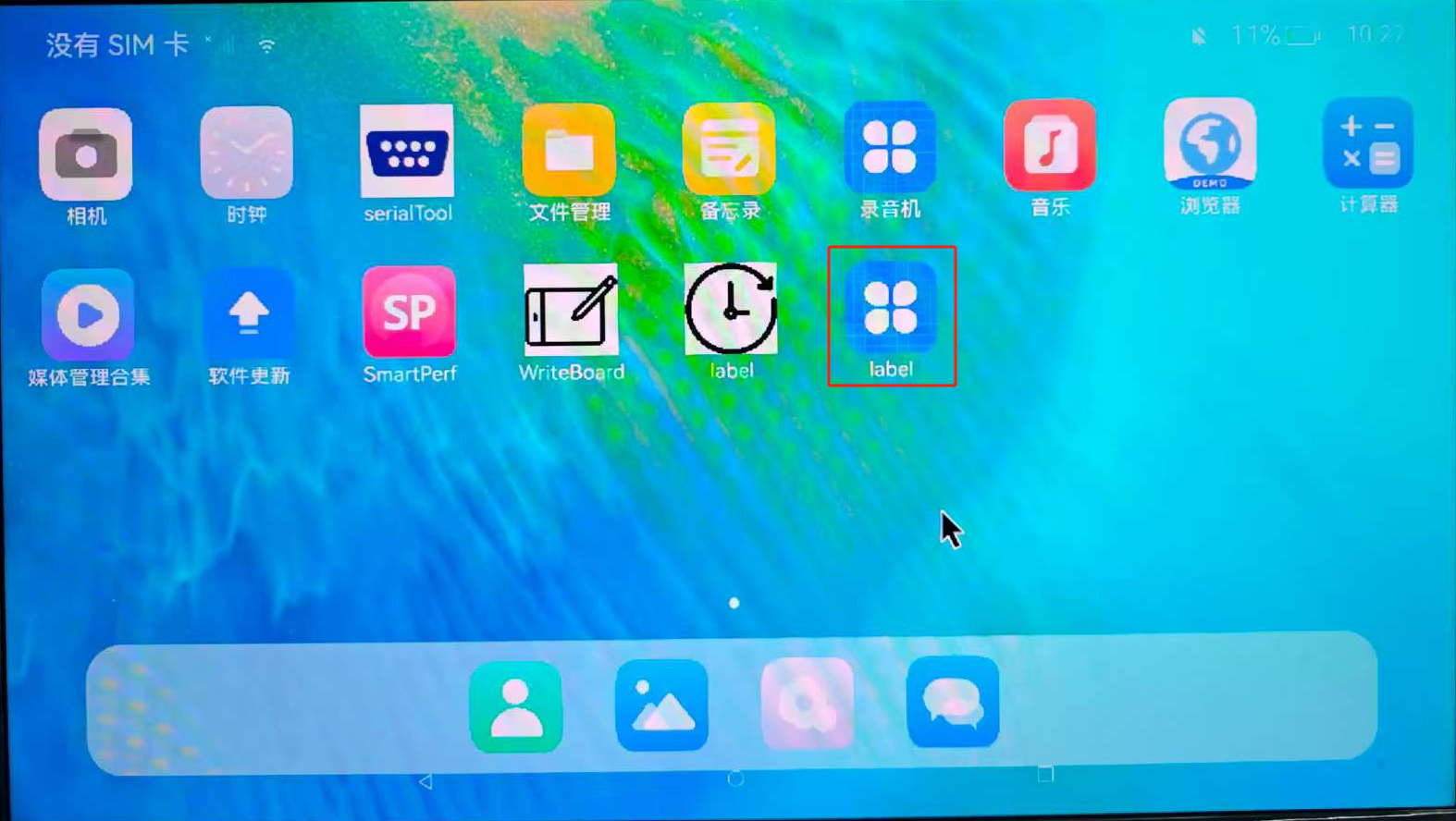
  1. Click the desktop icon to enter the application interface.
ENT

Note:

When using this application, connect the development board to the computer or router via Ethernet cable.

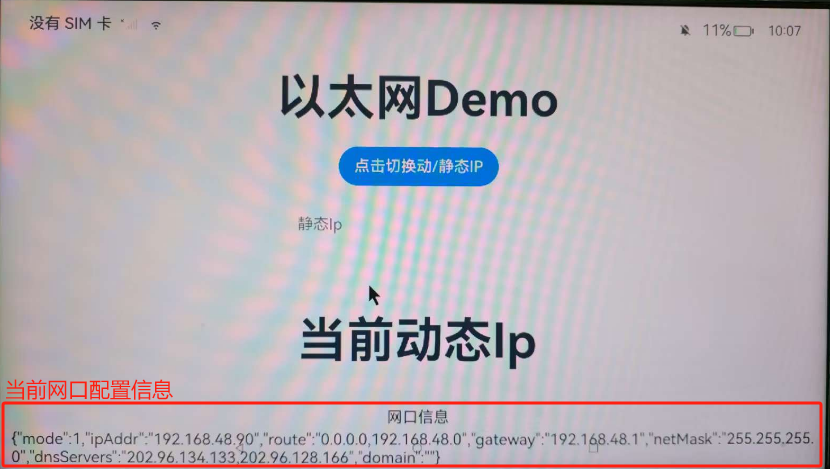
  1. The application interface is as follows:
ENT

At this point, it defaults to dynamic IP display, and the interface information section at the bottom shows the current interface configuration (IP, gateway, subnet mask, etc.).

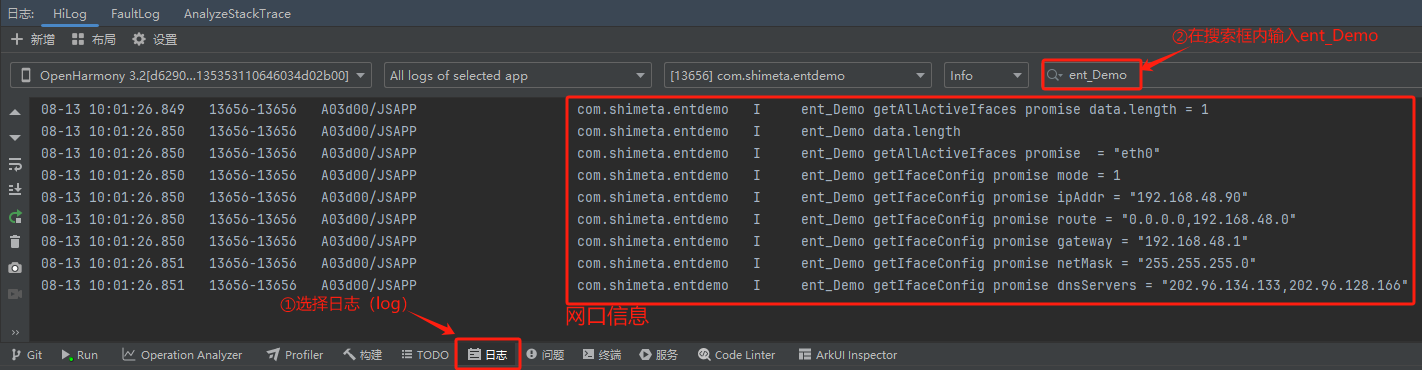
  1. You can view this information in the DevEco Studio software log as follows:
ENT

The interface information contains two parts: all currently active interfaces and the current interface configuration information.

  • data.length = 1 and eth0 indicate that the device has 1 active interface, named eth0 (consistent with entName in the code, no modification needed).
  • Exception: If data.length = 0, check if the Ethernet cable is properly connected, the router is powered on, or the device interface is damaged.
  • mode = 1 indicates the current is dynamic IP mode (1 = dynamic, 0 = static), ipAddr is the IP assigned by the router through DHCP, and gateway is the router gateway. These values being non-empty indicate successful initialization.
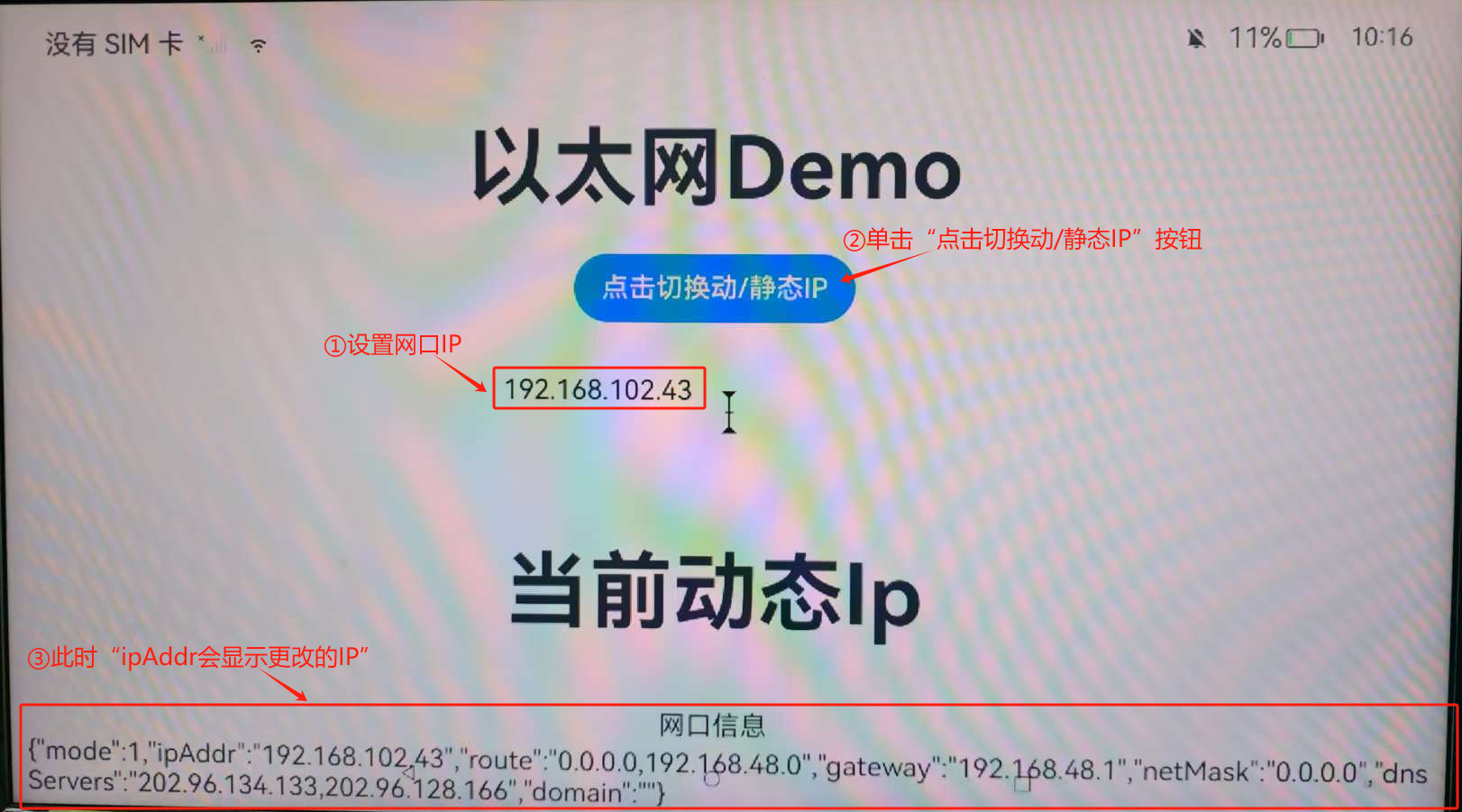
  1. The application also supports dynamic/static IP switching, as follows:
    ① Fill in the interface IP at "Static IP", using "192.168.102.43" as an example;
    ② Click the switch button, which completes the switch from dynamic IP to static IP. The interface information at the bottom will be synchronized and updated.
ENT
  1. You can also view this information in the DevEco Studio software log.

Displaying "ent_Demo setIfaceConfig promise ok" indicates successful switching

ENT

At the same time, the displayed interface information will also be synchronized and updated. The "ipAddr" should be the IP you set.

ENT

Note:

Common Error Explanations:

  • Permission denied: Check if SET_NETWORK_INFO and GET_NETWORK_INFO permissions are added in module.json5.
  • Interface not found: The interface name may not be eth0. Check the actual interface name (such as eth1) via the device command line ifconfig, and modify the entName variable in the code.
  • Invalid configuration: Static IP format error (such as 192.168.1.256), or gateway and IP are not in the same network segment.
Edit this page on GitHub
Last Updated:
Contributors: ZSL
Prev
3.6.3 Digital Clock