
Screen (Display)
1 Introduction to Mainstream Display Interfaces
In embedded devices and consumer electronics products, MIPI DSI, eDP, and HDMI are the three mainstream display interfaces used to transmit video data and commands between a host (such as a SoC, computer, or phone motherboard) and a display (screen). Each has its own focus and is applied in different fields. Below we will introduce these three display methods in detail.
1.1 MIPI Screen
MIPI (Mobile Industry Processor Interface) is a series of open standards developed by the MIPI Alliance, designed specifically for mobile devices (such as smartphones, tablets, laptops, IoT devices, automotive, etc.). It features low power consumption, high integration, and strong anti-interference capability.
MIPI is not a single interface. The MIPI Alliance mainly defines standard interfaces and specifications for mobile processors, and the developed interfaces are widely used in devices such as processors, cameras, displays, and baseband modems. The common interfaces are MIPI DSI (display interface) and MIPI CSI (camera interface). This article only introduces MIPI DSI.
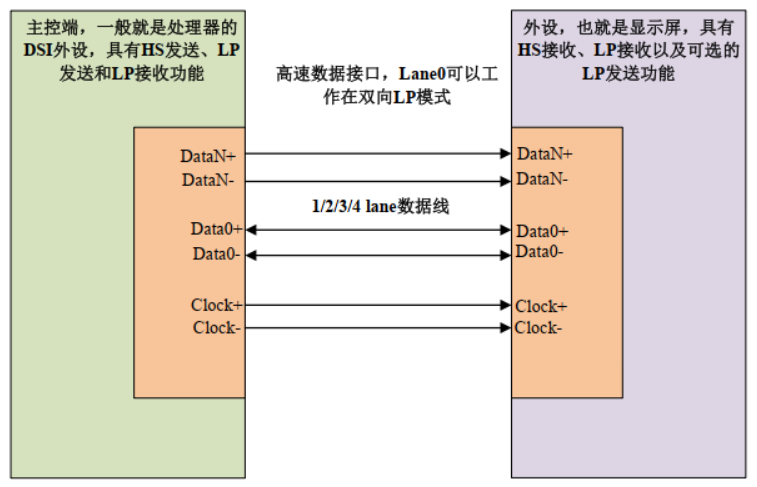 The MIPI DSI interface is split into data lines and a clock line, all of which are differential signals. The data lines can use 1/2/3/4 lanes, and the clock line has one pair — at most 10 lines. RK3568 uses 4 lanes by default to drive a MIPI screen; of course, for small-sized screens, 2 lanes can also be used. For the MIPI DSI interface, the most commonly used configurations are 2 lanes and 4 lanes.
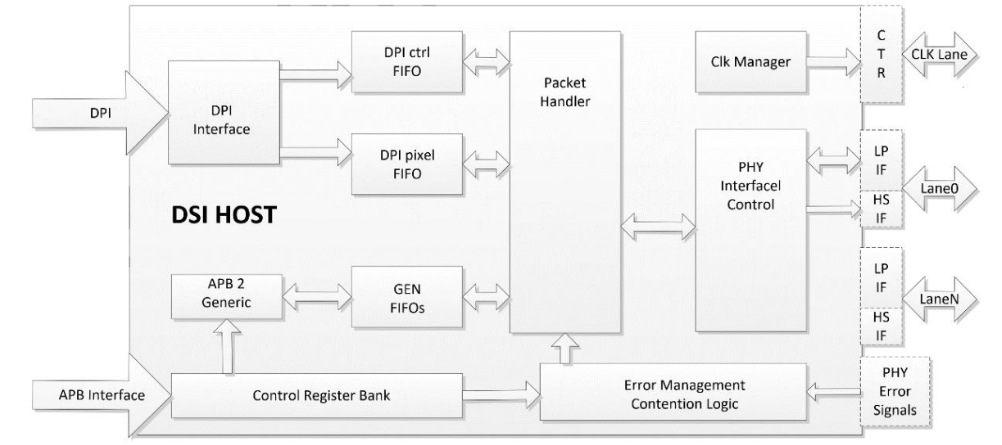
 RK3568 has one MIPI DSI interface, so it also has one MIPI DSI host peripheral for driving MIPI DSI screens. This MIPI DSI HOST core conforms to the MIPI protocol. The MIPI DSI HOST is used to connect the core and D-PHY. The RK3568 MIPI DSI HOST interface supports 1–4 lanes.
The RK3568 MIPI DSI HOST controller supports the following features:
- Compatible with MIPI Alliance standards
- Supports DPI interface color mapping; supports 16/18/24-bit color depth
- All DPI interface signal polarities are programmable
- Supports up to 4-lane D-PHY data lanes
- Data0 supports bidirectional communication and Escape mode
- Can transmit all Generic commands
- Supports EOTP packets
The block diagram of the RK3568 MIPI DSI HOST controller is shown below:
 (For a more detailed introduction or if you have questions about the above, please refer to the official website data: https://www.mipi.org/)
 1.2 HDMI Screen
HDMI stands for High Definition Multimedia Interface. It is a purely digital audio/video transmission interface that sends audio and video data simultaneously over a single cable. It is now widely used in TVs, monitors, computers, set-top boxes, and other fields.
Rockchip's RK3568 chip natively integrates an HDMI peripheral interface that can be used to connect HDMI displays. In this chapter, we will learn how to use the RK3568's HDMI interface.
The HDMI block diagram is shown below:
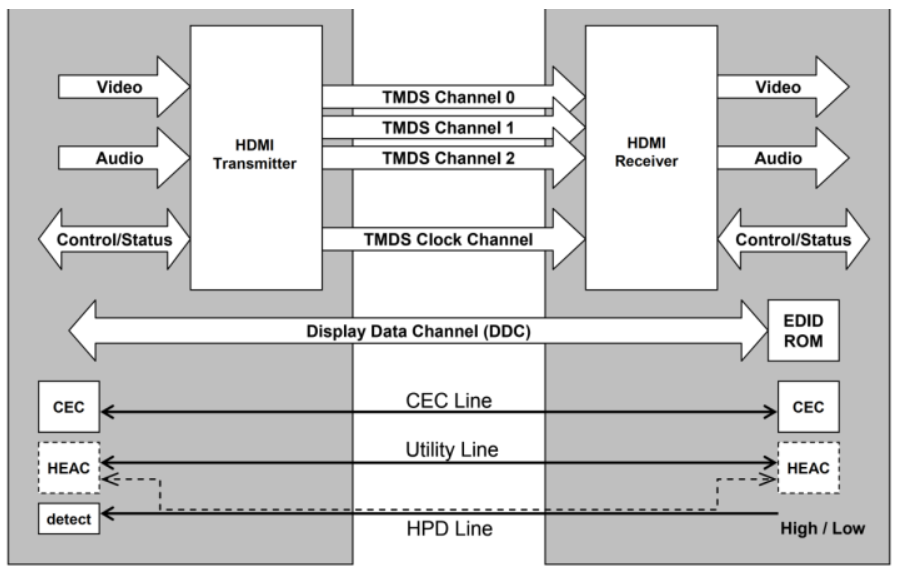
The functions implemented by the channels in the figure are:
- TMDS: transmits audio/video data
- CEC: implements remote control functionality
- DDC: implements adaptive screen resolution; obtains parameter information of different screens via DDC
- HPD: implements hot-plug detection HDMI has a total of five interface types as follows:
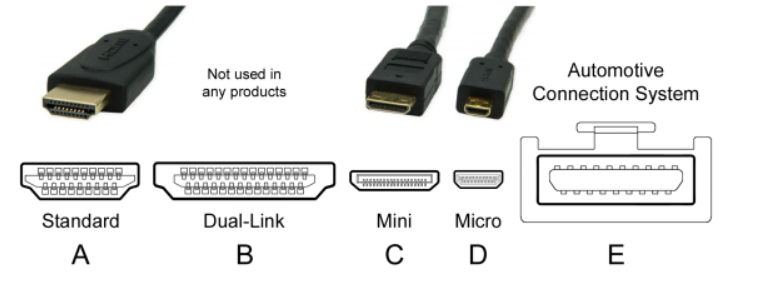
The most commonly used interface type is Type A, and our M4-R1 development board is also equipped with a Type A port.
Let's introduce the Type A interface. Its corresponding pinout and pin definitions are shown in the figure below:
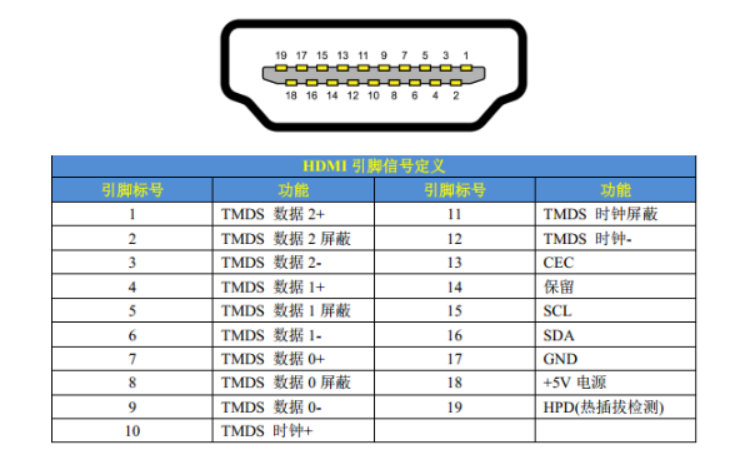 RK3568 has a built-in HDMI TX peripheral that can be used to connect HDMI displays. The RK3568's HDMI interface supports versions 1.4a and 2.0a, providing a convenient screen connection method for consumer electronics such as DVD players, players, and camcorders. The RK3568's HDMI peripheral includes an HDMI transmit controller and a PHY. The features supported by RK3568 HDMI are as follows:
 1. Video formats:
- Video formats supported by the CEA-861-E standard, 1080p@60Hz or 720p/1080i@120Hz
- Video formats supported by HDMI 1.4b:
- CEA-861-E video formats up to 1080p@120Hz
- Supports 4K×2K
- Supports 3D video (TMDS clock up to 340 MHz)
- Supports HDMI 2.0 video formats
2. Color support: RGB 4:4:4
3. Pixel clock: 13.5 MHz–600 MHz
4. Supports audio sample rates up to 192 kHz per the IEC60958 standard
5. Supports I2C DDC and EDID block read mode
6. Supports up to 2160p@60Hz, RGB 4:4:4
(For a more detailed introduction or if you have questions about the above, please refer to the official website data: https://www.hdmi.org/)
1.3 eDP Screen
eDP (Embedded DisplayPort) is a digital display interface standard designed specifically for internal connections. It was developed by the Video Electronics Standards Association (VESA) and is intended to serve as the primary interconnect standard between the motherboard and the built-in display in laptops, tablets, all-in-ones, and other devices. The eDP interface typically uses an FPC connector and is attached to the motherboard. Laptops usually use eDP screens, and the screen also has a digital microphone and camera; the screen can optionally support touch functionality.
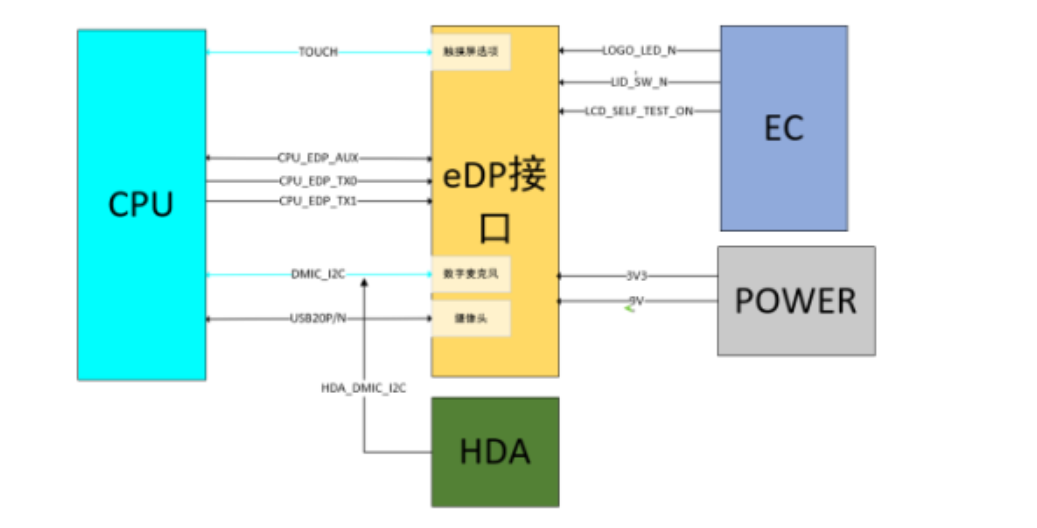
Simply put, eDP is the optimized and extended version of the DisplayPort standard for the embedded field. It inherits the high-performance characteristics of DisplayPort and is enhanced for the space, power, and cost requirements of embedded devices.
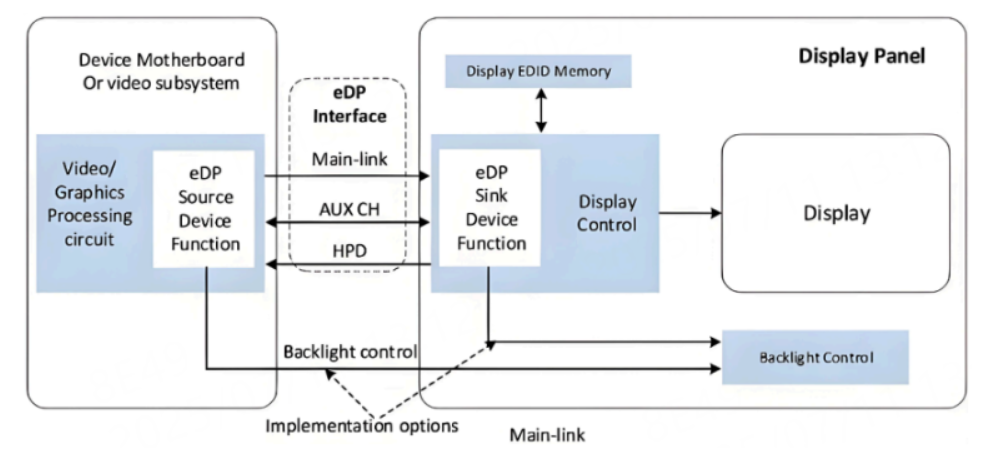
eDP interface composition:
- Main-Link: used to transmit video/audio data, composed of high-speed differential pairs (TX0–TX3), up to 4 lanes, though some screens only use 2 lanes
- AUX CH (Auxiliary Channel): a low-speed single differential pair (AUX+/-), used to transmit configuration commands and parameters
- HPD (Hot Plug Detect): indicates the hot-plug detection channel; the HPD signal is driven by the Sink end (screen) to notify the Source end whether a device is connected (optional)
The features supported by RK3568 eDP are as follows:
| Feature | Specification |
|---|---|
| Supported version | eDP 1.3 |
| Maximum resolution | 2560x1600 @ 60Hz |
| Data lanes | Up to 4 physical lanes |
| Color depth | Supports up to 10-bit RGB output |
| Auxiliary channel(AUX) | Supports AUX CH communication |
| Hot Plug Detect(HPD) | Supports Hot Plug Detect |
| Panel Self Refresh(PSR) | Supports Panel Self Refresh |
(For a more detailed introduction or if you have questions about the above, please refer to the official website data: https://www.edp.com/zh-hans/node)
1.4 Summary
The three display interfaces above are the most mainstream high-performance screen interfaces today. If you have to choose among them, the biggest difference is probably the interface size:
- MIPI DSI interface: If your device is a small device such as a phone screen, then the compact MIPI DSI interface is undoubtedly recommended.
- eDP interface: If it is a slightly larger mobile device such as a laptop, choose the eDP interface screen with a moderate interface size.
- HDMI interface: If it is a fixed large-screen device for personal use such as a desktop monitor or TV, then interfaces with a larger size but impressive speed such as HDMI and DP are recommended.
2 Board Interfaces for the Three Screen Types
2.1 MIPI DSI Interface
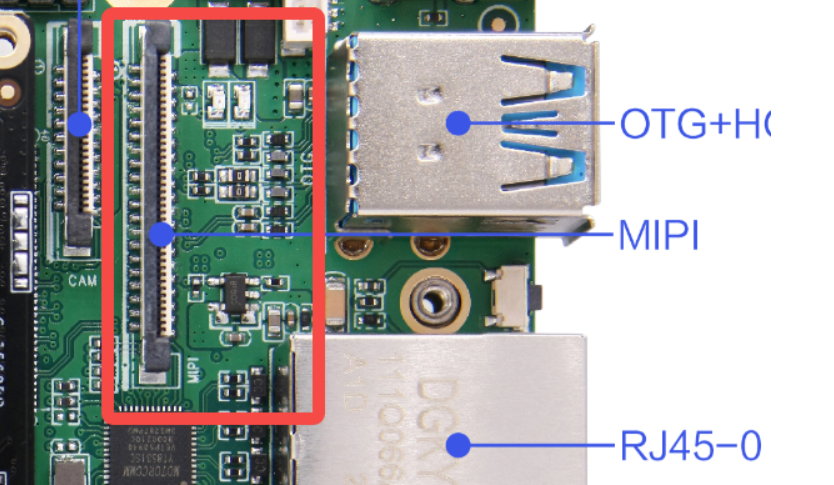
2.2 HDMI Interface
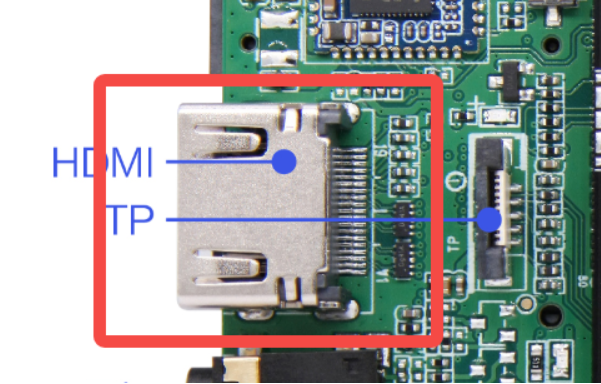
2.3 eDP Interface
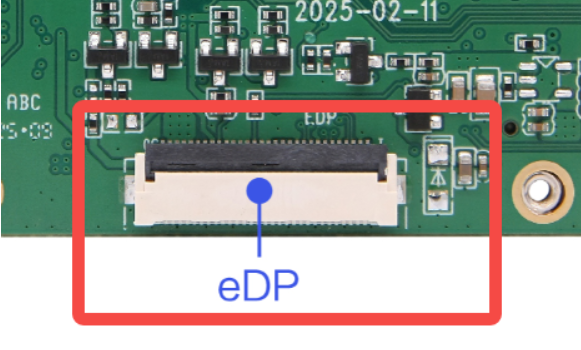
3 Screen DTS Configuration and Switching
3.1 Principle Introduction
Because the device trees of the three RK3568 screen interfaces (MIPI DSI, HDMI, eDP) are too complex — a single peripheral often involves multiple device tree files — and considering space limitations and that most readers are beginners, this chapter and some subsequent chapters will only analyze some board-level configuration files, summarize the core content, and present it to you. Our goal is to let you understand these relatively complex peripheral modules; we are unable to provide file paths.
Before that, let us introduce two basic concepts:
- VOP (Video Output Processor) is the RK3568's video output processor, responsible for managing all display output. It has three video ports: vp0, vp1, and vp2. The VOP routing determines which video pipeline is connected to which display interface. The details are shown in the following table:
| Video Port | Routing Config | Target Interface |
|---|---|---|
| vp0 | vp0_out_dsi0 | MIPI DSI0 |
| vp0 | vp0_out_dsi1 | MIPI DSI1 |
| vp0 | vp0_out_edp | eDP |
| vp0 | vp0_out_hdmi | HDMI |
| vp1 | vp1_out_dsi0 | MIPI DSI0 |
| vp1 | vp1_out_dsi1 | MIPI DSI1 |
| vp1 | vp1_out_edp | eDP |
| vp1 | vp1_out_hdmi | HDMI |
| vp1 | vp1_out_lvds | LVDS |
| vp2 | vp2_out_lvds | LVDS |
| vp2 | vp2_out_rgb | RGB |
- PHY (Physical Layer) is the physical layer interface, responsible for converting between digital signals and the physical transmission medium. Different screen interfaces require different PHYs, as shown in the following table.
| PHY Type | Node Name | Base Address | Function Description |
|---|---|---|---|
| Video PHY | video_phy0 | 0xfe850000 | Physical layer signal processing for the MIPI DSI interface |
| Video PHY | video_phy1 | 0xfe860000 | Physical layer signal processing for the MIPI DSI interface |
| eDP PHY | edp_phy | 0xfdcb0000 | Dedicated to physical layer processing for the eDP interface |
| HDMI PHY | Built-in PHY | - | The HDMI controller has built-in PHY functionality; configures PHY parameters at different frequencies via rockchip,phy-table |
3.2 MIPI DTS Configuration
&dsi0 {
    status = "okay";

    dsi0_panel: panel@0 {
        compatible = "simple-panel-dsi";
        reg = <0>;
        backlight = <&backlight>;
        prepare-delay-ms = <2>;
        reset-delay-ms = <100>;
        init-delay-ms = <20>;
        enable-delay-ms = <120>;
        disable-delay-ms = <50>;
        unprepare-delay-ms = <20>;
        width-mm = <68>;
        height-mm = <121>;

        dsi,flags = <(MIPI_DSI_MODE_VIDEO | MIPI_DSI_MODE_VIDEO_BURST |
                      MIPI_DSI_MODE_LPM | MIPI_DSI_MODE_EOT_PACKET)>;
        dsi,format = <MIPI_DSI_FMT_RGB888>;
        dsi,lanes = <4>;

        pinctrl-names = "default";
        pinctrl-0 = <&mipi_power_en>;
        enable-gpios = <&gpio3 RK_PB6 GPIO_ACTIVE_HIGH>;

        panel-init-sequence = [
            05 64 01 11
            39 00 04 FF 98 81 03
            /* ... 更多初始化命令 ... */
        ];
    };
};

&dsi0_in_vp1 {
    status = "okay";
};

&route_dsi0 {
    status = "okay";
    connect = <&vp1_out_dsi0>;
};- compatible = "simple-panel-dsi": generic DSI panel driver
- dsi,lanes = <4>: 4-lane data transmission
- dsi,format = <MIPI_DSI_FMT_RGB888>: RGB888 color format
- dsi,flags: DSI operating modes (video mode, burst mode, etc.)
- enable-gpios: panel enable GPIO control
- panel-init-sequence: panel initialization command sequence
- connect = <&vp1_out_dsi0>: connect to the VP1 port of VOP
3.3 EDP DTS Configuration
&edp {
	status = "okay";
	force-hpd;

	ports {
		port@1 {
			reg = <1>;

			edp_out: endpoint {
				remote-endpoint = <&panel_in>;
			};
		};
	};
};

&route_edp {
	status = "okay";
	connect = <&vp1_out_edp>;
};

&edp_phy {
	status = "okay";
};

&edp_in_vp0 {
	status = "disabled";
};

&edp_in_vp1 {
	status = "okay";
};

&edp_panel {
	power-supply = <&vcc3v3_lcd0_n>;
};

&backlight {
	status = "okay";
	enable-gpios = <&gpio3 RK_PB5 GPIO_ACTIVE_HIGH>;
	pinctrl-names = "default";
	pinctrl-0 = <&backlight_en>;
};- Controller enable:
status = "okay"enables the eDP controller - Hot-plug detection:
force-hpdforces hot-plug detection - Port connection: defines the output endpoint through the
portsnode, connecting to the panel input - VOP routing:
route_edpis configured to connect to the VOP1 output (vp1_out_edp) - Physical layer: enables the eDP PHY (
edp_phy) - Input endpoints: disables VOP0 input (
edp_in_vp0), enables VOP1 input (edp_in_vp1) - Power management: the panel power supply is configured as
vcc3v3_lcd0_n - Backlight control: controls backlight enable via GPIO3_PB5
3.4 HDMI DTS Configuration
&hdmi {
	status = "okay";
	rockchip,phy-table =
		<92812500  0x8009 0x0000 0x0270>,
		<165000000 0x800b 0x0000 0x026d>,
		<185625000 0x800b 0x0000 0x01ed>,
		<297000000 0x800b 0x0000 0x01ad>,
		<594000000 0x8029 0x0000 0x0088>,
		<000000000 0x0000 0x0000 0x0000>;
};

&hdmi_in_vp0 {
	status = "okay";
};

&hdmi_in_vp1 {
	status = "disabled";
};

&hdmi_sound {
	status = "okay";
};

&route_hdmi {
	status = "okay";
	connect = <&vp0_out_hdmi>;
};
Controller enable:status = "okay"enables the HDMI controllerPHY parameter table:rockchip,phy-tabledefines the PHY configuration parameters at different frequencies- Supports a frequency range from 92.8 MHz to 594 MHz
- Each row contains: frequency, configuration register 1, configuration register 2, configuration register 3
VOP routing: enables VOP0 input (hdmi_in_vp0), disables VOP1 input (hdmi_in_vp1)Audio support: enables HDMI audio (hdmi_sound)Routing configuration:route_hdmiconnects to the VOP0 output (vp0_out_hdmi)
3.5 Switching the Screen Display Mode
Currently M4-R1 supports three display modes: MIPI0, EDP, and HDMI. The default display is MIPI0+HDMI simultaneous display.
To switch the screen in use, modify the file out/kernel/src_tmp/linux-5.10/arch/arm64/boot/dts/rockchip/rk3568-toybrick-x0-linux.dts:
Using MIPI0:
/dts-v1/;
#include "rk3568.dtsi"
#include "rk3568-linux.dtsi"
#include "rk3568-toybrick-x0.dtsi"
#include "rk3568-toybrick-mipi-tx0-beiqicloud.dtsi"
//#include "rk3568-toybrick-mipi-tx1.dtsi"
//#include "rk3568-toybrick-edp.dtsi"
Using EDP:
/dts-v1/;
#include "rk3568.dtsi"
#include "rk3568-linux.dtsi"
#include "rk3568-toybrick-x0.dtsi"
//#include "rk3568-toybrick-mipi-tx0-beiqicloud.dtsi"
//#include "rk3568-toybrick-mipi-tx1.dtsi"
#include "rk3568-toybrick-edp.dtsi"