
NAPI Introduction
Part One: NAPI Basic Concept Introduction
NAPI in OpenHarmony (extended from the Node.js N-API framework) is part of the ArkUI subsystem under the UI framework. It is used to interact between code written in JS/ETS languages and native code (C/C++). NAPI is suitable for encapsulating IO, CPU-intensive, OS low-level, and other capabilities and exposing JS interfaces externally. Through NAPI, JS (JavaScript) and C/C++ code can access each other.
1 JavaScript, TypeScript, and ArkTS
TypeScript is a typed superset of JavaScript. It supports ES6 syntax and supports object-oriented programming concepts such as classes, interfaces, inheritance, generics, etc. It is a statically-type-checked language that provides type annotations, allowing data-type errors to be caught at the code-compilation stage. At the same time, it extends the syntax of JavaScript, so any existing JavaScript program can work under TypeScript without change. To ensure compatibility, TypeScript needs to be compiled into pure JavaScript by a compiler at the compilation stage to run. TypeScript files have the suffix .ts (.ts, .tsx, .d.ts); JavaScript files are .js.
ArkTS, on the other hand, extends some features on the basis of TypeScript, adding things similar to syntactic sugar and "annotations".
2 .ts and .d.ts Files
A .ts file contains the actual code logic and is used to write the implementation of a TypeScript program. The file contains the definitions and implementations of variables, functions, classes, and other TypeScript code. At compile time, the .ts file is converted into a JavaScript file so it can be executed in a browser or other JavaScript runtime environment. A .d.ts file, on the other hand, is a type declaration file that contains only type code and no specific code implementation. Its file name is usually in the form [module-name].d.ts, where d stands for declaration. It is used to describe the type information of JavaScript code in TypeScript. In short, .ts files are where we write actual business logic, and .d.ts files are where type declarations are provided.
3 Basic Data Types
In the NAPI framework, all parameters — whether the eight data types defined in the ECMAScript standard (Boolean, Null, Undefined, Number, BigInt, String, Symbol, and Object) or the Function type — are uniformly encapsulated as napi_value type. Therefore, you can obtain a Function-type parameter just as you would obtain a parameter of a data type.
Basic data types:
- napi_env corresponds to NativeEngine; in oh it refers to the relevant context environment of JSNAPI in ArkComplier. Any conversion between napi data types and js data types requires it.
- napi_value corresponds to NativeValue; in oh it refers to all js data types that ArkComplier can recognize. It has subclasses ArkNativeNumber, ArkNativeString, ArkNativeFunction, etc., corresponding to number, string, function, and other data types in js.
- napi_callback_info corresponds to NativeCallbackInfo; it is the data type used to store the parameter information passed in from js when registering a callback handle. It is a struct.
- napi_property_descriptor is the data type used to store a single property.
- napi_callback corresponds to NativeCallback, i.e. the callback handle mentioned earlier; native code registers it as the callback function for the corresponding js interface.
4 NAPI Object Lifecycle
The NAPI object lifecycle represents the entire process from object creation to release, as shown in the figure below:
When the ArkTS application starts, it loads the NAPI module. During the NAPI module loading process, an object A is created for the application to use. Before the application exits or actively releases object A, object A must always remain "active". The entire process from object A's creation to its release also represents the lifecycle of object A.
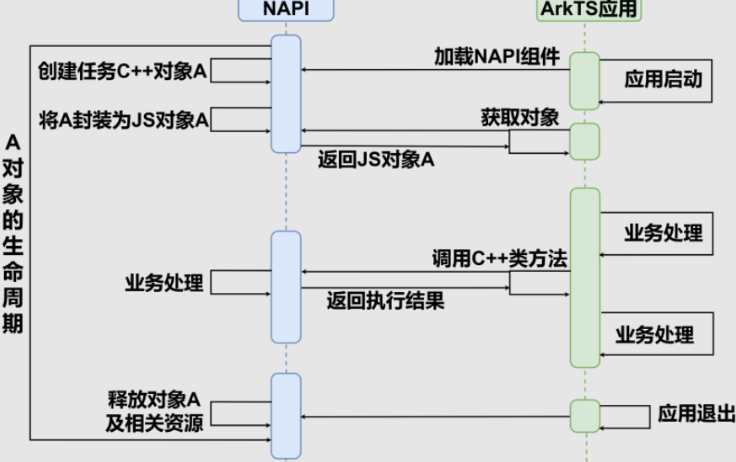
When calling Node-API, handles of objects in the heap of the underlying virtual machine may be returned in the form of napi_values. These handles must keep the object "alive" until the native code no longer needs them.
5 Synchronous Interfaces and Asynchronous Interfaces
Synchronous interfaces execute in the main thread and may cause UI stutter; asynchronous interfaces execute in a worker thread, avoiding blocking of the main thread.
| Concept | Synchronous Interface | Asynchronous Interface |
|---|---|---|
| Execution Thread | Main thread | Worker thread |
| Blocking | Blocks the main thread | Does not block the main thread |
| Use Case | Simple tasks | Complex tasks, CPU-intensive tasks |
| Implementation Complexity | Simple | Complex |
The asynchronous interface uses the napi_create_async_work function to create an async work item, and uses the napi_queue_async_work function to add it to the scheduling queue. It processes the asynchronous result in the Complete function, calling the callback function or updating the Promise state.
Part Two: Common NAPI Functions
After learning the basic theory of NAPI, this section introduces several functions that developers frequently use.
1 napi_get_cb_info
Function Description:
napi_get_cb_info is a core function in Node.js N-API. It is mainly used in native plugins (usually written in C/C++) to obtain parameter information, the this object, and other context data passed when calling a JavaScript function. Simply put, it is the core of the interaction between native code and JavaScript.
Function Prototype:
napi_status napi_get_cb_info(napi_env env,
                             napi_callback_info cbinfo,
                             size_t* argc,
                             napi_value* argv,
                             napi_value* this_arg,
                             void** data)
Parameter Description:
| Parameter | Type (C/C++) | Direction (for the function) | Description |
|---|---|---|---|
| env | napi_env | Input | The N-API environment handle, providing the context for function execution. |
| cbinfo | napi_callback_info | Input | The callback info handle, usually passed in by Node.js when calling a native function. |
| argc | size_t * | Input/Output | On input, indicates the expected number of parameters to obtain; on output, indicates the actual number of parameters received. |
| argv | napi_value * | Output | The array used to store parameters. If nullptr is passed in, parameters are not copied; only the count is obtained. |
| this_arg | napi_value * | Output | Used to receive the this object in JavaScript. |
| data | void ** | Output | Used to receive the extra data pointer that may be bound when the function was created. |
Usage Example:
#include <node_api.h>

// 准备变量来获取参数和信息
size_t argc = 2; // 我们期望获取2个参数
napi_value argv[2]; // 准备一个数组来存放这两个参数
napi_value this_arg;
void* data;

// 调用 napi_get_cb_info 获取信息
status = napi_get_cb_info(env, info, &argc, argv, &this_arg, &data);
if (status != napi_ok) {
  // 处理错误...
}
2 napi_get_value_string_utf8
Function Description: Extracts a UTF-8-encoded C string from a JavaScript string value. It converts a JavaScript string into a UTF-8-format char array for convenient processing by C/C++ code.
Function Prototype:
napi_status napi_get_value_string_utf8(napi_env env,
                                       napi_value value,
                                       char* buf,
                                       size_t bufsize,
                                       size_t* result);
Parameter Description:
| Parameter | Type | Direction | Description |
|---|---|---|---|
| env | napi_env | Input | N-API environment handle, providing the context for function execution |
| value | napi_value | Input | The JavaScript string value to be converted |
| buf | char* | Output | Pointer to the buffer that stores the result (can be NULL) |
| bufsize | size_t | Input | Buffer size (in bytes) |
| result | size_t* | Output | Optional parameter; receives the actual string length (not including the null terminator) |
Usage Example:
napi_value js_string;
// ... 获取 JavaScript 字符串到 js_string ...

// 首先获取所需缓冲区大小
size_t length;
napi_get_value_string_utf8(env, js_string, NULL, 0, &length);

// 分配缓冲区(+1 用于空终止符)
char* buffer = (char*)malloc(length + 1);

// 实际获取字符串内容
napi_get_value_string_utf8(env, js_string, buffer, length + 1, NULL);

// 使用 buffer...
free(buffer);
3 napi_create_function
Function Description: Creates a new JavaScript function object that, when called, executes the specified C/C++ callback function.
Function Prototype:
napi_status napi_create_function(napi_env env,
                                 const char* utf8name,
                                 size_t length,
                                 napi_callback cb,
                                 void* data,
                                 napi_value* result);
Parameter Description:
| Parameter | Type | Direction | Description |
|---|---|---|---|
| env | napi_env | Input | N-API environment handle |
| utf8name | const char* | Input | Function name (UTF-8 encoded) |
| length | size_t | Input | Function name length (use NAPI_AUTO_LENGTH to auto-calculate) |
| cb | napi_callback | Input | The native callback function to execute when the JavaScript function is called |
| data | void* | Input | User data passed to the callback function |
| result | napi_value* | Output | The newly created JavaScript function object |
Usage Example:
napi_value my_function;
napi_create_function(env, "myFunction", NAPI_AUTO_LENGTH, MyNativeFunction, NULL, &my_function);
4 napi_create_object
Function Description: Creates a new empty JavaScript object.
Function Prototype:
napi_status napi_create_object(napi_env env, napi_value* result);Parameter Description:
| Parameter | Type | Direction | Description |
|---|---|---|---|
| env | napi_env | Input | N-API environment handle |
| result | napi_value* | Output | The newly created JavaScript object |
Usage Example:
napi_value obj;
napi_create_object(env, &obj);
5 napi_create_string_utf8
Function Description: Creates a JavaScript string from a UTF-8-encoded C string.
Function Prototype:
napi_status napi_create_string_utf8(napi_env env,
                                    const char* str,
                                    size_t length,
                                    napi_value* result);
Parameter Description:
| Parameter | Type | Direction | Description |
|---|---|---|---|
| env | napi_env | Input | N-API environment handle |
| str | const char* | Input | UTF-8-encoded C string |
| length | size_t | Input | String length (use NAPI_AUTO_LENGTH to auto-calculate) |
| result | napi_value* | Output | The newly created JavaScript string |
Usage Example:
napi_value js_string;
napi_create_string_utf8(env, "Hello World", NAPI_AUTO_LENGTH, &js_string);
6 napi_set_named_property
Function Description: Sets a named property on a JavaScript object.
Function Prototype:
napi_status napi_set_named_property(napi_env env,
                                    napi_value object,
                                    const char* utf8name,
                                    napi_value value);
Parameter Description:
| Parameter | Type | Direction | Description |
|---|---|---|---|
| env | napi_env | Input | N-API environment handle |
| object | napi_value | Input | The JavaScript object on which to set the property |
| utf8name | const char* | Input | Property name (UTF-8 encoded) |
| value | napi_value | Input | The property value to set |
Usage Example:
napi_value obj, value;
napi_create_object(env, &obj);
napi_create_string_utf8(env, "test", NAPI_AUTO_LENGTH, &value);
napi_set_named_property(env, obj, "propertyName", value);
7 napi_get_value_double
Function Description: Extracts a C double-precision floating-point value from a JavaScript numeric value.
Function Prototype:
napi_status napi_get_value_double(napi_env env, napi_value value, double* result);Parameter Description:
| Parameter | Type | Direction | Description |
|---|---|---|---|
| env | napi_env | Input | N-API environment handle |
| value | napi_value | Input | JavaScript numeric value |
| result | double* | Output | The extracted double-precision floating-point value |
Usage Example:
double number;
napi_get_value_double(env, js_number_value, &number);
8 napi_typeof
Function Description: Determines the type of a JavaScript value.
Function Prototype:
napi_status napi_typeof(napi_env env, napi_value value, napi_valuetype* result);Parameter Description:
| Parameter | Type | Direction | Description |
|---|---|---|---|
| env | napi_env | Input | N-API environment handle |
| value | napi_value | Input | The JavaScript value to check |
| result | napi_valuetype* | Output | The type of the value (such as napi_number, napi_string, etc.) |
Usage Example:
napi_valuetype type;
napi_typeof(env, js_value, &type);
if (type == napi_number) {
    // 处理数字类型
}
9 napi_open_handle_scope / napi_close_handle_scope
Function Description: Manages the lifecycle of napi_value handles to prevent memory leaks.
Function Prototype:
napi_status napi_open_handle_scope(napi_env env, napi_handle_scope* result);
napi_status napi_close_handle_scope(napi_env env, napi_handle_scope scope);
Parameter Description:
| Parameter | Type | Direction | Description |
|---|---|---|---|
| env | napi_env | Input | N-API environment handle |
| result | napi_handle_scope* | Output | The newly created scope handle |
| scope | napi_handle_scope | Input | The scope handle to close |
Usage Example:
napi_handle_scope scope;
napi_open_handle_scope(env, &scope);
// 在此作用域内创建 napi_value
napi_close_handle_scope(env, scope);
10 napi_throw_error
Function Description: Throws a JavaScript error.
Function Prototype:
napi_status napi_throw_error(napi_env env, const char* code, const char* msg);Parameter Description:
| Parameter | Type | Direction | Description |
|---|---|---|---|
| env | napi_env | Input | N-API environment handle |
| code | const char* | Input | Error code (can be NULL) |
| msg | const char* | Input | Error message |
Usage Example:
napi_throw_error(env, NULL, "Something went wrong");11 napi_create_int32
Function Description: Creates a JavaScript number from a C int32_t value.
Function Prototype:
napi_status napi_create_int32(napi_env env, int32_t value, napi_value* result);Parameter Description:
| Parameter | Type | Direction | Description |
|---|---|---|---|
| env | napi_env | Input | N-API environment handle |
| value | int32_t | Input | C integer value |
| result | napi_value* | Output | The newly created JavaScript number |
Usage Example:
napi_value js_number;
napi_create_int32(env, 42, &js_number);
12 napi_call_function
Function Description: Calls a JavaScript function.
Function Prototype:
napi_status napi_call_function(napi_env env,
                               napi_value recv,
                               napi_value func,
                               size_t argc,
                               const napi_value* argv,
                               napi_value* result);
Parameter Description:
| Parameter | Type | Direction | Description |
|---|---|---|---|
| env | napi_env | Input | N-API environment handle |
| recv | napi_value | Input | The this object at function call time |
| func | napi_value | Input | The JavaScript function to call |
| argc | size_t | Input | Number of arguments |
| argv | const napi_value* | Input | Argument array |
| result | napi_value* | Output | Return value of the function call (can be NULL) |
Usage Example:
napi_value global, func, args[1], result;
napi_get_global(env, &global);
// 假设 func 是一个 JavaScript 函数
napi_call_function(env, global, func, 1, args, &result);
Part Three: NAPI Development Steps
1. Include the Header File and Implement the C/C++ Function Body
The first step is to include #include "napi/native_api.h" in the C/C++ file, and then implement the C/C++ function body according to normal logic.
#include "napi/native_api.h"2. Define the Mapping between the NAPI Interface Functions to be Exposed and the Native Functions
To expose C/C++ native functions or properties to JavaScript, the mapping is usually done within the framework-provided function static napi_value Init(napi_env env, napi_value exports).
EXTERN_C_START
static napi_value Init(napi_env env, napi_value exports) {
    napi_property_descriptor desc[] = {
        {"Init", nullptr, ObjectDectionInit, nullptr, nullptr, nullptr, napi_default, nullptr},
        {"Process", nullptr, ObjectDectionProcess, nullptr, nullptr, nullptr, napi_default, nullptr},
        {"DeInit", nullptr, ObjectDectionDeInit, nullptr, nullptr, nullptr, napi_default, nullptr}};
    napi_define_properties(env, exports, sizeof(desc) / sizeof(desc[0]), desc);
    return exports;
}
EXTERN_C_END
Or use macro definitions:
EXTERN_C_START
static napi_value Init(napi_env env, napi_value exports) {
    napi_property_descriptor desc[] = {
        DECLARE_NAPI_FUNCTION("Init", ObjectDectionInit),
        DECLARE_NAPI_FUNCTION("Process", ObjectDectionProcess),
        DECLARE_NAPI_FUNCTION("DeInit", ObjectDectionDeInit)
         };
    napi_define_properties(env, exports, sizeof(desc) / sizeof(desc[0]), desc);
    return exports;
}
EXTERN_C_END
This completes the relevant mapping.
3. Establish the Mapping between the Interface and the Module
3.1 Define an napi_module Object
Define an napi_module object, bind the corresponding so to the nm_modname property, and bind the entry function that registers the Module.
/*
 * Napi Module define
 */

static napi_module msLiteModule = {
    .nm_version = 1,
    .nm_flags = 0,
    .nm_filename = nullptr,
    .nm_register_func = Init,
    .nm_modname = "mslite_napi",
    .nm_priv = ((void *)0),
    .reserved = {0},
};
After binding, you can use import mslite_napi from 'libmslite_napi.so' on the ETS side.
import mslite_napi from 'libmslite_napi.so'

let resourceManager = context.resourceManager
mslite_napi.Init(resourceManager)
mslite_napi
  .Process(this.modelId, picDesc, buffer)
  .then((value: InferResult) => {
    callback(value.objects)
  })
  .catch((err: BusinessError) => {})
mslite_napi.DeInit()
3.2 Bind the napi_module Object to the System Function RegisterModule
Then pass the napi_module object into the system function RegisterModule:
/*
 * module register
 */
extern "C" __attribute__((constructor)) void RegisterModule(void) {
  MS_LOG(INFO) << "RegisterModule() is called";
  napi_module_register(&g_module);
}
3.3 Execute the Entry Function nm_register_func of napi_module
Generally, in the OH system, the built-in NAPI registration entry function is automatically executed by the Framework, so when we develop NAPI ourselves, we need to call and trigger it ourselves.
4. Define the ETS Interface Description File .d.ts
export const Init: (path: Object) => number
export const Process: (
  modeid: number,
  picDesc: Object,
  buffer: ArrayBuffer,
) => number
export const DeInit: () => number
5. Implement Receiving and Processing of ETS Parameters and Feedback of Results on the Native Side
Because on the ETS side you can consider the data types to be weakly typed; the specific type needs to be parsed by the native side itself.
On the native side, the formal-parameter list of the function passed from the ETS side and the return value are of a fixed type.
5.1 Develop a Synchronous Interface
C developers just need to do the data-conversion work properly.
The parameter objects and function objects passed by the JavaScript call are provided to C in such an abstract type as napi_value. The developer needs to convert them into C data types for computation, and then convert the result back to the napi_value type to return. The NAPI framework provides various api interfaces for users to complete these conversions; these conversion operations are implemented by the JS engine behind the scenes.
static napi_value GetVisitCountSync(napi_env env, napi_callback_info info) {
  /* 根据环境变量获取参数 */
  size_t argc = 2; //参数个数
  napi_value argv[2] = { 0 }; //参数定义

  /* 入参变量获取 */
  napi_get_cb_info(env, info, &argc, argv, nullptr, nullptr);
  // 获取入参的类型
  napi_valuetype valueType = napi_undefined;
  napi_typeof(env, argv[0], &valueType);

  // 入参值转换为C/C++可以操作的数据类型
  char value[VALUE_BUFFER_SIZE] = { 0 };
  size_t valueLen = 0;
  napi_get_value_string_utf8(env, argv[0], value, VALUE_BUFFER_SIZE, &valueLen);

  // ...... 省略若干业务流程计算步骤

  /* C/C++数据类型转换为JS数据类型并返回 */
  napi_value result = nullptr; // JS字符串对象
  std::string resultStr = "Visit Count = 65535";
  napi_create_string_utf8(env, resultStr.c_str(), resultStr.length(), &result);

  return result; //返回JS对象
}
5.1.1 Function Declaration
Each mapped function must take parameters napi_env env, napi_callback_info cbinfo, and return napi_value. To implement js or ets calls, the NAPI framework needs to solve the following problems: data passing and conversion. The input parameters passed in by js/ets and the returned results need to be converted into data types that C/C++ code can operate on. Therefore, the NAPI framework introduces an intermediate data type to respectively correspond to the types of upper-layer js/ets and C/C++, as well as the methods for operating on the data types.
5.1.2 Get Input Parameters
The function napi_get_cb_info obtains the parameters passed in from JavaScript from the cbinfo parameter.
5.1.3 Convert NAPI Types to C/C++-Recognizable Types
napi_value NapiDemo(napi_env env, napi_callback_info cbinfo)
{
        ...
    char* type = nullptr;
    size_t typeLen = 0;
    napi_get_value_string_utf8(env, argv[0], nullptr, 0, &typeLen);
    NAPI_ASSERT(env, typeLen > 0, "typeLen == 0");
    type = new char[typeLen + 1];
    napi_get_value_string_utf8(env, argv[0], type, typeLen + 1, &typeLen);
        ...
}
5.1.4 Return Value
When C++ has no return value, NapiDemo returns nullptr. The NAPI framework has no nullptr; napi_get_undefined converts nullptr into nullptr napi_undefined.
napi_value NapiDemo(napi_env env, napi_callback_info cbinfo)
{
...
    napi_value result = nullptr;
    napi_get_undefined(env, &result);
    return result;
}