
I2C Communication
1 I2C Introduction
The I2C bus controller transfers information between devices connected to the bus through the Serial Data (SDA) line and the Serial Clock (SCL) line. Each device has a unique address identification (whether it is a microcontroller — MCU, LCD driver, memory, or keyboard interface), and each can act as a transmitter or receiver (determined by the device's function).
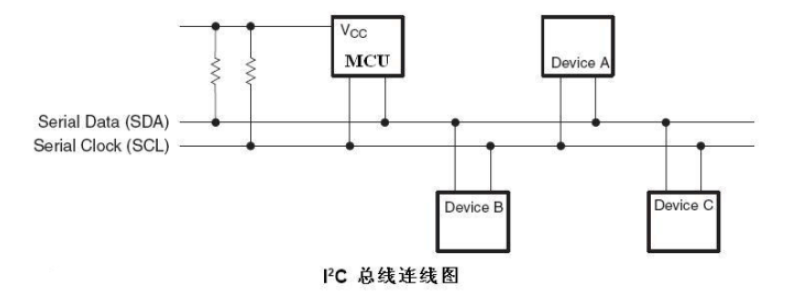
For a detailed I2C introduction, please refer to:
2 I2C Board Interface
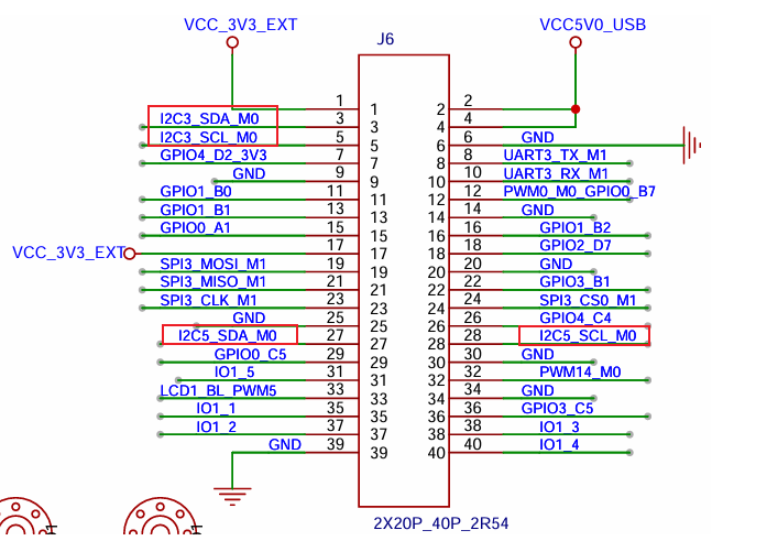
The board's pins expose a total of 2 groups of I2C interfaces, namely i2c-3 and i2c-5.
3 I2C Usage — Command-Line Method
3.1 I2C Device-Tree Configuration
Below, based on the introduction in the device-tree chapter, we will analyze the device-tree configuration of I2C3 and I2C5.
Tips
For the file paths below: out/kernel/src_tmp/linux-5.10/arch/arm64/boot/dts/rockchip/ requires compiling the source code first.
Let's first find the basic configuration content of I2C3 and I2C5 in rk3568.dtsi, as follows:
i2c3: i2c@fe5c0000 {
    compatible = "rockchip,rk3399-i2c";
    reg = <0x0 0xfe5c0000 0x0 0x1000>;  // 寄存器地址
    clocks = <&cru CLK_I2C3>, <&cru PCLK_I2C3>;  // 时钟配置
    clock-names = "i2c", "pclk";
    interrupts = <GIC_SPI 49 IRQ_TYPE_LEVEL_HIGH>;  // 中断配置
    pinctrl-names = "default";
    pinctrl-0 = <&i2c3m0_xfer>;  // 引脚复用配置
    #address-cells = <1>;
    #size-cells = <0>;
    status = "disabled";  // 默认禁用
};

i2c5: i2c@fe5e0000 {
    compatible = "rockchip,rk3399-i2c";
    reg = <0x0 0xfe5e0000 0x0 0x1000>;  // 寄存器地址
    clocks = <&cru CLK_I2C5>, <&cru PCLK_I2C5>;  // 时钟配置
    clock-names = "i2c", "pclk";
    interrupts = <GIC_SPI 51 IRQ_TYPE_LEVEL_HIGH>;  // 中断配置
    pinctrl-names = "default";
    pinctrl-0 = <&i2c5m0_xfer>;  // 引脚复用配置
    #address-cells = <1>;
    #size-cells = <0>;
    status = "disabled";  // 默认禁用
};
Then go to rk3568-pinctrl.dtsi to view the I2C pin configuration:
i2c3m0_xfer: i2c3m0-xfer {
    rockchip,pins =
        /* i2c3_sclm0 - 时钟线 */
        <1 RK_PA1 1 &pcfg_pull_none_smt>,
        /* i2c3_sdam0 - 数据线 */
        <1 RK_PA0 1 &pcfg_pull_none_smt>;
};

i2c5m0_xfer: i2c5m0-xfer {
    rockchip,pins =
        /* i2c5_sclm0 - 时钟线 */
        <3 RK_PB3 4 &pcfg_pull_none_smt>,
        /* i2c5_sdam0 - 数据线 */
        <3 RK_PB4 4 &pcfg_pull_none_smt>;
};
Finally, find the board-level configuration file to view the I2C peripheral's specific configuration.
In rk3568-toybrick.dtsi, I2C5 is enabled and sensor devices are configured:
&i2c5 {
	status = "okay";

	gs_mxc6655xa: gs_mxc6655xa@15 {
		status = "okay";
		compatible = "gs_mxc6655xa";
		pinctrl-names = "default";
		pinctrl-0 = <&mxc6655xa_irq_gpio>;
		reg = <0x15>;
		irq-gpio = <&gpio3 RK_PC1 IRQ_TYPE_LEVEL_LOW>;
		irq_enable = <0>;
		poll_delay_ms = <30>;
		type = <SENSOR_TYPE_ACCEL>;
		power-off-in-suspend = <1>;
		layout = <1>;
	};

    mxc6655xa: mxc6655xa@15 {
		status = "disabled";
		compatible = "gs_mxc6655xa";
		pinctrl-names = "default";
		pinctrl-0 = <&mxc6655xa_irq_gpio>;
		reg = <0x15>;
		irq-gpio = <&gpio3 RK_PC1 IRQ_TYPE_LEVEL_LOW>;
		irq_enable = <0>;
		poll_delay_ms = <30>;
		type = <SENSOR_TYPE_ACCEL>;
		power-off-in-suspend = <1>;
		layout = <1>;
	};

    hym8563: hym8563@51 {
		compatible = "haoyu,hym8563";
		reg = <0x51>;
		pinctrl-names = "default";
		pinctrl-0 = <&rtc_int>;

		interrupt-parent = <&gpio0>;
		interrupts = <RK_PD3 IRQ_TYPE_LEVEL_LOW>;
	};
};
Info
MXC6655XA is a digital-output three-axis accelerometer released by MEMSIC. hym8563 is an I2C-interface real-time clock (RTC) chip; the development board actually enables this device.
In rk3568-toybrick-x0-linux.dts, I2C3 is enabled and NCA9555 is configured:
&i2c3{
    nca9555:nca9555@20{
        reg=<0x20>;  // I2C设备地址为0x20
        compatible = "novosense,nca9555";  // 设备兼容性字符串
        status="okay";  // 设备状态为使能
        gpio-controller;  // 声明为GPIO控制器
        #gpio-cells = <2>;  // GPIO单元格数量
    };
};
Info
NCA9555 is a 24-pin CMOS device that provides 16-bit general-purpose parallel I2C-bus input/output GPIO expansion.
3.2 Common Commands for Operating I2C
Check I2C devices:
ls dev/i2c*Test I2C commands:
I2C tool is an open-source tool. The SDK we provide has already downloaded and cross-compiled it. After compilation, test commands such as i2cdetect, i2cdump, i2cset, and i2cget have been generated on the board and can be used directly for debugging on the command line:
- i2cdetect – used to enumerate the I2C bus and all the devices on it
- i2cdump – displays all register values of an i2c device
- i2cget – reads the value of a register of an i2c device
- i2cset – writes the value of a register of an i2c device
3.3 Specific Function Demo
The following are common usage examples of the above commands:
1. Detect how many groups of i2c buses the current system has:
i2cdetect -l
2. View devices on the i2c-3 interface:
i2cdetect -a 3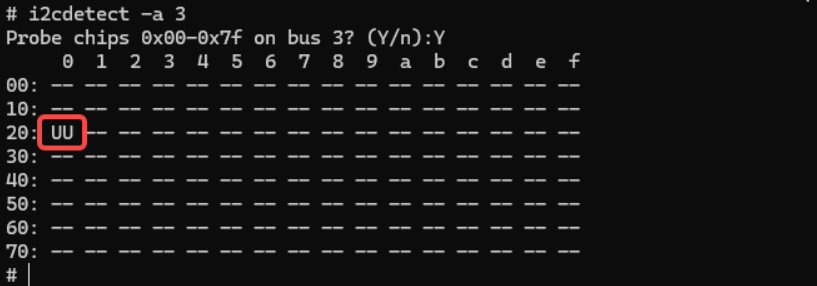
UU indicates that the device driver for the device with address 20 has been loaded successfully, that is, the NCA9555 mounted on I2C3 mentioned above.
3. Read all register values of the specified device:
i2cdump -f -y 3 0x20(Display the values of all register addresses from 0x00 to 0xff on the slave device 0x20 on i2c bus 3)
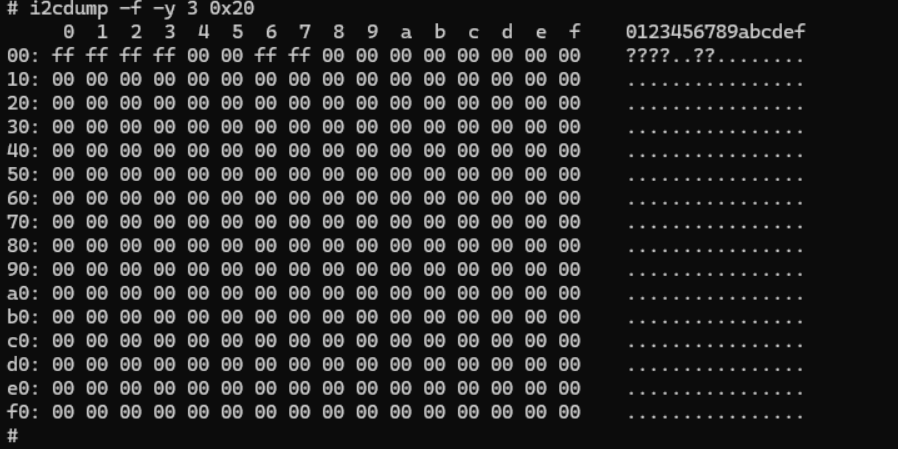
The command executed successfully and output data, which indicates that a device with address 0x20 exists on bus 3 and that basic communication is normal.
4. Read the value of a register of the specified I2C device:
i2cget -f -y 3 0x20 0x01(Read the value of the 0x01 register in the device with address 0x20)

4. I2C Usage — NAPI Method
Materials Path
hap package: \05-Development Materials\01-OpenHarmory Development Materials\Peripheral Test APP\HAP\I2C_TEST.hap
Project source code: \05-Development Materials\01-OpenHarmory Development Materials\Peripheral Test APP\SRC\I2C_TEST
4.1 Kernel Permission Setting
We execute the following command in the terminal to add permission for I2C3:
chmod 777 /dev/i2c-34.2 Test Program Explanation
To see the data intuitively, a logic analyzer is used here to capture the sent I2C signals, to verify the correctness of the sent data.
After adding permission, first click to open the I2C device. After the prompt indicates the open succeeded, click to start sending "Shimeta Pi".
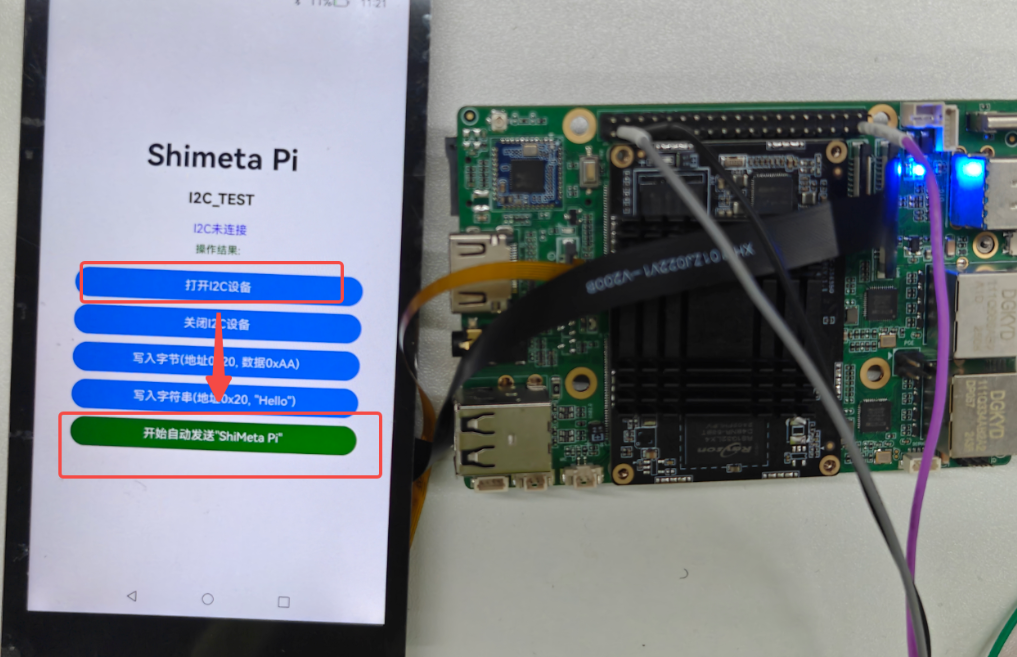
After clicking, I2C3 will send the string "Shimeta Pi" once every 100ms.
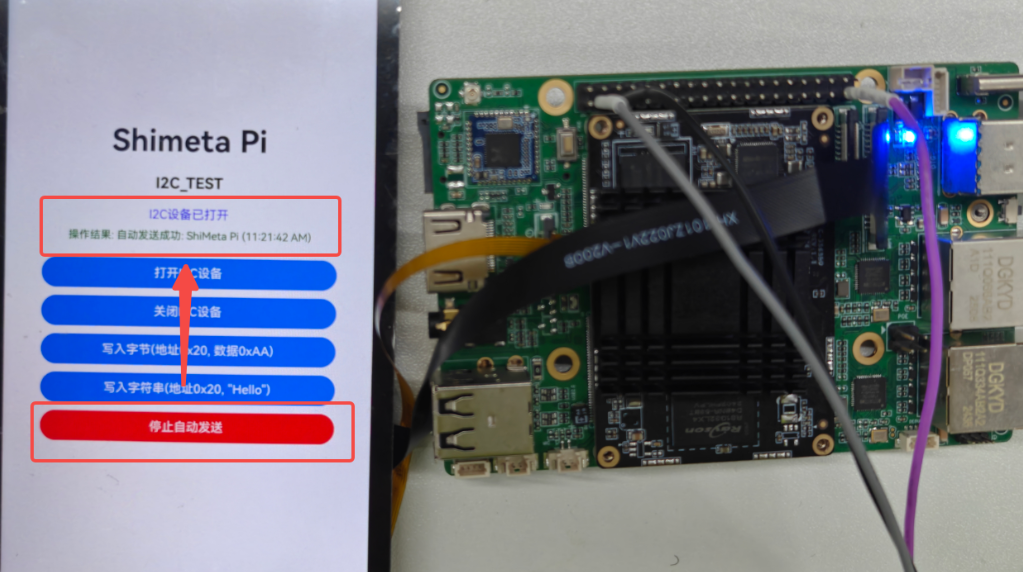
After enabling auto-send, we use a logic analyzer to capture data; the data captured within 1s is as follows:

We can see that the data sent every 100ms is as shown above.
Let's take the last 2 data items as an example to view:

The last two data packets are 0x50 and 0x69, corresponding to decimal 80 and 105. Check the ASCII table as follows:
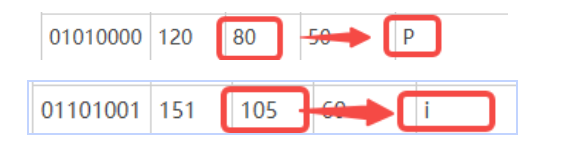
These correspond to the last 2 data items of the string "ShiMeta Pi".
By the same logic, the organized data is as shown in the table below:
| Character | Hex Value | Decimal Value | Description |
|---|---|---|---|
'S' | 0x53 | 83 | Character S |
'h' | 0x68 | 104 | Character h |
'i' | 0x69 | 105 | Character i |
'M' | 0x4D | 77 | Character M |
'e' | 0x65 | 101 | Character e |
't' | 0x74 | 116 | Character t |
'a' | 0x61 | 97 | Character a |
' ' | 0x20 | 32 | Space |
'P' | 0x50 | 80 | Character P |
'i' | 0x69 | 105 | Character i |
There is no difference from the values actually observed by the logic analyzer.

4.3 Partial Code Explanation
Here we use the method of reading system nodes to operate I2C for read/write operations on the peripheral. We excerpt part of the code for introduction.
Let's first introduce the function ioctl, a very important control-operation function in the embedded field. You can imagine it as a universal remote control: press the corresponding button against the specified device and the device will perform the corresponding operation.
The function prototype is:
int ioctl(int fd, unsigned long request, ...);Parameter introduction:
fd is the file descriptor, specifying the device file to operate on; request is the request code. For example, after you press the AC remote control, the remote control sends a section of ENC infrared encoding. After receiving this string of encoding, the AC decodes it; for example, if the decoded result is "0x9E", the AC internally looks at its own "task list". If it sees that "0x9E" means to turn on cooling, it performs the cooling operation. Correspondingly, the kernel has already defined some I2C operations; we only need to send the corresponding request code, and the kernel will perform the corresponding operation after receiving it.
... is a variable parameter that sends different data according to different request codes. For example, if the AC command code "0x88" means to set the temperature, then this data may be the temperature data.
Now look at one of the most important functions in our program: ioctl(i2c_fd, I2C_RDWR, &i2c_data). Is it not hard to understand? It tells the Linux kernel: "The I2C controller corresponding to i2c_fd is to perform an I2C read/write operation, and the specific data is &i2c_data."
Let's look again at the i2c-dev.h file provided by the Linux kernel, placed in the project in the same directory as napi_init.cpp. The code is as follows:
/*
    i2c-dev.h - i2c-bus driver, char device interface

    Copyright (C) 1995-97 Simon G. Vogl
    Copyright (C) 1998-99 Frodo Looijaard <frodol@dds.nl>

    This program is free software; you can redistribute it and/or modify
    it under the terms of the GNU General Public License as published by
    the Free Software Foundation; either version 2 of the License, or
    (at your option) any later version.

    This program is distributed in the hope that it will be useful,
    but WITHOUT ANY WARRANTY; without even the implied warranty of
    MERCHANTABILITY or FITNESS FOR A PARTICULAR PURPOSE.  See the
    GNU General Public License for more details.

    You should have received a copy of the GNU General Public License
    along with this program; if not, write to the Free Software
    Foundation, Inc., 675 Mass Ave, Cambridge, MA 02139, USA.
*/

#ifndef _LINUX_I2C_DEV_H
#define _LINUX_I2C_DEV_H

#include <linux/types.h>
#include <linux/compiler.h>

/* /dev/i2c-X ioctl commands.  The ioctl's parameter is always an
 * unsigned long, except for:
 *  - I2C_FUNCS, takes pointer to an unsigned long
 *  - I2C_RDWR, takes pointer to struct i2c_rdwr_ioctl_data
 *  - I2C_SMBUS, takes pointer to struct i2c_smbus_ioctl_data
 */
#define I2C_RETRIES 0x0701 /* number of times a device address should
                be polled when not acknowledging */
#define I2C_TIMEOUT 0x0702 /* set timeout in units of 10 ms */

/* NOTE: Slave address is 7 or 10 bits, but 10-bit addresses
 * are NOT supported! (due to code brokenness)
 */
#define I2C_SLAVE   0x0703 /* Use this slave address */
#define I2C_SLAVE_FORCE 0x0706 /* Use this slave address, even if it
                is already in use by a driver! */
#define I2C_TENBIT  0x0704 /* 0 for 7 bit addrs, != 0 for 10 bit */

#define I2C_FUNCS   0x0705 /* Get the adapter functionality mask */

#define I2C_RDWR    0x0707 /* Combined R/W transfer (one STOP only) */

#define I2C_PEC    0x0708 /* != 0 to use PEC with SMBus */
#define I2C_SMBUS   0x0720 /* SMBus transfer */


/* This is the structure as used in the I2C_SMBUS ioctl call */
struct i2c_smbus_ioctl_data {
    __u8 read_write;
    __u8 command;
    __u32 size;
    union i2c_smbus_data __user *data;
};

/* This is the structure as used in the I2C_RDWR ioctl call */
struct i2c_rdwr_ioctl_data {
    struct i2c_msg __user *msgs;   /* pointers to i2c_msgs */
    __u32 nmsgs;         /* number of i2c_msgs */
};

#define  I2C_RDRW_IOCTL_MAX_MSGS    42

#ifdef __KERNEL__
#define I2C_MAJOR   89    /* Device major number    */
#endif

#endif /* _LINUX_I2C_DEV_H */
We can find that these are mainly some macro definitions, defining the operations that need to be performed upon receiving the corresponding request code.
#define I2C_RDWR 0x0707 /* Combined R/W transfer (one STOP only) *//* This is the structure as used in the I2C_RDWR ioctl call */
struct i2c_rdwr_ioctl_data {
struct i2c_msg __user *msgs; /* pointers to i2c_msgs */
__u32 nmsgs; /* number of i2c_msgs */
};Let's pull out I2C_RDWR, used in this project, as an example (code as above). Its function is to perform a complex combined I2C message transfer. The parameter is a pointer to i2c_rdwr_ioctl_data. The function it implements is to create an array i2c_msg containing read operations, write operations, and read/write combination operations, producing only one STOP signal that conforms to the I2C standard during the process.
At this point, looking at the NAPI function that sends I2C data, it is easy to explain:
// I2C写入一个字节
// 参数:offset (寄存器偏移地址), data (要写入的字节)
// 返回:成功返回0,失败返回-1
static napi_value I2cWriteByte(napi_env env, napi_callback_info info)
{
    size_t argc = 2;
    napi_value args[2] = {nullptr};
    napi_value result;

    napi_get_cb_info(env, info, &argc, args, nullptr, nullptr);

    if (argc < 2) {
        napi_create_int32(env, -1, &result);  // 参数错误返回-1
        return result;
    }

    if (!i2c_opened || i2c_fd < 0) {
        napi_create_int32(env, -1, &result);  // 设备未打开返回-1
        return result;
    }

    int32_t offset, data;
    napi_get_value_int32(env, args[0], &offset);
    napi_get_value_int32(env, args[1], &data);

    // 使用ioctl直接操作I2C设备
    struct i2c_rdwr_ioctl_data i2c_data;
    struct i2c_msg msg;
    unsigned char buf[2];

    buf[0] = (unsigned char)offset;  // 寄存器地址
    buf[1] = (unsigned char)data;    // 要写入的数据

    msg.addr = I2C_SLAVE_ADDR;       // I2C设备地址
    msg.flags = 0;                   // 写操作
    msg.len = 2;                     // 数据长度
    msg.buf = buf;                   // 数据缓冲区

    i2c_data.msgs = &msg;
    i2c_data.nmsgs = 1;

    int ret = ioctl(i2c_fd, I2C_RDWR, &i2c_data);

    if (ret < 0) {
        OH_LOG_Print(LOG_APP, LOG_ERROR, GLOBAL_RESMGR, I2C_TAG,
                   "I2C write byte failed: %{public}s", strerror(errno));
        napi_create_int32(env, -1, &result);  // 写入失败返回-1
        return result;
    }

    OH_LOG_Print(LOG_APP, LOG_INFO, GLOBAL_RESMGR, I2C_TAG,
               "I2C write byte success: addr=0x%{public}02X, offset=0x%{public}02X, data=0x%{public}02X",
               I2C_SLAVE_ADDR, offset, data);

    napi_create_int32(env, 0, &result);  // 成功返回0
    return result;
}
Let's first look at the function I2cWriteByte. The process of implementing the function is as follows:
- Use the functions
napi_get_cb_infoandnapi_get_value_int32to obtain the offset value (offset) and data (data) passed in from theJavaScriptside. - Write the 2 bytes of data into the array
i2c_data. - Through the
ioctlfunction, tell the kernel to perform theI2C_RDWRoperation, with datai2c_data. - The underlying layer will automatically drive the physical layer to generate the corresponding
I2Cstart signal, send the corresponding 2 bytes of data, and then generate a stop signal to complete theI2Csignal-transfer process.
// I2C写入字符串
// 参数:offset (寄存器偏移地址), data (要写入的字符串)
// 返回:成功返回0,失败返回-1
static napi_value I2cWriteString(napi_env env, napi_callback_info info)
{
    size_t argc = 2;
    napi_value args[2] = {nullptr};
    napi_value result;

    napi_get_cb_info(env, info, &argc, args, nullptr, nullptr);

    if (argc < 2) {
        napi_create_int32(env, -1, &result);  // 参数错误返回-1
        return result;
    }

    if (!i2c_opened || i2c_fd < 0) {
        napi_create_int32(env, -1, &result);  // 设备未打开返回-1
        return result;
    }

    int32_t offset;
    napi_get_value_int32(env, args[0], &offset);

    size_t str_length;
    napi_get_value_string_utf8(env, args[1], nullptr, 0, &str_length);

    if (str_length == 0 || str_length > 256) {
        napi_create_int32(env, -1, &result);  // 字符串长度无效返回-1
        return result;
    }

    char* str_buffer = new char[str_length + 1];
    napi_get_value_string_utf8(env, args[1], str_buffer, str_length + 1, &str_length);

    // 使用ioctl直接操作I2C设备,逐字节写入
    struct i2c_rdwr_ioctl_data i2c_data;
    struct i2c_msg msg;
    unsigned char buf[2];
    int success_count = 0;

    for (size_t i = 0; i < str_length; i++) {
        buf[0] = (unsigned char)(offset + i);  // 寄存器地址
        buf[1] = (unsigned char)str_buffer[i]; // 要写入的数据

        msg.addr = I2C_SLAVE_ADDR;             // I2C设备地址
        msg.flags = 0;                         // 写操作
        msg.len = 2;                           // 数据长度
        msg.buf = buf;                         // 数据缓冲区

        i2c_data.msgs = &msg;
        i2c_data.nmsgs = 1;

        int ret = ioctl(i2c_fd, I2C_RDWR, &i2c_data);

        if (ret < 0) {
            OH_LOG_Print(LOG_APP, LOG_ERROR, GLOBAL_RESMGR, I2C_TAG,
                       "I2C write string failed at byte %{public}zu: %{public}s", i, strerror(errno));
            break;
        }
        success_count++;
    }

    delete[] str_buffer;

    if (success_count == (int)str_length) {
        OH_LOG_Print(LOG_APP, LOG_INFO, GLOBAL_RESMGR, I2C_TAG,
                   "I2C write string success: addr=0x%{public}02X, offset=0x%{public}02X, length=%{public}d",
                   I2C_SLAVE_ADDR, offset, success_count);

        napi_create_int32(env, 0, &result);  // 成功返回0
    } else {
        OH_LOG_Print(LOG_APP, LOG_WARN, GLOBAL_RESMGR, I2C_TAG,
                   "I2C write string partial success: %{public}d/%{public}zu bytes written", success_count, str_length);

        napi_create_int32(env, -1, &result);  // 部分失败返回-1
    }

    return result;
}
The I2C write-string function is simpler: after obtaining the string length, perform the corresponding number of character transfers. It will not be explained further here.