
UART Communication
1 UART Introduction
For the basic concepts of UART communication, please refer to: https://zhuanlan.zhihu.com/p/657771076 . The Rockchip UART (Universal Asynchronous Receiver/Transmitter) is based on the 16550A serial standard. The complete module supports the following features:
- Supports 5, 6, 7, 8 bits data length.
- Supports 1, 1.5, 2 bits stop bits.
- Supports odd parity and even parity; does not support mark parity or space parity.
- Supports receive FIFO and transmit FIFO, generally 32 bytes or 64 bytes.
- Supports baud rates up to 4M; the actual supported baud rate depends on the chip clock division strategy.
- Supports both interrupt transfer mode and DMA transfer mode.
- Supports hardware automatic flow control, RTS+CTS.
2 UART Board Interface
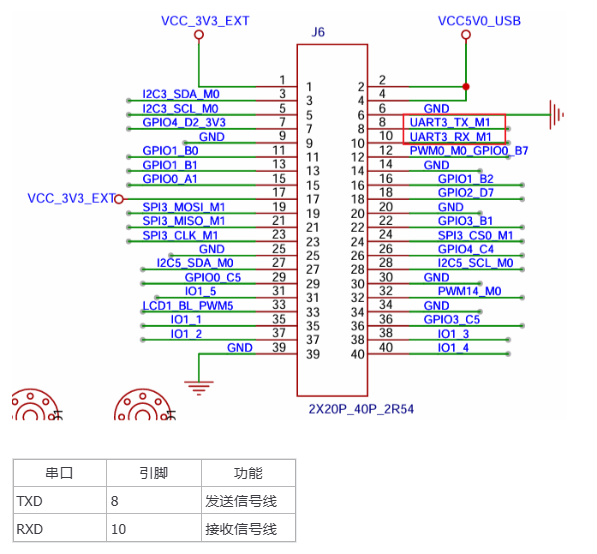
3 UART Usage — Command-Line Method
3.1 Device Tree Analysis
Tips
The file path below: out/kernel/src_tmp/linux-5.10/arch/arm64/boot/dts/rockchip/ requires the kernel source to be compiled first.
Base definition layer (rk3568.dtsi):
uart3: serial@fe670000 {
    compatible = "rockchip,rk3568-uart", "snps,dw-apb-uart";
    reg = <0x0 0xfe670000 0x0 0x100>;
    interrupts = <GIC_SPI 119 IRQ_TYPE_LEVEL_HIGH>;
    clocks = <&cru SCLK_UART3>, <&cru PCLK_UART3>;
    clock-names = "baudclk", "apb_pclk";
    reg-shift = <2>;
    reg-io-width = <4>;
    dmas = <&dmac0 6>, <&dmac0 7>;
    pinctrl-names = "default";
    pinctrl-0 = <&uart3m0_xfer>;
    status = "disabled";
};
We analyze some of the basic properties:
compatible: specifies compatibility, supports RK3568 UART and standard DW APB UARTreg: register address range (0xfe670000-0xfe6700ff)interrupts: interrupt number 119, triggered on high levelclocks: baud rate clock (SCLK_UART3) and APB clock (PCLK_UART3)dmas: DMA channels 6 (TX) and 7 (RX)pinctrl-0: defaults to the uart3m0_xfer pin groupstatus: disabled by default
Pin configuration layer (rk3568-pinctrl.dtsi), where UART3 provides two pin configuration modes:
uart3m0_xfer: uart3m0-xfer {
    rockchip,pins =
        /* uart3_rxm0 */
        <1 RK_PA0 2 &pcfg_pull_up>,
        /* uart3_txm0 */
        <1 RK_PA1 2 &pcfg_pull_up>;
};

uart3m1_xfer: uart3m1-xfer {
    rockchip,pins =
        /* uart3_rxm1 */
        <3 RK_PC0 4 &pcfg_pull_up>,
        /* uart3_txm1 */
        <3 RK_PB7 4 &pcfg_pull_up>;
};uart3m0_xfer: pin group 1, uses PA0 as RX and PA1 as TXuart3m1_xfer: pin group 2, uses PC0 as RX and PB7 as TX
Board-level configuration layer (rk3568-toybrick-x0.dtsi)
&uart3 {
    status = "okay";
    pinctrl-names = "default";
    pinctrl-0 = <&uart3m1_xfer>;
};&uart3: references the uart3 node in the base definitionstatus = "okay": enables the UART3 controllerpinctrl-0: selects M1 mode pins (GPIO3_C0/GPIO3_B7)
3.2 Application-Layer Method for Testing UART
In the past, when doing MCU development and debugging, we often used the CH340 series USB-to-serial modules from WCH (Qinheng Electronics); there is also the common FT232RL USB-to-serial chip. This test uses a USB-to-serial module equipped with the FT232RL chip. There is no difference in usage between the two. In practice, you only need to cross-connect the module's TX and RX with the board's RX and TX.
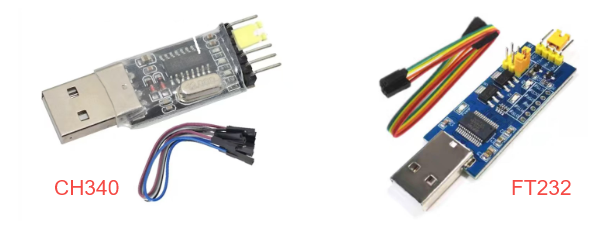
In this experiment, we still choose this method to perform UART communication with the board via USB.
As before, the driver file is placed under the /dev directory. With the command
ls /dev/tty*you can view all terminal devices as follows: 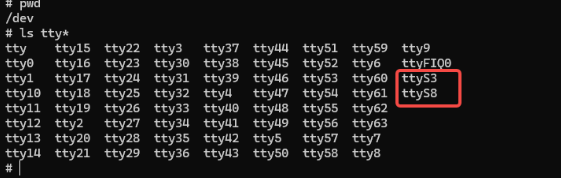
The tty prefix is for virtual terminals, and the ttyS prefix is for the serial terminals we will study in this section.
(ttyS3 is UART3, ttyS8 is UART8 (this serial port is occupied by the Bluetooth module))
BusyBox is a single executable file that integrates hundreds of common Linux commands. stty in it is short for "set tty", a command dedicated to changing and printing terminal line settings. Common commands are as follows:
View a port
busybox stty -F /dev/ttySx //ttyS is the specific port to viewSet baud rate
busybox stty -F /dev/ttyS3 baudrateSet baud rate to 9600, 8 data bits, 1 stop bit, no parity
busybox stty -F /dev/ttyS3 9600 cs8 -cstopb -parenbDisable hardware flow control
busybox stty -F /dev/ttyS3 -crtsctsmicrocom is a component of BusyBox; its core function is to open a specified serial device and receive data.
Run the serial port at a baud rate of 115200
microcom -s 115200 /dev/ttyS33.2 Functional Demonstration
Use the stty tool to query the UART3 parameters of the development board.
busybox stty -F /dev/ttyS3
Use the stty tool to change the serial port baud rate to 115200, where ispeed is the input speed and ospeed is the output speed.
busybox stty -F /dev/ttyS3 ispeed 115200 ospeed 115200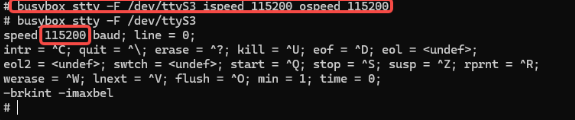
(Note: each time the device is powered on, you need to set the baud rate again. A reboot resets the baud rate to 9600 by default.)
Note
Serial port tool download URL and path: https://pan.baidu.com/s/1ZUn2BNg-Sb6M-fWhDqAFMw?pwd=smcc Extraction code: smcc ShimetaPi OpenHarmony materials > 02-Software Tools > Rockchip > OpenHarmony > Serial Port Tools > sscom5.13.1.exe
After configuring the serial debug assistant as described above, use the following command on the board side to test whether serial data transmission succeeds:
#Run the following command in the terminal on the board
#Use the echo command to write the strings "Hello!" and "OpenHarmony!" to the terminal device file
echo Hello! > /dev/ttyS3
echo "OpenHarmony" > /dev/ttyS3
#The serial debug assistant on the PC will receive the content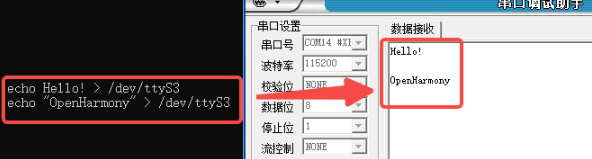
As shown in the figure, the PC side successfully received the data, so the board is transmitting data normally. Next, send data from the PC side to test whether the board's serial port can receive data normally. Using the microcom tool mentioned above, run the following command in the terminal on the board to connect to the serial device ttyS3 and perform bidirectional communication. At this point, the microcom command will wait for serial data and display the received data in the terminal.
microcom -s 115200 /dev/ttyS3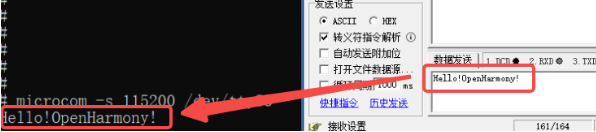
The board terminal successfully displays the received data. The PC side sent data and the board received it successfully, so the board is receiving data normally.
4. UART Usage — NAPI Method
Material Path
HAP package: \05-开发资料\01-OpenHarmory 开发资料\外设测试APP\HAP\UART_TEST.hap
Project source: \05-开发资料\01-OpenHarmory 开发资料\外设测试APP\SRC\UART_TEST
Here we build the NAPI by reading and writing the system node /dev/ttyS3.
4-1 Test Environment Preparation
First, set the permissions on the /dev/ttyS3 node:
chmod 777 /dev/ttyS3 //path4-2 Test Program Usage
The following is the serial port test program we wrote. Its basic functions are to open/close the serial port and to send/receive data. Considering layout difficulty and to keep the overall complexity low, we did not put a parameter configuration feature on the program UI; instead it is annotated with a line of text. The provided C source already implements this part of the functionality. Anyone who is capable may add it to the ets file by themselves!
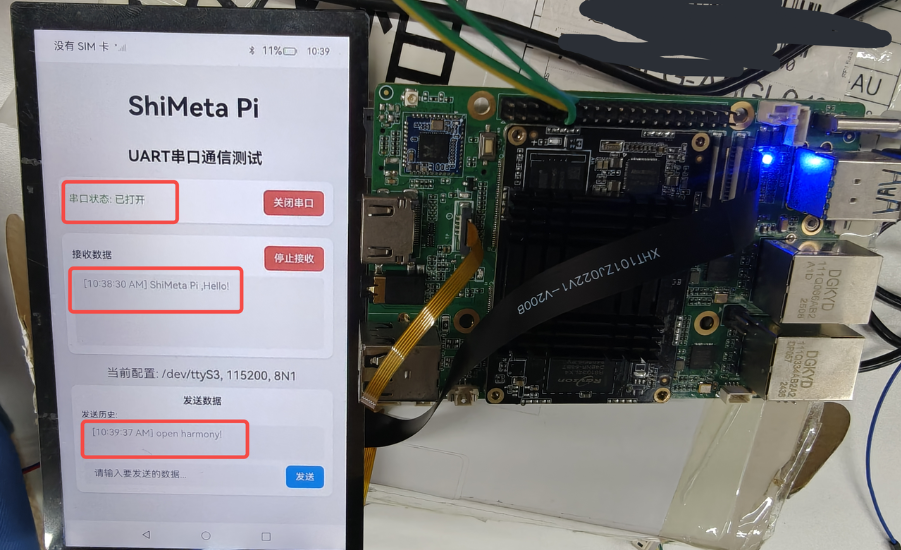
We connect the development board to the computer via a USB-to-TTL module. Open the application as shown below, and we open the serial port.
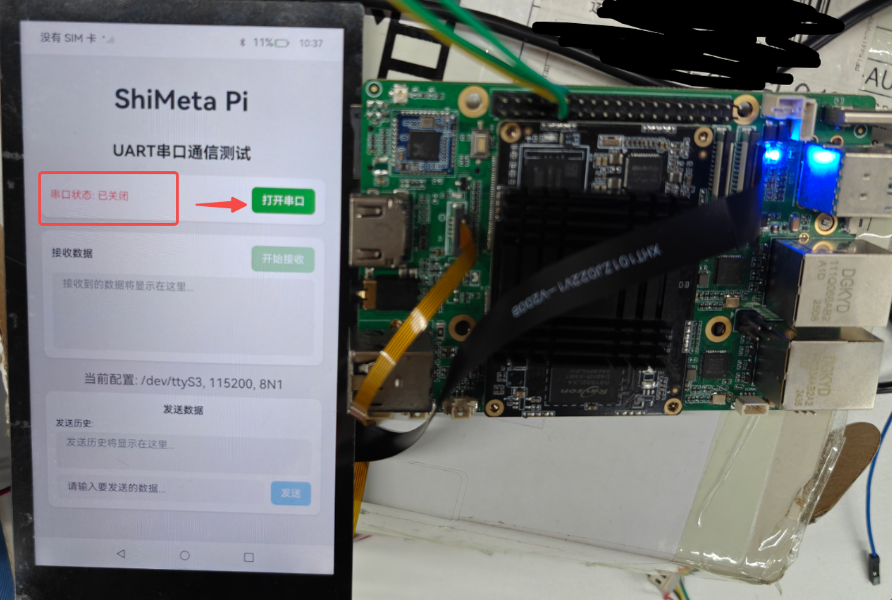
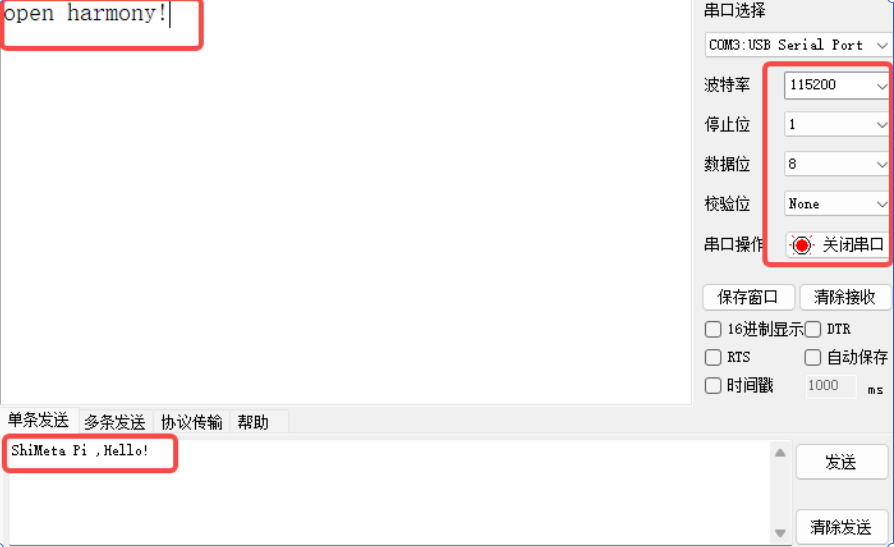
After opening the serial port, click Start Receive, and use the PC serial assistant to send the text "ShiMeta Pi ,Hello!". The application successfully receives the text and displays it in the data reception area.
Then send the string "open harmony!" from the application, and the serial terminal also receives the data successfully, as shown in the following figure:
4-3 Test Program Code Introduction
Since the knowledge points involved have all been introduced earlier, here we paste the test program napi_init.cpp code for reference by those who need it. You can also view it in the materials yourself.
#include "napi/native_api.h"
#include <stdio.h>
#include <stdlib.h>
#include <unistd.h>
#include <fcntl.h>
#include <string.h>
#include <errno.h>
#include <termios.h>
#include <sys/ioctl.h>
#include <sys/types.h>
#include <sys/stat.h>
#include "hilog/log.h"

const int GLOBAL_RESMGR = 0xFF00;
const char *UART_TAG = "[UART]";
const char *UART_DEVICE = "/dev/ttyS3";  // 固定使用ttyS3串口

// 全局变量
static int uart_fd = -1;        // 串口文件描述符
static struct termios old_cfg;  // 保存原始配置
static bool uart_opened = false;

// 配置串口参数
static int configure_uart(int fd, int baudrate, int databits, int stopbits, char parity)
{
    struct termios cfg;

    // 获取当前配置
    if (tcgetattr(fd, &cfg) != 0) {
        OH_LOG_Print(LOG_APP, LOG_ERROR, GLOBAL_RESMGR, UART_TAG,
                   "Failed to get uart config: %{public}s", strerror(errno));
        return -1;
    }

    // 保存原始配置
    old_cfg = cfg;

    // 清除所有标志
    cfg.c_cflag &= ~CSIZE;
    cfg.c_cflag &= ~CSTOPB;
    cfg.c_cflag &= ~PARENB;
    cfg.c_cflag &= ~PARODD;

    // 设置数据位
    switch (databits) {
        case 5: cfg.c_cflag |= CS5; break;
        case 6: cfg.c_cflag |= CS6; break;
        case 7: cfg.c_cflag |= CS7; break;
        case 8: cfg.c_cflag |= CS8; break;
        default: cfg.c_cflag |= CS8; break;
    }

    // 设置停止位
    if (stopbits == 2) {
        cfg.c_cflag |= CSTOPB;
    }

    // 设置校验位
    switch (parity) {
        case 'O': case 'o': // 奇校验
            cfg.c_cflag |= PARENB;
            cfg.c_cflag |= PARODD;
            break;
        case 'E': case 'e': // 偶校验
            cfg.c_cflag |= PARENB;
            cfg.c_cflag &= ~PARODD;
            break;
        case 'N': case 'n': // 无校验
        default:
            cfg.c_cflag &= ~PARENB;
            break;
    }

    // 设置波特率
    speed_t speed;
    switch (baudrate) {
        case 4800: speed = B4800; break;
        case 9600: speed = B9600; break;
        case 19200: speed = B19200; break;
        case 38400: speed = B38400; break;
        case 57600: speed = B57600; break;
        case 115200: speed = B115200; break;
        case 230400: speed = B230400; break;
        case 460800: speed = B460800; break;
        case 921600: speed = B921600; break;
        case 1500000: speed = B1500000; break;
        default: speed = B115200; break;
    }

    cfsetispeed(&cfg, speed);
    cfsetospeed(&cfg, speed);

    // 设置控制模式
    cfg.c_cflag |= CLOCAL | CREAD;

    // 设置输入模式
    cfg.c_iflag &= ~(IXON | IXOFF | IXANY);
    cfg.c_iflag &= ~(INLCR | ICRNL | IGNCR);

    // 设置输出模式
    cfg.c_oflag &= ~OPOST;

    // 设置本地模式
    cfg.c_lflag &= ~(ICANON | ECHO | ECHOE | ISIG);

    // 设置读取参数
    cfg.c_cc[VTIME] = 0; // 非阻塞读取
    cfg.c_cc[VMIN] = 0;

    // 应用配置
    if (tcsetattr(fd, TCSANOW, &cfg) != 0) {
        OH_LOG_Print(LOG_APP, LOG_ERROR, GLOBAL_RESMGR, UART_TAG,
                   "Failed to set uart config: %{public}s", strerror(errno));
        return -1;
    }

    // 清空缓冲区
    tcflush(fd, TCIOFLUSH);

    return 0;
}

// 打开串口
static napi_value Open_UART(napi_env env, napi_callback_info info)
{
    napi_value result;

    // 检查串口是否已经打开
    if (uart_opened) {
        OH_LOG_Print(LOG_APP, LOG_WARN, GLOBAL_RESMGR, UART_TAG,
                   "UART is already opened");
        napi_create_string_utf8(env, "UART already opened", NAPI_AUTO_LENGTH, &result);
        return result;
    }

    // 打开串口设备
    uart_fd = open(UART_DEVICE, O_RDWR | O_NOCTTY | O_NONBLOCK);
    if (uart_fd < 0) {
        OH_LOG_Print(LOG_APP, LOG_ERROR, GLOBAL_RESMGR, UART_TAG,
                   "Failed to open %{public}s: %{public}s", UART_DEVICE, strerror(errno));
        napi_create_string_utf8(env, "Failed to open UART device", NAPI_AUTO_LENGTH, &result);
        return result;
    }

    // 配置串口参数 (115200, 8N1)
    if (configure_uart(uart_fd, 115200, 8, 1, 'N') != 0) {
        close(uart_fd);
        uart_fd = -1;
        napi_create_string_utf8(env, "Failed to configure UART", NAPI_AUTO_LENGTH, &result);
        return result;
    }

    uart_opened = true;
    OH_LOG_Print(LOG_APP, LOG_INFO, GLOBAL_RESMGR, UART_TAG,
               "UART opened successfully");

    napi_create_string_utf8(env, "UART opened successfully", NAPI_AUTO_LENGTH, &result);
    return result;
}

// 关闭串口
static napi_value Close_UART(napi_env env, napi_callback_info info)
{
    napi_value result;

    if (!uart_opened || uart_fd < 0) {
        OH_LOG_Print(LOG_APP, LOG_WARN, GLOBAL_RESMGR, UART_TAG,
                   "UART is not opened");
        napi_create_string_utf8(env, "UART is not opened", NAPI_AUTO_LENGTH, &result);
        return result;
    }

    // 恢复原始配置
    tcsetattr(uart_fd, TCSANOW, &old_cfg);

    // 关闭串口
    close(uart_fd);
    uart_fd = -1;
    uart_opened = false;

    OH_LOG_Print(LOG_APP, LOG_INFO, GLOBAL_RESMGR, UART_TAG,
               "UART closed successfully");

    napi_create_string_utf8(env, "UART closed successfully", NAPI_AUTO_LENGTH, &result);
    return result;
}

// 设置串口配置
static napi_value Set_UART_Config(napi_env env, napi_callback_info info)
{
    napi_value result;
    size_t argc = 4;
    napi_value args[4];

    // 获取参数
    napi_get_cb_info(env, info, &argc, args, nullptr, nullptr);

    if (argc < 4) {
        napi_create_string_utf8(env, "Invalid parameters", NAPI_AUTO_LENGTH, &result);
        return result;
    }

    if (!uart_opened || uart_fd < 0) {
        napi_create_string_utf8(env, "UART is not opened", NAPI_AUTO_LENGTH, &result);
        return result;
    }

    // 解析参数
    int32_t baudrate, databits, stopbits;
    char parity_char;
    size_t parity_len;
    char parity_str[10];

    napi_get_value_int32(env, args[0], &baudrate);
    napi_get_value_int32(env, args[1], &databits);
    napi_get_value_int32(env, args[2], &stopbits);
    napi_get_value_string_utf8(env, args[3], parity_str, sizeof(parity_str), &parity_len);

    parity_char = (parity_len > 0) ? parity_str[0] : 'N';

    // 重新配置串口
    if (configure_uart(uart_fd, baudrate, databits, stopbits, parity_char) != 0) {
        napi_create_string_utf8(env, "Failed to configure UART", NAPI_AUTO_LENGTH, &result);
        return result;
    }

    OH_LOG_Print(LOG_APP, LOG_INFO, GLOBAL_RESMGR, UART_TAG,
               "UART configured: %{public}d-%{public}d-%{public}d-%{public}c",
               baudrate, databits, stopbits, parity_char);

    napi_create_string_utf8(env, "UART configured successfully", NAPI_AUTO_LENGTH, &result);
    return result;
}

// 发送数据
static napi_value Send_Data(napi_env env, napi_callback_info info)
{
    napi_value result;
    size_t argc = 1;
    napi_value args[1];

    // 获取参数
    napi_get_cb_info(env, info, &argc, args, nullptr, nullptr);

    if (argc < 1) {
        napi_create_string_utf8(env, "Invalid parameters", NAPI_AUTO_LENGTH, &result);
        return result;
    }

    if (!uart_opened || uart_fd < 0) {
        napi_create_string_utf8(env, "UART is not opened", NAPI_AUTO_LENGTH, &result);
        return result;
    }

    // 获取要发送的字符串
    size_t str_len;
    napi_get_value_string_utf8(env, args[0], nullptr, 0, &str_len);

    char *send_data = (char*)malloc(str_len + 1);
    if (!send_data) {
        napi_create_string_utf8(env, "Memory allocation failed", NAPI_AUTO_LENGTH, &result);
        return result;
    }

    napi_get_value_string_utf8(env, args[0], send_data, str_len + 1, &str_len);

    // 发送数据
    ssize_t bytes_written = write(uart_fd, send_data, str_len);

    if (bytes_written < 0) {
        OH_LOG_Print(LOG_APP, LOG_ERROR, GLOBAL_RESMGR, UART_TAG,
                   "Failed to send data: %{public}s", strerror(errno));
        free(send_data);
        napi_create_string_utf8(env, "Failed to send data", NAPI_AUTO_LENGTH, &result);
        return result;
    }

    OH_LOG_Print(LOG_APP, LOG_INFO, GLOBAL_RESMGR, UART_TAG,
               "Sent %{public}zd bytes: %{public}s", bytes_written, send_data);

    free(send_data);

    char response[100];
    snprintf(response, sizeof(response), "Sent %zd bytes successfully", bytes_written);
    napi_create_string_utf8(env, response, NAPI_AUTO_LENGTH, &result);
    return result;
}

// 接收数据
static napi_value Receive_Data(napi_env env, napi_callback_info info)
{
    napi_value result;

    if (!uart_opened || uart_fd < 0) {
        napi_create_string_utf8(env, "UART is not opened", NAPI_AUTO_LENGTH, &result);
        return result;
    }

    char buffer[1024];
    ssize_t bytes_read = read(uart_fd, buffer, sizeof(buffer) - 1);

    if (bytes_read < 0) {
        if (errno == EAGAIN || errno == EWOULDBLOCK) {
            // 非阻塞模式下没有数据可读
            napi_create_string_utf8(env, "", NAPI_AUTO_LENGTH, &result);
            return result;
        }
        OH_LOG_Print(LOG_APP, LOG_ERROR, GLOBAL_RESMGR, UART_TAG,
                   "Failed to read data: %{public}s", strerror(errno));
        napi_create_string_utf8(env, "", NAPI_AUTO_LENGTH, &result);
        return result;
    }

    if (bytes_read == 0) {
        napi_create_string_utf8(env, "", NAPI_AUTO_LENGTH, &result);
        return result;
    }

    buffer[bytes_read] = '\0';

    OH_LOG_Print(LOG_APP, LOG_INFO, GLOBAL_RESMGR, UART_TAG,
               "Received %{public}zd bytes: %{public}s", bytes_read, buffer);

    napi_create_string_utf8(env, buffer, NAPI_AUTO_LENGTH, &result);
    return result;
}

// 检查串口状态
static napi_value Get_UART_Status(napi_env env, napi_callback_info info)
{
    napi_value result;

    if (uart_opened && uart_fd >= 0) {
        napi_create_string_utf8(env, "opened", NAPI_AUTO_LENGTH, &result);
    } else {
        napi_create_string_utf8(env, "closed", NAPI_AUTO_LENGTH, &result);
    }

    return result;
}

// 模块初始化
EXTERN_C_START
static napi_value Init(napi_env env, napi_value exports)
{
    napi_property_descriptor desc[] = {
        { "Open_UART", nullptr, Open_UART, nullptr, nullptr, nullptr, napi_default, nullptr },
        { "Close_UART", nullptr, Close_UART, nullptr, nullptr, nullptr, napi_default, nullptr },
        { "Set_UART_Config", nullptr, Set_UART_Config, nullptr, nullptr, nullptr, napi_default, nullptr },
        { "Send_Data", nullptr, Send_Data, nullptr, nullptr, nullptr, napi_default, nullptr },
        { "Receive_Data", nullptr, Receive_Data, nullptr, nullptr, nullptr, napi_default, nullptr },
        { "Get_UART_Status", nullptr, Get_UART_Status, nullptr, nullptr, nullptr, napi_default, nullptr }
    };

    napi_define_properties(env, exports, sizeof(desc) / sizeof(desc[0]), desc);
    return exports;
}
EXTERN_C_END

static napi_module demoModule = {
    .nm_version = 1,
    .nm_flags = 0,
    .nm_filename = nullptr,
    .nm_register_func = Init,
    .nm_modname = "entry",
    .nm_priv = ((void*)0),
    .reserved = { 0 },
};

extern "C" __attribute__((constructor)) void RegisterEntryModule(void)
{
    napi_module_register(&demoModule);
}