
WIFI & BT
1 WIFI & BT Introduction
1.1 WIFI
WiFi (Wireless Fidelity) is a wireless communication technology based on the IEEE 802.11 standard. Its core function is to connect devices to a local area network (LAN) wirelessly. For many years, WiFi has been the first choice for high-rate wireless communication required under short-distance conditions. It offers two frequency bands, 2.4 GHz and 5 GHz, and is commonly used for video streaming, OTA upgrades, etc. Its communication rate is significantly higher than that of Bluetooth.
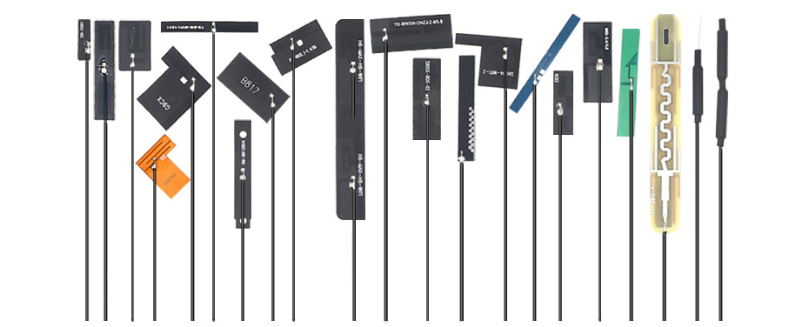
In terms of hardware, it usually uses the SDIO interface to communicate with the host chip. In use, it must be paired with an antenna to receive and transmit electromagnetic wave signals. Our embedded boards generally use an external antenna, as shown in the figure below:
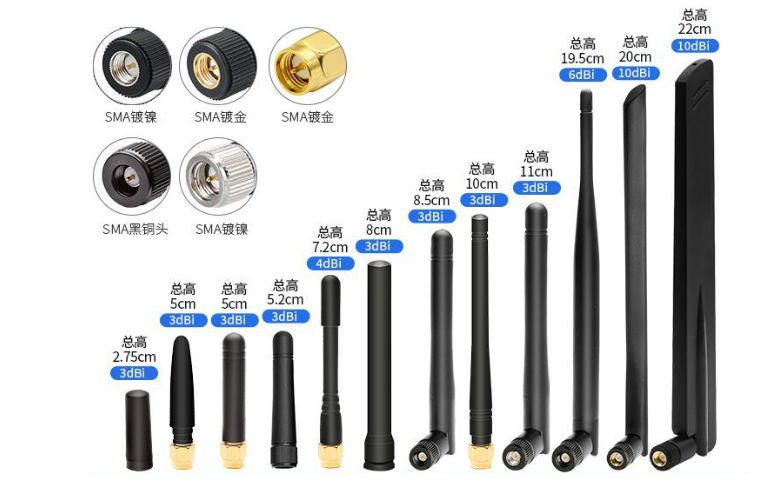
For routers, which have high communication requirements, the antennas used are generally like the one below:
 Some friends may be puzzled — antennas could be seen on old "brick" phones, but since the era of touch screen phones, antennas seem to have disappeared. In fact, in the early days they were integrated into the phone's side bezel, or the side bezel itself was the antenna. As circuits became highly integrated, antennas have become smaller and smaller. You can observe your own phone — the small stripes on the side bezel are the antennas responsible for various functions (WiFi, Bluetooth, GPS, GSM, etc.).
1.2 Classic Bluetooth (SPP) and Bluetooth Low Energy (BLE)
Regarding Classic Bluetooth and Bluetooth Low Energy, you can refer to the following table I summarized:
| Distinction | Bluetooth Low Energy (BLE) | Classic Bluetooth (SPP) |
|---|---|---|
| Transmission distance | Shorter distance; communication range is generally about 10 m | Longer communication distance; up to 100 m |
| Transmission rate | 1 Mbps or lower | 3 Mbps or higher |
| Bluetooth power | Extremely low power; suitable for battery-powered devices | Higher power: Classic Bluetooth focuses on speed and transmission capacity and requires continuous power |
| Hardware cost | Low cost: BLE chips and modules are inexpensive | Slightly more expensive than BLE |
| Development difficulty | Low complexity: simple protocol stack, easy to develop | Higher complexity: more complex protocol stack, harder to develop |
| Typical applications | Sensors, IoT devices | Bluetooth printers, high-speed data exchange (image transfer, file transfer), etc. |
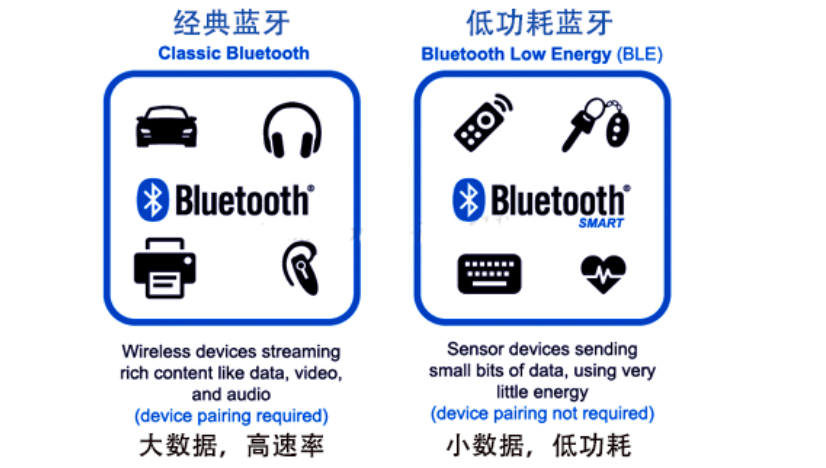 Some friends may be curious about what black magic BLE uses to achieve such low power consumption.
In fact, BLE's power consumption during data transmission is not lower than SPP at all! The key to power saving is that after transmitting data at high power, it enters a sleep period. As shown in the figure below, it transmits data only when a connection event occurs:
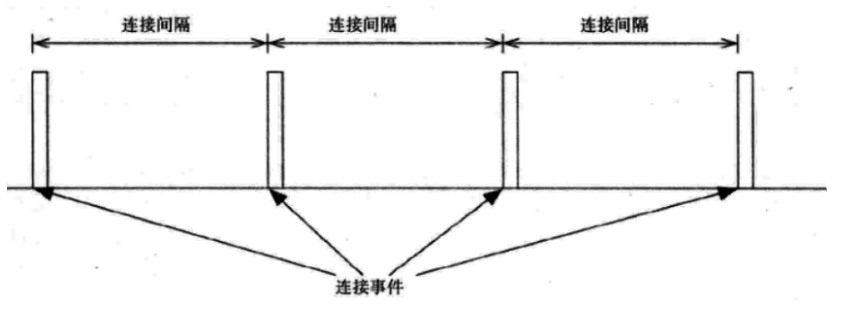
Let's look at the power consumption graph of the capture:
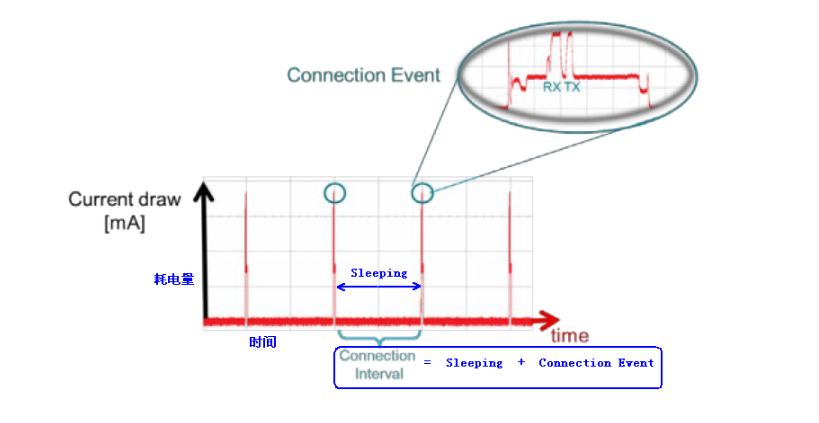
Now that we understand why BLE has low power consumption, we also understand why we do not use BLE when the data volume requirement is relatively high — because most of the time it is in the "sleep" state.
1.3 RTL8723DS Module Introduction
The RTL8723DS is an SDIO-interface single-band single-channel Bluetooth + WiFi combo module based on the RTL8723DS chip, mainly used in smart home, IoT devices, and other embedded system designs that require Bluetooth and WiFi functionality. This WiFi module provides an SDIO interface to connect to the host processor and provides a high-speed UART interface for BT. It also has a PCM interface for audio data transmission, connecting directly to an external audio codec via the BT controller. Using 1x1 802.11 b/g/n MIMO technology, the theoretical WiFi throughput can reach 150 Mbps. Bluetooth supports BT2.1+EDR/BT3.0 and BT4.2, supports dual-mode Bluetooth, and is simultaneously compatible with both BLE and SPP to meet different development needs.
2 Location of the WIFI & BT Module on the Board
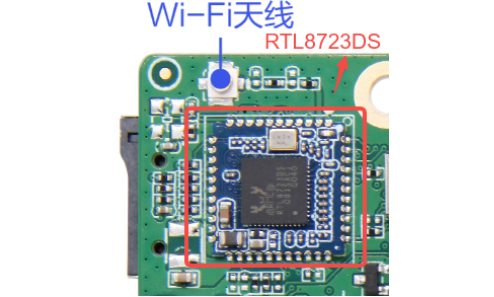
3 WIFI & BT Connectivity Testing
3.1 Device Tree Analysis
Tips
The file path below: out/kernel/src_tmp/linux-5.10/arch/arm64/boot/dts/rockchip/ requires the kernel source to be compiled first.
The WiFi and BT on this board use the SDMMC2 peripheral and UART8 respectively. Let's analyze the device tree files:
Base definition layer (rk3568.dtsi)
sdmmc2: dwmmc@fe000000 {
    compatible = "rockchip,rk3568-dw-mshc",
                 "rockchip,rk3288-dw-mshc";
    reg = <0x0 0xfe000000 0x0 0x4000>;
    interrupts = <GIC_SPI 100 IRQ_TYPE_LEVEL_HIGH>;
    max-frequency = <150000000>;
    clocks = <&cru HCLK_SDMMC2>, <&cru CLK_SDMMC2>,
             <&cru SCLK_SDMMC2_DRV>, <&cru SCLK_SDMMC2_SAMPLE>;
    clock-names = "biu", "ciu", "ciu-drive", "ciu-sample";
    fifo-depth = <0x100>;
    resets = <&cru SRST_SDMMC2>;
    reset-names = "reset";
    status = "disabled";
};
........

uart8: serial@fe6c0000 {
    compatible = "rockchip,rk3568-uart", "snps,dw-apb-uart";
    reg = <0x0 0xfe6c0000 0x0 0x100>;
    interrupts = <GIC_SPI 124 IRQ_TYPE_LEVEL_HIGH>;
    clocks = <&cru SCLK_UART8>, <&cru PCLK_UART8>;
    clock-names = "baudclk", "apb_pclk";
    reg-shift = <2>;
    reg-io-width = <4>;
    dmas = <&dmac0 16>, <&dmac0 17>;
    pinctrl-names = "default";
    pinctrl-0 = <&uart8m0_xfer>;
    status = "disabled";
};sdmmc2controller: address 0xfe000000, supports a maximum frequency of 150 MHz, configures clocks, reset, and FIFO depthuart8controller: address 0xfe6c0000, used for Bluetooth communication, supports DMA transfer
sdmmc2 {
    sdmmc2m0_bus4: sdmmc2m0-bus4 {
        rockchip,pins =
            /* sdmmc2_d0m0 */
            <3 RK_PC6 3 &pcfg_pull_up_drv_level_2>,
            /* sdmmc2_d1m0 */
            <3 RK_PC7 3 &pcfg_pull_up_drv_level_2>,
            /* sdmmc2_d2m0 */
            <3 RK_PD0 3 &pcfg_pull_up_drv_level_2>,
            /* sdmmc2_d3m0 */
            <3 RK_PD1 3 &pcfg_pull_up_drv_level_2>;
    };

    sdmmc2m0_clk: sdmmc2m0-clk {
        rockchip,pins =
            /* sdmmc2_clkm0 */
            <3 RK_PD3 3 &pcfg_pull_up_drv_level_2>;
    };

    sdmmc2m0_cmd: sdmmc2m0-cmd {
        rockchip,pins =
            /* sdmmc2_cmdm0 */
            <3 RK_PD2 3 &pcfg_pull_up_drv_level_2>;
    };
};

uart8 {
    uart8m0_xfer: uart8m0-xfer {
        rockchip,pins =
            /* uart8_rxm0 */
            <2 RK_PC6 2 &pcfg_pull_up>,
            /* uart8_txm0 */
            <2 RK_PC5 3 &pcfg_pull_up>;
    };

    uart8m0_rtsn: uart8m0-rtsn {
        rockchip,pins =
            /* uart8m0_rtsn */
            <2 RK_PB1 3 &pcfg_pull_none>;
    };
};sdiopins: GPIO3_PC6~PD3 configured as SDIO function, supports a 4-bit data busuart8pins: GPIO2_PC5/PC6 used for TX/RX, GPIO2_PB1 used for RTS control
Finally, the board-level configuration layer (excerpted from rk3568-toybrick.dtsi and rk3568-toybrick-x0.dtsi)
//基础定义 (在 `rk3568-toybrick.dtsi` ):
sdio_pwrseq: sdio-pwrseq {
    compatible = "mmc-pwrseq-simple";           // 简单MMC电源序列控制器
    clocks = <&rk809 1>;                        // 使用RK809 PMIC的1号时钟输出
    clock-names = "ext_clock";                  // 外部时钟名称
    pinctrl-names = "default";                  // 引脚控制状态名
    pinctrl-0 = <&wifi_enable_h>;               // WiFi使能引脚配置
    post-power-on-delay-ms = <200>;             // 上电后延时200ms
    reset-gpios = <&gpio3 RK_PD5 GPIO_ACTIVE_LOW>; // 复位GPIO,低电平有效
};
//板级覆盖配置 (在 `rk3568-toybrick-x0.dtsi` ):
&sdio_pwrseq {
    post-power-on-delay-ms = <20>;               // 缩短延时至20ms
    status = "okay";                            // 明确启用状态
};
......

wireless_wlan: wireless-wlan {
    compatible = "wlan-platdata";                // WiFi平台数据兼容性
    rockchip,grf = <&grf>;                      // 关联通用寄存器文件
    wifi_chip_type = "rtl8723ds";               // 明确指定芯片型号
    status = "okay";                            // 启用状态
};

&wireless_wlan {
    pinctrl-names = "default";                  // 引脚控制状态
    pinctrl-0 = <&wifi_host_wake_irq>;          // 主机唤醒中断引脚
    WIFI,host_wake_irq = <&gpio3 RK_PD4 GPIO_ACTIVE_HIGH>; // 主机唤醒中断GPIO
};
......

&wireless_bluetooth {
    compatible = "bluetooth-platdata";           // 蓝牙平台数据兼容性
    clocks = <&rk809 1>;                        // 使用RK809的1号时钟
    clock-names = "ext_clock";                  // 外部时钟名称
    uart_rts_gpios = <&gpio2 RK_PB1 GPIO_ACTIVE_LOW>; // UART RTS控制GPIO
    pinctrl-names = "default", "rts_gpio";      // 两种引脚状态:默认和RTS GPIO
    pinctrl-0 = <&uart8m0_rtsn>;               // 默认状态:UART8 RTS引脚
    pinctrl-1 = <&uart8_gpios>;                // RTS GPIO状态:GPIO模式
    BT,reset_gpio = <&gpio3 RK_PA0 GPIO_ACTIVE_HIGH>;     // 蓝牙复位GPIO
    BT,wake_gpio = <&gpio3 RK_PA2 GPIO_ACTIVE_HIGH>;      // 蓝牙唤醒GPIO
    BT,wake_host_irq = <&gpio3 RK_PA1 GPIO_ACTIVE_HIGH>;  // 蓝牙唤醒主机中断
    status = "okay";                            // 启用状态
};
......

&sdmmc2 {
    max-frequency = <150000000>;                 // 最大工作频率150MHz
    supports-sdio;                               // 支持SDIO协议
    bus-width = <4>;                            // 4位数据总线宽度
    disable-wp;                                 // 禁用写保护检测
    cap-sd-highspeed;                           // 支持SD高速模式
    cap-sdio-irq;                               // 支持SDIO中断
    keep-power-in-suspend;                      // 休眠时保持供电
    mmc-pwrseq = <&sdio_pwrseq>;               // 关联电源序列控制器
    non-removable;                              // 不可移除设备
    pinctrl-names = "default";                  // 引脚控制状态
    pinctrl-0 = <&sdmmc2m0_bus4 &sdmmc2m0_cmd &sdmmc2m0_clk>; // 引脚复用配置
    sd-uhs-sdr104;                              // 支持UHS-I SDR104模式
    status = "okay";                            // 启用状态
};
......

&uart8 {
    status = "okay";                            // 启用UART8
    pinctrl-names = "default";                  // 引脚控制状态
    pinctrl-0 = <&uart8m0_xfer &uart8m0_ctsn>; // TX/RX和CTS引脚配置
};
Due to space, here is an explanation of several key nodes:
mmc-pwrseq: the key property that binds the WiFi module to the SDMMC2 interfacecap-sdio-irq: enables SDIO interrupt support to improve data transfer efficiencykeep-power-in-suspend: ensures the WiFi module keeps power during sleep and supports the wake-up functionnon-removable: identifies it as an on-board fixed device that does not support hot-pluggingsd-uhs-sdr104: supports high-speed transfer mode; maximum transfer rate 104 MB/suart_rts_gpios: Bluetooth UART flow control signal to ensure reliable data transmission- Dual pin state management: switches between UART and GPIO modes via
pinctrl-0andpinctrl-1
3.2 WIFI & BT Connection Testing Method
Since the current Linux kernel does not come with pre-installed WiFi and Bluetooth test commands, we directly use the factory-shipped system for testing.
For BLE, if pairing succeeds, communication is verified — because the pairing process itself is a specific form of communication, and successful pairing is a prerequisite for successfully establishing a communication link (i.e., connection).
However, a successful WiFi connection only means that a logical link has been established between the device and the router (and similar devices); it does not guarantee that the connection works. You also need to perform network tests, such as opening a web page or using the ping command.
3.3 WIFI & BT Connection Testing Demonstration
After connecting the antenna, plug in the power and enter the system:
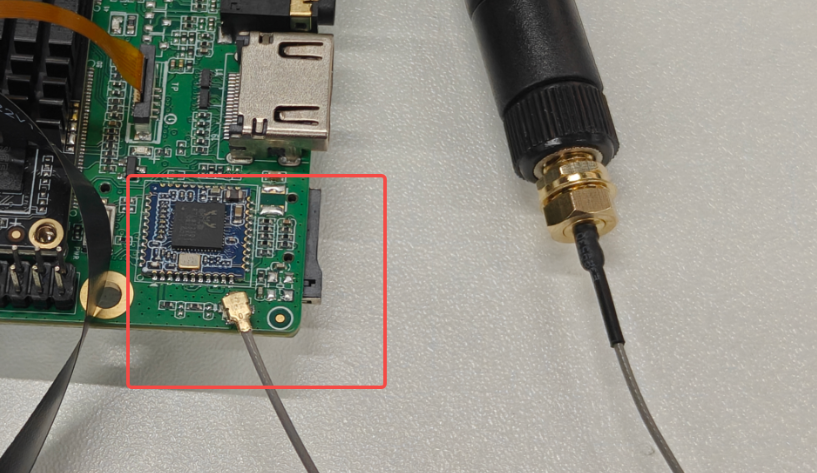
(Note: as the software is updated, the interface after entering the system may differ.)
BLE Test
I use my phone's Bluetooth to pair with the development board. In Settings, find the other device and pair. Click connect; the Android phone and HarmonyOS will each pop up a confirmation pairing code request. Click pair on both devices respectively:
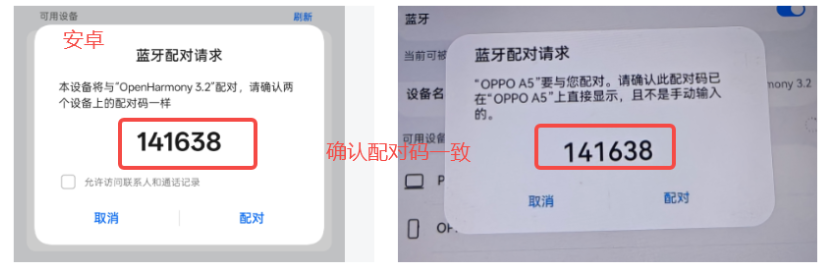
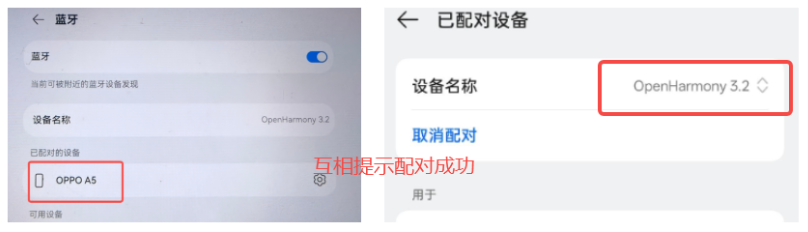
Pairing succeeded; Bluetooth test is normal.
WiFi Connection Test
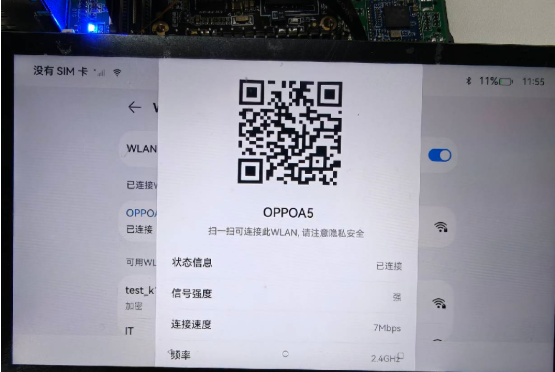
Use the board to connect to the phone hotspot "OPPOA5" for testing. After successful connection, you can see the connection information in Settings:
Open the browser to test whether the network is normal:
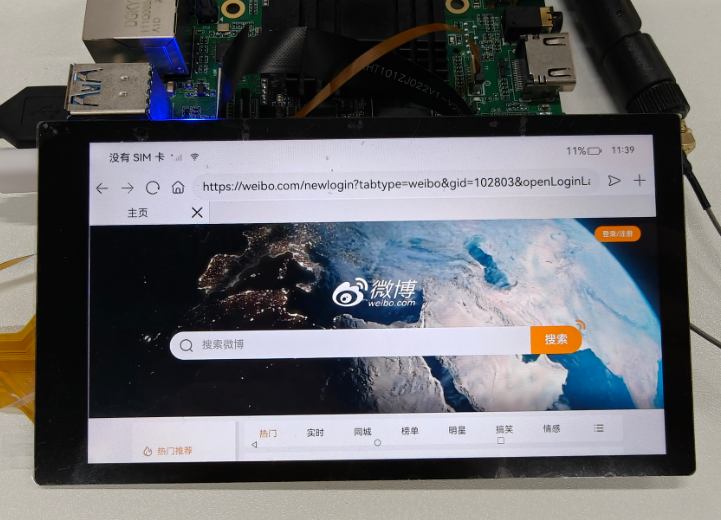
Successfully accessed Weibo; the network connection is normal.
4 WIFI & BT Usage — Official Library Method
Material Path
HAP package: \05-开发资料\01-OpenHarmory 开发资料\外设测试APP\HAP\NET_TEST.hap
Source: \05-开发资料\01-OpenHarmory 开发资料\外设测试APP\SRC\NATEWORK_TEST
See: Ethernet Test