
LED Blink Demo
This demo alternately writes 1 and 0 to the device node of the user-programmable indicator LED on the evaluation carrier board to make the LED blink. Both the LED on-time and off-time are 0.5s. The LED is located in the red box in the figure below.
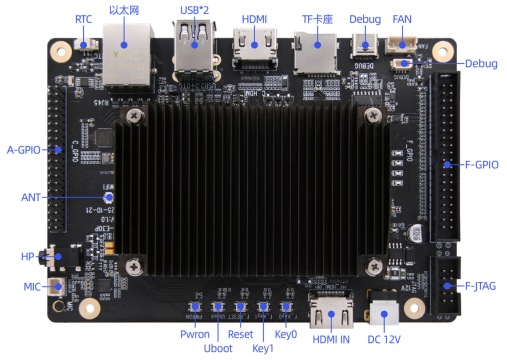
Basic LED Control
Enter the following commands in the terminal to view all LED device files.
cd /sys/class/leds/
ls
Enter a specific LED device directory, for example to view user-led1 information.
cd cd user-led1
ls
Enter the following command to turn on the corresponding LED, where 1 means on and 0 means off.
echo 1 > brightnessProcedure
Copy the executable smdt_led_demo from the bin directory of this demo (05-开发资料\软件开发资料\linux_demo\smdt_led_demo\bin) to the development board's filesystem (the source code can be found in the src directory).
In the terminal, run the following command to switch to the directory containing the smdt_led_demo executable.
cd ‘文件所在目录’After switching, run the ls command to verify that the smdt_led_demo executable is in the current directory.
lsIf the executable smdt_led_demo exists in the current directory, proceed with the following operations. Enter the following command to modify the file permissions.
chmod 777 smdt_led_demoAfter modifying the permissions, enter the following command to verify the change.
ls -ld smdt_led_demoThe result is: -rwxrwxrwx 1 root root 13824 Mar 4 01:22 smdt_led_demo
-rwxrwxrwx indicates that the permissions have been modified successfully and the file can be executed. You can continue with the following operations.
Enter the following commands:
./led_flash -help
./led_flash -n 2
The green LED on the development board's carrier board will blink at a 0.5s interval. Meanwhile, the serial terminal prints information about all LED devices in the system and the LED device currently controlled by the program.
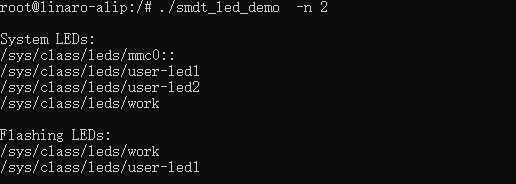
Press Ctrl+C to exit the test.