
Hello RK1828
The previous section got a pure-print Hello World running. This section detects the RK1828's PCIe device nodes and prints out the NPU device information.
Overall block diagram:
Host SoC (RK3588)                           RK1828 (PCIe co-processor)
─────────────────────                       ──────────────────────────
Application CPU + syscalls                  No application CPU
     │                                       │
     ▼                                       │
Run hello_rk1828 (detect PCIe)               │
     │                                       │
     ▼                                       │
PCIe Gen3 x4 → /dev/dri/renderD128 ────────►  NPU inference entry
1. Prerequisites
| Requirement | Description |
|---|---|
| Host SoC (RK3588) flashed with firmware and booted | Provides the OS and CPU |
| Cross-compile toolchain installed | aarch64-linux-gnu-gcc |
PCIe device 0004:41:00.0 present on the Host | Identifies the RK1828 |
2. Write the code
Create a file hello_rk1828.c:
#include <stdio.h>
#include <stdlib.h>
#include <unistd.h>
#include <sys/sysinfo.h>

int main(int argc, char **argv) {
    printf("================================\n");
    printf("  Hello RK1828!\n");
    printf("================================\n\n");

    struct sysinfo info;
    sysinfo(&info);

    printf("系统运行时间: %ld 秒\n", info.uptime);
    printf("总内存:      %ld MB\n", info.totalram / 1024 / 1024);
    printf("空闲内存:    %ld MB\n", info.freeram / 1024 / 1024);

    printf("\n--- /proc/cpuinfo (摘要) ---\n");
    system("grep -m1 'model name' /proc/cpuinfo 2>/dev/null || "
           "grep -m1 'CPU implementer' /proc/cpuinfo");
    system("grep -m1 'BogoMIPS' /proc/cpuinfo");

    printf("\n--- RK1828 NPU 设备 (PCIe) ---\n");
    system("ls -l /dev/dri/renderD128 2>/dev/null && "
           "echo 'RK1828 PCIe 设备就绪' || "
           "echo '未发现 RK1828 设备,请检查 PCIe链接'");

    printf("\n--- PCIe 拓扑 ---\n");
    system("lspci -s 0004:41:00.0 2>/dev/null || echo 'lspci 未找到该地址'");

    printf("\n程序执行完毕。\n");
    return 0;
}
3. Compile
aarch64-linux-gnu-gcc hello_rk1828.c -o hello_rk1828 -static

# Verify
file hello_rk1828
Output:
hello_rk1828: ELF 64-bit LSB executable, ARM aarch64, version 1 (GNU/Linux), statically linked, BuildID[sha1]=669625d82ce36b9b5617b050831b8bb203190fbe, for GNU/Linux 3.7.0, not strippedUsing
-staticavoids libc version mismatch issues on the dev board.
4. Deploy
scp
scp hello_rk1828 root@<Host SoC IP>:/tmp/NFS / Samba mount
Suited to fast-iteration development workflows.
USB drive / SD card
cp hello_rk1828 /media/$USER/USBDRIVE/5. Run it
Expected output:
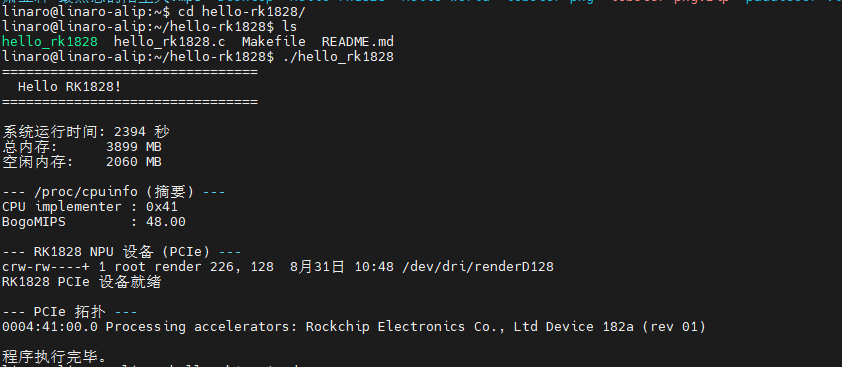
The
uptime / free memory / /dev/dri/renderD128timestamps are dynamic values and differ on every run.
6. Verify the key nodes individually
PCIe device details:
lspci -s 0004:41:00.0Output:
0004:41:00.0 Processing accelerators: Rockchip Electronics Co., Ltd Device 182a (rev 01)The /dev/dri/renderD128 device node:
ls -l /dev/dri/renderD128Output (measured):
crw-rw----+ 1 root render 226, 128 8月20日 16:56 /dev/dri/renderD128Contents of /dev/dri/:
ls /dev/dri/Output:
by-path
card0
card1
renderD128
renderD129
RK1828 PCIe device verified: the device node
/dev/dri/renderD128exists and corresponds to PCIe device0004:41:00.0(Rockchip Device 182a).
7. Call the RK1828 NPU
Hello World is only the beginning — to actually use the RK1828's NPU you still call rkllm3-server over PCIe:
# Start the NPU inference service (run on the Host)
rkllm3-server -m <model.rknn> -c 0xff -n 4096
# -m model file path
# -c NPU core mask (use 0xff for 8 cores)
# -n max number of tokens to generate
See section 6 of Hello World for details.
8. FAQ
| Symptom | Cause | Fix |
|---|---|---|
cannot execute binary file | Architecture mismatch | Make sure it was built with aarch64-linux-gnu-gcc |
not found / missing library | Dynamic linking missing | Add -static or check with ldd on the Host |
Permission denied | No execute permission | chmod +x |
| Program runs but the NPU does nothing | Wrong device path probed | The RK1828 device node is /dev/dri/renderD128 |
rkllm3-server crashes after a while | Residual KV cache | Restart the service |
Related docs
- Hello World — basic getting started
- Hardware Architecture Overview — hardware specs
- NPU Subsystem — NPU inference