
Key Detection Demo
Demo Introduction
This demo detects key events by listening to the state of the user input UBOOT key. After obtaining a key event, the program matches the key value and then handles the event. To test other keys, modify the corresponding device node and source code accordingly.
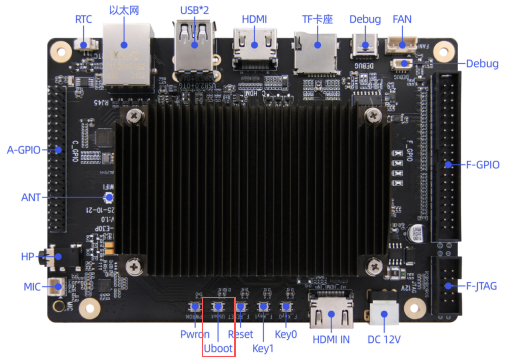
The UBOOT key used in this demo is the one highlighted in the red box in the figure below.
Procedure
Open a terminal and use the evtest command to find the event device node corresponding to the UBOOT key. The UBOOT key corresponds to "adc-keys". This command can be executed in any directory.
evtest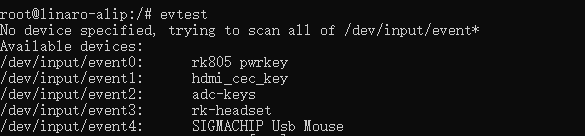
From the query result, the event device node corresponding to the UBOOT key is event2.
Copy the executable smdt_key_demo from the bin directory of this demo (05-开发资料\软件开发资料\linux_demo\smdt_key_demo\bin) to the development board's filesystem (the source code can be found in the src directory).
In the terminal, run the following command to switch to the directory containing the smdt_key_demo executable.
cd ‘文件所在目录’After switching, run the ls command to verify that the smdt_key_demo executable is in the current directory.
lsIf the executable smdt_key_demo exists in the current directory, proceed with the following operations. Enter the following command to modify the file permissions.
chmod 777 smdt_key_demoAfter modifying the permissions, enter the following command to verify the change.
ls -ld smdt_key_demoThe result is: -rwxrwxrwx 1 root root 13824 Mar 4 01:22 smdt_key_demo
-rwxrwxrwx indicates that the permissions have been modified successfully and the file can be executed. You can continue with the following operations.
Enter the command to view the program parameter information. Note that event2 in the following command must be adjusted according to the result obtained from the preceding evtest command.
./smdt_key_demo -help
./smdt_key_demo -d /dev/input/event2
Then press the UBOOT key on the development board. The program will detect the key event and print the key status information.
The test result is shown in the figure below.

Press "Ctrl+C" to exit the test.