
FAN Detection Demo
1 Demo Introduction
This demo describes how to test the fan interface on the development board to control the fan's start/stop and speed adjustment.
2 FAN Interface Introduction
The FAN interface on the development board is a 4-pin connector, but only three pins are active: 12V, PWM, and GND. The fan is controlled through a PWM signal to achieve speed adjustment.
3 Procedure
Open a terminal and copy the executable smdt_fan_demo from the bin directory of this demo (05-开发资料\软件开发资料\linux_demo\smdt_fan_demo\bin) to the development board's filesystem (the source code can be found in the src directory).
Optional operation: Because the development board is equipped with a wireless network card, if the terminal keeps displaying log messages generated by the wireless network card driver, you can modify the display level of Linux kernel logs with the following command.
#修改 Linux 内核日志的显示级别,内核的日志级别被设置为只显示紧急或更高级别的消息
echo 1 4 1 7 > /proc/sys/kernel/printk
First, check whether the PWM device has been exported. If it has not been exported, you need to export the PWM device. Here we choose device pwmchip0 and export the first channel (pwm0).
#检查 /sys/class/pwm/pwmchip0 目录中是否有 pwm0
ls /sys/class/pwm/pwmchip0

#若没有,则导出 PWM 设备
echo 0 > /sys/class/pwm/pwmchip0/export

#再次检查是否成功导出 PWM 设备
ls /sys/class/pwm/pwmchip0
In the terminal, run the following commands to switch to the directory containing the smdt_fan_demo executable.
#切换到 smdt_fan_demo 可执行程序所在目录
cd ‘可执行文件所在目录’

#查看 smdt_fan_demo 是否在该目录下
ls
If the executable smdt_fan_demo is in the current directory, modify the executable's permissions.
#修改文件权限
chmod 777 smdt_fan_demo

#查询是否修改成功
ls -ld smdt_fan_demo
After confirming that the file permissions have been successfully modified, run ./smdt_fan_demo -h to view the program's help information. Some default parameters set in this test script are as follows: period: 200000, meaning the PWM waveform period is 200ms polarity: normal, in this mode duty_cycle represents the duration of the high level within one period
#查看帮助信息
./smdt_fan_demo -h
The execution result is shown in the figure below:
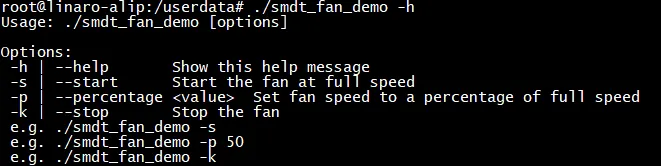
Enter the following commands to test the fan's start, stop, and speed adjustment.
#查看帮助信息
#风扇启动
./smdt_fan_demo -s

#风扇调速
./smdt_fan_demo -p 50		#50%占空比

#风扇停止
./smdt_fan_demo -k
Fan start execution result:

Fan speed adjusted to 50% duty cycle execution result:

Fan stop execution result:
