HOME
Shop
  • English
  • 简体中文
HOME
Shop
  • English
  • 简体中文
  • Product Series

    • FPGA+ARM

      • GM-3568JHF

        • Introduction

          • GM-3568JHF Introduction
        • Quick Start

          • Preface
          • Environment Setup
          • Compilation Notes
          • Flashing Guide
          • Debugging Tools
          • Software Update
          • Viewing System Information
          • Test Commands
          • Application Compilation
          • Source Code Access
        • Peripherals & Interfaces

          • USB
          • Display and Touch
          • Ethernet
          • WIFI
          • Bluetooth
          • TF-Card
          • Audio
          • Serial Port
          • CAN
          • RTC
        • Application Development

          • UART Read/Write Demo
          • Key Detection Demo
          • LED Blink Demo
          • MIPI Screen Detection Demo
          • Read USB Device Information Demo
          • FAN Detection Demo
          • FPGA FSPI Communication Demo
          • FPGA DMA Read/Write Demo
          • GPS Debugging Demo
          • Ethernet Test Demo
          • RS485 Read/Write Demo
          • FPGA I2C Read/Write Demo
          • PN532 NFC Card-Reading Demo
          • TF Card Read/Write Demo
        • QT Development

          • ARM64 Cross-Compiler Environment Setup
          • Adding a QT Program to Boot Auto-Start
        • RKNN_NPU Development

          • RK3568 NPU Overview
          • Development Environment Setup
          • Run the Official YOLOv5 Example
        • FPGA Development

          • ARM and FPGA Communication
          • FPGA Development Manual
        • Others

          • Modifying the Root Filesystem
          • System Auto-Start Services
        • Downloads

          • Downloads
      • MB-E30P

        • Introduction

          • MB-E30P Introduction
        • Quick Start

          • Preface
          • Environment Setup
          • Compilation Instructions
          • Flashing Guide
          • Debugging Tools
          • Software Update
          • Viewing Information
          • Test Commands
          • Application Compilation
          • Source Code Acquisition
        • Peripherals & Interfaces

          • USB
          • Display and Touch
          • Ethernet
          • WIFI
          • Bluetooth
          • TF-Card
          • Audio
          • RTC
        • Application Development

          • Key Detection Demo
          • LED Blink Demo
          • MIPI Screen Detection Demo
          • Read USB Device Information Demo
          • FAN Detection Demo
          • FPGA FSPI Communication Demo
          • FPGA DMA Read/Write Demo
          • Ethernet Test Demo
          • FPGA IIC Read/Write Demo
          • PN532 NFC Card Reading Demo
          • TF Card Read/Write Demo
        • QT Development

          • ARM64 Cross-Compiler Environment Setup
          • Adding a QT Program to the Boot Auto-Start Service
        • RKNN_NPU Development

          • RK3568 NPU Overview
          • Development Environment Setup
          • Run the Official YOLOv5 Example
          • Model Conversion In Detail
          • Run Custom Models on the Board
        • FPGA Development

          • ARM and FPGA Communication
          • FPGA Development Manual
        • Others

          • Modifying the Root Filesystem
          • System Auto-Start Service
        • Downloads

          • Downloads
    • ShimetaPi

      • M4-R1

        • Introduction

          • M4-R1 Introduction
        • Quick Start

          • OpenHarmony Overview
          • Image Burning
          • Application Development Quick Start
          • Device Development Quick Start
        • Application Development

          • ArkUI

            • ArkTS Language Overview
            • UI Components - Row Container Introduction
            • UI Components - Column Container Introduction
            • UI Components - Text Component
            • UI Components - Toggle Component
            • UI Components - Slider Component
            • UI Components - Animation Component & Transition Component
          • Documentation

            • OpenHarmony Official Materials
          • Development Notes

            • Full-SDK Replacement Tutorial
            • Introducing and Using Third-Party Libraries
            • HDC Debugging
            • Restore Factory Mode via Command Line
            • Upgrade App to System Permission
          • First App

            • Build Your First ArkTS Application - HelloWorld
          • Demos

            • Serial-Debug-Assistant Application Demo
            • Writing-Board Application Demo
            • Digital Clock Application Demo
            • Wi-Fi Information Acquisition Application Demo
        • Device Development

          • Ubuntu Development

            • Environment Setup
            • Download Source Code
            • Compile Source Code
          • DevEco Device Tool

            • Tool Introduction
            • Development Environment Construction
            • Import the SDK
            • HUAWEI DevEco Tool Function Introduction
        • Kernel Peripherals & Interfaces

          • Guide
          • Device Tree Introduction
          • NAPI Introduction
          • ArkTS Introduction
          • NAPI Development Hands-on Demo
          • GPIO Introduction
          • I2C Communication
          • SPI Communication
          • PWM Control
          • UART Communication
          • TF Card (MicroSD)
          • Screen (Display)
          • Touch
          • Ethernet
          • M.2 SSD
          • Audio
          • WIFI & BT
          • Camera
        • Downloads

          • Downloads
      • M5-R1

        • Introduction

          • M5-R1 Development Docs
        • Quick Start

          • Image Burning
          • Environment Setup
          • Download Source Code
        • Peripherals & Interfaces

          • Raspberry Pi Interfaces
          • GPIO Interface
          • I2C Interface
          • SPI Communication
          • PWM Control
          • Serial Port Communication
          • TF Card
          • Display
          • Touch
          • Audio
          • RTC
          • Ethernet
          • M.2
          • MINI-PCIE
          • Camera
          • WIFI & BT
        • Downloads

          • Downloads
      • Pico-G1

        • Product Overview

          • Product Introduction
          • SDK Version Information
        • Quick Start

          • Development Environment Setup
          • Image Build
          • Image Flashing
          • System Login
          • Network Configuration
          • File Transfer
          • SDK Directory Structure
          • Deploying Your First Application
          • Deploying Your First Driver
          • Mounting an SD Card
        • Peripherals & Interfaces

          • GPIO Control
          • UART Serial Communication
          • I2C Communication
          • SPI Communication
        • MPP Media Development

          • MPP Media Processing Software
          • Image Processing Chain
          • Video Input
          • Image Encoding
        • NPU & AI

          • NPU Driver and Runtime Library Architecture
          • .xmm Model Loading
          • SVP Video Processing
          • AI Noise Reduction (AI_NR)
        • Application Samples

          • Encryption/Decryption Application
          • ADC Acquisition Application
          • Low-Power Application
          • Audio Processing Application
          • Video Encoding Application
          • Video Input Application
          • Video Graphics Subsystem (VGS) Application
          • 08 Region Overlay Application
          • 09 Intelligent Video Engine Application
          • 10 UVC Webcam Application
          • 11 All-in-One Quickstart Application
          • 12 FPN Correction Application
          • 13 Regional Motion Detection Application
          • 14 MTCNN Face Detection Application
        • Expansion Board Peripheral Examples

          • 00 - Pico Expansion Board Peripheral Examples Overview
          • 01 - OLED Display Application
          • 02 - TFT Display Application
          • 03 - MPU6050 Gyroscope Application
          • 04 - ADC Acquisition Application
          • 05 - Passive Buzzer Application
          • 06 - MQ Gas Sensor Application
          • 07 - GPS Positioning Application
          • 08 - SHT20 Temperature & Humidity Application
          • 09 - Ultrasonic Ranging Application
          • 10 - SpO2 Sensor Application
          • 11 - DC Motor Control Application
          • 12 - Servo Control Application
    • OpenHarmony

      • SC-3568HA

        • Introduction

          • SC-3568HA Overview
        • Quick Start Guide

          • OpenHarmony Overview
          • Image Flashing
          • Setting Up the Development Environment
          • Hello World Application and Deployment
        • Application Development

          • ArkUI

            • Introduction to ArkTS Language
            • Introduction to UI Components and Practical Applications (Part 1)
            • Introduction to UI Components and Practical Applications (Part 2)
            • Introduction to UI Components and Practical Applications (Part 3)
          • Expand

            • Getting Started Guide
            • Referencing and Using Third-Party Libraries
            • Application Compilation and Deployment
            • Command-Line Factory Reset
            • System Debugging -- HDC Debugging
            • APP Stability Testing
            • Chapter 7 Application Testing
        • Device Development

          • Environment Setup
          • Download Source Code
          • Compiling Source Code
        • Peripheral And Interface

          • Raspberry Pi interface
          • GPIO Interface
          • I2C Interface
          • SPI communication
          • PWM (Pulse Width Modulation) control
          • Serial port communication
          • TF Card
          • Display Screen
          • Touch
          • Audio
          • RTC
          • Ethernet
          • M.2
          • MINI-PCIE
          • Camera
          • WIFI&BT
          • Raspberry Pi expansion board
        • Downloads

          • Downloads
      • M-K1HSE

        • Introduction

          • M-K1HSE Introduction
        • Quick Start

          • Development environment construction
          • Source code acquisition
          • Compilation Notes
          • Burning Guide
        • Application Development

          • Application Development Environment Setup
          • First Application - Hello World
        • Peripherals and interfaces

          • 01 Audio
          • 02 RS485
          • 03 Display
        • System customization development

          • System transplant
          • System customization
          • Driver Development
          • System Debugging
          • OTA Update
        • Downloads

          • Downloads
    • HVS Camera

      • Quick Start

        • SDK Overview
        • Downloads
        • Your First C++ Program
        • Python Data Analysis
        • MultiVision Studio
      • Development

        • Programming Guides

          • Open Camera
          • Read Events
          • Recording & Replay
          • Event Processing (Denoising)
          • Display & Visualization
          • Tuning
          • Capture APS Image
        • Toolkit SDK

          • Hybrid Vision Toolkit
          • Quick Start
          • C++ API
          • Python API
        • Algorithm

          • Hybrid Vision Algo
          • Hybrid Vision Algo API
          • Windows Algo SDK
        • Samples Overview
        • Applications
      • Fundamentals

        • Event Camera Fundamentals
        • HVS Hybrid Vision
        • Event Visualization
        • Data Formats Reference
        • Glossary
        • Bias & Tuning
        • Video Tutorials
      • USB Cameras

        • HVS Camera Quick Start
        • Networking Capabilities

          • HVS Camera System Architecture
          • EVS Network Server
          • EVS Time Sync
          • Web Window
        • HVS Camera Compatibility Matrix
        • FAQ & Troubleshooting Guide
        • Products

          • CF-NRS1 (Lingguang No.1 Hybrid Vision Camera)
      • MIPI Modules

        • MIPI Module Quick Start
        • Carrier Boards

          • RDK X5 Carrier Board Adaptation
          • Raspberry Pi Carrier Board Adaptation
          • Digua Pi Carrier Board Adaptation
          • ShimeTai Board Carrier Board Adaptation
        • MIPI Module Compatibility Matrix
        • Products

          • EVS_003 Sensor Module
    • AI-model

      • 1684XB-32T

        • Introduction

          • AIBOX-1684XB-32 Introduction
        • Quick Start

          • First Use
          • Network Configuration
          • Disk Usage
          • Memory Allocation
          • Fan Control Strategy
          • Firmware Upgrade
          • Cross Compilation
          • Model Quantization
        • Application Development

          • Development Overview

            • Sophgo SDK Development
            • Sophgo Demo Introduction
          • Large Language Models

            • Deploying Llama3 Example
            • Sophon LLM_api_server Development
            • Deploying MiniCPM-V-2_6
            • Qwen-2-5-VL Image and Video Recognition Demo
            • Qwen3-chat Demo
            • Qwen3-Qwen Agent-MCP Development
            • Qwen3-langchain-AI Agent
          • Deep Learning

            • ResNet (Image Classification)
            • LPRNet (License Plate Recognition)
            • SAM (General Image Segmentation Foundation Model)
            • YOLOv5 (Object Detection)
            • OpenPose (Human Keypoint Detection)
            • PP-OCR (Optical Character Recognition)
        • Downloads

          • Downloads
      • 1684X-416T

        • Introduction

          • AIBOX-1684X-416 Introduction
        • Demo Quick Guide

          • ShimeTai Intelligent Monitoring Demo Quick Usage Guide
      • RDK-X5

        • Introduction

          • RDK-X5 Hardware Introduction
        • Quick Start

          • RDK-X5 Quick Start
        • Application Development

          • AI Online Model Development

            • Experiment 01 - Access Volcengine Doubao AI
            • Experiment 02 - Image Analysis
            • Experiment 03 - Multimodal Visual Analysis & Localization
            • Experiment 04 - Multimodal Image-Text Comparison
            • Experiment 05 - Multimodal Document/Table Analysis
            • Experiment 06 - Camera-based AI Visual Analysis
          • Large Language Models

            • Experiment 01 - Speech Recognition
            • Experiment 02 - Voice Conversation
            • Experiment 03 - Multimodal Image Analysis - Voice
            • Experiment 04 - Multimodal Image Comparison - Voice
            • Experiment 05 - Multimodal Document Analysis - Voice
            • Experiment 06 - Multimodal Vision Application - Voice
          • ROS2 Basics

            • Experiment 01 - Environment Setup
            • Experiment 02 - Create & Build a Workspace Package
            • Experiment 03 - Run ROS2 Topic Communication Node
            • Experiment 04 - ROS2 Camera Application
          • 40-pin IO Development

            • Experiment 01 - GPIO Output (LED Blink)
            • Experiment 02 - GPIO Input
            • Experiment 03 - Button-controlled LED
            • Experiment 04 - PWM Output
            • Experiment 05 - Serial Output
            • Experiment 06 - I2C Experiment
            • Experiment 07 - SPI Experiment
          • USB Module Usage

            • Experiment 01 - USB Voice Module Usage
            • Experiment 02 - Sound Source Localization Module
          • Machine Vision Practice

            • Experiment 01 - Open USB Camera
            • Experiment 02 - Color Recognition
            • Experiment 03 - Gesture Recognition
            • Experiment 04 - YOLOv5 Object Detection
      • RDK-S100

        • Introduction

          • RDK-S100 Hardware Introduction
        • Quick Start

          • RDK-S100 Quick Start
        • Application Development

          • AI Online Model Development

            • Experiment 01 - Access Volcengine Doubao AI
            • Experiment 02 - Image Analysis
            • Experiment 03 - Multimodal Visual Analysis & Localization
            • Experiment 04 - Multimodal Image-Text Comparison
            • Experiment 05 - Multimodal Document/Table Analysis
            • Experiment 06 - Camera-based AI Visual Analysis
          • Large Language Models

            • Experiment 01 - Speech Recognition
            • Experiment 02 - Voice Conversation
            • Experiment 03 - Multimodal Image Analysis - Voice
            • Experiment 04 - Multimodal Image Comparison - Voice
            • Experiment 05 - Multimodal Document Analysis - Voice
            • Experiment 06 - Multimodal Vision Application - Voice
          • ROS2 Basics

            • Experiment 01 - Environment Setup
            • Experiment 02 - Create & Build a Workspace Package
            • Experiment 03 - Run ROS2 Topic Communication Node
            • Experiment 04 - ROS2 Camera Application
          • 40-pin IO Development

            • Experiment 01 - GPIO Output (LED Blink)
            • Experiment 02 - GPIO Input
            • Experiment 03 - Button-controlled LED
            • Experiment 04 - PWM Output
            • Experiment 05 - Serial Output
            • Experiment 06 - I2C Experiment
            • Experiment 07 - SPI Experiment
          • USB Module Usage

            • Experiment 01 - USB Voice Module Usage
            • Experiment 02 - Sound Source Localization Module
          • Machine Vision Practice

            • Experiment 01 - Open USB Camera
            • Experiment 02 - Image Processing Basics
            • Experiment 03 - Object Detection
            • Experiment 04 - Image Segmentation
      • RK1828

        • Introduction

          • M5-182X-A1 AI Edge Box - Product Introduction
          • M5-182X-A1 Hardware Specifications
          • M5-182X-A1 Usage & Safety
        • Quick Start

          • M5-182X-A1 Image Flashing
          • RK182X Hardware Installation & Verification
          • RK182X Development Environment Quick Setup
          • RK182X SDK Overview
          • RK182X Environment Setup in Detail
          • RK182X Quick Start
          • Vendor SDK Data Extraction Record
        • Development Guide

          • ClawChips Architecture and Principles
          • SKILL User Manual
          • RK182X Series LLM Inference (RK1828 Model)
          • RK182X Series CNN Inference (RK1828 Model)
          • Model Conversion
          • RK182X AI Agent Application Development Guide
          • RK182X Industrial Anomaly Detection Application
        • SDK Reference

          • RKNN3-SDK Overview

            • RKNN3 SDK Overview
          • RKNN3-Toolkit

            • RKNN3 Toolkit Installation and Usage
          • RKLLM

            • RKLLM On-Device LLM Inference
          • RK182X Series NPU Overview and Architecture (RK1828 Model)
          • RK182X INT8 Quantized Inference Deployment
          • RK182X MPP Multimedia Framework
          • MPP Details

            • RK182X Video Decoding
            • RK182X Video Encoding
          • NPU Details

            • RKNN Model Conversion
            • RK182X NPU INT8 Quantized Inference
            • RK182X Multi-Model Parallel Inference
          • RGA Details

            • RK182X RGA 2D Graphics Acceleration
          • VPU Details

            • RK182X VPU Codec
        • Hardware Reference

          • RK182X Series Hardware Architecture Overview (RK1828 Model)
          • RK182X Pin Definitions and Multiplexing Configuration
          • RK182X Pin Definitions
          • RK182X Power Management
          • RK182X Clock and PLL Configuration
          • RK182X Clock and Frequency Configuration
        • Tutorials

          • Hello World
          • Hello RK1828 - The First Program
          • RTSP Streaming
          • RTSP Streaming + AI Analysis
          • ShiMetaPi AI Lobster One-Click Deployment
          • PaddleOCR-VL Text Recognition
          • Qwen3-1.7B LLM Text Chat
          • AI Multi-View Inspection (Qwen3-VL Wrapper)
          • YOLOv5 Object Detection
        • Downloads

          • Downloads
        • FAQ

          • FAQ
    • Core-Board

      • C-3568BQ

        • Introduction

          • C-3568BQ Overview
      • C-3588LQ

        • Introduction

          • C-3588LQ Overview
      • GC-3568JBAF

        • Introduction

          • GC-3568JBAF Overview
      • C-K1BA

        • Introduction

          • C-K1BA Overview
    • Software Platform

      • ShiMetaPi Workbench

        • Introduction

          • Product Overview
          • Core Architecture
          • Feature Entries
          • Supported Hardware
          • Release Notes
        • Quick Start

          • Install & Login
          • Connect the Device
          • Set Up the Environment
          • Connect to AIHub
          • First Inference
        • User Guide

          • Workspace Overview
          • Device Manager
          • Model Market
          • One-Click Deploy
          • Vision — SVP
          • Vision - Custom Models
          • shimeta-py IDE
          • Terminal
          • Agent Debug Assistant
          • Settings and Resources
        • FAQ

          • Installation & Login
          • Device Connection
          • Models & Deployment
          • Vision & Runtime
          • Settings & Other
      • ShimetaPi Repository

        • Introduction

          • ShimetaPi Software Repository
        • Pico G1 (GK7206)

          • Quick Start

            • Installation & First Inference
            • shimeta_infer — Image Inference
            • shimeta_camera — Real-time Camera Inference
            • SVP Scene Detection
            • File Transfer & Built-in Model Reference
            • FAQ
          • HTTP API & Python SDK

            • HTTP API Reference
      • Model Fine-tuning Platform

        • Introduction

          • Model Training Platform
        • Quick Start

          • Register & Login
          • Create Your First Model (30-Minute Quick Experience)
        • Training Guide

          • Data Preparation & Annotation
          • Training Parameter Configuration
          • Start & Monitor Training
          • Model Evaluation & Testing
        • Model Deployment

          • Export Model
          • Deploy to Edge Device

Voice LLM Applications

Experiment 04 - Multimodal Image Comparison - Voice Dialogue

Experiment preparation:

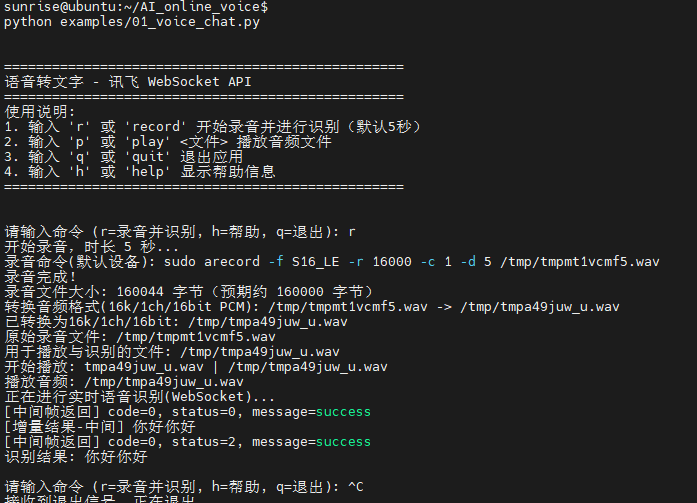
  1. Ensure you have connected to Volcengine Doubao AI and iFLYTEK AI (refer to Experiment 01 and Experiment 02).
  2. Find an image to use as the experiment material. Image import supports both relative and absolute paths. The relative path defaults to AI_online_voice/assets/sample.jpg (a default relative-path image is included in the package; you may replace it, but the filename must remain sample.jpg).

Experiment steps: (Ensure the voice module is connected)

  1. cd AI_online_voice # Enter the main directory
  2. python examples/04_voice_image_comparison.py # Run the example program
  3. After entering the program, follow the terminal prompts. First enter y to enter image selection. You can use voice to choose between an absolute path or a relative path. For an absolute path, manually enter the image path; the relative path defaults to assets/sample.jpg.

Terminal example:

Image setting:
TOOL

Image-text comparison analysis:

TOOL
# -*- coding: utf-8 -*-
"""
04_voice_image_comparison.py

实验04:图片比较 - 语音输入
- 参考实验03:语音选择路径(绝对/相对),相对路径默认 assets/sample.jpg
- 选择图片一与图片二;录音文本与两图一起提交给豆包进行比较分析

指令:
- i1:选择图片一(语音选择绝对/相对路径)
- i2:选择图片二(语音选择绝对/相对路径)
- r [秒数]:录音并提交到豆包进行两图分析(默认5秒)
- p:回放最近一次录音
- h:帮助
- q:退出
"""

import os
import sys
import json
import base64
import wave
from typing import Optional
import importlib.util

CURRENT_DIR = os.path.dirname(os.path.abspath(__file__))
PROJECT_ROOT = os.path.dirname(CURRENT_DIR)
sys.path.append(PROJECT_ROOT)

from utils.audio_processor import AudioProcessor
import config

# 动态导入实验03模块,复用内联的客户端
EXP03_PATH = os.path.join(PROJECT_ROOT, "examples", "03_voice_image_dialogue.py")
spec = importlib.util.spec_from_file_location("exp03", EXP03_PATH)
exp03 = importlib.util.module_from_spec(spec)
spec.loader.exec_module(exp03)

DoubaoAPIClient = exp03.DoubaoAPIClient
XunfeiRealtimeSpeechClient = exp03.XunfeiRealtimeSpeechClient


class VoiceImageComparisonApp:
    def __init__(self):
        self.processor = AudioProcessor()
        self.asr = XunfeiRealtimeSpeechClient()
        self.doubao = DoubaoAPIClient()
        self.last_audio: Optional[str] = None
        self.last_wav: Optional[str] = None
        self.image_path1: Optional[str] = None
        self.image_path2: Optional[str] = None

    def _resolve_path(self, p: str, is_absolute: bool = False) -> Optional[str]:
        if not p:
            return None
        p = os.path.expanduser(p)
        if os.name != "nt":
            p = p.replace("\\", "/")
        if is_absolute or os.path.isabs(p):
            return os.path.abspath(p)
        return os.path.abspath(os.path.join(PROJECT_ROOT, p))

    def print_help(self):
        print("\n指令帮助:")
        print("  i1       选择图片一(绝对路径手动;相对路径默认 assets/sample.jpg)")
        print("  i2       选择图片二(绝对路径手动;相对路径默认 assets/sample.jpg)")
        print("  r [秒数]  录音并提交两图比较分析(默认 5 秒)")
        print("  p        回放最近一次录音")
        print("  h        查看帮助")
        print("  q        退出\n")

    def _select_image(self, which: int):
        assert which in (1, 2)
        label = "图片一" if which == 1 else "图片二"
        print(f"[{label}选择] 录音 5 秒选择路径类型(说:绝对路径 或 相对路径;相对路径默认 assets/sample.jpg)")
        audio_file = self.processor.record(5)
        if not audio_file:
            print("[错误] 路径类型录音失败")
            return
        wav_path = self.processor.convert_to_wav(audio_file) or audio_file
        selection_text = None
        try:
            selection_text = self.asr.transcribe_audio_ws(wav_path)
        except Exception as e:
            print(f"[识别异常] {e}")
        choice = None
        if selection_text:
            t = selection_text.lower()
            if ("绝对" in t) or ("absolute" in t):
                choice = "abs"
            elif ("相对" in t) or ("relative" in t):
                choice = "rel"
        if not choice:
            print("[提示] 未识别到路径类型。请输入:abs(绝对) 或 rel(相对)")
            try:
                choice = input("路径类型(abs/rel): ").strip().lower()
            except Exception:
                return
        is_abs = choice.startswith("a")
        if is_abs:
            path_input = input(f"请输入{label}绝对路径: ").strip()
            final_path = self._resolve_path(path_input, is_absolute=True)
        else:
            rel_default = "assets/sample.jpg"
            print(f"[使用默认相对路径] {rel_default}")
            final_path = self._resolve_path(rel_default, is_absolute=False)
        if not final_path or not os.path.exists(final_path):
            print(f"[错误] 图像文件不存在: {final_path}")
            print("[示例] 绝对: /home/user/pic.jpg | 相对: assets/sample.jpg")
            return
        ext = os.path.splitext(final_path)[1].lower()
        if ext not in (".jpg", ".jpeg", ".png"):
            print("[错误] 仅支持 JPG/JPEG/PNG 格式")
            return
        if which == 1:
            self.image_path1 = final_path
        else:
            self.image_path2 = final_path
        print(f"[已设置{label}] {final_path}")

    def _build_image_content(self, text: str) -> list:
        content = [{"type": "text", "text": text}]
        for p in [self.image_path1, self.image_path2]:
            if not p:
                continue
            ext = os.path.splitext(p)[1].lower()
            mime = "image/jpeg" if ext in (".jpg", ".jpeg") else "image/png"
            with open(p, "rb") as f:
                b64 = base64.b64encode(f.read()).decode("utf-8")
            content.append({"type": "image_url", "image_url": {"url": f"data:{mime};base64,{b64}"}})
        return content

    def handle_record(self, duration_sec: int):
        print(f"[操作] 开始录音 {duration_sec} 秒…")
        audio_file = self.processor.record(duration_sec)
        if not audio_file:
            print("[错误] 录音失败")
            return
        self.last_audio = audio_file
        try:
            with wave.open(audio_file, "rb") as wf:
                print(f"[音频信息] rate={wf.getframerate()}, ch={wf.getnchannels()}, bits={wf.getsampwidth()*8}")
        except Exception:
            pass
        wav_path = self.processor.convert_to_wav(audio_file)
        if not wav_path:
            print("[错误] 转换 WAV 失败")
            return
        self.last_wav = wav_path
        print("[识别] 讯飞实时识别…")
        text = self.asr.transcribe_audio_ws(wav_path)
        if not text:
            print("[识别失败] 未获取到文本")
            return
        print(f"[识别结果] {text}")

        print("[豆包] 提交两图比较分析…")
        try:
            sys_prompt = getattr(exp03, "ROOT_CONFIG", None)
            sys_prompt = getattr(sys_prompt, "SYSTEM_PROMPT", None) if sys_prompt else None
            messages = []
            if sys_prompt:
                messages.append({"role": "system", "content": sys_prompt})
            messages.append({"role": "user", "content": self._build_image_content(text)})
            result = self.doubao._make_request(messages)
            if result and result.get("choices"):
                print("[豆包回复]", result["choices"][0]["message"]["content"])
            else:
                print("[豆包回复] None")
        except Exception as e:
            print("[豆包错误]", e)

    def handle_play(self):
        if not self.last_audio:
            print("[提示] 尚无可回放的录音。请先使用 r 指令录音。")
            return
        print("[播放] 回放最近一次录音…")
        self.processor.play(self.last_audio)

    def run(self):
        print("\n=== 04 图片比较(语音选择两图 + 讯飞 + 豆包)实验 ===")
        self.print_help()
        try:
            first = input("是否先选择图片一? (y/n): ").strip().lower()
            if first.startswith("y"):
                self._select_image(1)
            second = input("是否选择图片二? (y/n): ").strip().lower()
            if second.startswith("y"):
                self._select_image(2)
        except Exception:
            pass
        while True:
            try:
                cmd = input("请输入指令 (i1/i2/r/p/h/q): ").strip()
            except (EOFError, KeyboardInterrupt):
                print("\n[退出]")
                break
            if not cmd:
                continue
            if cmd == "q":
                print("[退出]")
                break
            if cmd == "h":
                self.print_help()
                continue
            if cmd == "p":
                self.handle_play()
                continue
            if cmd == "i1":
                self._select_image(1)
                continue
            if cmd == "i2":
                self._select_image(2)
                continue
            if cmd.startswith("r"):
                parts = cmd.split()
                duration = 5
                if len(parts) >= 2:
                    try:
                        duration = int(parts[1])
                    except Exception:
                        print("[提示] 秒数无效,使用默认 5 秒")
                self.handle_record(duration)
                continue
            print("[提示] 未知指令。输入 h 查看帮助。")


if __name__ == "__main__":
    VoiceImageComparisonApp().run()
Edit this page on GitHub
Prev
Experiment 03 - Multimodal Image Analysis - Voice
Next
Experiment 05 - Multimodal Document Analysis - Voice