
HOME
Shop
  • English
  • 简体中文
HOME
Shop
  • English
  • 简体中文
  • Product Series

    • FPGA+ARM

      • GM-3568JHF

        • Introduction

          • GM-3568JHF Introduction
        • Quick Start

          • Preface
          • Environment Setup
          • Compilation Notes
          • Flashing Guide
          • Debugging Tools
          • Software Update
          • Viewing System Information
          • Test Commands
          • Application Compilation
          • Source Code Access
        • Peripherals & Interfaces

          • USB
          • Display and Touch
          • Ethernet
          • WIFI
          • Bluetooth
          • TF-Card
          • Audio
          • Serial Port
          • CAN
          • RTC
        • Application Development

          • UART Read/Write Demo
          • Key Detection Demo
          • LED Blink Demo
          • MIPI Screen Detection Demo
          • Read USB Device Information Demo
          • FAN Detection Demo
          • FPGA FSPI Communication Demo
          • FPGA DMA Read/Write Demo
          • GPS Debugging Demo
          • Ethernet Test Demo
          • RS485 Read/Write Demo
          • FPGA I2C Read/Write Demo
          • PN532 NFC Card-Reading Demo
          • TF Card Read/Write Demo
        • QT Development

          • ARM64 Cross-Compiler Environment Setup
          • Adding a QT Program to Boot Auto-Start
        • RKNN_NPU Development

          • RK3568 NPU Overview
          • Development Environment Setup
          • Run the Official YOLOv5 Example
        • FPGA Development

          • ARM and FPGA Communication
          • FPGA Development Manual
        • Others

          • Modifying the Root Filesystem
          • System Auto-Start Services
        • Downloads

          • Downloads
      • MB-E30P

        • Introduction

          • MB-E30P Introduction
        • Quick Start

          • Preface
          • Environment Setup
          • Compilation Instructions
          • Flashing Guide
          • Debugging Tools
          • Software Update
          • Viewing Information
          • Test Commands
          • Application Compilation
          • Source Code Acquisition
        • Peripherals & Interfaces

          • USB
          • Display and Touch
          • Ethernet
          • WIFI
          • Bluetooth
          • TF-Card
          • Audio
          • RTC
        • Application Development

          • Key Detection Demo
          • LED Blink Demo
          • MIPI Screen Detection Demo
          • Read USB Device Information Demo
          • FAN Detection Demo
          • FPGA FSPI Communication Demo
          • FPGA DMA Read/Write Demo
          • Ethernet Test Demo
          • FPGA IIC Read/Write Demo
          • PN532 NFC Card Reading Demo
          • TF Card Read/Write Demo
        • QT Development

          • ARM64 Cross-Compiler Environment Setup
          • Adding a QT Program to the Boot Auto-Start Service
        • RKNN_NPU Development

          • RK3568 NPU Overview
          • Development Environment Setup
          • Run the Official YOLOv5 Example
          • Model Conversion In Detail
          • Run Custom Models on the Board
        • FPGA Development

          • ARM and FPGA Communication
          • FPGA Development Manual
        • Others

          • Modifying the Root Filesystem
          • System Auto-Start Service
        • Downloads

          • Downloads
    • ShimetaPi

      • M4-R1

        • Introduction

          • M4-R1 Introduction
        • Quick Start

          • OpenHarmony Overview
          • Image Burning
          • Application Development Quick Start
          • Device Development Quick Start
        • Application Development

          • ArkUI

            • ArkTS Language Overview
            • UI Components - Row Container Introduction
            • UI Components - Column Container Introduction
            • UI Components - Text Component
            • UI Components - Toggle Component
            • UI Components - Slider Component
            • UI Components - Animation Component & Transition Component
          • Documentation

            • OpenHarmony Official Materials
          • Development Notes

            • Full-SDK Replacement Tutorial
            • Introducing and Using Third-Party Libraries
            • HDC Debugging
            • Restore Factory Mode via Command Line
            • Upgrade App to System Permission
          • First App

            • Build Your First ArkTS Application - HelloWorld
          • Demos

            • Serial-Debug-Assistant Application Demo
            • Writing-Board Application Demo
            • Digital Clock Application Demo
            • Wi-Fi Information Acquisition Application Demo
        • Device Development

          • Ubuntu Development

            • Environment Setup
            • Download Source Code
            • Compile Source Code
          • DevEco Device Tool

            • Tool Introduction
            • Development Environment Construction
            • Import the SDK
            • HUAWEI DevEco Tool Function Introduction
        • Kernel Peripherals & Interfaces

          • Guide
          • Device Tree Introduction
          • NAPI Introduction
          • ArkTS Introduction
          • NAPI Development Hands-on Demo
          • GPIO Introduction
          • I2C Communication
          • SPI Communication
          • PWM Control
          • UART Communication
          • TF Card (MicroSD)
          • Screen (Display)
          • Touch
          • Ethernet
          • M.2 SSD
          • Audio
          • WIFI & BT
          • Camera
        • Downloads

          • Downloads
      • M5-R1

        • Introduction

          • M5-R1 Development Docs
        • Quick Start

          • Image Burning
          • Environment Setup
          • Download Source Code
        • Peripherals & Interfaces

          • Raspberry Pi Interfaces
          • GPIO Interface
          • I2C Interface
          • SPI Communication
          • PWM Control
          • Serial Port Communication
          • TF Card
          • Display
          • Touch
          • Audio
          • RTC
          • Ethernet
          • M.2
          • MINI-PCIE
          • Camera
          • WIFI & BT
        • Downloads

          • Downloads
      • Pico-G1

        • Product Overview

          • Product Introduction
          • SDK Version Information
        • Quick Start

          • Development Environment Setup
          • Image Build
          • Image Flashing
          • System Login
          • Network Configuration
          • File Transfer
          • SDK Directory Structure
          • Deploying Your First Application
          • Deploying Your First Driver
          • Mounting an SD Card
        • Peripherals & Interfaces

          • GPIO Control
          • UART Serial Communication
          • I2C Communication
          • SPI Communication
        • MPP Media Development

          • MPP Media Processing Software
          • Image Processing Chain
          • Video Input
          • Image Encoding
        • NPU & AI

          • NPU Driver and Runtime Library Architecture
          • .xmm Model Loading
          • SVP Video Processing
          • AI Noise Reduction (AI_NR)
        • Application Samples

          • Encryption/Decryption Application
          • ADC Acquisition Application
          • Low-Power Application
          • Audio Processing Application
          • Video Encoding Application
          • Video Input Application
          • Video Graphics Subsystem (VGS) Application
          • 08 Region Overlay Application
          • 09 Intelligent Video Engine Application
          • 10 UVC Webcam Application
          • 11 All-in-One Quickstart Application
          • 12 FPN Correction Application
          • 13 Regional Motion Detection Application
          • 14 MTCNN Face Detection Application
        • Expansion Board Peripheral Examples

          • 00 - Pico Expansion Board Peripheral Examples Overview
          • 01 - OLED Display Application
          • 02 - TFT Display Application
          • 03 - MPU6050 Gyroscope Application
          • 04 - ADC Acquisition Application
          • 05 - Passive Buzzer Application
          • 06 - MQ Gas Sensor Application
          • 07 - GPS Positioning Application
          • 08 - SHT20 Temperature & Humidity Application
          • 09 - Ultrasonic Ranging Application
          • 10 - SpO2 Sensor Application
          • 11 - DC Motor Control Application
          • 12 - Servo Control Application
    • OpenHarmony

      • SC-3568HA

        • Introduction

          • SC-3568HA Overview
        • Quick Start Guide

          • OpenHarmony Overview
          • Image Flashing
          • Setting Up the Development Environment
          • Hello World Application and Deployment
        • Application Development

          • ArkUI

            • Introduction to ArkTS Language
            • Introduction to UI Components and Practical Applications (Part 1)
            • Introduction to UI Components and Practical Applications (Part 2)
            • Introduction to UI Components and Practical Applications (Part 3)
          • Expand

            • Getting Started Guide
            • Referencing and Using Third-Party Libraries
            • Application Compilation and Deployment
            • Command-Line Factory Reset
            • System Debugging -- HDC Debugging
            • APP Stability Testing
            • Chapter 7 Application Testing
        • Device Development

          • Environment Setup
          • Download Source Code
          • Compiling Source Code
        • Peripheral And Interface

          • Raspberry Pi interface
          • GPIO Interface
          • I2C Interface
          • SPI communication
          • PWM (Pulse Width Modulation) control
          • Serial port communication
          • TF Card
          • Display Screen
          • Touch
          • Audio
          • RTC
          • Ethernet
          • M.2
          • MINI-PCIE
          • Camera
          • WIFI&BT
          • Raspberry Pi expansion board
        • Downloads

          • Downloads
      • M-K1HSE

        • Introduction

          • M-K1HSE Introduction
        • Quick Start

          • Development environment construction
          • Source code acquisition
          • Compilation Notes
          • Burning Guide
        • Application Development

          • Application Development Environment Setup
          • First Application - Hello World
        • Peripherals and interfaces

          • 01 Audio
          • 02 RS485
          • 03 Display
        • System customization development

          • System transplant
          • System customization
          • Driver Development
          • System Debugging
          • OTA Update
        • Downloads

          • Downloads
    • HVS Camera

      • Quick Start

        • SDK Overview
        • Downloads
        • Your First C++ Program
        • Python Data Analysis
        • MultiVision Studio
      • Development

        • Programming Guides

          • Open Camera
          • Read Events
          • Recording & Replay
          • Event Processing (Denoising)
          • Display & Visualization
          • Tuning
          • Capture APS Image
        • Toolkit SDK

          • Hybrid Vision Toolkit
          • Quick Start
          • C++ API
          • Python API
        • Algorithm

          • Hybrid Vision Algo
          • Hybrid Vision Algo API
          • Windows Algo SDK
        • Samples Overview
        • Applications
      • Fundamentals

        • Event Camera Fundamentals
        • HVS Hybrid Vision
        • Event Visualization
        • Data Formats Reference
        • Glossary
        • Bias & Tuning
        • Video Tutorials
      • USB Cameras

        • HVS Camera Quick Start
        • Networking Capabilities

          • HVS Camera System Architecture
          • EVS Network Server
          • EVS Time Sync
          • Web Window
        • HVS Camera Compatibility Matrix
        • FAQ & Troubleshooting Guide
        • Products

          • CF-NRS1 (Lingguang No.1 Hybrid Vision Camera)
      • MIPI Modules

        • MIPI Module Quick Start
        • Carrier Boards

          • RDK X5 Carrier Board Adaptation
          • Raspberry Pi Carrier Board Adaptation
          • Digua Pi Carrier Board Adaptation
          • ShimeTai Board Carrier Board Adaptation
        • MIPI Module Compatibility Matrix
        • Products

          • EVS_003 Sensor Module
    • AI-model

      • 1684XB-32T

        • Introduction

          • AIBOX-1684XB-32 Introduction
        • Quick Start

          • First Use
          • Network Configuration
          • Disk Usage
          • Memory Allocation
          • Fan Control Strategy
          • Firmware Upgrade
          • Cross Compilation
          • Model Quantization
        • Application Development

          • Development Overview

            • Sophgo SDK Development
            • Sophgo Demo Introduction
          • Large Language Models

            • Deploying Llama3 Example
            • Sophon LLM_api_server Development
            • Deploying MiniCPM-V-2_6
            • Qwen-2-5-VL Image and Video Recognition Demo
            • Qwen3-chat Demo
            • Qwen3-Qwen Agent-MCP Development
            • Qwen3-langchain-AI Agent
          • Deep Learning

            • ResNet (Image Classification)
            • LPRNet (License Plate Recognition)
            • SAM (General Image Segmentation Foundation Model)
            • YOLOv5 (Object Detection)
            • OpenPose (Human Keypoint Detection)
            • PP-OCR (Optical Character Recognition)
        • Downloads

          • Downloads
      • 1684X-416T

        • Introduction

          • AIBOX-1684X-416 Introduction
        • Demo Quick Guide

          • ShimeTai Intelligent Monitoring Demo Quick Usage Guide
      • RDK-X5

        • Introduction

          • RDK-X5 Hardware Introduction
        • Quick Start

          • RDK-X5 Quick Start
        • Application Development

          • AI Online Model Development

            • Experiment 01 - Access Volcengine Doubao AI
            • Experiment 02 - Image Analysis
            • Experiment 03 - Multimodal Visual Analysis & Localization
            • Experiment 04 - Multimodal Image-Text Comparison
            • Experiment 05 - Multimodal Document/Table Analysis
            • Experiment 06 - Camera-based AI Visual Analysis
          • Large Language Models

            • Experiment 01 - Speech Recognition
            • Experiment 02 - Voice Conversation
            • Experiment 03 - Multimodal Image Analysis - Voice
            • Experiment 04 - Multimodal Image Comparison - Voice
            • Experiment 05 - Multimodal Document Analysis - Voice
            • Experiment 06 - Multimodal Vision Application - Voice
          • ROS2 Basics

            • Experiment 01 - Environment Setup
            • Experiment 02 - Create & Build a Workspace Package
            • Experiment 03 - Run ROS2 Topic Communication Node
            • Experiment 04 - ROS2 Camera Application
          • 40-pin IO Development

            • Experiment 01 - GPIO Output (LED Blink)
            • Experiment 02 - GPIO Input
            • Experiment 03 - Button-controlled LED
            • Experiment 04 - PWM Output
            • Experiment 05 - Serial Output
            • Experiment 06 - I2C Experiment
            • Experiment 07 - SPI Experiment
          • USB Module Usage

            • Experiment 01 - USB Voice Module Usage
            • Experiment 02 - Sound Source Localization Module
          • Machine Vision Practice

            • Experiment 01 - Open USB Camera
            • Experiment 02 - Color Recognition
            • Experiment 03 - Gesture Recognition
            • Experiment 04 - YOLOv5 Object Detection
      • RDK-S100

        • Introduction

          • RDK-S100 Hardware Introduction
        • Quick Start

          • RDK-S100 Quick Start
        • Application Development

          • AI Online Model Development

            • Experiment 01 - Access Volcengine Doubao AI
            • Experiment 02 - Image Analysis
            • Experiment 03 - Multimodal Visual Analysis & Localization
            • Experiment 04 - Multimodal Image-Text Comparison
            • Experiment 05 - Multimodal Document/Table Analysis
            • Experiment 06 - Camera-based AI Visual Analysis
          • Large Language Models

            • Experiment 01 - Speech Recognition
            • Experiment 02 - Voice Conversation
            • Experiment 03 - Multimodal Image Analysis - Voice
            • Experiment 04 - Multimodal Image Comparison - Voice
            • Experiment 05 - Multimodal Document Analysis - Voice
            • Experiment 06 - Multimodal Vision Application - Voice
          • ROS2 Basics

            • Experiment 01 - Environment Setup
            • Experiment 02 - Create & Build a Workspace Package
            • Experiment 03 - Run ROS2 Topic Communication Node
            • Experiment 04 - ROS2 Camera Application
          • 40-pin IO Development

            • Experiment 01 - GPIO Output (LED Blink)
            • Experiment 02 - GPIO Input
            • Experiment 03 - Button-controlled LED
            • Experiment 04 - PWM Output
            • Experiment 05 - Serial Output
            • Experiment 06 - I2C Experiment
            • Experiment 07 - SPI Experiment
          • USB Module Usage

            • Experiment 01 - USB Voice Module Usage
            • Experiment 02 - Sound Source Localization Module
          • Machine Vision Practice

            • Experiment 01 - Open USB Camera
            • Experiment 02 - Image Processing Basics
            • Experiment 03 - Object Detection
            • Experiment 04 - Image Segmentation
      • RK1828

        • Introduction

          • M5-182X-A1 AI Edge Box - Product Introduction
          • M5-182X-A1 Hardware Specifications
          • M5-182X-A1 Usage & Safety
        • Quick Start

          • M5-182X-A1 Image Flashing
          • RK182X Hardware Installation & Verification
          • RK182X Development Environment Quick Setup
          • RK182X SDK Overview
          • RK182X Environment Setup in Detail
          • RK182X Quick Start
          • Vendor SDK Data Extraction Record
        • Development Guide

          • ClawChips Architecture and Principles
          • SKILL User Manual
          • RK182X Series LLM Inference (RK1828 Model)
          • RK182X Series CNN Inference (RK1828 Model)
          • Model Conversion
          • RK182X AI Agent Application Development Guide
          • RK182X Industrial Anomaly Detection Application
        • SDK Reference

          • RKNN3-SDK Overview

            • RKNN3 SDK Overview
          • RKNN3-Toolkit

            • RKNN3 Toolkit Installation and Usage
          • RKLLM

            • RKLLM On-Device LLM Inference
          • RK182X Series NPU Overview and Architecture (RK1828 Model)
          • RK182X INT8 Quantized Inference Deployment
          • RK182X MPP Multimedia Framework
          • MPP Details

            • RK182X Video Decoding
            • RK182X Video Encoding
          • NPU Details

            • RKNN Model Conversion
            • RK182X NPU INT8 Quantized Inference
            • RK182X Multi-Model Parallel Inference
          • RGA Details

            • RK182X RGA 2D Graphics Acceleration
          • VPU Details

            • RK182X VPU Codec
        • Hardware Reference

          • RK182X Series Hardware Architecture Overview (RK1828 Model)
          • RK182X Pin Definitions and Multiplexing Configuration
          • RK182X Pin Definitions
          • RK182X Power Management
          • RK182X Clock and PLL Configuration
          • RK182X Clock and Frequency Configuration
        • Tutorials

          • Hello World
          • Hello RK1828 - The First Program
          • RTSP Streaming
          • RTSP Streaming + AI Analysis
          • ShiMetaPi AI Lobster One-Click Deployment
          • PaddleOCR-VL Text Recognition
          • Qwen3-1.7B LLM Text Chat
          • AI Multi-View Inspection (Qwen3-VL Wrapper)
          • YOLOv5 Object Detection
        • Downloads

          • Downloads
        • FAQ

          • FAQ
    • Core-Board

      • C-3568BQ

        • Introduction

          • C-3568BQ Overview
      • C-3588LQ

        • Introduction

          • C-3588LQ Overview
      • GC-3568JBAF

        • Introduction

          • GC-3568JBAF Overview
      • C-K1BA

        • Introduction

          • C-K1BA Overview
    • Software Platform

      • ShiMetaPi Workbench

        • Introduction

          • Product Overview
          • Core Architecture
          • Feature Entries
          • Supported Hardware
          • Release Notes
        • Quick Start

          • Install & Login
          • Connect the Device
          • Set Up the Environment
          • Connect to AIHub
          • First Inference
        • User Guide

          • Workspace Overview
          • Device Manager
          • Model Market
          • One-Click Deploy
          • Vision — SVP
          • Vision - Custom Models
          • shimeta-py IDE
          • Terminal
          • Agent Debug Assistant
          • Settings and Resources
        • FAQ

          • Installation & Login
          • Device Connection
          • Models & Deployment
          • Vision & Runtime
          • Settings & Other
      • ShimetaPi Repository

        • Introduction

          • ShimetaPi Software Repository
        • Pico G1 (GK7206)

          • Quick Start

            • Installation & First Inference
            • shimeta_infer — Image Inference
            • shimeta_camera — Real-time Camera Inference
            • SVP Scene Detection
            • File Transfer & Built-in Model Reference
            • FAQ
          • HTTP API & Python SDK

            • HTTP API Reference
      • Model Fine-tuning Platform

        • Introduction

          • Model Training Platform
        • Quick Start

          • Register & Login
          • Create Your First Model (30-Minute Quick Experience)
        • Training Guide

          • Data Preparation & Annotation
          • Training Parameter Configuration
          • Start & Monitor Training
          • Model Evaluation & Testing
        • Model Deployment

          • Export Model
          • Deploy to Edge Device

RK3568 NPU Overview

1 What is an NPU

1.1 Basic NPU Concepts

An NPU (Neural Processing Unit) is a dedicated processor designed specifically for artificial intelligence and machine learning tasks. Compared with traditional CPUs and GPUs, NPUs have higher energy efficiency and lower power consumption when performing neural network inference tasks.

1.2 Technical Features of NPU

Dedicated Architecture Design

  • Parallel computing capability: Optimized for the matrix operations used in neural networks
  • Low-power design: Lower power consumption than GPUs for inference tasks
  • Efficient memory access: Optimized memory hierarchy reduces data movement
  • Fixed-point arithmetic support: Supports low-precision operations such as INT8/INT16 to speed up inference

Application Scenarios

  • Computer vision: image classification, object detection, face recognition
  • Natural language processing: speech recognition, text analysis
  • Intelligent control: industrial automation, robot control
  • Edge computing: IoT devices, smart surveillance

1.3 NPU vs CPU/GPU Comparison

FeatureCPUGPUNPU
ArchitectureGeneral-purpose computingParallel computingAI-dedicated computing
Inference performanceLowMediumHigh
Power efficiencyLowMediumHigh
Programming complexitySimpleMediumSimple (framework-supported)
Applicable scenariosGeneral tasksGraphics/parallel computingAI inference

2 RK3568 NPU Specifications

2.1 Hardware Specifications

Basic Parameters

  • NPU model: Rockchip self-developed NPU
  • Compute performance: 0.8 TOPS (INT8)
  • Supported precision: INT8, INT16, FP16, BFP16
  • Memory bandwidth: Shared system memory
  • Operating frequency: Up to 600MHz

Architecture Features

RK3568 NPU 架构
├── 计算单元
│   ├── 矩阵乘法单元 (MAC Array)
│   ├── 激活函数单元 (Activation)
│   └── 池化单元 (Pooling)
├── 内存子系统
│   ├── 片上缓存 (On-chip Cache)
│   ├── DMA 控制器
│   └── 内存管理单元 (MMU)
└── 控制单元
    ├── 指令解码器
    ├── 调度器
    └── 中断控制器

2.2 Performance Benchmarks

Typical model performance (INT8)

ModelInput sizeInference timeFPSAccuracy loss
MobileNetV2224x224x3~15ms~66< 1%
YOLOv5s640x640x3~180ms~5.5< 2%
ResNet50224x224x3~45ms~22< 1%
EfficientNet-B0224x224x3~25ms~40< 1%

Power characteristics

  • Peak power: approximately 1.2W
  • Average power: approximately 0.8W (typical inference task)
  • Standby power: < 10mW
  • Power efficiency: approximately 667 GOPS/W

2.3 Supported Operators

① Convolution operators

These operators are the core of deep learning, especially computer vision tasks, used to extract features from input data (such as images).

- Conv2D             (标准卷积)
- DepthwiseConv2D    (深度可分离卷积)
- TransposeConv2D    (转置卷积)
- DilatedConv2D      (空洞卷积)
  • Conv2D: Standard convolution operation that uses a learnable convolution kernel (filter) to perform a sliding-window computation over the input feature map, extracting local features such as edges and textures.
  • DepthwiseConv2D: Decomposes a standard convolution into two steps: depthwise convolution (an independent convolution per input channel) and pointwise convolution (a 1x1 convolution used to combine channel information). This structure can greatly reduce computation and the number of parameters.
  • TransposeConv2D: Can be regarded as the "inverse" of standard convolution. It can upsample (enlarge) a small feature map into a larger one.
  • DilatedConv2D: Inserts "holes" (zeros) between the elements of a standard convolution kernel, thereby enlarging the receptive field of the kernel without increasing the number of parameters or computation, capturing broader contextual information.

② Pooling and normalization

These operators are mainly used for dimensionality reduction, preserving translation invariance (such as in image classification tasks), and stabilizing the training process.

- MaxPool2D / AvgPool2D          (最大池化 / 平均池化)
- GlobalMaxPool / GlobalAvgPool  (全局最大池化 / 全局平均池化)
- BatchNormalization             (批量归一化)
- LayerNormalization             (层归一化)
  • MaxPool2D / AvgPool2D: Takes the maximum (MaxPool) or average (AvgPool) value within a local region (such as a 2x2 window). Mainly used to reduce the spatial dimensions (width and height) of the feature map, reducing computation while enhancing the positional invariance of features.
  • GlobalMaxPool / GlobalAvgPool: Takes the maximum or average value of each channel across the entire feature map, directly converting an HxWxC feature map into a 1x1xC vector, used for extracting global features.
  • BatchNormalization: Normalizes data within a batch (subtracting the mean and dividing by the standard deviation) so its mean is 0 and variance is 1. Then it scales and shifts via learnable parameters. This accelerates model training convergence, mitigates vanishing/exploding gradient problems, and has a certain regularization effect. Used to stabilize the training process and accelerate convergence.
  • LayerNormalization: Similar to batch normalization, but its normalization dimension differs. It normalizes all channels and spatial positions within a single sample. It performs better in sequence models (such as Transformer) and small-batch training, used to normalize the features of each sample.

③ Activation functions

Activation functions introduce non-linearity into neural networks, helping models learn complex feature representations.

- ReLU / ReLU6 / LeakyReLU    (修正线性单元)
- Sigmoid / Tanh              (S 型函数 / 双曲正切函数)
- Swish / Mish                (平滑 ReLU / Mish 激活函数)
- Softmax                     (软最大函数)
  • ReLU: Rectified Linear Unit, a max-activation function that sets all negative values to 0 and keeps positive values unchanged. Commonly used in hidden layers and solves the vanishing-gradient problem.
  • ReLU6: Similar to ReLU, but limits the output to the [0, 6] range; used for mobile-side deployment.
  • LeakyReLU: An improvement on ReLU that solves the "dying ReLU" problem — when the input is negative, it outputs a small non-zero value, preventing neurons from "dying".
  • Sigmoid: Maps the input to the (0, 1) range; commonly used in the output layer of binary classification problems.
  • Tanh: Maps the input to the (-1, 1) range; similar to Sigmoid but with a wider output range.
  • Swish: A smooth activation function defined as f(x) = x * sigmoid(x); performs well in some models.
  • Mish: A newer activation function defined as f(x) = x * tanh(softplus(x)); also shows good performance in some models.
  • Softmax: Maps an input vector to a probability distribution; commonly used in the output layer of multi-class classification problems. It converts each element into a probability value between 0 and 1, and the sum of all elements is 1.

④ Other operators

The following are the basic operations and connection operators necessary for building complex network structures.

- Add / Sub / Mul / Div    (基本算术运算)
- Concat / Split           (拼接与分割)
- Reshape / Transpose      (形状变换)
- MatMul / FullyConnected  (矩阵乘法 / 全连接层)
  • Add / Sub / Mul / Div: Correspond to addition, subtraction, multiplication, and division respectively.
  • Concat: Used to merge multiple tensors by concatenating along a specified dimension.
  • Split: Used to split a tensor into multiple sub-tensors along a specified dimension.
  • Reshape: Used to change the shape of a tensor without changing the number of elements.
  • Transpose: Used to swap the order of tensor dimensions.
  • MatMul: Used for matrix multiplication; mainly used to build linear-transformation layers in neural networks.
  • FullyConnected: Used for fully connected layers; multiplies the input tensor by a weight matrix and then adds a bias term.

3 RKNN Software Stack Ecosystem Overview

3.1 RKNN Software Stack Architecture

应用层
├── Python 应用   (rknn-toolkit2)
├── C/C++ 应用    (rknnrt)
└── Android 应用  (RKNN API)
    │
框架层
├── RKNN-Toolkit2 (模型转换)
├── RKNN Runtime  (推理引擎)
└── RKNN API      (编程接口)
    │
驱动层
├── NPU 驱动   (Kernel Driver)
├── 内存管理   (Memory Manager)
└── 电源管理   (Power Manager)
    │
硬件层
└── RK3568 NPU 硬件

3.2 Core Components

1) RKNN-Toolkit2

The core function of RKNN-Toolkit2 is to serve as a bridge for model conversion and deployment. It supports converting models trained in multiple mainstream frameworks (such as TensorFlow, PyTorch, ONNX, etc.) into the dedicated RKNN format. During conversion, the tool automatically performs quantization and graph optimization, significantly improving the model's inference efficiency on the NPU. It also provides model simulation and performance-analysis functions, making it easy for developers to verify model correctness and execution speed before deployment. The tool runs on Windows, Linux, and macOS, providing good cross-platform compatibility.

Supported frameworks:

# 支持的输入格式
- TensorFlow / TensorFlow Lite
- PyTorch / ONNX
- Caffe / Caffe2
- MXNet
- Darknet

2) RKNN Runtime

Core functions:

  • Efficient model inference engine
  • Memory management and optimization
  • Multi-threaded support
  • Hardware resource scheduling

To meet the needs of different development scenarios, RKNN Runtime provides multi-level API language support. For embedded deployment scenarios that demand extreme performance and low latency, the C/C++ API is the best choice, offering the most direct and efficient low-level control. During the rapid prototyping of algorithms, scientific research, and script development, the Python API is favored for its concise syntax and fast iteration, greatly improving development convenience. In addition, for application development on the Android platform, it provides a Java API, making it convenient for developers to integrate AI capabilities into existing Android applications.

3.3 Development Toolchain

PC-side tools

# RKNN-Toolkit2 安装
pip install rknn-toolkit2

# 模型转换工具
rknn-toolkit2-convert

# 性能分析工具
rknn-toolkit2-profiler

Board-side runtime

# RKNN Runtime 库
librknnrt.so

# Python 绑定
rknnlite

# 示例程序
rknn_demo

3.4 Ecosystem Support

  • GitHub repository: https://github.com/rockchip-linux/rknn-toolkit2
  • Development documentation: Complete API documentation and user guides
  • Sample code: Demos covering a variety of application scenarios
  • Model library: Pre-trained models and conversion scripts

The RK3568 NPU has a mature development ecosystem led officially with an active community. Its core resources are concentrated in the official GitHub repository (rockchip-linux/rknn-toolkit2), which provides a complete software development kit, including detailed API documentation, user guides, sample code covering image classification, object detection, semantic segmentation, and other applications, as well as a continuously updated model library containing a large number of pre-trained RKNN models and conversion scripts to help developers get started quickly.

4 Development Workflow Overview
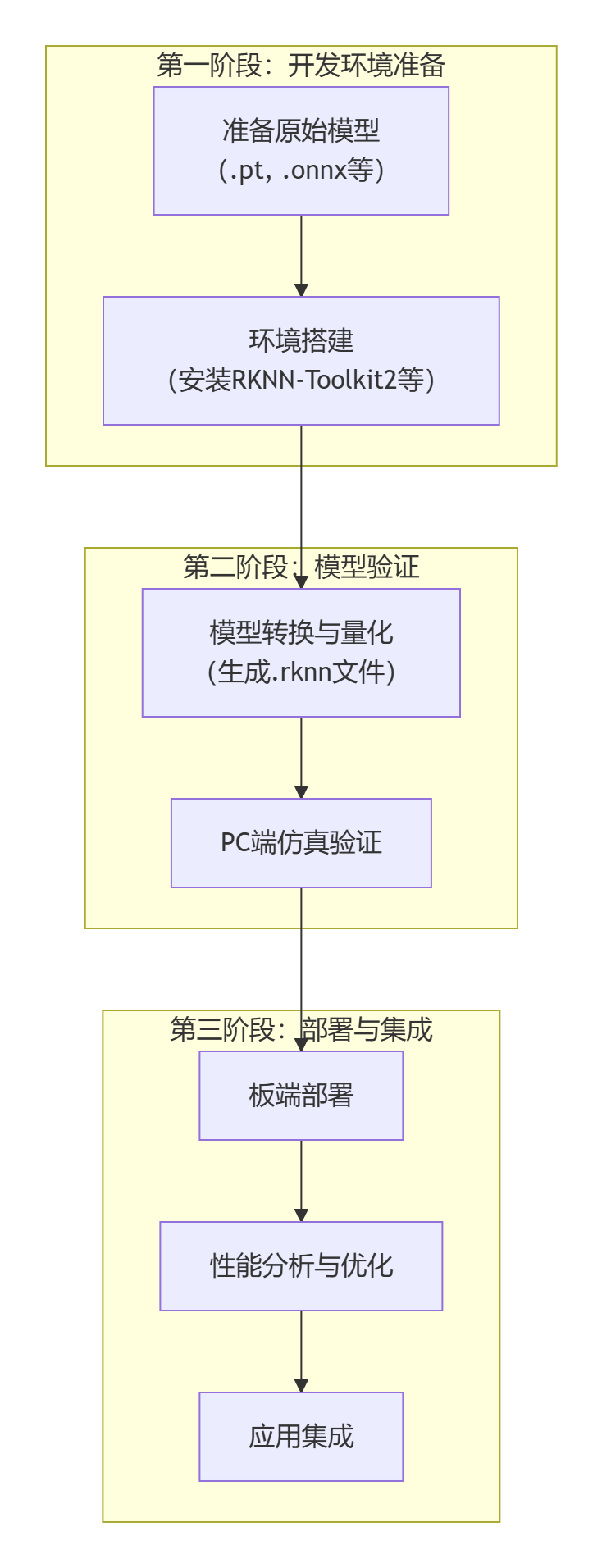
WholeStep

The first phase is "Development Environment Preparation". Here two foundational tasks must be completed: first, prepare the original model file (such as .pt or .onnx format) trained and exported by mainstream frameworks such as PyTorch or TensorFlow; second, configure the core model-conversion toolchain, i.e., install the RKNN-Toolkit2 SDK and its related dependency environment.

Next comes the second phase, "Model Verification", a key step in ensuring the model can run correctly and efficiently. First use RKNN-Toolkit2 to convert the original model into the RKNN format dedicated to the NPU. This process typically includes the critical quantization step, intended to optimize the model size and inference speed. Then perform simulation verification on the PC side — you can quickly check the functional correctness and basic performance of the converted model without connecting actual hardware, greatly improving development and debugging efficiency.

The final phase is "Deployment and Integration", deploying the verified RKNN model onto the target hardware. In this phase, board-side deployment is performed first to ensure the model is correctly loaded in the real environment; then through performance analysis and optimization, parameters are fine-tuned to fully release the NPU's computing power; finally, the optimized model is integrated into the final application, completing the implementation of the entire AI solution.

5 Summary

The RK3568's NPU provides powerful computing capability and complete software ecosystem support for edge AI applications. Through the RKNN software stack, developers can easily deploy a variety of deep learning models onto the MB-E30P development board to implement efficient AI inference applications.

The following chapters describe in detail the specific operational steps for setting up the development environment, running official examples, model conversion, and custom-model deployment, helping you quickly get started with RK3568 NPU development.

Edit this page on GitHub
Next
Development Environment Setup