
EVS Time Sync
For where this feature sits in the USB-camera system, see System Architecture. :::
📋 Introduction
EVS Time Sync is a high-precision time-synchronization solution based on the UDP protocol, designed for multi-device event-camera systems. Through a heartbeat mechanism and offset calculation, it keeps all device timestamps consistent, achieving microsecond-level time-sync precision.
📋 Technical specifications
System requirements
- Operating system: Ubuntu 22.04 / CentOS / RHEL
- Build tools: gcc, g++, build-essential
- Network protocol: UDP
- Default port: 9999 (configurable)
Protocol specification
- Protocol file:
time_sync_protocol.h - Protocol version: 1
- Magic number: 0x54535943 ("TSYNC")
- Sync precision: microsecond-level
🔧 Dependencies
- Required: gcc, g++, pthread, librt (usually shipped with the system)
- Network library: standard socket library
🚀 Quick start
Build the server (PC side)
# 编译时间同步服务器
make timesync

# 编译结果:生成 time_sync_server 可执行文件
Run the time-sync server on a PC
# 运行时间同步服务器(默认端口9999)
./time_sync_server

# 或指定端口
./time_sync_server 10000
Program screenshot 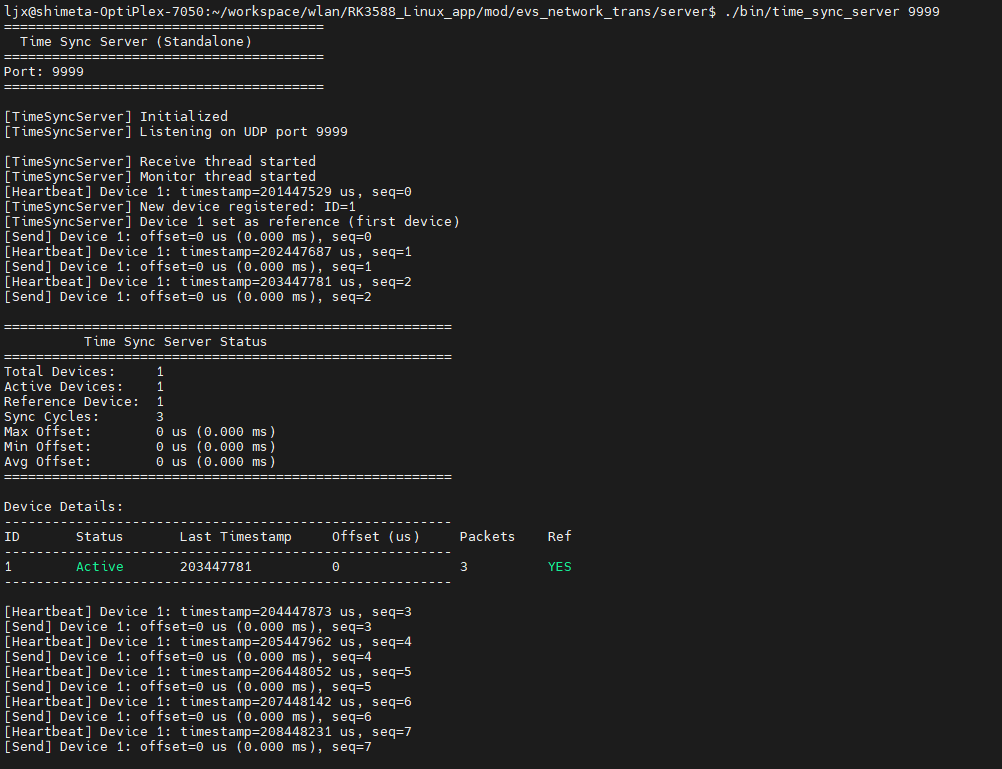
Clean build files
# 清理时间同步相关编译文件
make clean_timesync
📡 Communication protocol
Message types
1. Heartbeat message (device → server)
Message type: TIME_SYNC_MSG_HEARTBEAT = 1
Structure:
typedef struct {
    TimeSyncMsgHeader_t header;
    uint64_t timestamp_us;    // 设备当前时间戳(微秒)
    uint32_t sequence;        // 序列号
} TimeSyncHeartbeatMsg_t;
Send frequency: once per second
2. Offset reply (server → device)
Message type: TIME_SYNC_MSG_OFFSET_REPLY = 2
Structure:
typedef struct {
    TimeSyncMsgHeader_t header;
    int64_t  offset_us;           // 推荐的时间偏移(微秒)
    uint32_t reference_device_id; // 参考设备ID
    uint32_t sync_quality;        // 同步质量(0-100)
    uint32_t sequence;            // 对应的心跳序列号
} TimeSyncOffsetReplyMsg_t;
Send timing: replied immediately upon receiving a heartbeat
3. Status query / reply (optional)
Message types:
TIME_SYNC_MSG_STATUS_REQ = 3TIME_SYNC_MSG_STATUS_REPLY = 4
Purpose: query server status and multi-device sync status
Communication flow
设备端                                     服务器
  │                                         │
  │──── TimeSyncHeartbeatMsg_t ───────────► │
  │     (device_id=1, timestamp=12345)      │
  │                                         │
  │                                         ├─ update_device()
  │                                         ├─ calculate_offsets()
  │                                         ├─ get_device_offset()
  │                                         │
  │◄─── TimeSyncOffsetReplyMsg_t ────────── │
  │     (offset=-500us, quality=85)         │
  │                                         │
  ├─ set_offset_us(-500)                    │
  │                                         │
  │  ... after 1 second ...                 │
  │                                         │
  │──── TimeSyncHeartbeatMsg_t ───────────► │
  │     (device_id=1, timestamp=13345)      │
  │                                         │
🚨 Troubleshooting
Common issues
Issue 1: the time-sync server cannot start
Check port usage:
# 检查9999端口是否被占用
sudo netstat -anp | grep 9999

# 如果被占用,终止进程或更换端口
./time_sync_server 10000
Check the firewall:
# Ubuntu/Debian
sudo ufw allow 9999/udp

# CentOS/RHEL
sudo firewall-cmd --add-port=9999/udp --permanent
sudo firewall-cmd --reload
Issue 2: how multiple devices sync
The server automatically selects the first device to connect as the reference device; the timestamps of the other devices are calibrated to the reference device:
设备1 (参考): offset = 0 us
设备2: offset = -1500 us  (比设备1快1.5ms)
设备3: offset = +200 us   (比设备1慢0.2ms)
🙋 Contact us
If you encounter any problems or have any suggestions while using the time-sync system, reach us via: Open-source hardware website: https://www.shimetapi.cn (domestic) / https://www.shimetapi.com (overseas) Online technical docs: https://forum.shimetapi.cn/wiki/zh/ Online technical community: https://forum.shimetapi.cn
Time-sync system — making multi-device time sync easier 🚀