
Hardware Installation & Verification
Overall block diagram
RK3588 / RK3576 host board        RK182X (PCIe AI co-processor)
───────────────────────           ───────────────────────
PCIe/M.2 slot  ◄────────────►     No application CPU
Power supply (independent)  ◄────► Independent power cable
       │
       ▼
  Debian 12 aarch64
  /dev/pcie-rkep-<BDF>
  rknn3.service / rknn3_transfer_proxy
1. Prerequisites
- RK3588 / RK3576 host development board + RK182X AI co-processor
- System booted (Debian 12 bookworm / aarch64)
2. Log In to the Host
Pick any one of the three methods.
Method 1: HDMI + Keyboard & Mouse (Simplest)
Connect a display + USB keyboard and mouse; open a terminal after boot.
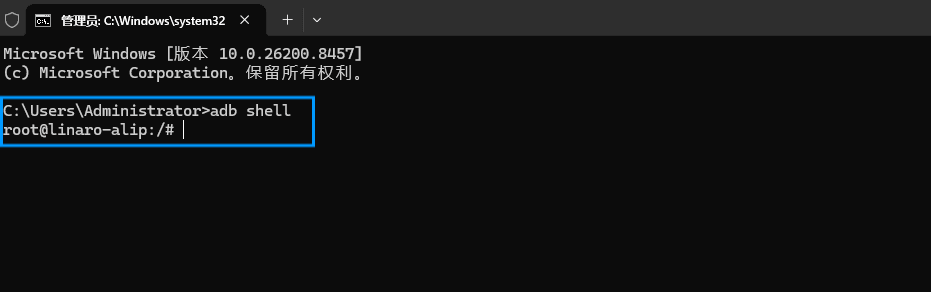
Method 2: ADB Connection (USB)
Connect the computer to the board's OTG port with a USB data cable:
adb shellDefault user is linaro.
Method 3: SSH Remote Login (Recommended)
1. Find the board's IP
Run on the development board (with a display attached, or check the router's admin page):
ip a | grep inetFind an IP on the same subnet, e.g. 192.168.1.100.
Without a display, look up the device with hostname
linaroin the router's admin page.
2. SSH login
Run on the computer:
ssh linaro@<board-ip>Default username linaro, password linaro.
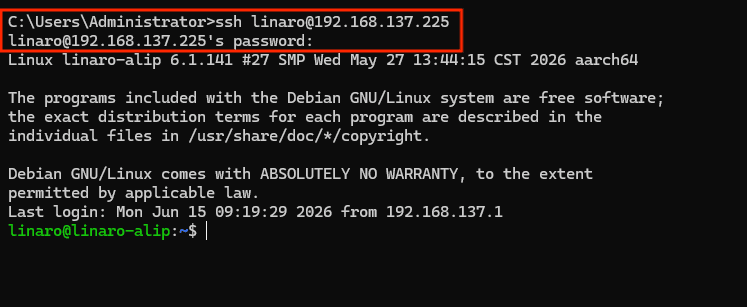
On the first connection you will be asked whether to trust the host; enter yes.
3. Verify
whoami        # should output linaro
uname -a      # confirm the system is aarch64 / Debian
3. Verify Hardware Detection
Check the PCIe Device
lspci | grep RockchipExpected output:
0004:41:00.0 Processing accelerators: Rockchip Electronics Co., Ltd. Device 182aNotes:
- The device ID usually shows as
182a(the PCIe-side device ID of the 1828 chip); this is normal- The BDF address (e.g.
0004:41:00.0) varies with the board's PCIe topology; seeing Rockchip'sProcessing acceleratorsentry is normal
One-Shot Health Check
cat <<'EOF' > /tmp/check_1828.sh
#!/bin/bash
echo "=== RK1828 健康检查 ==="
# 自动探测 BDF(实际 BDF 因主板 PCIe 拓扑而异,如 0004:41:00.0)
bdf=$(ls /dev/pcie-rkep-* 2>/dev/null | head -1 | sed 's|/dev/pcie-rkep-||')
[ -n "$bdf" ] && echo "✅ 设备节点 OK (${bdf})" || echo "❌ 设备节点缺失"
systemctl is-active rknn3.service >/dev/null && echo "✅ 服务运行中" || echo "❌ 服务未运行"
# 进程名可能带 hash 后缀(如 rknn3_transfer_proxy_c36211b1),也可能无后缀,故放宽匹配
npu_pid=$(pgrep -f rknn3_transfer_proxy | head -1)
if [ -n "$npu_pid" ]; then
    echo "✅ 代理进程 PID=$npu_pid, CPU=$(ps -p $npu_pid -o pcpu= | tr -d ' ')%"
else
    echo "❌ 代理进程不在"
fi
/usr/bin/pcie_upgrade_tool ld 2>&1 | grep -q 182a && echo "✅ PCIe 链路正常" || echo "❌ PCIe 链路异常"
EOF
chmod +x /tmp/check_1828.sh && /tmp/check_1828.sh
Expected output:
=== RK1828 健康检查 ===
✅ 设备节点 OK (0004:41:00.0)
✅ 服务运行中
✅ 代理进程 PID=1952, CPU=25%
✅ PCIe 链路正常
The script checks 4 things one by one:
- Whether the
/dev/pcie-rkep-*device node exists- Whether the
rknn3.serviceservice is active- Whether the
rknn3_transfer_proxydaemon is running- Whether
pcie_upgrade_tool ldcan detect182aon the link
4. Troubleshooting
| Symptom | Cause | Fix |
|---|---|---|
No Rockchip in lspci | Card not seated / insufficient power / wrong slot mode | Reseat + check power + dmesg | grep -iE 'pcie|pcie-rkep|182a|fw_load' |
Device node missing (/dev/pcie-rkep-*) | PCIe not enumerated | Reboot the host or sudo modprobe pcie_rkep |
rknn3.service not active | systemd service error | sudo systemctl restart rknn3.service |
Daemon rknn3_transfer_proxy missing | Runtime did not start | sudo systemctl restart rknn3.service |
| Daemon CPU usage abnormally high | Inference task stuck | rmmod pcie_rkep && modprobe pcie_rkep && systemctl restart rknn3.service |
| Inference task fails | Driver error | Same as above + check PCIe errors in dmesg |
5. Next Steps
- Environment Setup — toolchain + firmware + SDK locations
- SDK Overview — architecture of the RK182X SDK subsystems
- Quick Start — first demo