
ClawChips Architecture and Principles
Overall block diagram
QQ / Channel messages
        │
        ▼
┌──────────────────┐
│     OpenClaw     │
│  Agent Gateway   │
└────────┬─────────┘
         │
         ▼
┌──────────────────┐     ┌─────────────────┐
│    ClawChips     │────▶│  Cloud models   │
│  Local Router    │     │ (deepseek etc.) │
└────────┬─────────┘     └─────────────────┘
         │
         ▼
┌──────────────────┐     ┌─────────────────┐
│    ModelHub      │────▶│  ASR / TTS /    │
│   Scheduler      │     │  VLM / Embedding│
└──────────────────┘     └────────┬────────┘
                                  │
                          ┌───────┴───────┐
                          │   RK182X NPU  │
                          │(coprocessor)  │
                          └───────────────┘
If you have not deployed OpenClaw yet, see ch05 One-Click QQ Bot Deployment first.
1. Overall Architecture
ClawChips is an edge AI Agent deployment solution from ShiMeta, adapted from the OpenClaw framework and optimized for the RK3588 + RK182X platform.
| Module | Responsibility |
|---|---|
| OpenClaw Gateway | Message entry (QQ / Channel) + Agent scheduling |
| ClawChips Router | Device-cloud routing (LOCAL vs CLOUD) |
| ModelHub | Model service scheduling (start / stop / health check) |
| RK182X NPU | Local model inference (LLM / VLM / ASR / TTS / Embedding) |
2. Device-Cloud Smart Routing
Actual deployments currently rely on OpenClaw connecting directly to MiniMax.
The routing policy is configured in ~/.openclaw/clawchips.yaml (takes effect once enabled). Provider names in the rules follow whatever setup.sh actually configures (may be minimax / deepseek / glm / custom, etc.):
router:
  strategy: rules # or memory
  rules:
    - LOCAL: <provider>/<model> # local model, e.g. rkllm/Qwen3-1.7B
    - CLOUD: <provider>/<model> # cloud model, e.g. deepseek/deepseek-chat
    - default: <provider>/<model>
enable: true| Mode | Description |
|---|---|
rules | Rule-based routing, matched by LOCAL / CLOUD / default labels |
memory | Continuously optimizes routing based on historical decisions (see OpenClaw docs) |
2.1 Configuring Cloud Models
Edit ~/.openclaw/openclaw.json and add a Provider under models.providers:
The following is a recommended configuration example (two providers: local rkllm + cloud deepseek). The actual provider is whatever
setup.shconfigures — the current deployment only configures one provider, MiniMax, and the rkllm local service is not installed.
{
  "models": {
    "providers": {
      "rkllm": {
        "baseUrl": "http://127.0.0.1:7878/v1",
        "api": "openai-completions",
        "models": [
          {
            "id": "Qwen3-1.7B",
            "name": "Qwen3-1.7B RKLLM",
            "contextWindow": 8192,
            "maxTokens": 512
          }
        ]
      },
      "deepseek": {
        "baseUrl": "https://api.deepseek.com/v1",
        "apiKey": "sk-xxxxxxxxxxxx",
        "api": "openai-completions",
        "models": [
          {
            "id": "deepseek-chat",
            "contextWindow": 65536,
            "maxTokens": 4096
          }
        ]
      }
    }
  }
}
Also update the Agent-level configuration at ~/.openclaw/agents/main/agent/models.json.
Known issue:
setup.shcurrently does not sync-writeagents/main/agent/models.json(that file contains{"providers": {}}); you must copy/merge fromopenclaw.jsonmanually. "Automatic sync" is a planned feature.
2.2 Dashboard Configuration
Visit http://<board IP>:18789/plugins/clawchips/dashboard:
This path is only available when the clawchips plugin is enabled.
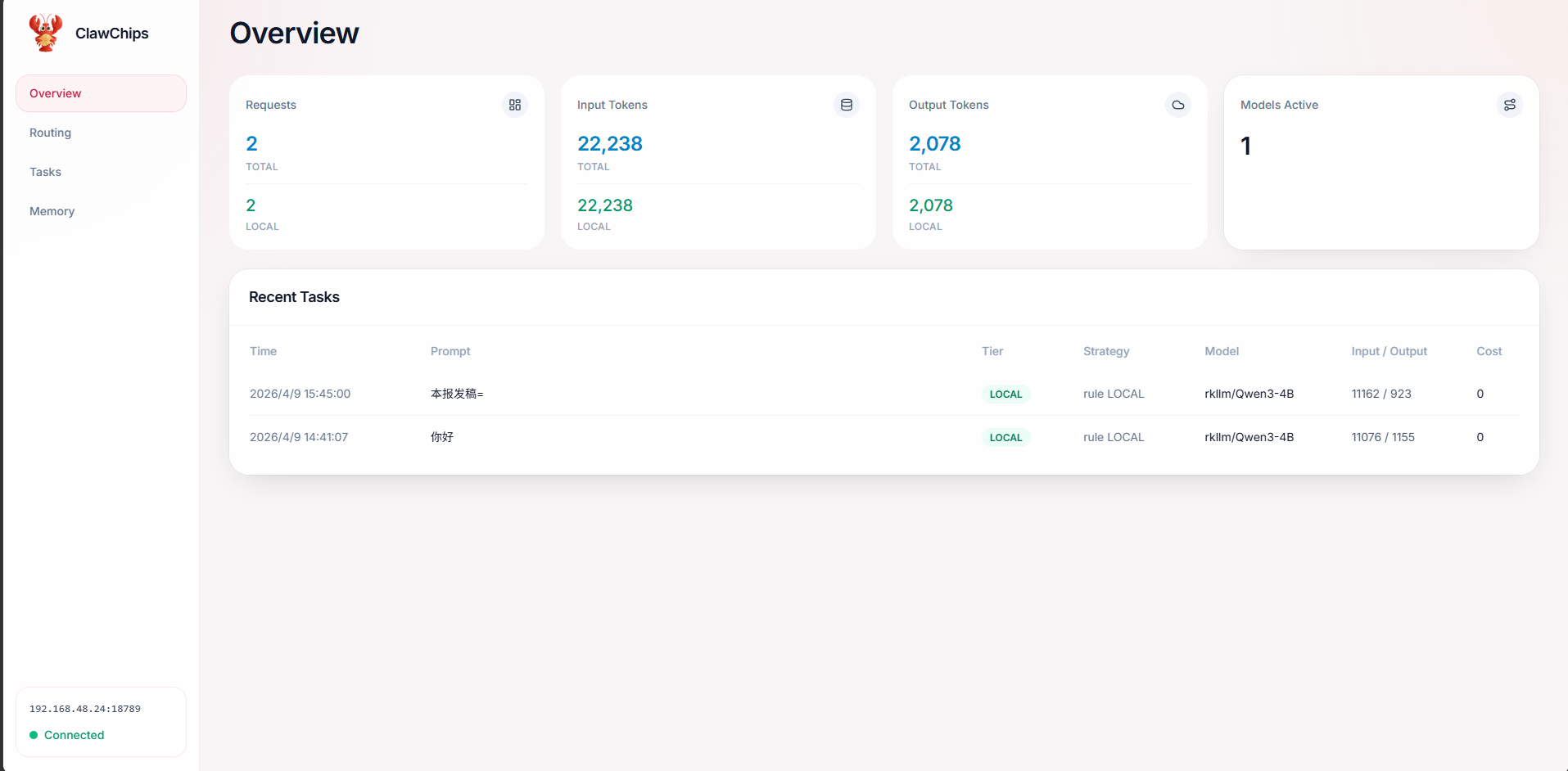
- Enable local routing and memory routing
- Select the CLOUD model ID (dropdown options come from the
providersconfiguration) - Save and restart:
openclaw gateway restart
2.3 ShiMeta Practice: Device-Cloud Collaboration
Recommended setup: the cloud handles conversational inference while the local NPU handles VLM image recognition.
The actual routing depends on whether the provider / model IDs in
clawchips.yamlare filled in correctly. Misconfiguration sends everything to the cloud or fails entirely.
4. Token Consumption Optimization
Write frequently used tool invocation patterns into ~/.openclaw/workspace/TOOLS.md; the AI can then skip the "read SKILL.md first" step, reducing API call rounds.
| Strategy | Effect |
|---|---|
| Default (read SKILL.md, then execute) | One extra API call round |
| Inline in TOOLS.md (direct invocation) | Saves one API call round |
The exact token counts depend on the model, context length, and conversation complexity.
TOOLS.mdhas been verified effective in real deployments.
5. FAQ
5.1 Routing Always Falls Back to the Local Model
Symptom: logs show [hooks] provider overridden to rkllm.
Solution: point the LOCAL rule to a cloud model:
router:
  rules:
    - LOCAL: deepseek/deepseek-chat
    - CLOUD: deepseek/deepseek-chat
    - default: deepseek/deepseek-chat
5.2 Local Model Response Timeout
Cause: the OpenClaw system prompt is about 7000 tokens, and small local models infer slowly.
Solution:
- Use a cloud model for conversation (recommended)
- Or run a benchmark first to measure speed:
rkllm3-server --help 2>&1 | head -20- Then raise the timeout
5.3 NPU Device Not Found
# 1. Check the service
sudo systemctl status rknn3.service --no-pager
Output:
● rknn3.service - rknn3 runtime service
     Loaded: loaded (/lib/systemd/system/rknn3.service; enabled; preset: enabled)
     Active: active (running) since Thu 2026-08-20 11:24:04 CST; 2h 55min ago
    Process: 516 ExecStart=/bin/rknn3_startup start (code=exited, status=0/SUCCESS)
   Main PID: 1396 (rknn3_transfer_)
        CPU: 43.212s
   CGroup: /system.slice/rknn3.service
             ├─1396 /bin/rknn3_transfer_proxy
             └─58359 rknn3_transfer_proxy_c36211b1 -s 0004:41:00.0
# 2. Check the PCIe device (exact match by vendor:device)
lspci -d 1d87:182aOutput:
0004:41:00.0 Processing accelerators: Rockchip Electronics Co., Ltd Device 182a (rev 01)5.4 Quick Troubleshooting Reference
| Symptom | Cause | Fix |
|---|---|---|
| Routing falls back to the local model | LOCAL rule misconfigured | Point both LOCAL/CLOUD to the cloud |
| Local model response timeout | Long system prompt + slow model | Use cloud for chat / raise the timeout |
| NPU device not found | Card not seated / service not up | systemctl status rknn3.service + lspci -d 1d87:182a |
agents/main/agent/models.json is {"providers": {}} | setup.sh did not sync | Merge manually from openclaw.json |
| Dashboard returns 404 | Plugin not enabled | Use openclaw channels list instead |
6. Next Steps
- SKILL User Manual — write custom Skills
- LLM Inference — connect the local rkllm3-server
- AI Agent Applications — integrate into Agent frameworks