Workbench IDE's features are spread across 6 top Tabs + 3 left areas + 4 right areas. This section lists every clickable entry with its one-line responsibility.
| Tab | One-line responsibility | Status | Details |
|---|
| Agent | Claude Code-driven board debugging assistant, natural-language board operations | ✅ Live | ch09-agent |
| shimeta-py IDE | Python code editor, run directly on the board after editing | ✅ Live | ch07-shimeta-py-ide |
| Terminal | SSH terminal, multiple Tabs connect straight to the board | ✅ Live | ch08-terminal |
| Skills | Skill package management (.smpkg) | | — |
| Models | Model Market + user models, one-click deploy to the board | ✅ Live | ch03-model-market |
| Vision | Launch shimeta-svp / shimeta-xmm, view the camera feed on the right | ✅ Live | ch05-vision-svp |
| Area | Entry | Responsibility |
|---|
| WORKSPACE | Refresh | Refresh the workspace list |
| default | Current workspace (empty state when no .py files) |
| + New Project | Create a new workspace project |
| DEVICE TREE | + | Add a new device |
| GK7206 [1] | Board SoC group (with board count) |
| Pico-G1 | Added boards (shows IP, user, status dot) |
| Reconnect (red button) | Manually reconnect when the device is disconnected |
| QUICK START | + New Skill Package | |
| Import .smpkg | |
| View PRD | |
| Button | Action |
|---|
| 🔍 Search | Global search |
| ⏐ Panel | Toggle the right-side panel display |
| ☀ Theme | Switch light/dark theme |
| 🔔 Notification | View IDE notifications |
| Avatar (User) | Personal account menu |
| Log out | Exit the IDE (local cache is kept) |
| Field | Example | Meaning |
|---|
| Board status | shimetad@192.168.49.23 shimetad not running | IP, user, and running services of the connected board |
| IPC | 22ms | Network latency between board and IDE |
| CPU | 5.0% | Board CPU usage (refreshed in real time) |
| MEM | 17.0% | Board memory usage |
| > Logs | — | Expand IDE local logs |
running=false owners=- url=-
Shows the run status, owner, and URL of the current shimeta service process.
| Tab | Content | Status |
|---|
| Object view (物象, default view) | Live camera feed (after running shimeta-svp/xmm) | ✅ Live |
| Peripherals | Board peripheral status | |
| Audit | Operation audit logs | |
GK7206                                    ● (green = connected, red = disconnected)
├─ A7 ×2      Dual-core ARM CPU
├─ NPU 1T     1 TOPS NPU compute
├─ ISP        Image signal processor
└─ DDR3 256M  Memory
| Metric | Meaning | Healthy range |
|---|
| CPU | CPU usage | < 70% |
| MEM | Memory usage | < 80% |
| TMP | Board temperature | < 60°C |
| IPC | Network latency between board and IDE | < 50ms |
| Position | Entry | Action |
|---|
| Top | Select Agent dropdown | Choose the current Agent type |
| Top | 192.168.49.23 / default | Current board + workspace |
| Top | New Session | Start a new conversation |
| Top | Sessions dropdown | Switch to a past conversation |
| Top | + New Session | Quickly create a session |
| Top | Reinitialize context | Reset the Agent context |
| Center | 3 shortcut buttons | One-click common operations |
| Bottom | Input box + send | Natural-language instructions |

| Position | Entry | Action |
|---|
| Top | Model Market / User Models | Switch between the two sub-Tabs |
| Top | All / pt / onnx / xmm / rknn filters | Filter by format |
| Upper right | Model Training link | Jump to the aihub.shimetapi.cn training page |
| Card bottom | Deploy to Board button | Push to the board's /mnt/models/xmm/ |

| Position | Entry | Action |
|---|
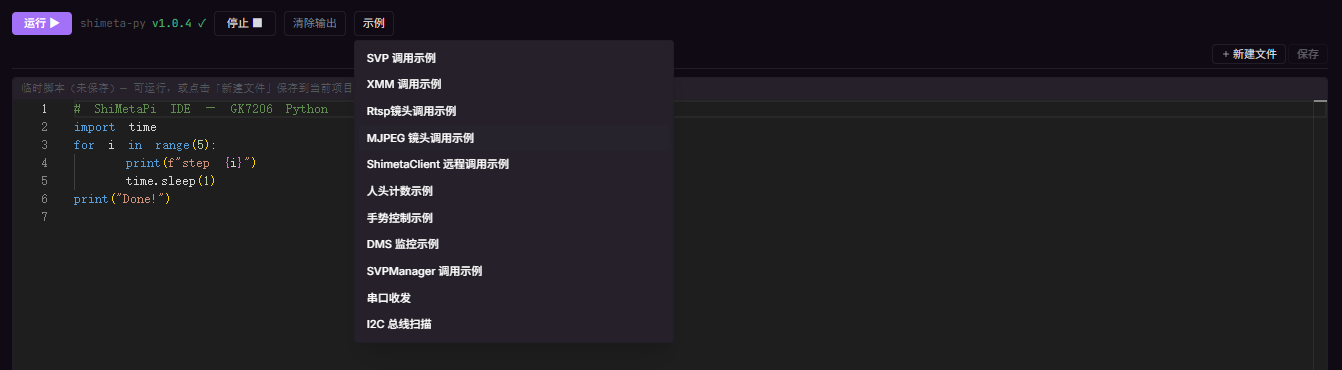
| Top | Run | Execute the current code on the board |
| Top | shimeta-py v1.0.4 | Board-side Python runtime version |
| Top | Stop | Terminate the current run |
| Top | Clear output | Empty the output area below |
| Top | Examples | Load example code |
| Upper right | + New File | Create a new Python script |
| Upper right | Save | Save the current script |
| Position | Entry | Action |
|---|
| Top | shell 1 / other Tabs | Switch SSH sessions |
| Top | + New | Open a new SSH Tab |

New users are advised to get familiar with the entries in this order:
- Log in (login screen) → enter the workspace
- Device management (left DEVICE TREE) → add Pico-G1
- Models Tab (ch04) → browse the Model Market → deploy a model
- Vision Tab (ch05) → run a shimeta-svp scenario → watch the feed on the right
- shimeta-py IDE (ch07) → edit some Python → run it on the board
- Terminal Tab (ch08) → SSH to the board and run commands
- Agent Tab (ch09) → let Claude Code debug the board
