
Model Market
The Models tab is Workbench's entry point to the AIHub training platform, split into two sub-tabs: Model Market (official + community) and User Models (models you trained yourself).
What it does
The Models tab brings the AIHub model library into the IDE:
- Model Market: official models + models published by community users, visible to all logged-in users
- User Models: models you trained yourself on AIHub, visible only to you
- Complete card fields: model name / type / base model / author / mAP50 / format size / input size
- Format filter at the top (pt / onnx / xmm / rknn)
- One-click "Deploy to board" → pushes to the Pico-G1 /mnt/models/xmm/
- "Model training" link in the upper-right corner jumps to the AIHub training page
The Pico-G1 currently supports only .xmm format deployment; other formats are display-only.
Where to find it
Top tab → "Models"
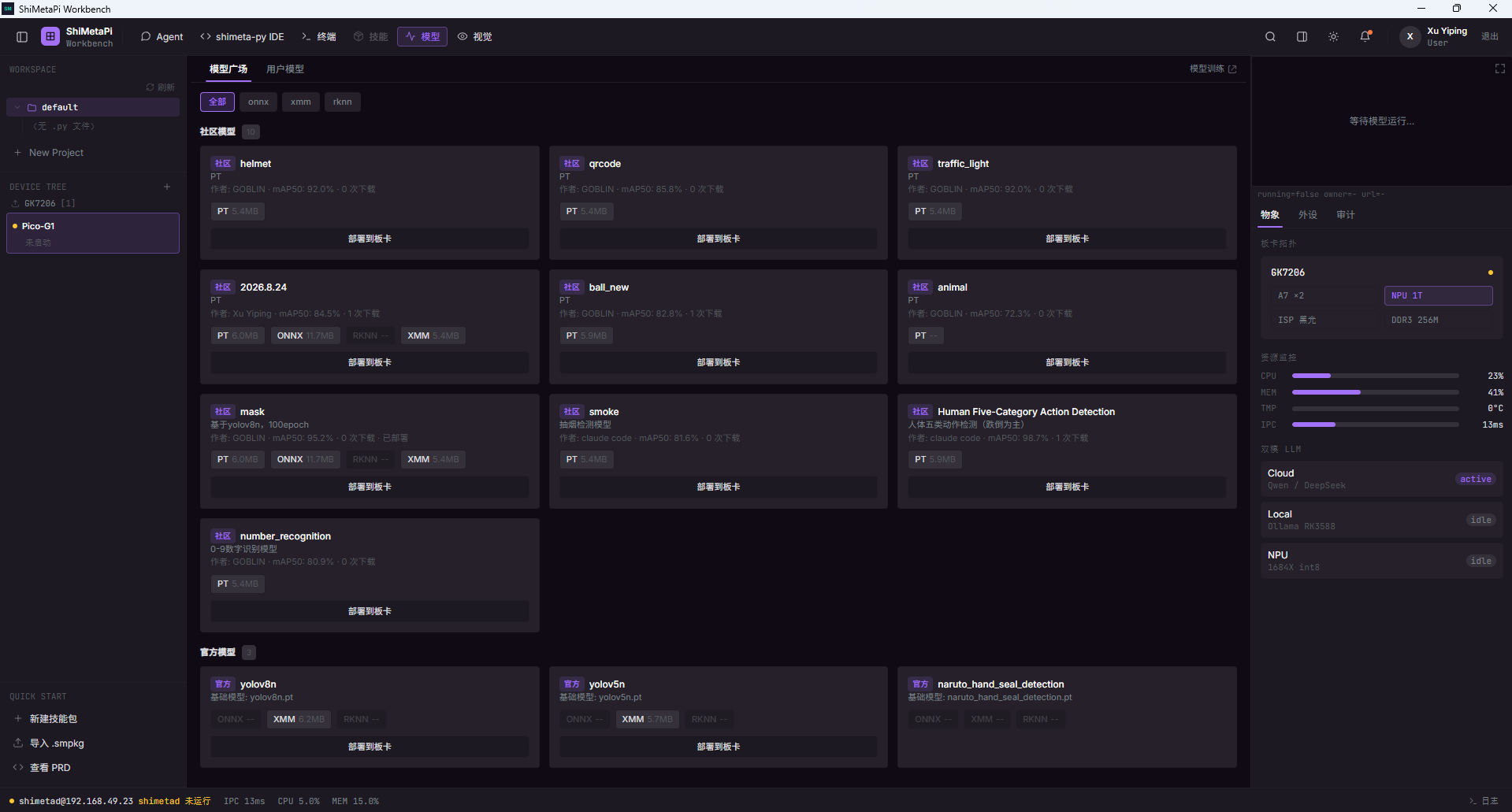
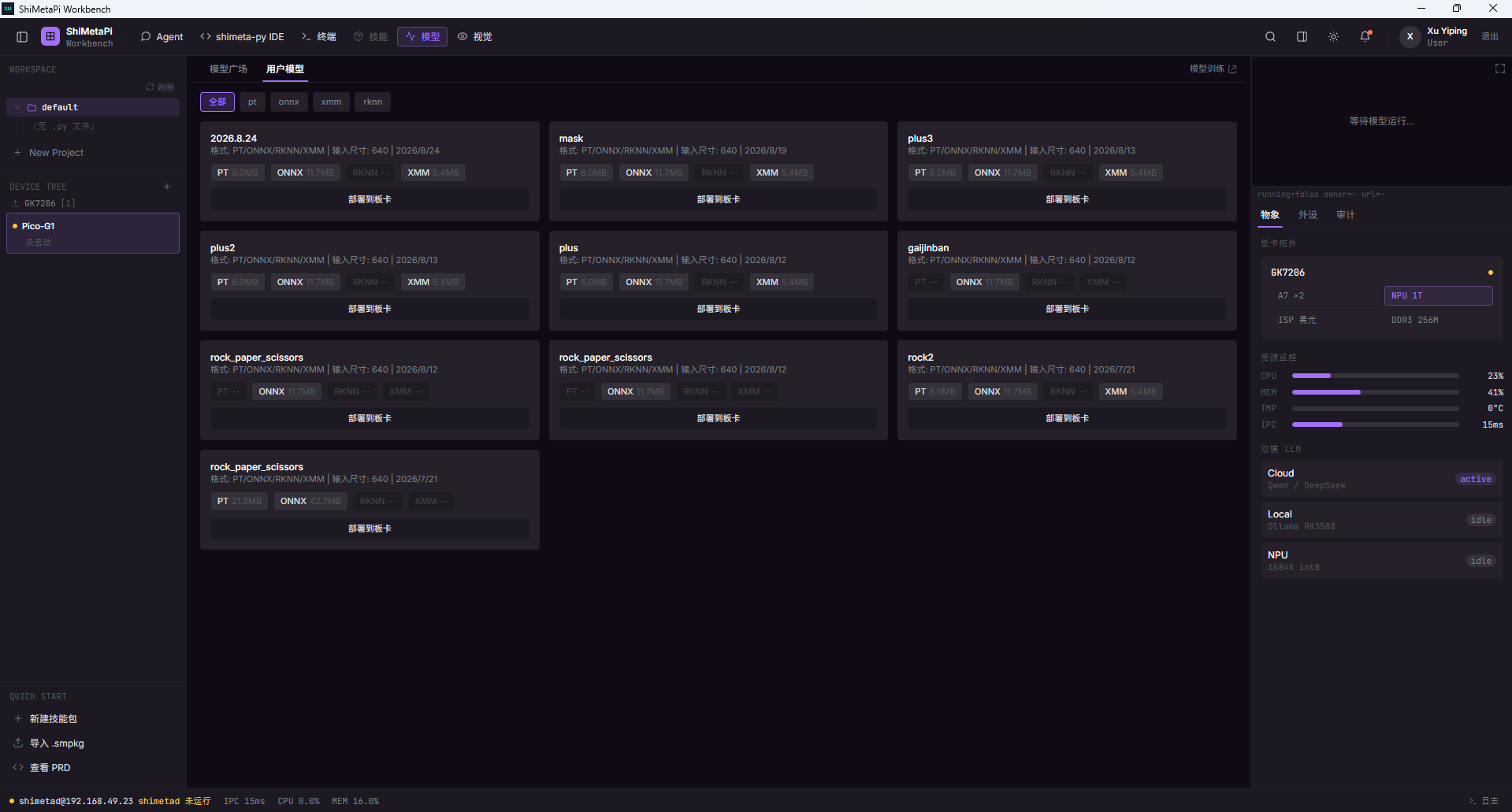
The two sub-tabs
| Sub-tab | Data source | Visible to | Who can download |
|---|---|---|---|
| Model Market | AIHub official + community publications | All logged-in users | All logged-in users |
| User Models | Models the current user trained on AIHub | Current user only | The user (can also publish to the community) |
Switch by clicking the "Model Market / User Models" tabs at the top.
Model Market
Top filter
| Filter | Options |
|---|---|
| Format | All / pt / onnx / xmm / rknn |
Cards always show the badges and sizes of all 4 formats (some may be
--, meaning that format was not exported).
Model card fields
| Field | Description |
|---|---|
| Model name | Short identifier (e.g. mask / yolov8n) |
| Type badge | Blue "Official" or gray "Community" |
| Base model | e.g. "Based on yolov8n, 100 epochs" |
| Author | Community models show the publisher's username |
| mAP50 | Some models show mean average precision |
| Downloads / Deployed | Community models show download count; user models show "Deployed" status |
| Format sizes | Actual file sizes for PT / ONNX / RKNN / XMM |
| Input size | Model inference input (e.g. 640×640) |
| Release date | Training date |
| "Deploy to board" button | Pushes to the Pico-G1 /mnt/models/xmm/ |
Community model examples
| Model | Author | mAP50 | Status |
|---|---|---|---|
| mask (based on yolov8n, 100 epochs) | GOBLIN | 95.2% | Deployed |
| 2026.8.24 | Xu Yiping | 84.5% | — |
| ball_new | GOBLIN | 82.8% | — |
| Human Five-Category Action Detection | claude code | 98.7% | — |
| smoke (smoking detection) | claude code | 81.6% | — |
| number_recognition (0–9 digits) | GOBLIN | 80.9% | — |
Official model examples
| Model | Base model |
|---|---|
| yolov8n | yolov8n.pt |
| yolov5n | yolov5n.pt |
| naruto_hand_seal_detection | naruto_hand_seal_detection.pt |
User Models
Switch to the "User Models" sub-tab:
Card fields
| Field | Description |
|---|---|
| Model name | The name set during training (e.g. 2026.8.24 / plus / gaijinban) |
| Format | PT / ONNX / RKNN / XMM |
| Input size | 640×640 |
| Release date | Training date |
Model format notes
| Format | Use | Deployable on Pico-G1? |
|---|---|---|
| pt | Raw PyTorch weights, for continued training | ❌ Display only |
| onnx | Generic intermediate format | ❌ Display only |
| xmm | Model package runnable on the board | ✅ Deployable |
| rknn | Rockchip NPU acceleration (coming soon) | ❌ Display only |
The Pico-G1 currently supports only
.xmmformat deployment. Other formats are display-only and cannot be deployed directly.
Deployment permissions
Deploying a model requires no special permissions.
Community models follow the license set by the publisher (visible on the model detail page).
Jump to AIHub training
The "Model training" link in the upper-right corner → opens the aihub.shimetapi.cn training page in your browser:
- Create a new training task
- Upload a dataset
- Choose a base model
- Export to
.xmmformat when training completes
Exported models appear automatically in the Workbench User Models sub-tab.
See the AIHub docs — Training Guide for details.
Troubleshooting
| Symptom | Fix |
|---|---|
| Models tab loads slowly | Check the PC's network |
| Can't find your own trained model | The AIHub training did not export the .xmm format |
| Model card shows only PT/ONNX | XMM format was not selected at export after training |
| "Deploy to board" button unresponsive | Board not connected; go back to ch02 |
Next
- ch04 One-Click Deploy: push a model to the board
- AIHub docs — Training Guide: train your own model