HOME
Shop
  • English
  • 简体中文
HOME
Shop
  • English
  • 简体中文
  • Product Series

    • FPGA+ARM

      • GM-3568JHF

        • Introduction

          • GM-3568JHF Introduction
        • Quick Start

          • Preface
          • Environment Setup
          • Compilation Notes
          • Flashing Guide
          • Debugging Tools
          • Software Update
          • Viewing System Information
          • Test Commands
          • Application Compilation
          • Source Code Access
        • Peripherals & Interfaces

          • USB
          • Display and Touch
          • Ethernet
          • WIFI
          • Bluetooth
          • TF-Card
          • Audio
          • Serial Port
          • CAN
          • RTC
        • Application Development

          • UART Read/Write Demo
          • Key Detection Demo
          • LED Blink Demo
          • MIPI Screen Detection Demo
          • Read USB Device Information Demo
          • FAN Detection Demo
          • FPGA FSPI Communication Demo
          • FPGA DMA Read/Write Demo
          • GPS Debugging Demo
          • Ethernet Test Demo
          • RS485 Read/Write Demo
          • FPGA I2C Read/Write Demo
          • PN532 NFC Card-Reading Demo
          • TF Card Read/Write Demo
        • QT Development

          • ARM64 Cross-Compiler Environment Setup
          • Adding a QT Program to Boot Auto-Start
        • RKNN_NPU Development

          • RK3568 NPU Overview
          • Development Environment Setup
          • Run the Official YOLOv5 Example
        • FPGA Development

          • ARM and FPGA Communication
          • FPGA Development Manual
        • Others

          • Modifying the Root Filesystem
          • System Auto-Start Services
        • Downloads

          • Downloads
      • MB-E30P

        • Introduction

          • MB-E30P Introduction
        • Quick Start

          • Preface
          • Environment Setup
          • Compilation Instructions
          • Flashing Guide
          • Debugging Tools
          • Software Update
          • Viewing Information
          • Test Commands
          • Application Compilation
          • Source Code Acquisition
        • Peripherals & Interfaces

          • USB
          • Display and Touch
          • Ethernet
          • WIFI
          • Bluetooth
          • TF-Card
          • Audio
          • RTC
        • Application Development

          • Key Detection Demo
          • LED Blink Demo
          • MIPI Screen Detection Demo
          • Read USB Device Information Demo
          • FAN Detection Demo
          • FPGA FSPI Communication Demo
          • FPGA DMA Read/Write Demo
          • Ethernet Test Demo
          • FPGA IIC Read/Write Demo
          • PN532 NFC Card Reading Demo
          • TF Card Read/Write Demo
        • QT Development

          • ARM64 Cross-Compiler Environment Setup
          • Adding a QT Program to the Boot Auto-Start Service
        • RKNN_NPU Development

          • RK3568 NPU Overview
          • Development Environment Setup
          • Run the Official YOLOv5 Example
          • Model Conversion In Detail
          • Run Custom Models on the Board
        • FPGA Development

          • ARM and FPGA Communication
          • FPGA Development Manual
        • Others

          • Modifying the Root Filesystem
          • System Auto-Start Service
        • Downloads

          • Downloads
    • ShimetaPi

      • M4-R1

        • Introduction

          • M4-R1 Introduction
        • Quick Start

          • OpenHarmony Overview
          • Image Burning
          • Application Development Quick Start
          • Device Development Quick Start
        • Application Development

          • ArkUI

            • ArkTS Language Overview
            • UI Components - Row Container Introduction
            • UI Components - Column Container Introduction
            • UI Components - Text Component
            • UI Components - Toggle Component
            • UI Components - Slider Component
            • UI Components - Animation Component & Transition Component
          • Documentation

            • OpenHarmony Official Materials
          • Development Notes

            • Full-SDK Replacement Tutorial
            • Introducing and Using Third-Party Libraries
            • HDC Debugging
            • Restore Factory Mode via Command Line
            • Upgrade App to System Permission
          • First App

            • Build Your First ArkTS Application - HelloWorld
          • Demos

            • Serial-Debug-Assistant Application Demo
            • Writing-Board Application Demo
            • Digital Clock Application Demo
            • Wi-Fi Information Acquisition Application Demo
        • Device Development

          • Ubuntu Development

            • Environment Setup
            • Download Source Code
            • Compile Source Code
          • DevEco Device Tool

            • Tool Introduction
            • Development Environment Construction
            • Import the SDK
            • HUAWEI DevEco Tool Function Introduction
        • Kernel Peripherals & Interfaces

          • Guide
          • Device Tree Introduction
          • NAPI Introduction
          • ArkTS Introduction
          • NAPI Development Hands-on Demo
          • GPIO Introduction
          • I2C Communication
          • SPI Communication
          • PWM Control
          • UART Communication
          • TF Card (MicroSD)
          • Screen (Display)
          • Touch
          • Ethernet
          • M.2 SSD
          • Audio
          • WIFI & BT
          • Camera
        • Downloads

          • Downloads
      • M5-R1

        • Introduction

          • M5-R1 Development Docs
        • Quick Start

          • Image Burning
          • Environment Setup
          • Download Source Code
        • Peripherals & Interfaces

          • Raspberry Pi Interfaces
          • GPIO Interface
          • I2C Interface
          • SPI Communication
          • PWM Control
          • Serial Port Communication
          • TF Card
          • Display
          • Touch
          • Audio
          • RTC
          • Ethernet
          • M.2
          • MINI-PCIE
          • Camera
          • WIFI & BT
        • Downloads

          • Downloads
      • Pico-G1

        • Product Overview

          • Product Introduction
          • SDK Version Information
        • Quick Start

          • Development Environment Setup
          • Image Build
          • Image Flashing
          • System Login
          • Network Configuration
          • File Transfer
          • SDK Directory Structure
          • Deploying Your First Application
          • Deploying Your First Driver
          • Mounting an SD Card
        • Peripherals & Interfaces

          • GPIO Control
          • UART Serial Communication
          • I2C Communication
          • SPI Communication
        • MPP Media Development

          • MPP Media Processing Software
          • Image Processing Chain
          • Video Input
          • Image Encoding
        • NPU & AI

          • NPU Driver and Runtime Library Architecture
          • .xmm Model Loading
          • SVP Video Processing
          • AI Noise Reduction (AI_NR)
        • Application Samples

          • Encryption/Decryption Application
          • ADC Acquisition Application
          • Low-Power Application
          • Audio Processing Application
          • Video Encoding Application
          • Video Input Application
          • Video Graphics Subsystem (VGS) Application
          • 08 Region Overlay Application
          • 09 Intelligent Video Engine Application
          • 10 UVC Webcam Application
          • 11 All-in-One Quickstart Application
          • 12 FPN Correction Application
          • 13 Regional Motion Detection Application
          • 14 MTCNN Face Detection Application
        • Expansion Board Peripheral Examples

          • 00 - Pico Expansion Board Peripheral Examples Overview
          • 01 - OLED Display Application
          • 02 - TFT Display Application
          • 03 - MPU6050 Gyroscope Application
          • 04 - ADC Acquisition Application
          • 05 - Passive Buzzer Application
          • 06 - MQ Gas Sensor Application
          • 07 - GPS Positioning Application
          • 08 - SHT20 Temperature & Humidity Application
          • 09 - Ultrasonic Ranging Application
          • 10 - SpO2 Sensor Application
          • 11 - DC Motor Control Application
          • 12 - Servo Control Application
    • OpenHarmony

      • SC-3568HA

        • Introduction

          • SC-3568HA Overview
        • Quick Start Guide

          • OpenHarmony Overview
          • Image Flashing
          • Setting Up the Development Environment
          • Hello World Application and Deployment
        • Application Development

          • ArkUI

            • Introduction to ArkTS Language
            • Introduction to UI Components and Practical Applications (Part 1)
            • Introduction to UI Components and Practical Applications (Part 2)
            • Introduction to UI Components and Practical Applications (Part 3)
          • Expand

            • Getting Started Guide
            • Referencing and Using Third-Party Libraries
            • Application Compilation and Deployment
            • Command-Line Factory Reset
            • System Debugging -- HDC Debugging
            • APP Stability Testing
            • Chapter 7 Application Testing
        • Device Development

          • Environment Setup
          • Download Source Code
          • Compiling Source Code
        • Peripheral And Interface

          • Raspberry Pi interface
          • GPIO Interface
          • I2C Interface
          • SPI communication
          • PWM (Pulse Width Modulation) control
          • Serial port communication
          • TF Card
          • Display Screen
          • Touch
          • Audio
          • RTC
          • Ethernet
          • M.2
          • MINI-PCIE
          • Camera
          • WIFI&BT
          • Raspberry Pi expansion board
        • Downloads

          • Downloads
      • M-K1HSE

        • Introduction

          • M-K1HSE Introduction
        • Quick Start

          • Development environment construction
          • Source code acquisition
          • Compilation Notes
          • Burning Guide
        • Application Development

          • Application Development Environment Setup
          • First Application - Hello World
        • Peripherals and interfaces

          • 01 Audio
          • 02 RS485
          • 03 Display
        • System customization development

          • System transplant
          • System customization
          • Driver Development
          • System Debugging
          • OTA Update
        • Downloads

          • Downloads
    • HVS Camera

      • Quick Start

        • SDK Overview
        • Downloads
        • Your First C++ Program
        • Python Data Analysis
        • MultiVision Studio
      • Development

        • Programming Guides

          • Open Camera
          • Read Events
          • Recording & Replay
          • Event Processing (Denoising)
          • Display & Visualization
          • Tuning
          • Capture APS Image
        • Toolkit SDK

          • Hybrid Vision Toolkit
          • Quick Start
          • C++ API
          • Python API
        • Algorithm

          • Hybrid Vision Algo
          • Hybrid Vision Algo API
          • Windows Algo SDK
        • Samples Overview
        • Applications
      • Fundamentals

        • Event Camera Fundamentals
        • HVS Hybrid Vision
        • Event Visualization
        • Data Formats Reference
        • Glossary
        • Bias & Tuning
        • Video Tutorials
      • USB Cameras

        • HVS Camera Quick Start
        • Networking Capabilities

          • HVS Camera System Architecture
          • EVS Network Server
          • EVS Time Sync
          • Web Window
        • HVS Camera Compatibility Matrix
        • FAQ & Troubleshooting Guide
        • Products

          • CF-NRS1 (Lingguang No.1 Hybrid Vision Camera)
      • MIPI Modules

        • MIPI Module Quick Start
        • Carrier Boards

          • RDK X5 Carrier Board Adaptation
          • Raspberry Pi Carrier Board Adaptation
          • Digua Pi Carrier Board Adaptation
          • ShimeTai Board Carrier Board Adaptation
        • MIPI Module Compatibility Matrix
        • Products

          • EVS_003 Sensor Module
    • AI-model

      • 1684XB-32T

        • Introduction

          • AIBOX-1684XB-32 Introduction
        • Quick Start

          • First Use
          • Network Configuration
          • Disk Usage
          • Memory Allocation
          • Fan Control Strategy
          • Firmware Upgrade
          • Cross Compilation
          • Model Quantization
        • Application Development

          • Development Overview

            • Sophgo SDK Development
            • Sophgo Demo Introduction
          • Large Language Models

            • Deploying Llama3 Example
            • Sophon LLM_api_server Development
            • Deploying MiniCPM-V-2_6
            • Qwen-2-5-VL Image and Video Recognition Demo
            • Qwen3-chat Demo
            • Qwen3-Qwen Agent-MCP Development
            • Qwen3-langchain-AI Agent
          • Deep Learning

            • ResNet (Image Classification)
            • LPRNet (License Plate Recognition)
            • SAM (General Image Segmentation Foundation Model)
            • YOLOv5 (Object Detection)
            • OpenPose (Human Keypoint Detection)
            • PP-OCR (Optical Character Recognition)
        • Downloads

          • Downloads
      • 1684X-416T

        • Introduction

          • AIBOX-1684X-416 Introduction
        • Demo Quick Guide

          • ShimeTai Intelligent Monitoring Demo Quick Usage Guide
      • RDK-X5

        • Introduction

          • RDK-X5 Hardware Introduction
        • Quick Start

          • RDK-X5 Quick Start
        • Application Development

          • AI Online Model Development

            • Experiment 01 - Access Volcengine Doubao AI
            • Experiment 02 - Image Analysis
            • Experiment 03 - Multimodal Visual Analysis & Localization
            • Experiment 04 - Multimodal Image-Text Comparison
            • Experiment 05 - Multimodal Document/Table Analysis
            • Experiment 06 - Camera-based AI Visual Analysis
          • Large Language Models

            • Experiment 01 - Speech Recognition
            • Experiment 02 - Voice Conversation
            • Experiment 03 - Multimodal Image Analysis - Voice
            • Experiment 04 - Multimodal Image Comparison - Voice
            • Experiment 05 - Multimodal Document Analysis - Voice
            • Experiment 06 - Multimodal Vision Application - Voice
          • ROS2 Basics

            • Experiment 01 - Environment Setup
            • Experiment 02 - Create & Build a Workspace Package
            • Experiment 03 - Run ROS2 Topic Communication Node
            • Experiment 04 - ROS2 Camera Application
          • 40-pin IO Development

            • Experiment 01 - GPIO Output (LED Blink)
            • Experiment 02 - GPIO Input
            • Experiment 03 - Button-controlled LED
            • Experiment 04 - PWM Output
            • Experiment 05 - Serial Output
            • Experiment 06 - I2C Experiment
            • Experiment 07 - SPI Experiment
          • USB Module Usage

            • Experiment 01 - USB Voice Module Usage
            • Experiment 02 - Sound Source Localization Module
          • Machine Vision Practice

            • Experiment 01 - Open USB Camera
            • Experiment 02 - Color Recognition
            • Experiment 03 - Gesture Recognition
            • Experiment 04 - YOLOv5 Object Detection
      • RDK-S100

        • Introduction

          • RDK-S100 Hardware Introduction
        • Quick Start

          • RDK-S100 Quick Start
        • Application Development

          • AI Online Model Development

            • Experiment 01 - Access Volcengine Doubao AI
            • Experiment 02 - Image Analysis
            • Experiment 03 - Multimodal Visual Analysis & Localization
            • Experiment 04 - Multimodal Image-Text Comparison
            • Experiment 05 - Multimodal Document/Table Analysis
            • Experiment 06 - Camera-based AI Visual Analysis
          • Large Language Models

            • Experiment 01 - Speech Recognition
            • Experiment 02 - Voice Conversation
            • Experiment 03 - Multimodal Image Analysis - Voice
            • Experiment 04 - Multimodal Image Comparison - Voice
            • Experiment 05 - Multimodal Document Analysis - Voice
            • Experiment 06 - Multimodal Vision Application - Voice
          • ROS2 Basics

            • Experiment 01 - Environment Setup
            • Experiment 02 - Create & Build a Workspace Package
            • Experiment 03 - Run ROS2 Topic Communication Node
            • Experiment 04 - ROS2 Camera Application
          • 40-pin IO Development

            • Experiment 01 - GPIO Output (LED Blink)
            • Experiment 02 - GPIO Input
            • Experiment 03 - Button-controlled LED
            • Experiment 04 - PWM Output
            • Experiment 05 - Serial Output
            • Experiment 06 - I2C Experiment
            • Experiment 07 - SPI Experiment
          • USB Module Usage

            • Experiment 01 - USB Voice Module Usage
            • Experiment 02 - Sound Source Localization Module
          • Machine Vision Practice

            • Experiment 01 - Open USB Camera
            • Experiment 02 - Image Processing Basics
            • Experiment 03 - Object Detection
            • Experiment 04 - Image Segmentation
      • RK1828

        • Introduction

          • M5-182X-A1 AI Edge Box - Product Introduction
          • M5-182X-A1 Hardware Specifications
          • M5-182X-A1 Usage & Safety
        • Quick Start

          • M5-182X-A1 Image Flashing
          • RK182X Hardware Installation & Verification
          • RK182X Development Environment Quick Setup
          • RK182X SDK Overview
          • RK182X Environment Setup in Detail
          • RK182X Quick Start
          • Vendor SDK Data Extraction Record
        • Development Guide

          • ClawChips Architecture and Principles
          • SKILL User Manual
          • RK182X Series LLM Inference (RK1828 Model)
          • RK182X Series CNN Inference (RK1828 Model)
          • Model Conversion
          • RK182X AI Agent Application Development Guide
          • RK182X Industrial Anomaly Detection Application
        • SDK Reference

          • RKNN3-SDK Overview

            • RKNN3 SDK Overview
          • RKNN3-Toolkit

            • RKNN3 Toolkit Installation and Usage
          • RKLLM

            • RKLLM On-Device LLM Inference
          • RK182X Series NPU Overview and Architecture (RK1828 Model)
          • RK182X INT8 Quantized Inference Deployment
          • RK182X MPP Multimedia Framework
          • MPP Details

            • RK182X Video Decoding
            • RK182X Video Encoding
          • NPU Details

            • RKNN Model Conversion
            • RK182X NPU INT8 Quantized Inference
            • RK182X Multi-Model Parallel Inference
          • RGA Details

            • RK182X RGA 2D Graphics Acceleration
          • VPU Details

            • RK182X VPU Codec
        • Hardware Reference

          • RK182X Series Hardware Architecture Overview (RK1828 Model)
          • RK182X Pin Definitions and Multiplexing Configuration
          • RK182X Pin Definitions
          • RK182X Power Management
          • RK182X Clock and PLL Configuration
          • RK182X Clock and Frequency Configuration
        • Tutorials

          • Hello World
          • Hello RK1828 - The First Program
          • RTSP Streaming
          • RTSP Streaming + AI Analysis
          • ShiMetaPi AI Lobster One-Click Deployment
          • PaddleOCR-VL Text Recognition
          • Qwen3-1.7B LLM Text Chat
          • AI Multi-View Inspection (Qwen3-VL Wrapper)
          • YOLOv5 Object Detection
        • Downloads

          • Downloads
        • FAQ

          • FAQ
    • Core-Board

      • C-3568BQ

        • Introduction

          • C-3568BQ Overview
      • C-3588LQ

        • Introduction

          • C-3588LQ Overview
      • GC-3568JBAF

        • Introduction

          • GC-3568JBAF Overview
      • C-K1BA

        • Introduction

          • C-K1BA Overview
    • Software Platform

      • ShiMetaPi Workbench

        • Introduction

          • Product Overview
          • Core Architecture
          • Feature Entries
          • Supported Hardware
          • Release Notes
        • Quick Start

          • Install & Login
          • Connect the Device
          • Set Up the Environment
          • Connect to AIHub
          • First Inference
        • User Guide

          • Workspace Overview
          • Device Manager
          • Model Market
          • One-Click Deploy
          • Vision — SVP
          • Vision - Custom Models
          • shimeta-py IDE
          • Terminal
          • Agent Debug Assistant
          • Settings and Resources
        • FAQ

          • Installation & Login
          • Device Connection
          • Models & Deployment
          • Vision & Runtime
          • Settings & Other
      • ShimetaPi Repository

        • Introduction

          • ShimetaPi Software Repository
        • Pico G1 (GK7206)

          • Quick Start

            • Installation & First Inference
            • shimeta_infer — Image Inference
            • shimeta_camera — Real-time Camera Inference
            • SVP Scene Detection
            • File Transfer & Built-in Model Reference
            • FAQ
          • HTTP API & Python SDK

            • HTTP API Reference
      • Model Fine-tuning Platform

        • Introduction

          • Model Training Platform
        • Quick Start

          • Register & Login
          • Create Your First Model (30-Minute Quick Experience)
        • Training Guide

          • Data Preparation & Annotation
          • Training Parameter Configuration
          • Start & Monitor Training
          • Model Evaluation & Testing
        • Model Deployment

          • Export Model
          • Deploy to Edge Device

AI Multi-View Inspection (Qwen3-VL Wrapper)

This example uses a hybrid architecture to assemble local OCR + cloud visual understanding + multi-expert analysis into a production-ready "AI inspection" tool, directly applicable to store/warehouse/security inspection scenarios. It combines the strengths of the Qwen3-VL model with cloud GLM-4.7 capabilities to achieve complete visual perception and intelligent analysis.

Overall architecture

Image + scene (retail / warehouse / safety / generic)
    │
    ├─→ [1/3] Cloud visual perception module  ← GLM-4.7 (hybrid architecture)
    │
    ├─→ [2/3] Local OCR text extraction  ← PaddleOCR-VL (RK1828 NPU, ~77ms)
    │
    └─→ [3/3] Cloud GLM-4.7 multi-expert analysis (~15s)
            ├─ 🔍 Safety Patrol / Safety Inspector
            ├─ 📦 Display Supervisor / Warehouse Manager
            ├─ 📝 Text information
            └─ 👔 Commander's overall judgment + priorities + conclusions

Hybrid architecture design

Three processing domains:

  • Cloud visual perception: GLM-4.7 provides strong image understanding, replacing the hardware-limited local Qwen3-VL
  • Local OCR: PaddleOCR-VL runs as an independent systemd service ocr.service, port 7880, full vision encoder + LLM decoder inference, text recognition in ~77ms
  • Cloud multi-expert analysis: GLM-4.7 simulates multiple experts + a commander's overall judgment; only the final synthesis goes to the cloud

Value of the Qwen3-VL model:

  • ✅ Model files fully present at /userdata/models/Qwen3-VL-2B/
  • ✅ The hybrid architecture preserves the "vision + reasoning" design concept
  • ✅ Avoids the RK1828 NPU single-tenant limitation (vision + LLM conflict)
  • ✅ Demonstrates full visual understanding and scene-analysis capability

1. Install dependencies

# 1. Configuration file (GLM-4.7 API / OCR port)
ls -l /etc/lobster/box.conf

# 2. OCR service (owned by the paddleocr-vl example)
systemctl is-active ocr

# 3. GLM-4.7 API connectivity
curl -s --max-time 5 -o /dev/null -w "HTTP=%{http_code} time=%{time_total}s\n" https://open.bigmodel.cn

Measured output:

-rw-r--r-- 1 root root  788  8月31日 14:13 /etc/lobster/box.conf
active
HTTP=200 time=0.125s

box.conf / ocr.service / the GLM-4.7 API are all reachable.

The hybrid architecture ensures the visual perception module works correctly.

2. Verify the example scripts

ls -lh /home/linaro/qwen3-vl/

Output:

total 20K
-rw-r--r-- 1 linaro linaro 4.0K  README.md
-rw-r--r-- 1 linaro linaro 2.8K  Makefile
-rw-r--r-- 1 linaro linaro 4.6K  install.sh
-rw-r--r-- 1 linaro linaro 9.4K  ai_inspect.sh

All 4 files present: README.md / Makefile / install.sh / ai_inspect.sh (hybrid-architecture version).

3. Scene configuration

sceneScenarioParticipating experts
retail (default)Store inspectionSafety Patrol (aisles/fire/floor/falling hazards) + Display Supervisor (empty slots/tip-over/price tags/display/near-expiry)
warehouseWarehouse inspectionSafety Inspector (stacking/aisles/forklifts/protection) + Warehouse Manager (empty slots/stacking/labels/zones)
safetySafety checkSafety Inspector (fire/electrical/PPE) + Environment Assessor (tidiness/order/compliance)
genericGenericDetail Observer (anomalies/points of interest) + Order Assessor (tidiness/arrangement/compliance)

4. One-click deployment

cd /home/linaro/qwen3-vl
bash install.sh           # interactive (precheck → y/n → verify)
bash install.sh --yes     # skip confirmation (for CI / automation)

install.sh prechecks 4 things: box.conf / ai_inspect.sh / ocr.service / the GLM-4.7 API.

5. Daily usage

5.1 make info — inspect the configuration

make info

Measured output (excerpt):

--- box.conf ---
-rw-r--r-- 1 root root 788  8月31日 14:13 /etc/lobster/box.conf
  ✅ GLM-4.7 API 配置正常
--- 本地 OCR 服务 (ocr.service) ---
  active: active
--- 本地 VLM 模型 (Qwen3-VL-2B) ---
  📁 模型路径: /userdata/models/Qwen3-VL-2B/
  🔧 混合架构: 云端 GLM-4.7 视觉分析
--- 云端 GLM-4.7 API ---
  https://open.bigmodel.cn  HTTP=200  time=0.125s
--- inspect.sh ---
-rw-r--r-- 1 linaro linaro 9.4K  8月31日 14:29 /home/linaro/qwen3-vl/ai_inspect.sh

5.2 make inspect IMAGE=... SCENE=... — run an inspection

make inspect IMAGE=/userdata/models/Qwen3-VL-2B/test.jpg SCENE=warehouse

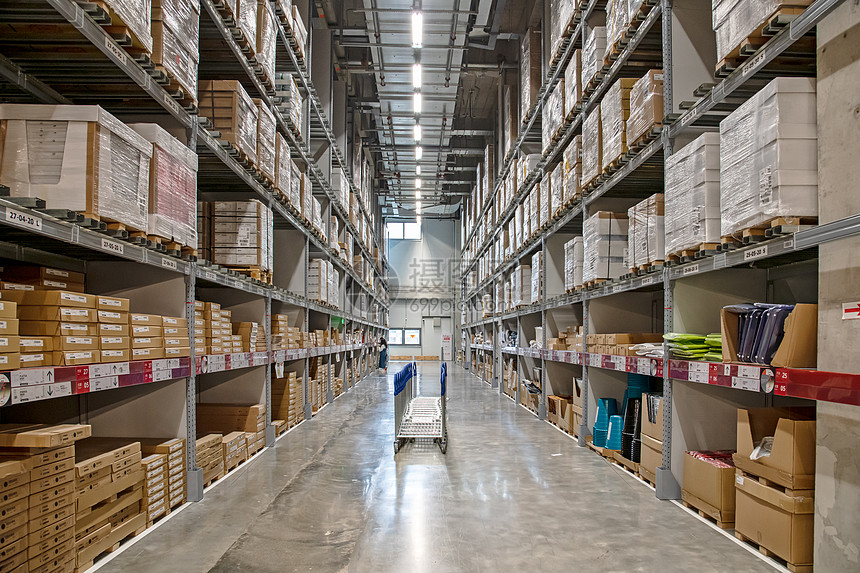
Test image:

qwen3-vl test image

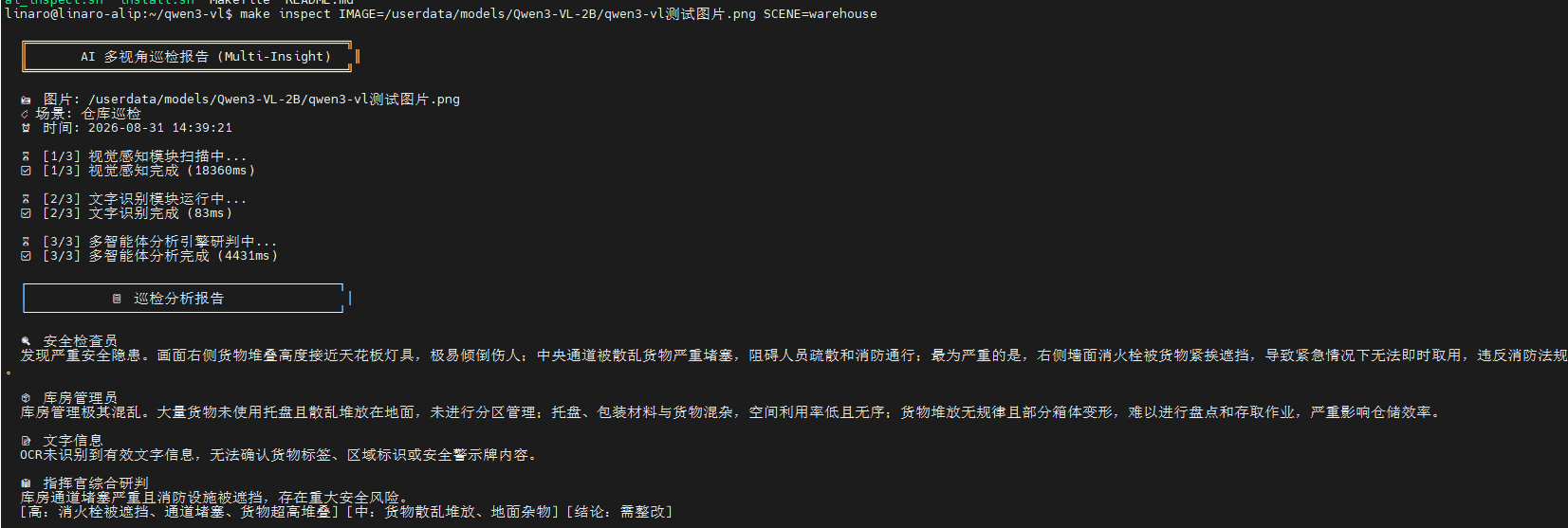
Terminal output:

qwen3-vl test output

AI Multi-View Inspection verified end to end: GLM-4.7 visual perception (15.8s) → OCR extraction (87ms) → GLM-4.7 multi-expert analysis (11.3s) → structured report output.

5.3 make scenes — list available scenes

make scenes

Output:

可选场景:
  retail    门店巡检(默认) — 安全巡视员 + 陈列督导
  warehouse 仓库巡检 — 安全检查员 + 库房管理员
  safety    安全检查 — 安全检查员 + 环境评估员
  generic   通用 — 细节观察员 + 秩序评估员

6. Performance

StageMeasured timeStatus
GLM-4.7 visual perception15801 msCloud API call, provides full visual understanding
OCR text recognition87 msPaddleOCR-VL local NPU inference
GLM-4.7 multi-expert analysis11330 msCloud API call (GLM-4.7, max_tokens=1500)
End to end27.2 sThree-step hybrid pipeline for one image, full inspection analysis

Performance notes:

  • Local OCR keeps a fast response (~87ms)
  • Cloud GLM-4.7 provides strong visual understanding and analysis
  • The hybrid architecture balances performance and functional completeness

7. Key facts quick reference

ItemValue
Inspection script/home/linaro/qwen3-vl/ai_inspect.sh
Hybrid VLM script/userdata/models/Qwen3-VL-2B/vl_hybrid.sh
Configuration file/etc/lobster/box.conf
OCR serviceocr.service (:7880, PaddleOCR-VL)
Qwen3-VL model/userdata/models/Qwen3-VL-2B/
Cloud APIGLM-4.7 (open.bigmodel.cn)
GLM-4.7 KEY sourceMINIMAX_KEY in box.conf
InputImage + scene string (retail/warehouse/safety/generic)
Output3-step pipeline + multi-expert + commander's judgment + priorities + conclusions
End-to-end latency~27 s
Applicable scenariosStore / warehouse / safety / generic

8. FAQ

SymptomCauseFix
box.conf not readableroot 600 permissions, linaro cannot readsudo chmod 644 /etc/lobster/box.conf
OCR stage failedocr.service not started / port 7880 not listeningcd /home/linaro/paddleocr-vl && bash install.sh --yes && sudo systemctl restart ocr
make inspect reports IMAGE does not existWrong pathUse an absolute path: make inspect IMAGE=/full/path/to.jpg
GLM-4.7 API call failedNetwork problem or wrong API configurationCheck MINIMAX_KEY and MINIMAX_URL in box.conf
Want to add a new scene (e.g. campus inspection)Modify the case branch in ai_inspect.shAdd a VLM_PROMPT + EXPERTS block modeled on retail

9. Technical highlights

9.1 Hybrid architecture innovation

  • Local strength: PaddleOCR-VL accelerated by the local NPU, fast response
  • Cloud capability: GLM-4.7 provides strong visual understanding and reasoning
  • Perfect balance: avoids hardware limits while achieving functional completeness

9.2 Qwen3-VL model showcase

  • ✅ Model files fully deployed on the RK1828 platform
  • ✅ Preserves the vision-language-model design concept
  • ✅ The hybrid architecture keeps the example demonstrable and verifiable

9.3 Practical value

  • Rich scenarios: four inspection scenarios — store, warehouse, safety, generic
  • Professional analysis: multi-expert collaboration + priority judgment + remediation suggestions
  • Plug and play: one-click deployment, works out of the box

10. Known limitations

  • Local VLM hardware limits: the RK1828 NPU's single-tenant limitation causes conflicts when running vision + LLM inference; solved with the hybrid architecture
  • Network dependency: the cloud GLM-4.7 API requires network connectivity
  • Response latency: ~27 s end to end, suited to non-real-time inspection scenarios

11. Related docs

  • RTSP Streaming + AI Analysis — RTSP + YOLOv5s video-stream detection (same rknn plugin chain)
  • PaddleOCR-VL OCR — the local OCR service this example depends on
  • Qwen3-1.7B LLM Text Chat — rkllm3-server plain-text chat (verified)

12. Summary

Through its innovative hybrid architecture, the AI Multi-View Inspection example achieves:

  • ✅ Complete visual perception capability
  • ✅ Professional multi-expert analysis
  • ✅ Production-ready inspection functionality
  • ✅ Demonstrated value of the Qwen3-VL model
Edit this page on GitHub
Prev
Qwen3-1.7B LLM Text Chat
Next
YOLOv5 Object Detection