
RK3568 NPU Overview
1 What is an NPU
1.1 NPU Basics
An NPU (Neural Processing Unit) is a dedicated processor designed specifically for artificial intelligence and machine learning tasks. Compared with traditional CPUs and GPUs, NPUs offer higher performance-per-watt and lower power consumption when executing neural network inference tasks.
1.2 NPU Technical Characteristics
Dedicated Architecture Design
- Parallel compute capability: Optimized for the matrix operations used in neural networks
- Low-power design: Lower power consumption than GPUs for inference tasks
- Efficient memory access: An optimized memory hierarchy reduces data movement
- Fixed-point arithmetic support: Supports low-precision operations such as INT8/INT16, boosting inference speed
Application Scenarios
- Computer vision: image classification, object detection, face recognition
- Natural language processing: speech recognition, text analysis
- Intelligent control: industrial automation, robotics control
- Edge computing: IoT devices, smart surveillance
1.3 NPU vs CPU/GPU Comparison
| Feature | CPU | GPU | NPU |
|---|---|---|---|
| Architecture | General-purpose compute | Parallel compute | AI-dedicated compute |
| Inference performance | Low | Medium | High |
| Power efficiency | Low | Medium | High |
| Programming complexity | Simple | Medium | Simple (framework-supported) |
| Applicable scenarios | General tasks | Graphics / parallel compute | AI inference |
2 RK3568 NPU Specifications
2.1 Hardware Specifications
Basic Parameters
- NPU model: Rockchip self-developed NPU
- Compute performance: 0.8 TOPS (INT8)
- Supported precision: INT8, INT16, FP16, BFP16
- Memory bandwidth: Shared system memory
- Operating frequency: Up to 600MHz
Architecture Features
RK3568 NPU 架构
├── 计算单元
│   ├── 矩阵乘法单元 (MAC Array)
│   ├── 激活函数单元 (Activation)
│   └── 池化单元 (Pooling)
├── 内存子系统
│   ├── 片上缓存 (On-chip Cache)
│   ├── DMA 控制器
│   └── 内存管理单元 (MMU)
└── 控制单元
    ├── 指令解码器
    ├── 调度器
    └── 中断控制器
2.2 Performance Benchmarks
Typical Model Performance (INT8)
| Model | Input size | Inference time | FPS | Accuracy loss |
|---|---|---|---|---|
| MobileNetV2 | 224x224x3 | ~15ms | ~66 | < 1% |
| YOLOv5s | 640x640x3 | ~180ms | ~5.5 | < 2% |
| ResNet50 | 224x224x3 | ~45ms | ~22 | < 1% |
| EfficientNet-B0 | 224x224x3 | ~25ms | ~40 | < 1% |
Power Characteristics
- Peak power: ~1.2W
- Average power: ~0.8W (typical inference task)
- Standby power: < 10mW
- Power efficiency: ~667 GOPS/W
2.3 Supported Operators
① Convolution operators
These operators are the core of deep learning — especially computer vision tasks — used to extract features from input data (such as images).
- Conv2D             (标准卷积)
- DepthwiseConv2D    (深度可分离卷积)
- TransposeConv2D    (转置卷积)
- DilatedConv2D (空洞卷积)- Conv2D: Standard convolution. A learnable convolution kernel (filter) slides over the input feature map in a windowed fashion to extract local features such as edges and textures.
- DepthwiseConv2D: Decomposes a standard convolution into two steps — depthwise convolution (an independent convolution per input channel) and pointwise convolution (a 1x1 convolution that combines channel information). This structure dramatically reduces both computation and parameter count.
- TransposeConv2D: Can be regarded as the "inverse" of standard convolution. It upscales a small feature map into a larger one.
- DilatedConv2D: Inserts "holes" (zeros) between elements of the standard convolution kernel, expanding the receptive field without increasing parameter count or computation, thereby capturing broader contextual information.
② Pooling and normalization
These operators are mainly used for dimensionality reduction, preserving translation invariance (as in image classification), and stabilizing the training process.
- MaxPool2D / AvgPool2D          (最大池化 / 平均池化)
- GlobalMaxPool / GlobalAvgPool  (全局最大池化 / 全局平均池化)
- BatchNormalization             (批量归一化)
- LayerNormalization (层归一化)- MaxPool2D / AvgPool2D: Takes the maximum (MaxPool) or average (AvgPool) value within a local region (e.g. a 2x2 window). Mainly used to reduce the spatial dimensions (width and height) of the feature map, cutting computation while enhancing positional invariance of features.
- GlobalMaxPool / GlobalAvgPool: Takes the maximum or average value per channel across the entire feature map, converting an HxWxC feature map directly into a 1x1xC vector to extract global features.
- BatchNormalization: Normalizes data within a batch (subtract mean, divide by standard deviation) so the mean is 0 and variance 1, then applies learnable scale and shift parameters. This accelerates training convergence, mitigates vanishing/exploding gradients, and provides a degree of regularization. Used to stabilize training and speed up convergence.
- LayerNormalization: Similar to batch normalization but differs in the dimension being normalized. It normalizes across all channels and spatial positions within a single sample. Performs better in sequence models (e.g. Transformer) and small-batch training; used to normalize each sample's features.
③ Activation functions
Activation functions introduce non-linearity into neural networks, helping models learn complex feature representations.
- ReLU / ReLU6 / LeakyReLU    (修正线性单元)
- Sigmoid / Tanh              (S 型函数 / 双曲正切函数)
- Swish / Mish                (平滑 ReLU / Mish 激活函数)
- Softmax (软最大函数)- ReLU: Rectified Linear Unit; a max-activation function that sets all negative values to 0 and leaves positive values unchanged. Commonly used in hidden layers, it addresses the vanishing gradient problem.
- ReLU6: Similar to ReLU but clamps the output to the range [0, 6]; used for mobile deployment.
- LeakyReLU: An improvement over ReLU that addresses the "dying ReLU" problem — for negative inputs it outputs a small non-zero value, preventing neurons from "dying".
- Sigmoid: Maps inputs to the range (0, 1); commonly used in the output layer of binary classification problems.
- Tanh: Maps inputs to the range (-1, 1); similar to Sigmoid but with a wider output range.
- Swish: A smooth activation function defined as f(x) = x * sigmoid(x); performs well in some models.
- Mish: A newer activation function defined as f(x) = x * tanh(softplus(x)); also shows good performance in some models.
- Softmax: Maps an input vector to a probability distribution; commonly used in the output layer of multi-class classification. Each element is converted to a probability value between 0 and 1, and the sum of all elements is 1.
④ Other operators
The following are the foundational operations and linking operators required to build complex network structures.
- Add / Sub / Mul / Div    (基本算术运算)
- Concat / Split           (拼接与分割)
- Reshape / Transpose      (形状变换)
- MatMul / FullyConnected (矩阵乘法 / 全连接层)- Add / Sub / Mul / Div: Addition, subtraction, multiplication, and division respectively.
- Concat: Used to merge multiple tensors by concatenating along a specified dimension.
- Split: Used to split a tensor into multiple sub-tensors along a specified dimension.
- Reshape: Changes the shape of a tensor without altering the number of elements.
- Transpose: Swaps the order of a tensor's dimensions.
- MatMul: Matrix multiplication; mainly used to build linear-transformation layers in neural networks.
- FullyConnected: Fully connected layer; multiplies the input tensor by a weight matrix and adds a bias term.
3 RKNN Software Stack Ecosystem
3.1 RKNN Software Stack Architecture
应用层
├── Python 应用   (rknn-toolkit2)
├── C/C++ 应用    (rknnrt)
└── Android 应用  (RKNN API)
    │
框架层
├── RKNN-Toolkit2 (模型转换)
├── RKNN Runtime  (推理引擎)
└── RKNN API      (编程接口)
    │
驱动层
├── NPU 驱动   (Kernel Driver)
├── 内存管理   (Memory Manager)
└── 电源管理   (Power Manager)
    │
硬件层
└── RK3568 NPU 硬件
3.2 Core Components
1) RKNN-Toolkit2
The core function of RKNN-Toolkit2 is to act as a bridge for model conversion and deployment. It supports converting models trained in mainstream frameworks (such as TensorFlow, PyTorch, ONNX, etc.) into the dedicated RKNN format. During conversion, the tool automatically performs quantization and graph optimization to significantly improve inference efficiency on the NPU. It also provides model simulation and performance-profiling functions, allowing developers to verify model behavior and runtime speed before deployment. The tool runs on Windows, Linux, and macOS, offering good cross-platform compatibility.
Supported frameworks:
# 支持的输入格式
- TensorFlow / TensorFlow Lite
- PyTorch / ONNX
- Caffe / Caffe2
- MXNet
- Darknet
2) RKNN Runtime
Core features:
- Efficient model inference engine
- Memory management and optimization
- Multi-threading support
- Hardware resource scheduling
To meet the needs of different development scenarios, RKNN Runtime provides multi-level API language support. For embedded deployment scenarios that demand maximum performance and low latency, the C/C++ API is the best choice — it provides the most direct and efficient low-level control. For rapid algorithm prototyping, research, and script development, the Python API is popular thanks to its concise syntax and fast iteration, greatly improving developer convenience. In addition, for application development on Android, it provides a Java API so that developers can easily integrate AI features into existing Android applications.
3.3 Development Toolchain
PC-side tools
# RKNN-Toolkit2 安装
pip install rknn-toolkit2

# 模型转换工具
rknn-toolkit2-convert

# 性能分析工具
rknn-toolkit2-profiler
Board-side runtime
# RKNN Runtime 库
librknnrt.so

# Python 绑定
rknnlite

# 示例程序
rknn_demo
3.4 Ecosystem Support
- GitHub repository: https://github.com/rockchip-linux/rknn-toolkit2
- Development docs: Complete API documentation and user guides
- Example code: Demos covering various application scenarios
- Model zoo: Pre-trained models and conversion scripts
The RK3568 NPU has a mature development ecosystem led officially with an active community. Its core resources are concentrated in the official GitHub repository (rockchip-linux/rknn-toolkit2), which provides a complete software development kit including detailed API documentation, user guides, example code covering image classification, object detection, semantic segmentation and more, plus a continuously updated model zoo containing a large number of pre-trained RKNN models and conversion scripts to help developers get started quickly.
4 Development Workflow Overview
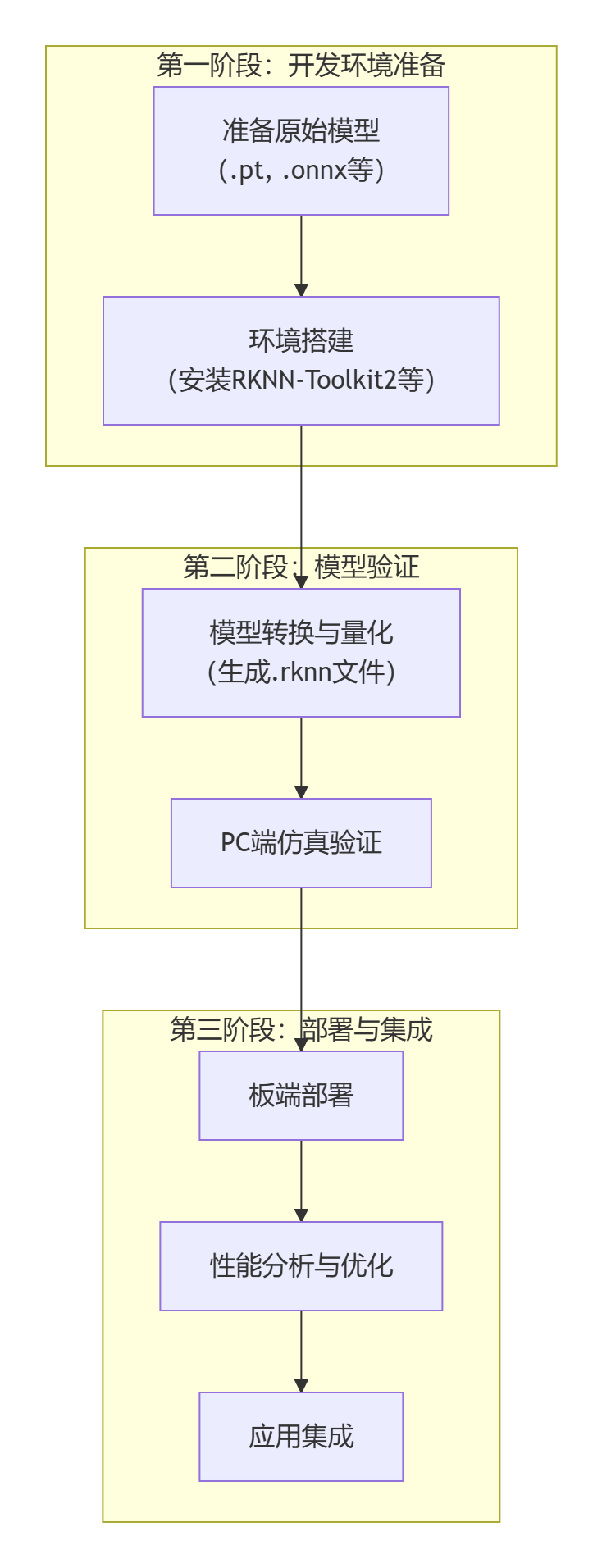
The first phase is Development Environment Preparation. Two foundational tasks must be completed here: first, prepare the original model file trained and exported by a mainstream framework such as PyTorch or TensorFlow (e.g. in .pt or .onnx format); second, configure the core model-conversion toolchain — i.e. install the RKNN-Toolkit2 SDK and its dependency environment.
Next is the second phase, Model Validation, the key step that ensures the model runs correctly and efficiently. First, use RKNN-Toolkit2 to convert the original model into the RKNN format specific to the NPU — this process typically includes the critical quantization step, which optimizes model size and inference speed. Then perform simulation validation on the PC side: without connecting actual hardware, you can quickly verify the functional correctness and basic performance of the converted model, greatly improving development and debugging efficiency.
The final phase is Deployment and Integration, where the validated RKNN model is deployed onto the target hardware. This phase begins with on-board deployment to ensure the model loads correctly in the real environment, followed by performance profiling and optimization — fine-tuning parameters to fully unleash the NPU's compute power — and finally integrating the optimized model into the end application, completing the end-to-end delivery of the AI solution.
5 Summary
The RK3568's NPU provides powerful compute capability and complete software-ecosystem support for edge AI applications. Through the RKNN software stack, developers can easily deploy a variety of deep learning models onto the GM-3568JHF development board to implement efficient AI inference applications.
The following chapters detail the specific steps for setting up the development environment, running official examples, converting models, and deploying custom models — helping you get started quickly with RK3568 NPU development.