
Flashing Guide
1 Windows Flashing Instructions
The SDK provides a Windows flashing tool (tool version must be V3.31 or above). The tool is located in the project root directory:
tools/
├── windows/RKDevTool
As shown in the figure below, after compiling the corresponding firmware, the device must enter MASKROM or LOADER flashing mode to be flashed. Prepare a USB cable with male connectors on both ends. Connect one end of the USB cable to the PC, plug the other end into the USB-OTG port of the development board, press and hold the "UBOOT" button, and power on the development board to enter flashing mode. After loading the path to the compiled firmware, click "Execute" to flash. The following shows the flashing files in LOADER mode.
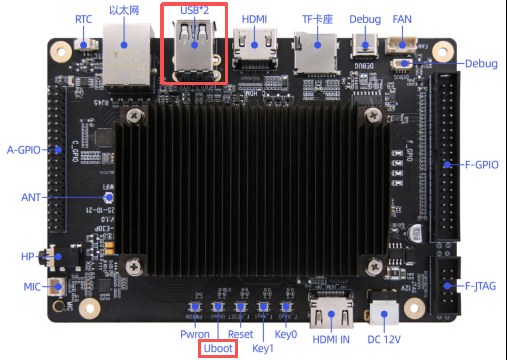
(Note: The Windows PC must run the tool with administrator privileges to execute.)
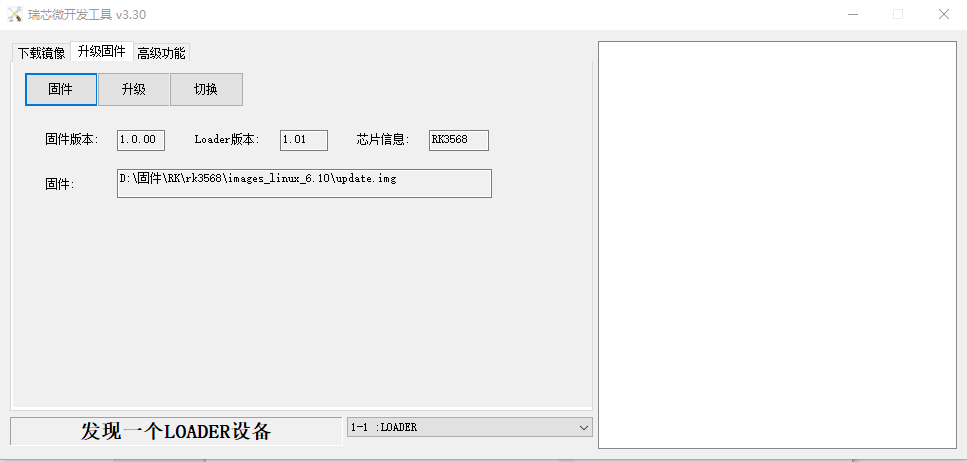
Note: Before flashing, install the latest USB driver. The driver is located at:
<SDK>/tools/windows/DriverAssitant_v5.13.zip2 Linux Flashing Instructions
The Linux flashing tool is located in the tools/linux directory (Linux_Upgrade_Tool version must be V2.36 or above). Please confirm that your board is connected to MASKROM/loader rockusb. For example, if the compiled firmware is in the rockdev directory, the upgrade commands are as follows:
sudo ./upgrade_tool ul rockdev/MiniLoaderAll.bin -noreset
sudo ./upgrade_tool di -p rockdev/parameter.txt
sudo ./upgrade_tool di -u rockdev/uboot.img
sudo ./upgrade_tool di -misc rockdev/misc.img
sudo ./upgrade_tool di -b rockdev/boot.img
sudo ./upgrade_tool di -recovery rockdev/recovery.img
sudo ./upgrade_tool di -oem rockdev/oem.img
sudo ./upgrade_tool di -rootfs rocdev/rootfs.img
sudo ./upgrade_tool di -userdata rockdev/userdata.img
sudo ./upgrade_tool rd
Or upgrade with the complete packaged firmware:
sudo ./upgrade_tool uf rockdev/update.imgOr, in the root directory, run the following upgrade while the machine is in MASKROM state:
./rkflash.sh3 System Partition Instructions
Default partition description (the following is an RK3568 EVB partition reference):
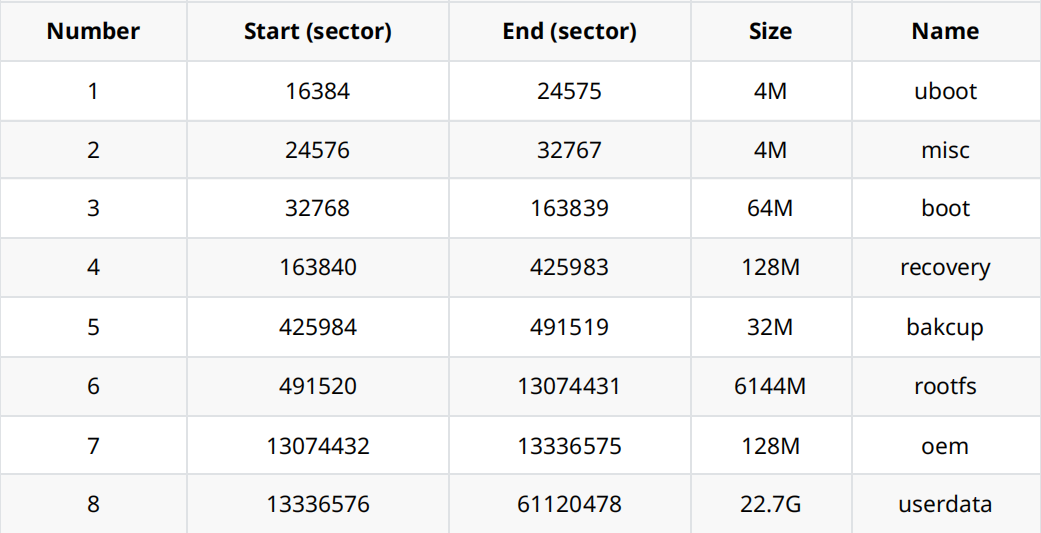
- uboot partition: holds the uboot.img produced by uboot compilation.
- misc partition: holds misc.img, used by recovery.
- boot partition: holds the boot.img produced by kernel compilation.
- recovery partition: holds the recovery.img produced by recovery compilation.
- backup partition: reserved, currently unused.
- rootfs partition: holds the rootfs.img produced by buildroot, debian, or yocto.
- oem partition: for manufacturer use, stores the manufacturer's apps or data. Mounted at the
/oemdirectory. - userdata partition: for apps to temporarily generate files or for end users; mounted at the
/userdatadirectory.